

Sub-organizations is a paid feature. If you’re using Infisical Cloud, then it
is available under the Enterprise Tier. If you’re self-hosting Infisical,
then you should contact [email protected] to purchase an enterprise license
to use it.
- Segment by business unit: Give departments (Engineering, Sales, Marketing) independent project spaces
- Delegate administration: Allow team leads to manage their own organization without root-level access
- Maintain clear boundaries: Keep projects and resources isolated between teams while sharing a common user directory
Key concepts
- Sub-organizations work like regular organizations. Visually and functionally, there’s little difference.
- One level of nesting. Root organization to sub-organizations. Sub-organizations can’t create their own sub-organizations.
- Authentication at root level only. SSO, SCIM, and identity configuration happens at the root organization.
- Resources flow downward. Users, groups, and machine identities from the root organization can be added to sub-organizations, but must be explicitly added before use.
- Resources stay where they’re created. Resources in a sub-organization aren’t visible to the root organization or other sub-organizations.
Resource inheritance
The following resources from a root organization can be added to sub-organizations:- Users
- Groups
- Machine Identities
Project visibility
Projects are scoped to the organization where they’re created. This ensures clear boundaries between teams and means users only see projects relevant to their scope of work.- In a root organization: You see only root organization projects
- In a sub-organization: You see only that sub-organization’s projects
Working with users
Users exist at the root organization level where authentication is configured. Sub-organizations can add users from the root organization to grant them access to sub-organization projects. In a root organization:- Projects can invite any user from the organization
- Projects can provision new users directly via project invite (with appropriate permissions)
- Projects can only see users who have been added to the sub-organization
- Users must be added to the sub-organization before they can join projects
Working with machine identities
Machine identities represent services, CI/CD pipelines, or automated processes. They can be created at the root organization level and shared with sub-organizations, or created directly within a sub-organization. In a root organization:- Projects can link machine identities directly
- Root-level machine identities must be added to the sub-organization first
- Sub-organizations can also create their own machine identities
Working with groups
Groups let you manage access for multiple users at once. Root organization groups can be shared with sub-organizations, and sub-organizations can also create their own groups.- Root organization groups can be added to sub-organizations
- Once added, the group is available to all projects in that sub-organization
- Sub-organizations can create their own groups with users or nested groups
Creating a sub-organization
Go to Settings, select Sub Organizations, then select Add Sub Org.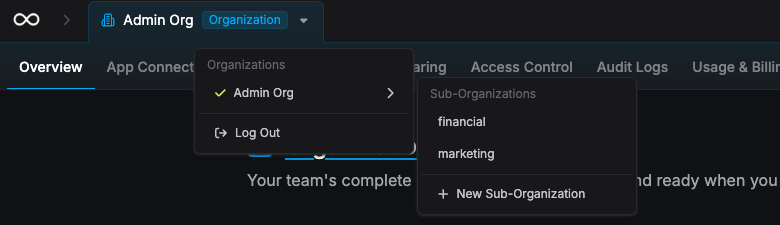 Enter a Display Name for the sub-organization. The Slug auto-fills from the name and is what API calls reference, so change it if you need something different. Select Create Sub-Organization to finish, and you’re added as an admin of the new sub-organization.
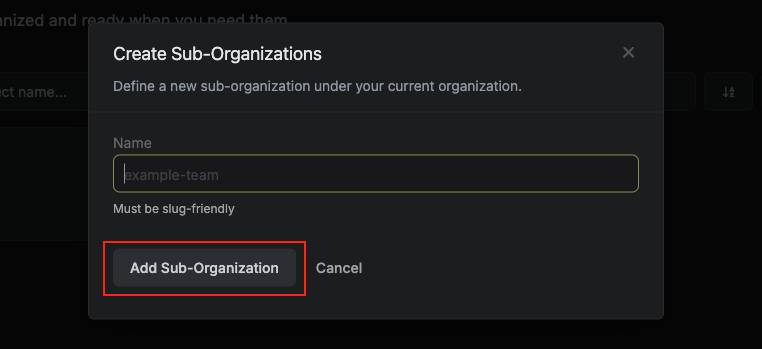
Adding resources to a sub-organization
To use root organization resources in a sub-organization:- Switch to the sub-organization from the organization switcher.
- Go to Access Control, then open the Users, Groups, or Machine Identities tab.
- Select the add button for that tab, then choose Assign Existing (except on Users, which goes straight to the invite form). Pick the users, groups, or machine identities to bring in from the root organization, and confirm with the button for that tab:
- Users → Add Member
- Groups → Link
- Machine Identities → Assign to Sub-Organization
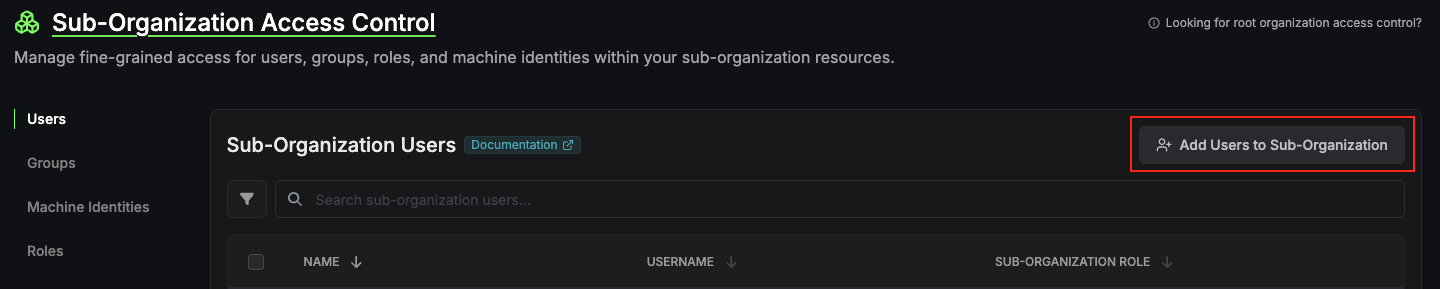 Once added, these resources can be assigned to projects within the sub-organization.