

UPPER_SNAKE_CASE, that values are at least 16 characters, that a connection string starts with a given prefix, or that the password behind a dynamic secret or a rotation matches a particular pattern.
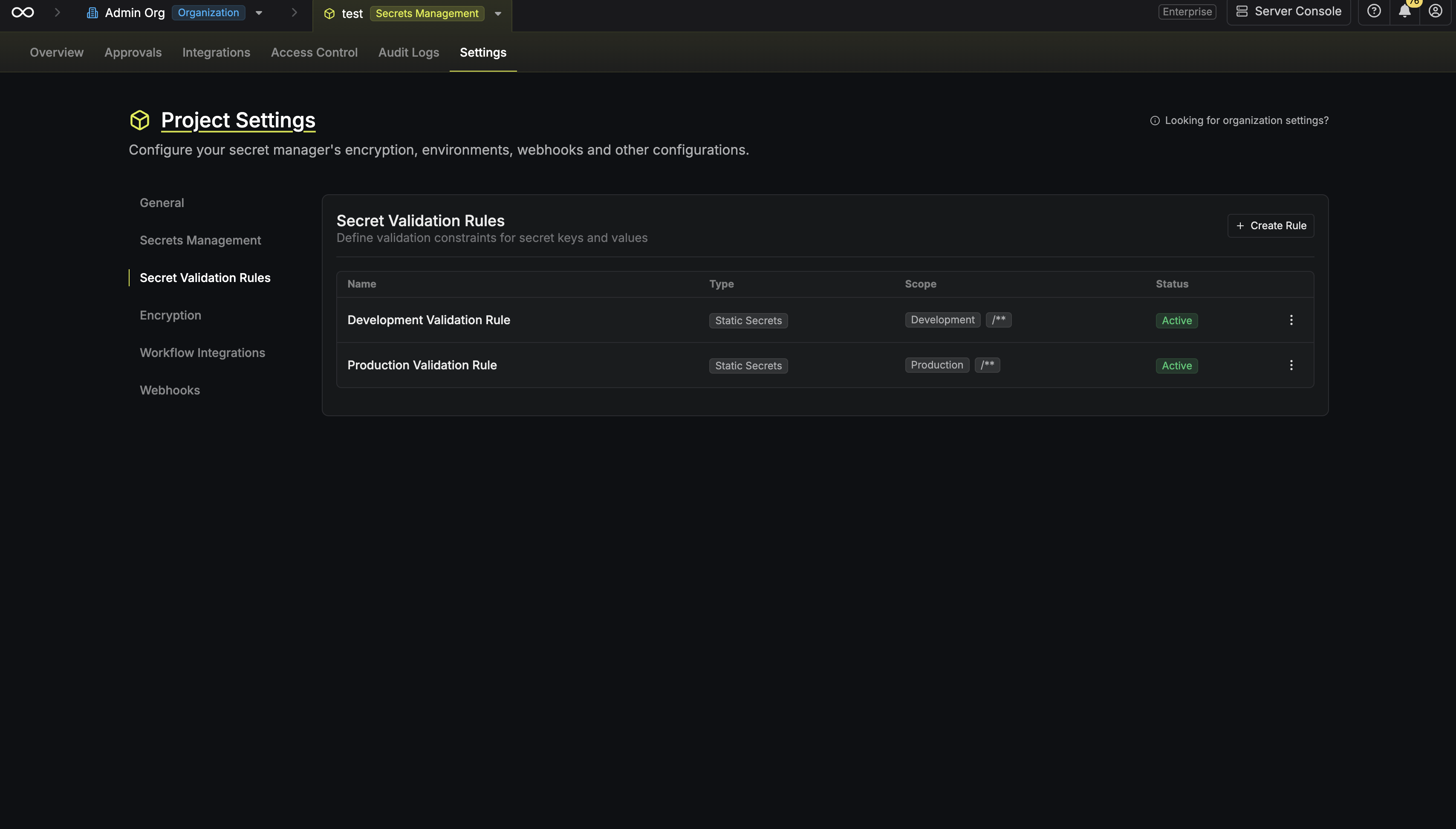
Rule types
There are three rule types, one per kind of secret:- Static Secrets — checked when someone creates or updates a secret.
- Dynamic Secrets — applied to the credential Infisical generates when it issues a lease.
- Secret Rotations — applied to the credential Infisical generates on each rotation.
A rule that covers a provider replaces the password configuration set on the dynamic secret or the rotation itself. The affected forms show a warning when that happens.
Constraints
A rule groups its constraints by what they apply to. Set only the fields you want enforced and leave the rest blank.
Which targets a rule offers depends on its type:
- A Static Secrets rule constrains the secret key, the secret value, or both.
- A Dynamic Secrets or Secret Rotations rule constrains the generated password.
valueConstraints reject a repeated value:
uniqueAcrossLastVersions is a whole number between 1 and 25. It rejects a new value that matches any of that many of the secret’s own prior versions.
uniqueWithinScope rejects a value that another secret the rule covers already holds. It requires secret blind indexing on the project; Infisical offers to enable it when you turn the option on.
Set either field on its own or both together. Leave both out to accept any value the other constraints allow.
A rule has to set at least one constraint. Infisical rejects a rule that constrains nothing.
How enforcement works
Static secrets
When someone creates or updates a secret, Infisical checks it against every active rule whose environment and folder path cover that secret. A violation rejects the write and returns a message naming the rule and the constraint it broke.A static secret rule applies to writes only. Secrets that already existed when you created the rule aren’t rechecked. To find them, run the Secret Validation Compliance audit report.
Dynamic secrets and secret rotations
For a dynamic secret or a rotation, a rule shapes the credential rather than rejecting an input. Infisical generates a password that satisfies the covering rule’s constraints, in place of its default generation. Set a regex pattern and Infisical builds the password from that pattern, ignoring the length constraints on the same rule. Put the length requirement inside the pattern instead, as in[A-Z0-9]{16,24}.
Infisical dry runs a dynamic secret rule and a rotation rule when you save it, so constraints the generator can’t satisfy — an invalid pattern, or a minimum length above the maximum — fail at that point rather than on the next lease or rotation.
Scope
Three fields decide where a rule applies:- Environment — one environment, or every environment in the project.
- Folder path — a path, or a glob pattern such as
/**for every path or/services/*for the immediate subfolders of/services. - Providers — dynamic secret and rotation rules only. The rule applies only to the providers you list.
Overlapping rules
Two rules of the same type conflict when they cover the same secrets and both set the same constraint field. Infisical rejects the second one, because each side would impose its own bound on the same thing. Two regex patterns on the secret key in overlapping scopes is the common case. Combine them into one rule instead. Provider sets narrow this for dynamic secret and rotation rules. A PostgreSQL rotation rule on/db/* conflicts with another PostgreSQL rotation rule on /**, because the providers and the paths both overlap. A Milvus rule on that same path doesn’t conflict with a PostgreSQL rule, because no provider is shared.
Permissions
Secret validation rules have their own permission subject. A project role needs Read to see rules, and Create, Modify, or Remove to change them. The Admin and Member roles hold all four; Viewer holds Read.Create a rule
1
Open the Policies tab
Go to Project Settings, select the Policies tab, and find the Secret Validation Rules section.
2
Start a new rule
Select Create Rule.
3
Describe the rule
- Name: what the rule enforces, such as
production-key-naming. - Description: optional, for why the rule exists.
- Rule Type: Static Secrets, Dynamic Secrets, or Secret Rotations. You can’t change the type after you save.
- Providers: dynamic secret and rotation rules only.
4
Set the scope
Choose an Environment, or All Environments. Then set the Folder Path, which accepts a glob pattern.
5
Set the constraints
Fill in the constraint fields you want enforced and leave the rest blank. A static secret rule offers one group for the secret key and one for the secret value. A dynamic secret or rotation rule offers one group for the generated password.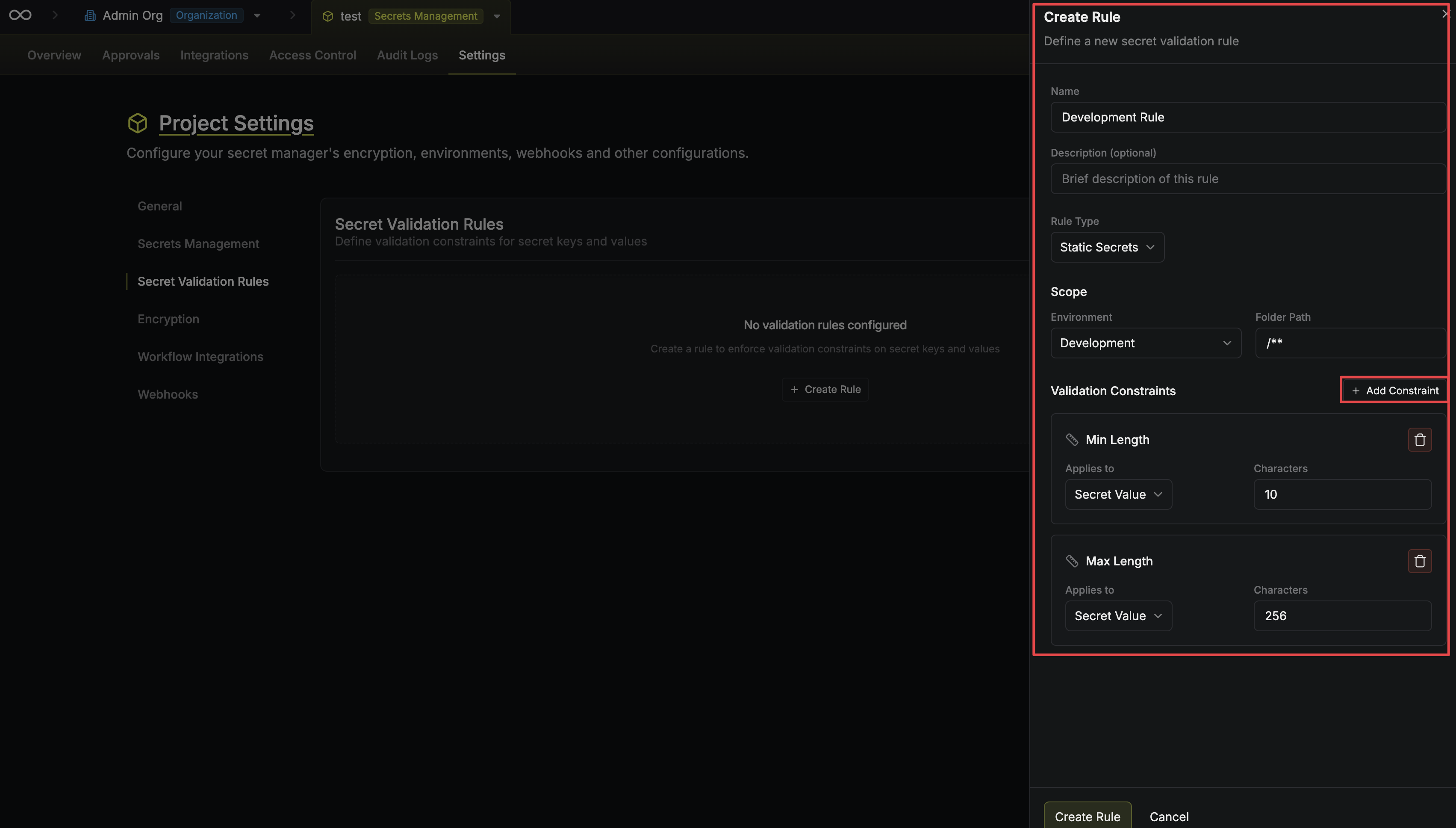
6
Save
Select Create Rule. The rule takes effect on the next write in its scope.
Manage rules through the API
Each rule type has its own set of endpoints under/api/v1/secret-validation-rules, so the request body carries only the fields that type accepts:
To read every rule in a project whatever its type, use List secret validation rules.
Creating the production key naming rule looks like this:
Examples
Enforce UPPER_SNAKE_CASE keys
Enforce UPPER_SNAKE_CASE keys
A static secret rule across all environments, with
^[A-Z][A-Z0-9_]*$ as the key regex pattern.Keys such as DATABASE_URL and API_KEY pass. mySecret and api-key are rejected.Require a minimum value length
Require a minimum value length
A static secret rule with a value minimum length of
16.This catches placeholder values and truncated pastes before they reach an environment.Enforce a connection string format
Enforce a connection string format
A static secret rule scoped to
/database/*, with postgresql:// as the value required prefix.Every secret in that folder then has to be a PostgreSQL connection string.Mark production keys with a suffix
Mark production keys with a suffix
A static secret rule scoped to the
production environment, with _PROD as the key required suffix.Production secrets are then distinguishable from the rest by name alone.Stop old values coming back
Stop old values coming back
A static secret rule with prevent value reuse set to
10 previous versions on the value.Updating a secret to any of its last 10 values is rejected, which is what makes a rotation policy stick.Generate strong SQL dynamic secret passwords
Generate strong SQL dynamic secret passwords
A dynamic secret rule across all environments on
/**, with SQL Database as its provider, a password minimum length of 24, and INF_ as the password required prefix.Every SQL lease in the project then produces a password of at least 24 characters starting with INF_, and the password configuration on each dynamic secret no longer applies.Generate rotation passwords from a pattern
Generate rotation passwords from a pattern
A secret rotation rule scoped to the
production environment, with PostgreSQL Credentials as its provider and ^[A-Z][A-Za-z0-9]{19,29}$ as the password regex pattern.Production PostgreSQL rotations then produce a password of 20 to 30 mixed-case alphanumerics starting with a capital. The pattern carries the length window, because a rule that sets a pattern ignores its length constraints.