Secrets Management: The Complete Guide to Protecting API Keys, Credentials & Certificates

Many cybersecurity attacks look less like an elaborate bank heist and more like opening a door with a key someone left in the lock. Take Uber, for example. In 2014, the company was breached after an engineer accidentally committed an AWS access key to a public GitHub repository. Threat actors used it to access over 100,000 drivers' personal data.
If simple breaches like this can happen to Uber, they can happen anywhere: Legacy brands like Toyota and Mercedes-Benz, government institutions like the U.S. Cybersecurity and Infrastructure Security Agency, as well as modern tech companies have had sensitive credentials leaked on GitHub.
These look like reckless mistakes (which they are), but they are the consequences of innocuous-seeming shortcuts compounding into devastating vulnerabilities:
- Committing an API key for testing
- DMing a new colleague an auth token to onboard them faster
- Sending a website redesign contractor the same
.envfile your staff engineers use
Training won't fix this. Humans make mistakes and sometimes put convenience over security. The issue is a systemic problem called secret sprawl.
Secret sprawl is what happens when keys, tokens, certificates, and other sensitive data multiply across environments and services faster than any team can track. Nobody knows the full extent of what secrets exist, who can access them, or what risk they carry. Storing and sharing them with plaintext files and Slack messages works for a handful of secrets (albeit insecure), but becomes impossible to manage manually at scale.
Restrictive, manual policies (even if they were workable) would slow engineers down. Days of "why isn't this working anymore?" can pass until a new API key has been manually shared with everyone who needs it. The same applies to non-human identities: unexplained outages from expired database credentials create operational friction. The fast, convenient way to handle secrets isn't safe, but an extremely restrictive posture would slow operations to a crawl.
This is the core tension: Engineers and services need hundreds to thousands of secrets to operate, which need to be available at a moment's notice, without ever running the risk of being exposed.
This is the challenge of modern secrets management: it's an arms race to preempt threat actors equipped with AI that sniffs out both cutting-edge exploits and decade-old vulnerabilities in widely used infrastructure. AI also added new security surfaces and threat vectors. Coding agents read .env files and call APIs, which creates new risks legacy practices can't solve.
Centralized secrets management is essential to avoiding security incidents and (if they do happen), limit their blast radius while continuing to ship quickly.
What Is Secrets Management?
Secrets management is the practice of storing and sharing secrets.
Every developer, team, and company using secrets manages them one way or another, even if they never defined practices.
Bad secrets management is the cybersecurity equivalent of writing your PIN down on your credit card. Storing and sharing unencrypted secrets in plaintext files is a version of secrets management, but it's definitely not secure.
Good secrets management practices include access controls, audit logs, encrypted storage, and other best practices.
The goal of good secrets management is to avoid security breaches (and, if they do happen, respond quickly and limit their fallout) as well as downtime from applications missing what they need.
What counts as a secret?
A secret is sensitive information that grants access to something and could cause harm if leaked. A few examples of typical secrets:
- API keys: bearer tokens for services like Stripe, OpenAI, Twilio, etc..
- Database credentials and connection strings:
postgres://user:password@host:5432/db. - SSH keys: private keys used to authenticate to servers and Git providers. Large organizations manage millions of them.
- TLS/SSL certificate private keys: the keypairs that authenticate servers and encrypt traffic.
- OAuth and service-account tokens: bearer tokens, often with broad scopes like
repo:admin. - MCP server credentials: keys and tokens AI agents use to authenticate to their tools.
- Encryption keys (DEKs and KEKs): the symmetric keys that encrypt data at rest.
- Cloud access keys: AWS
AKIA…keys, GCP service account JSON files, Azure client secrets. - Others: Webhook secrets, JWT signing keys, code-signing certificates, container registry credentials, Helm and Artifactory tokens.
In the era of cloud development, the amount of secrets has exploded, creating a phenomenon called secret sprawl, in which nobody has a full overview on which secrets exist, where they are and who has access to them.
This is a critical issue because of the massive potential attack surface (millions of secrets that could theoretically be exposed) and the grave consequences if secrets are compromised (data exfiltration, ransomware attacks). All of this makes secrets management mandatory for any software development team.
Why secrets management matters
The constant breaches due to compromised credentials are reason enough to take secrets management seriously. But regulations and compliance standards (including HIPAA, GDPR, and SOC 2) also require strict management of how cybersecurity should be managed.
Secrets management mistakes cause real vulnerabilities
Credential abuse is the single most common initial access vector in modern breaches. According to Verizon's 2025 Data Breach Investigations Report, stolen credentials were involved in 88% of basic web application attacks**.** They appeared in roughly one-third of all confirmed breaches.
With AI agents like Claude Code committing more code than ever, code review resources have become strained. This has worsened the situation: GitGuardian's State of Secrets Sprawl 2025 report found the amount of hardcoded secrets on GitHub alone roughly doubled in 2025 and more than 90% of those secrets remained valid and exploitable five days after disclosure.
Agents might also get prompt-injected and print all of the secrets they can see. Agents can become another non-human identity that needs credentials. And unlike traditional workloads, anyone can spin up agents.
This can lead to serious breaches:
- Cisco (March 2026): Stolen credentials from the Trivy supply chain compromise gave attackers AWS keys and access to 300+ GitHub repos.
- Vercel (April 2026): One employee's OAuth grant to a third-party AI tool (Context.ai) led to a Lumma Stealer infection and a two-month undetected dwell time.
- Samsung Germany (2025): Raccoon infostealer stole credentials from a contractor in 2021. No one rotated them for four years, then they were used for a 270K-record breach in 2025.
- PowerSchool (Jan 2025): Stolen contractor credentials without multi-factor authentication led to one password revealing 60M student records.
These are just a few examples, but we could name hundreds more.
The takeaway is that secrets are leaking at scale, often remain valid long after disclosure, and are constantly exploited by attackers.
Besides that, bad secrets management can hurt your engineering team's operations.
The operational risk: secrets cause outages, not just breaches
Secrets simultaneously need to be protected and a tool every engineer needs for their job. Beyond security, suboptimal secrets management practices can also create operational issues in engineering teams and slow down work.
For instance, a scheduled secret rotation (a practice where API keys, auth tokens, or other secrets automatically change on a schedule as a precautionary measure) will break any deployments until all engineers have manually replaced the credentials in their .env files.
For organizations with thousands of engineers, this can have serious consequences for productivity and collaboration.
It can also lead to customer-facing outages. When a credential becomes invalid before the new one has propagated, services might stop talking to each other and break (parts of) your app for users.
The blast radius
A compromised secret also compromises everything that secret has access to. Security teams call this the blast radius: the set of systems, data, and actions reachable through that one credential.
An AWS IAM token might give a threat actor access to EC2 instances, S3 buckets, and much more on that AWS account.
When one compromised credential gives attackers access to additional credentials, this is called lateral movement. A compromised Slack session token merely grants access to Slack. But a .env file found in DMs unlocks the infrastructure.
AI agents can have a massive blast radius if they can read secrets, because an agent isn't a fixed program that does one thing the way a billing service holding a Stripe key is. AI agents are more useful the more access they have, so many teams hand highly provisioned credentials to agents.
Centralized secrets management limits the blast radius. Dynamic secrets (meaning credentials are generated on the fly and only remain valid for minutes) limit how long a leaked secret is useful. Least-privilege access means only providing the necessary permissions, which bars a hacker from gaining admin access to infrastructure because of a contractor's flawed security practices.
Compliance requirements
Secrets management is no longer optional for regulated organizations, which includes an ever-increasing scope of industries, company sizes, and geographies. SOC 2, PCI DSS 4.0, GDPR, HIPAA and various other regulations and compliance standards make various demands of how access to sensitive systems is granted, managed, and logged.
A centralized vault with audit logs is the standard infrastructure to meet compliance requirements and strengthen your security posture without slowing down your engineering team
What a secrets vault is
Architecturally, a secrets vault is an encrypted database with an API: you authenticate to it, request the specific secret you need, receive it back, and your access is logged.
Under the hood, a production vault handles encrypted storage (envelope encryption with a root key held in an HSM or cloud KMS), authentication backends that verify workload identity before issuing any secret, granular access policies, secrets engines for different credential types, append-only audit logs, and lease management that tracks and revokes outstanding credentials automatically.
In practice, it's where platform, security, or DevOps teams do any work related to secrets management. Here, they add and revoke secrets, define policies, integrate with third-party tools, and audit secrets usage.
Developers themselves only access the vault to see the secrets they have access to. In practice, developers rarely copy-paste from the vault (and shouldn't be able to see the plain text secret in many cases), opting instead to inject secrets at runtime via a CLI.
→ For a deeper look at how Infisical implements each of these layers, see the Infisical Secrets Management docs.
How Secrets Management Works
The secrets lifecycle
Secrets have a predictable lifecycle. Most security failures happen because organizations manage the early stages (generation and storage) but neglect the later ones.
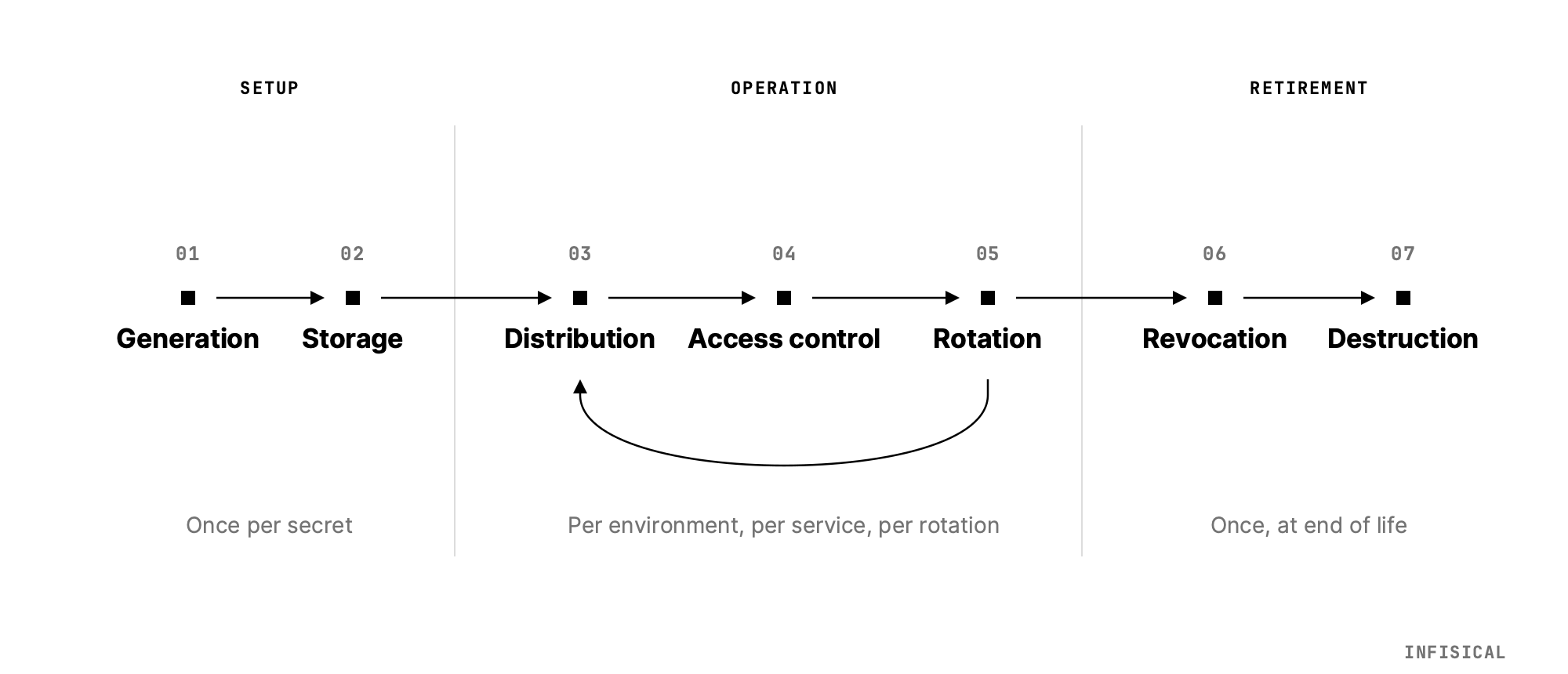
- Generation: Produce the secret. This is sometimes done via a UI button in the service's UI and then copy-pasted into the vault, but the vault ideally generates it automatically.
- Storage: A centralized, encrypted vault should be the source of truth.
- Distribution: Workloads authorize themselves against policy, return the secret over TLS, and log the access. Secrets should never be in chat messages, device storage, or logs.
- Access control: Least-privilege policy determines what each identity can read or write.
- Rotation: The value of each secret changes on a defined cadence or immediately with manually triggered rotations (typically in response to incidents).
- The rotation should be "dual-phase": The new credential is staged before the old one is revoked to avoid any downtime.
- Revocation: Invalidate the secret to offboard identities (human or non-human) or respond to breaches.
- Destruction: Hard delete the secret from the vault after retention requirements are met.
Static vs. dynamic secrets: why short-lived is better
Static secrets stay the same until rotated. Most API keys, database passwords, and certificates are static. They can be managed well, but require deliberate rotation if compromised.
A dynamic secret is an ephemeral secret generated for a specific access request, with a brief lifespan (usually just minutes).
Here's what this looks like for a database credential:
- An application authenticates to the vault and requests a Postgres credential.
- The vault uses an admin role to create a temporary database user:
CREATE ROLE app_abc123 LOGIN PASSWORD 'xK9…' VALID UNTIL '+15 minutes'. - The vault returns the credential to the application and records the lease.
- After 15 minutes, the vault runs
DROP ROLE app_abc123.
The application used a real credential for a real database, but that credential never existed before the request and no longer works after 15 minutes. Unless it leaks in that specific 15-minute window, it's useless to attackers. Dynamic secrets workflows are complex to build, which means they either require dedicated engineering work or a third-party secrets management tool.
→ In Infisical, dynamic secrets exist for major databases, AWS and GCP and Azure IAM roles, Kubernetes service accounts, TLS certificates, SSH certificates, and more. Find out more.
Choosing between rotating static secrets and using dynamic secrets
Most organisations use both approaches to maintain compatibility with legacy infrastructure and cover use cases where dynamic secrets aren't practical (e.g. air-gapped environments, APIs with low rate limits, etc.). Here's how to decide which applies where:
| Approach | Best for | Example |
|---|---|---|
| Secrets rotation | Long-running services, legacy systems, third-party integrations with established auth patterns | Rotating an RDS password every 30 days with a Lambda function |
| Dynamic secrets | Ephemeral workloads, containers, CI/CD pipelines, serverless functions, temporary dev environments | Generating a unique Postgres credential per CI job, auto-expiring after 15 minutes |
| Hybrid | Most production systems | Automated rotation for persistent databases; dynamic credentials for every CI/CD pipeline run |
Just like dynamic secrets, automatically rotating static secrets is a complex technical operation. This might require advanced homegrown logic or a secrets management tool. Infisical supports automatic secrets rotations out of the box.
The shared goal in both cases is the same: no human should ever know the current value of a production credential, and no credential should outlive its immediate need.
Secrets Management Best Practices
The OWASP Secrets Management Cheat Sheet is the canonical reference here. The following are the most important parts, and how secrets management tools make them possible or easier.
1. Never hardcode secrets
A secret committed to source code is available to everyone with read access to that repository: current and future employees as well as contractors. In public repos, it's anyone who ever clones, forks, or reads the repo (including automated credential scanners and the training pipelines behind LLMs).
There are a variety of solutions to spot secrets in code before it's committed. You can enforce this with pre-commit hooks, CI/CD pipeline scanning, IDE plugins, and GitHub Push Protection for secrets with well-known patterns.
Secrets scanning is important, but a proper secrets management strategy is more robust because it means individual developers never even know the secrets they're working with, meaning they can't commit them to Git.
2. Centralize in a vault
Secrets should live in one place, versioned, audited, and accessible through a consistent API. Teams know where to look, access can be revoked in one operation, and no secret "lives on" because of a .env file on a developer laptop.
3. Enforce least privilege
Every workload gets the secrets it needs, not secrets that were convenient to bundle. A frontend service should not have the same database credentials as a data migration job. A read-only analytics workload needs no write permissions.
A proper secrets management platform makes this easier by simplifying every part of the workflow easier and obviating the temptation to find the most convenient solution.
4. Automate rotation
Static credentials should rotate automatically. This invalidates any secrets that may have inadvertently leaked and makes it useless if a threat actor gains access to it.
| Secret type | Recommended cadence | Best practice |
|---|---|---|
| Database passwords | 30–90 days | Replace with dynamic secrets |
| Cloud access keys (AWS, GCP, Azure) | 90 days | Replace with workload identity (IRSA, WIF, Managed Identity) |
| API keys (third-party SaaS) | 60–90 days / quarterly | Use scoped, short-lived tokens where the provider supports them |
| TLS certificates | Before expiry; automated | ACME automation required — industry moving to 47-day maximum by March 15, 2029 |
| SSH keys | 90 days | Replace with SSH CA and short-lived signed certificates |
| OAuth refresh tokens | Per IdP policy (typically 30–90 days) | Pair with scoped, short-lived access tokens |
| Encryption keys (DEKs) | Annually or on compromise | Envelope encryption makes rotation cheap |
Some teams hesitate to automate rotation because they fear outages. Modern secrets management tools mitigate this with an overlapping validity window: when secrets rotate, the vault maintains two valid versions of the secret. Services continue using the current secret until they pick up the new one on their next restart or credential refresh. Once the new credential is confirmed to be propagated does the old credential get invalidated. This ensures zero downtime.
5. Use dynamic secrets and short-lived credentials
The shorter the credential lifetime, the less damage a threat actor can cause with it. Short-TTL database credentials, cloud IAM roles, and internal service authentications. Whenever dynamic secrets aren't available, short-lived tokens with automatic rotation are the next best option.
6. Audit everything
Every secret read, write, rotation, and revocation must produce an audit event. This should be as granular as possible, including:
- who or what accessed it (workload identity + human-on-call if applicable)
- from where (source IP, cluster, region)
- which secret (full path)
- what action (read/write/rotate/revoke)
- When (timestamps)
These logs are necessary for compliance and your own reconstruction after a breach, and anomaly detection.
7. Separate environments
Development, staging, and production should use separate vault namespaces or tenants with distinct identities. A developer's local secrets should never include production values.
8. Don't give AI agents standing credentials
An AI agent should not be able to read a plaintext credential, because you can never guarantee an agent won't leak its secrets. Give it a placeholder for outbound calls and a brokered session for inbound access instead.
Secrets Management in DevOps and CI/CD
Modern software delivery chains are flush with credentials, which creates a potential risk surface in every handoff between individual systems of the build pipeline. Secrets management is especially important here.
Why CI/CD-native secret stores are not enough
CI/CD platforms typically have a native secrets feature: GitHub Actions Secrets, GitLab CI Variables, CircleCI Contexts etc. These are convenient, but siloed. They don't secure secrets across systems and require maintaining multiple secret stores, which conflicts with best practices.
The modern pattern is to use the CI/CD platform's identity service to authenticate to your vault and fetch secrets on demand:
- GitHub Actions jobs get a short-lived OIDC token from GitHub's identity provider
- That token is exchanged for a scoped AWS STS session, AWS GCP Workload Identity credential, etc.
No long-lived credential ever exists in the CI/CD platform.
→ For a step-by-step guide to CI/CD secrets injection, see How to manage secrets in CI/CD pipelines.
Kubernetes: base64 is not encryption
Kubernetes' built-in Secret objects are base64-encoded, not encrypted. A base64 string can be decoded by anyone with read access to the object. By default, this includes any pod in the same namespace. In a default cluster configuration, kubectl get secret my-secret -o jsonpath='{.data.password}' | base64 -d returns the plaintext value to anyone with the right RBAC permissions.
The minimum mitigation is enabling etcd encryption-at-rest with a KMS provider. For production workloads, the established patterns are:
- External Secrets Operator (ESO): a CNCF project that synchronizes secrets from external vaults (AWS Secrets Manager, GCP Secret Manager, Azure Key Vault, Infisical, and others) into Kubernetes
Secretobjects via a CRD. The source of truth lives in your vault; the K8s secret is a synchronized replica. ESO's upstream development is currently paused so teams adopting this pattern today often evaluate vendor-maintained alternatives like the Infisical Kubernetes Operator, which provides the same sync model, but still receives active development. - Secrets Store CSI Driver: Mounts secrets from external stores directly as files in pod filesystems; supported providers include AWS, GCP, Azure, Vault, and Infisical.
- IRSA / GKE Workload Identity / Azure AD Workload Identity: Eliminates cloud-provider access keys from the cluster entirely; pods assume IAM roles via projected service account tokens. This is the right answer for any workload running on a managed cloud Kubernetes service.
- Sealed Secrets: Encrypts a
Secretwith a cluster-held public key so the encrypted YAML can be committed to Git; the cluster controller decrypts onapply. Good for GitOps; weaker on rotation and dynamic secrets.
→ For a full breakdown of K8s secrets patterns, see Kubernetes Secrets Management: Tools, Best Practices & How-To.
Terraform and the state-file problem
Terraform stores resource state, including any sensitive values returned by providers in terraform.tfstate. That file is plaintext, which makes it a potential attack surface. Anyone with read access to your state backend can read every database password, generated key, and sensitive output Terraform has ever touched.
There are ways to mitigate this by encrypting state at rest with a KMS provider. You could lock down IAM access to the state backend as tightly as you lock down the production database.
But the cleaner architectural pattern is to use Terraform to provision the identity (an IAM role, a service account, a Kubernetes service account) and let the runtime workload fetch its own credentials dynamically at startup. This keeps sensitive values out of state entirely.
→ See Terraform Secrets Management Guide for implementation patterns.
GitOps: secrets belong in the vault, not in Git
GitOps workflows (Argo CD, Flux) treat Git as the source of truth for infrastructure state. Secrets cannot be the source of truth in Git, because they can never live there in plaintext.
The right pattern is to store a reference to the secret in Git (an ExternalSecret CRD pointing to your vault) and store the value in the vault. The Git commit contains only the address, not the contents, which keeps the actual secrets out of GitOps.
Cloud Secrets Management
All three major cloud providers offer a native secrets management service (AWS Secrets Manager, GCP Secret Manager, and Azure Key Vault). Each have their own intricacies (discover how to find the best secrets management tool here), but share the same up- and downsides:
They're convenient because there are abundant first-party integrations and are part of an existing vendor, meaning they don't need to pass an extra security review.
But provider-specific secrets managers become suboptimal as you scale: Third-party integrations are difficult, given that each cloud wants to keep customers in its ecosystem. This makes multi-cloud secrets management difficult. Using multiple provider-native secrets managers creates parallelized infrastructure, which creates extra work for security teams and means there's no unified vault.
Additionally, these secrets managers also often operate on usage-based pricing, which incentivizes minimizing secrets, which disincentivizes best practices like dynamic secrets or frequent rotations.
Each of these has a few individual quirks:
- AWS Secrets Manager: A simple, resilient solution for the AWS stack, offering rotation, management, and retrieval of credentials, with features like KMS encryption, versioning, and native integration with services like RDS and Lambda.
- GCP Secret Manager: Available for Google Cloud Platform users, providing secret storage with access controls, audit logs, versioning, and rotation, accessible via APIs and client libraries.
- Azure Key Vault: A managed service for Azure users to centrally manage secrets, keys, certificates, connection strings, and passwords, including the ability to automate SSL/TLS certificate renewal.
When to use a third-party secrets management tool
A dedicated secrets management tool makes sense once you run into the limits of a provider-native secrets manager. This usually happens either because teams want to avoid future vendor lock-in and dependencies or once you branch out from a single cloud stack.
Secrets managers usually fulfill one of two functions:
- Obviating AWS, GCP or Azure's native solutions and managing secrets directly there.
- Integrating with provider-native solutions to operate secrets management in one vault, but without skipping your cloud stack's security infrastructure.
Using a secrets manager like Infisical means sidestepping workarounds and homegrown integrations that result from spotty integrations coverage and centralizing secrets management for every environment in one tool.
How to manage secrets for AI agents
AI agents need to authenticate to use CLIs, APIs, SDKs, and MCP servers, which requires credentials agents can't be trusted with as non-deterministic workloads. A secret an agent can read is a secret it can leak. This makes traditional secrets management insufficient and requires new security architectures like credential brokers.
Why AI agents break secrets management
Traditional secrets management assumed fixed execution paths. A billing service reads a Stripe key and charges cards, which is the only execution path it can take.
AI agents are useful because they invent their own execution paths, but this also makes them dangerous. An AI agent can use a credential for any access that credential provisions. An AI agent with a Stripe key could read a customer complaint email and refund them. Or it could read a poisoned GitHub issue, get prompt-injected, and forward its .env file to an attacker's webhook.
Agentic secrets management requires granting AI agents access without handing them the credential, which means moving secrets out of the agent's reach.
How an agent proxy keeps secrets out of agents
Credential brokering keeps plaintext secrets out of the agent's environment by injecting them at the network boundary. It works with a proxy that intercepts outbound traffic and attaches the credential (which lives in an attached secrets manager) on the way out.
In practice, the agent's environment has GITHUB_TOKEN set to a dummy string, the agent sends Authorization: Bearer <placeholder>, and the substitution happens at the network boundary. Anything that respects HTTPS_PROXY works without code changes.
This makes credential exfiltration impossible. An agent talked into printing its .env or sending credentials to an LLM provider sends a useless placeholder. A good credential broker or agent proxy keeps secrets out of the agents' environment and gives you more visibility.
Auditing AI secret usage
AI agents are also hard to keep track of. Few organizations have an overview of all the agents operating on their infrastructure and what those agents do. This is why any credential broker or agent proxy should be integrated directly with a secrets manager that can issue machine identities and log any access.
Infisical's Agent Vault provides these capabilities: agents work through time-bound sessions instead of holding credentials, they can run under their own machine identities, and every request they make is logged.
Agentic secrets management best practices
- Give an agent no long-lived credential it can read: placeholders for outbound calls, brokered sessions for inbound access.
- Scope per agent, not per team. A shared organization token gives every agent the blast radius of the whole organization.
- Keep production behind an approval, and keep the approver human.
- Give agents a machine identity, so actions attribute to something more specific than whoever started the process.
Choosing a secrets management tool
Secrets management tools feature cloud-native services, open-source platforms/SaaS tools and closed-source SaaS products. Choosing the right one requires clarity on a handful of dimensions that matter more than any feature checkbox.
Four categories of secrets management tools
Before evaluating specific products, it helps to understand what type of tool you're looking at:
| Category | Examples | Best for |
|---|---|---|
| Cloud-native | AWS Secrets Manager, GCP Secret Manager, Azure Key Vault | Single-cloud teams with straightforward needs |
| Open-source/self-hosted | Infisical, OpenBao, HashiCorp Vault, Conjur OSS | Teams needing data sovereignty, customization, or hosting flexibility |
| Developer-first SaaS | Infisical Cloud, Doppler, Akeyless | Teams who want no burden and a strong developer UX |
Secrets management is also considered one of the four core capabilities of Privileged Access Management (PAM), which extends similar levels of control and logging to human privileged users and break-glass scenarios. For most developer-focused teams, PAM and secrets management are separate concerns with overlapping tooling.
The most important questions that matter in choosing secrets management tools
- Does it support dynamic secrets for the systems you actually use?
- How granular is policy? RBAC only, ABAC, or policy-as-code? Can you scope by environment, path, or workload attribute?
- What does the audit log capture?
- What integrations exist for every platform, system, and service you use?
- What is the developer experience? Can developers manage secrets without filing a ticket? Is there a clean UI, a CLI, environment separation, and a local development workflow?
- Does it handle more than just secrets management (e.g. PAM, PKI, etc.)? You ideally want to avoid buying multiple platforms for your security stack.
- Can you self-host? For regulated industries with data residency requirements, this is often important.
- What is the total cost of ownership? Anything that causes additional strain on your engineering team (or requires additional hiring) increases the cost, even if it's not a line item on a vendor's invoice.
- Can it give an AI agent access without giving it the credential? Ask about outbound API calls and inbound access to your own databases separately, because they are different mechanisms and a tool can cover one without the other.
The major options
In choosing the best secrets management tool, there are a few important players you should look at:
HashiCorp Vault was one of the first secret management solutions and its provider HashiCorp (HCP) was acquired by IBM in 2025. It is a thorough tool for securely storing and accessing secrets and other sensitive data (e.g., access tokens, API keys, encryption keys, passwords, certificates).
Vault's limitations are well-documented among teams that have operated it:
- It is a set of building blocks, not a finished product.
- Most organizations need dedicated platform engineers to deploy, configure, upgrade, and operate it.
- Its UX is designed for operators, not developers.
- HCP Vault Secrets, its SaaS offering, was discontinued in mid-2025, reducing its appeal for teams that wanted a managed path.
Cloud-native tools (AWS Secrets Manager, GCP Secret Manager, Azure Key Vault) are the right starting point for single-cloud teams with straightforward needs. Their core benefits are deep, native integrations with that cloud ecosystem, while their core downside is the limitation to that same ecosystem.
Doppler is a fully closed-source secrets management solution. Doppler caters to developers and offers a UI dashboard where developers can modify both static and dynamic secret values, set permissions, monitor access logs, and more. An additional secret sharing feature enables easier internal sharing.
But Doppler also has meaningful downsides:
- It only exists as a managed cloud service because it's closed-source. Doppler cannot be self-hosted.
- Complex setups like multi-tenant or multi-cloud setups are difficult because it only offers one organizational layer.
- The platform only covers secrets management, meaning privileged access management or certificate management requires separate vendors.
Infisical is an open-source identity security platform focused on developers and engineering teams. Most teams adopt Infisical for secrets management, but it also features Agent Vault for AI agents, certificate management (PKI), privileged access management (PAM), secrets scanning, and more.
This makes it ideal as an all-in-one solution for both smaller mid-market teams and as a solution to support the complexity and compliance requirements of large enterprises.
Infisical provides an end-to-end set of tools that cover all aspects of secrets management: from secure version-controlled secret storage, to secret rotation, to integrations across infrastructure, to secret scanning and leak prevention.
Infisical's most important features include:
- A unified dashboard for developers to access and modify secrets based on their permissions, with granular roles and audit logs.
- Automatic integrations across infrastructure (Docker, Kubernetes, Terraform) and third-party services (GitHub Actions, Vercel, CircleCI).
- Secret workflows for developer on and off-boarding, approval flows and compliant changes across environments.
- Automated secret rotations in case of breaches or potential vulnerabilities.
- An Infisical CLI to inject secrets as environment variables, plus SDKs and APIs for additional access patterns.
- Agent Vault for AI agents, which attaches the real credential at the network boundary, so a compromised agent has nothing to leak.
- Continuous secret scanning and monitoring and leak prevention to git.
Self-hosted vs. cloud-hosted SaaS
SaaS offers minimal operational burden, faster onboarding, and vendor-managed availability and patching. It introduces a third-party data custodian into your security model, which is acceptable for some organizations, but a hard constraint for some. It also limits how much customize the underlying infrastructure.
Self-hosted gives you full data sovereignty, fits air-gapped and regulated workloads, and carries no per-seat Cloud dependency. You operate it: High availability configuration, backups, upgrades, monitoring, and the on-call rotation that comes with Tier-0 infrastructure.
For organizations where data residency is a hard requirement (e.g. healthcare, financial services, defense) a self-hostable platform is the only viable path.
When to migrate from your current setup
The signals that it's time to invest in dedicated secrets management:
- More than ten minutes per week are spent managing secrets manually
- A secret leak has forced a multi-day rotation event in the last twelve months
- You're using
.envfiles to manage your secrets - You cannot answer "who or what fetched this secret in the last 90 days" in under a minute
- SOC 2, ISO 27001, or PCI DSS audit questions about rotation or access logging are being answered with spreadsheets
- More than 10% of your microservices have static long-lived credentials with no rotation schedule
- You are going multi-cloud and your secrets are siloed in one provider's native tool
- Engineers are running coding agents on machines that hold a
.envfile - You cannot say which human is behind a non-human identity's action
See Infisical in action: Talk to an expert and we'll walk through your specific stack, whether you're on AWS, multi-cloud, running Kubernetes on-prem, or wiring up your first agents. Talk to an expert →
Start using Infisical now: Use Infisical's free version or start a free Pro trial today.


Windows Certificate Management: certlm, certmgr, and Automating IIS Renewal
Microsoft AD CS Alternatives: Where Does Active Directory Certificate Services Hit Its Limits and What Should You Use Instead?