Top HashiCorp Vault Alternatives [2026]

HashiCorp Vault has been the go-to secrets management tool for infrastructure and platform teams for nearly a decade. At its core, it's a key-value store for secrets, encryption keys, and certificates. But if you've operated Vault in production, you know the pain points:
- Operational overhead: Running a highly available Vault cluster means managing Raft consensus, storage backends, unsealing procedures, and complex HCL policies. Many organizations dedicate entire engineering headcount just to keep Vault running.
- Steep learning curve: HashiCorp built a certification program around Vault for a reason. Getting teams onboarded takes months, not days.
- Low developer adoption: The UI feels secondary to the CLI, workflows are rigid, and teams often end up building custom tooling on top of Vault just to make it usable.
On top of these long-standing frustrations, the landscape has kept shifting. In August 2023, HashiCorp changed its license from MPL 2.0 to the Business Source License (BSL), and IBM subsequently acquired HashiCorp for $6.4 billion, folding Vault into a much larger enterprise portfolio. The license change also spawned OpenBao, a Linux Foundation-governed fork of Vault's pre-BSL code, covered below. For teams already dealing with slow support and a stagnating developer experience, these moves have accelerated the search for alternatives. Here are the best options, open source and otherwise.
1. Infisical
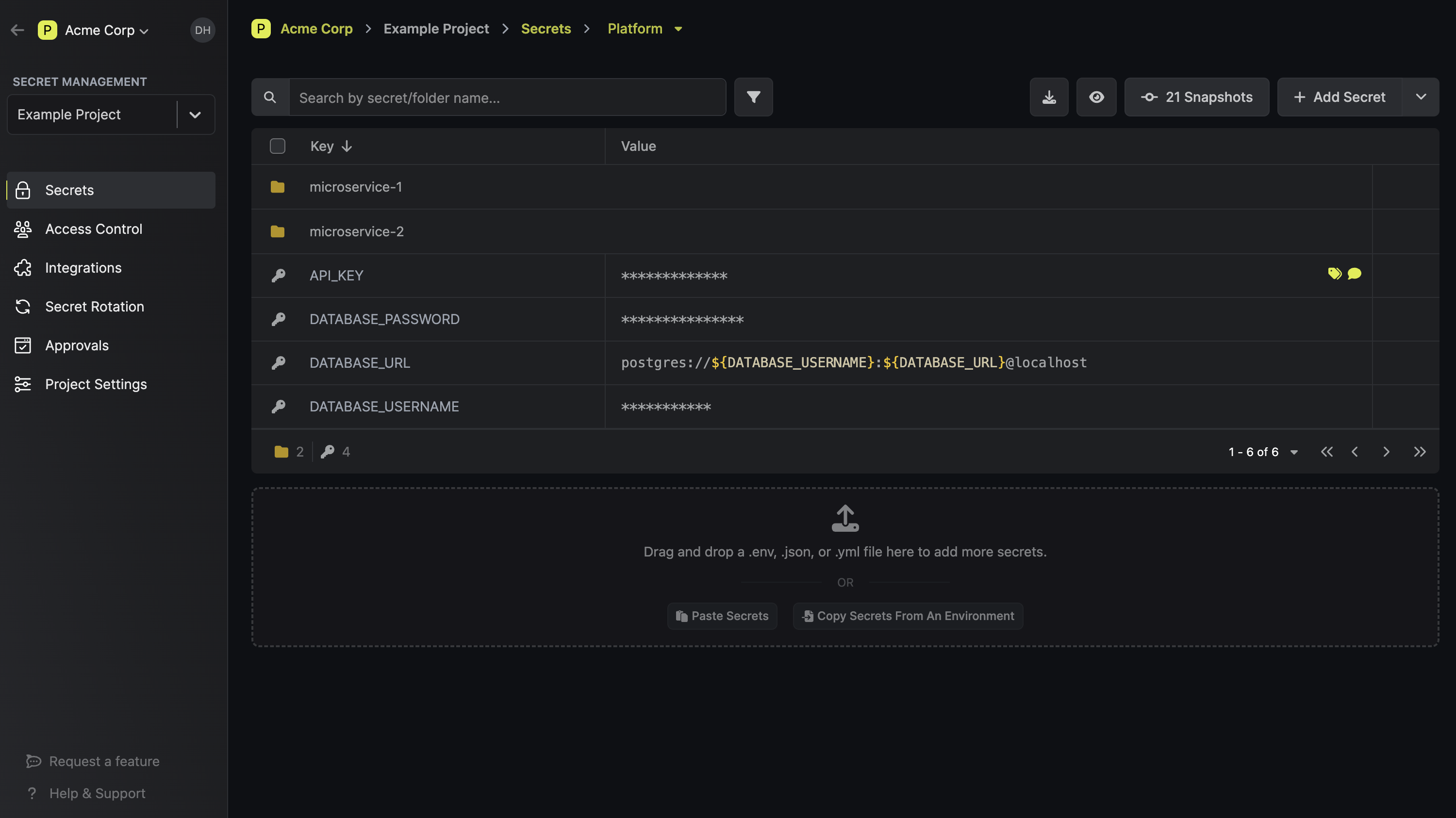
Infisical is an open source secret management platform. It provides an end-to-end set of tools that cover all aspects of secret management: from encrypted version-controled secret storage, to dynamic secret management, to integrations across infrastructure, to secret scanning, leak prevention, and certificate lifecycle management.
Industry Usage
Infisical is used by Fortune 500 companies, fast-growing startups, and international governments. It's one of the top 10 most popular security projects on GitHub, with a community of tens of thousands of developers. The core platform is MIT-licensed, so you can read the source, evaluate it on your own terms, and adopt it without waiting on legal or procurement.
Where Vault often requires weeks of setup before a team can store its first secret, Infisical is designed to get you there on day one. It runs on Postgres (not a proprietary Raft consensus layer), which means your team already knows how to operate, back up, and scale the underlying infrastructure. There's no certification to earn before you can be productive with it.
For larger organizations, Infisical Enterprise adds multi-region replication, advanced RBAC, and 24/7 support with SLAs. Companies like Hugging Face, Cisco, and Siemens use Infisical in production today.
Cost
One of the biggest differences between Vault and Infisical is what you get before you ever talk to a sales team. HashiCorp Vault's pricing gates many production-critical features behind an enterprise license. Infisical's open source core (MIT license) includes most of what a team needs to run secrets management in production (see our Vault TCO calculator if you want to estimate what switching would save your team):
- Unlimited instances, users, projects, environments, and secrets
- Full secret access via CLI, API, SDKs, Webhooks, and Agent
- Infrastructure integrations with Kubernetes, Terraform, and Ansible
- CI/CD integrations with GitHub Actions, CircleCI, and Jenkins
- Cloud platform integrations with AWS, Vercel, and Heroku
- Secret referencing, importing, and overrides
- Certificate lifecycle management
- Secret scanning and leak prevention
- Secret sharing
For teams that need multi-region replication, custom RBAC, or compliance features, those are available through Infisical Enterprise. If you want a managed option, Infisical Cloud has a free tier that includes everything listed above, with paid tiers for the advanced features.
Pros
- Day-one time to value: Most teams import existing secrets and are operational within hours, not weeks or months
- Runs on Postgres: No proprietary storage layer to learn. Your team already knows how to operate, back up, and scale it
- All-in-one platform: Secrets management, certificate lifecycle management, privileged access, secret scanning, and secret sharing in a single tool rather than stitching together multiple vendors
- Developer-first UX: A real UI with built-in approval workflows, access requests, and self-serve secret management. Engineers actually adopt it instead of working around it
- MIT-licensed core: Read the source, self-host it, and evaluate it without waiting on legal or procurement
- Broad integrations out of the box: Native support for Kubernetes, Terraform, Ansible, GitHub Actions, AWS, and dozens of other tools without building custom connectors
- Flexible deployment: Cloud, self-hosted, or hybrid across any infrastructure
Cons
- Younger project than Vault: Infisical doesn't have the decade-long track record that Vault has. For some organizations, that matters in vendor evaluation
- No encryption as a service: Unlike Vault, Infisical doesn't offer a transit secrets engine for encrypting/decrypting arbitrary data in transit
- Enterprise features require a paid license: Advanced capabilities like multi-region replication, custom RBAC, and SAML/SCIM are behind the enterprise tier, similar to most platforms in this space
2. OpenBao
OpenBao is a fork of Vault's own pre-BSL codebase, taken to the Linux Foundation and governed as an OpenSSF Sandbox project under a technical steering committee. It's architecturally Vault: same API, same storage backends, same core secrets engines, still under the MPL 2.0 license Vault used before the BSL switch.
As of February 2026, OpenBao ships dynamic secrets, PKI, KV secrets engines, Kubernetes auth, auto-unseal, and namespaces, all included with no enterprise tier gating them. Teams that already know Vault's HCL policies and Raft storage can move over with minimal relearning.
Cost
OpenBao itself is free, but it inherits Vault's operational model wholesale: Raft consensus, storage backends to size and back up, unsealing procedures, and the same HCL policy language that made Vault hard to onboard onto in the first place. The complexity doesn't go away because the license did. There's also no managed OpenBao SaaS, so self-hosting is the only option.
Pros
- True open source governance: MPL 2.0 under Linux Foundation and OpenSSF stewardship, no single vendor controlling the roadmap
- Direct Vault compatibility: Same API and secrets engines, the lowest-friction migration path for existing Vault users
- Full feature set, no enterprise gate: Dynamic secrets, PKI, and namespaces all ship in the open source project
- Active governance: Backed by a technical steering committee and working groups, not a single maintainer
Cons
- Inherits Vault's complexity: Raft consensus, unsealing, and HCL policy authoring are the same operational burden
- No managed offering: Self-hosting is the only option today
- Younger governance track record than Vault itself
- No developer UI: Same CLI-first interface as Vault
3. Mozilla SOPS
SOPS (Secrets OperationS) is not a secrets manager in the traditional sense. It's a CLI tool for encrypting and decrypting files (YAML, JSON, ENV, INI, and binary formats) so you can store secrets alongside your code in version control. Rather than centralizing secrets in a server, SOPS keeps them encrypted at rest in your repo and decrypts them in memory when needed.
SOPS delegates key management to external providers: AWS KMS, GCP KMS, Azure Key Vault, age, and PGP. This means you don't run a separate secrets server, but you do need one of these services to handle encryption keys.
It's a popular choice in GitOps workflows, particularly with Flux and ArgoCD, where teams want to keep encrypted secrets in Git alongside their Kubernetes manifests.
Cost
SOPS is fully open source (MPL 2.0 via the CNCF) and free to use. Your only costs are whatever you pay for the underlying KMS provider.
Maintenance and Governance
In 2023, Mozilla donated SOPS to the CNCF as a Sandbox project. It's now maintained by a new group of community maintainers under the getsops organization and is actively developed, with regular releases.
Pros
- Zero infrastructure to run: No server, no cluster, no unsealing. SOPS is a single binary that encrypts and decrypts files
- Git-native workflow: Encrypted secrets live in your repo, so they go through the same code review and versioning process as everything else
- Flexible key management: Works with AWS KMS, GCP KMS, Azure Key Vault, age, and PGP, so you can use whatever your team already has in place
- CI/CD friendly: Integrates well with Flux, ArgoCD, Helm Secrets, and most deployment pipelines
- Simple to adopt: Minimal learning curve compared to standing up a full secrets management platform
Cons
- Not a secrets manager: SOPS encrypts files. It doesn't provide dynamic secrets, secret rotation, access controls, audit logs, or a UI for managing secrets across teams
- No API access to secrets: Applications can't fetch secrets from SOPS at runtime the way they can from Vault or Infisical. You need a separate process to decrypt and inject them
- Scales poorly with complexity: As the number of secrets, environments, and teams grows, managing encrypted files across repos becomes difficult to maintain
- No centralized visibility: There's no dashboard or audit trail showing who accessed what and when. Governance relies entirely on your Git history
- Key management is on you: SOPS delegates encryption to external KMS providers, but you're responsible for configuring and securing access to those keys
4. Doppler
Doppler is a closed-source SaaS secrets manager built around syncing environment variables into CI/CD pipelines and cloud providers. It targets application developers rather than infrastructure teams evaluating a Vault replacement.
Cost
Doppler's Developer plan is free for up to three users. Team runs $21 per user per month and adds SSO, RBAC, and automatic secret rotation. Dynamic secrets and on-premise deployment require the custom-priced Enterprise tier. Custom roles and expanded integration syncs are billed as add-ons on top of Team.
Pros
- Fast setup: Syncing secrets into a CI/CD pipeline or cloud provider takes minutes
- Wide integration catalog, including a Kubernetes operator
- Developer-friendly CLI:
doppler runinjects secrets directly into a process
Cons
- Priced per seat, with custom roles and extra integrations billed as add-ons
- Dynamic secrets and certificate management require an Enterprise contract
- Closed source and SaaS-only: No self-hosting
5. Bitwarden Secrets Manager
Bitwarden Secrets Manager extends Bitwarden's password manager into infrastructure secrets: API keys, database credentials, CI/CD tokens. It's a secure, access-controlled vault, not a full secrets management platform. No dynamic secrets, no certificate lifecycle management, no workload authentication.
Cost
Free for up to two users. Teams starts at $6 per user per month with up to 20 machine accounts. Enterprise is $12 per user per month with up to 50 machine accounts, and self-hosting requires Enterprise.
Pros
- Free tier plus inexpensive per-seat pricing
- Open source codebase, client and server included
- Official Kubernetes operator
Cons
- Not a full secrets manager: No dynamic secrets, no rotation engine, no certificate management
- Roadmap sits with Bitwarden's password management business, not a dedicated secrets team
- Machine accounts are simple API keys, not real workload authentication
- Self-hosting requires Enterprise
6. 1Password Secrets Automation
1Password Secrets Automation similarly extends 1Password's password manager into developer secrets: CI/CD injection, SSH key management, service account tokens. It isn't sold as a standalone secrets manager, it's a feature of the Business plan.
Cost
Bundled into 1Password Business at $8.99 per user per month billed annually. High-volume infrastructure use requires a custom Enterprise agreement.
Pros
- No incremental cost for teams already on 1Password Business
- Straightforward CI/CD injection via service tokens, a Kubernetes operator, and the CLI
- SSH key management included
Cons
- Not a dedicated secrets manager: No dynamic secrets, no certificate lifecycle management, no policy-as-code
- Roadmap sits with 1Password's password management business
- Best fit is teams already standardized on 1Password, not a full Vault replacement
7. CyberArk Conjur
CyberArk Conjur is a secrets management platform built around machine identity and policy-based access control. It's designed to authenticate workloads (containers, VMs, CI/CD jobs) and provide them with the secrets they need at runtime, using a declarative policy language to define who gets access to what.
Conjur exists in three forms: Conjur Open Source (LGPL-licensed, community-supported), Secrets Manager Self-Hosted (the enterprise version, formerly Conjur Enterprise), and Secrets Manager SaaS (a managed cloud offering).
The open source version gives you the core API, CLI, and SDK, but production features like HA, a web UI, LDAP/SAML integration, and audit streaming require the enterprise or SaaS tiers.

CyberArk originally acquired Conjur Inc. in 2017. Palo Alto Networks completed its $25 billion acquisition of CyberArk in February 2026, and in May 2026 folded the portfolio into a single brand called Idira. Conjur's hosted tier is now Secrets Manager SaaS, and the self-hosted tier is Secrets Manager Self-Hosted, same names, just under Idira now.
Conjur's open source project has stopped receiving regular updates, and CyberArk's product palette, already the result of ten prior acquisitions, is folding into an even broader platform. Palo Alto Networks says it will keep supporting existing products, but the roadmap is uncertain. See our Idira guide and our Conjur vs. Infisical comparison for more.
Developer Experience
Conjur's strength is in its security model. Policy-as-code, role-based access, and native workload authentication (Kubernetes, AWS IAM, OIDC) give security teams strong controls. But developer experience has been a consistent pain point.
The UI is limited to the enterprise tier, the policy language has a learning curve, and day-to-day workflows feel more oriented toward security operators than the developers who need to consume secrets.
Cost
CyberArk Conjur pricing follows an identity-based model, where you pay per human and non-human identity managed. Conjur OSS is free but limited: no HA, no web UI, no enterprise authentication integrations.
Most production environments end up needing the enterprise plugins (LDAP/SAML, audit streaming, FIPS modules), which means you're on an enterprise contract. Deployment, maintenance, and training costs add up on top of the license, especially since Conjur requires dedicated expertise to operate.
Pros
- Strong workload authentication: Native authenticators for Kubernetes, OpenShift, AWS IAM, Azure, and OIDC mean your applications can authenticate to Conjur without hardcoded credentials
- Policy-as-code model: Access control is defined declaratively, which fits well into GitOps and infrastructure-as-code workflows
- Designed for machine identity: Built from the ground up around non-human identities, which is a genuine strength for container-heavy and CI/CD-heavy environments
- Enterprise security features: Audit logging, secret rotation, and granular RBAC in the enterprise tier meet compliance requirements for regulated industries
- Upgrade path from OSS to Enterprise: The open source version shares the same API and data model as the enterprise product, so migration is straightforward
Cons
- Poor developer experience: The interface is CLI-heavy, the policy language is complex, and there's no web UI in the open source version. Developers often find workarounds rather than adopt it
- LGPL license creates friction: The LGPL is harder for legal teams to evaluate than MIT or Apache 2.0, which can slow down adoption at organizations with strict open source policies
- High total cost of ownership: Enterprise licensing, professional services for deployment, dedicated staff to maintain it, and training costs make Conjur expensive to run, especially for mid-size teams
- Roadmap uncertainty under Idira: Conjur's open source updates have slowed, and its future now sits inside the broader Idira platform. See our Idira guide for details
- HA only in Enterprise: High availability requires an enterprise license, which means the open source version isn't viable for production workloads that need uptime guarantees
8. AWS Secrets Manager
AWS Secrets Manager is Amazon's fully managed secrets management service. It handles the storage, retrieval, and rotation of secrets like database credentials, API keys, and OAuth tokens within the AWS ecosystem.
If your infrastructure runs primarily on AWS, it's the path of least resistance: there's nothing to deploy, no cluster to manage, and it integrates natively with services like RDS, Lambda, ECS, and IAM.
For teams evaluating Vault alternatives, AWS Secrets Manager often comes up as the "we already have this" option. And for AWS-heavy shops with straightforward secrets needs, it can be a reasonable choice. The question is whether it's enough as your infrastructure grows past one account and one cloud, which is where enterprise secrets management gets hard.
For a deeper look at how the two compare, see our AWS Secrets Manager vs HashiCorp Vault breakdown.

Developer Experience
The developer experience is tightly coupled to AWS. If your team lives in the AWS console, CLI, and SDK ecosystem, Secrets Manager feels natural. Secrets are organized by name, support versioning, and can be accessed programmatically through the AWS SDK in any language. Rotation is built in for supported services (RDS, Redshift, DocumentDB) and can be extended via Lambda functions for custom rotation logic.
That said, the experience breaks down outside of AWS. There's no cross-cloud support, no standalone CLI for local development, and no UI designed for developers to browse and manage secrets across projects and environments the way tools like Infisical or even Vault provide.
If you're running a multi-cloud or hybrid setup, you'll need a separate solution for non-AWS resources, which often leads to managing secrets in two places.
Cost
AWS Secrets Manager charges $0.40 per secret per month, plus $0.05 per 10,000 API calls. For a small number of secrets, this is cheap. But costs scale linearly: 1,000 secrets costs $400/month before API calls, and high-throughput environments with frequent reads can see API charges add up.
There are no free tier credits for Secrets Manager beyond the initial trial period.
There's also a hidden cost: because Secrets Manager only covers AWS, teams running multi-cloud or hybrid infrastructure end up paying for a second secrets management solution alongside it, effectively doubling their operational overhead.
If you're hitting these limits, we've put together a list of AWS Secrets Manager alternatives worth evaluating.
Pros
- Zero operational overhead: Fully managed by AWS. No servers, no clusters, no patching, no unsealing
- Native AWS integration: Works out of the box with RDS, Lambda, ECS, EKS, and IAM for access control
- Built-in rotation: Automatic credential rotation for supported AWS database services, extensible via Lambda for custom rotation
- Encryption by default: All secrets are encrypted using AWS KMS, with support for customer-managed keys
- Audit logging via CloudTrail: Every secret access and modification is logged, which helps with compliance
Cons
- AWS lock-in: Only works within the AWS ecosystem. No support for Azure, GCP, on-prem, or multi-cloud environments
- No developer workflows: No approval workflows, access requests, secret sharing, or team-oriented UI. It's infrastructure tooling, not a developer platform
- No secret scanning or leak prevention: Doesn't detect or prevent secrets from being committed to repos or exposed in logs
- Limited organizational structure: Secrets are flat key-value pairs organized by name. There's no concept of projects, environments, or hierarchical organization beyond what you build yourself with naming conventions
- No self-hosting option: Fully proprietary and cloud-only. If your compliance requirements mandate on-prem or data sovereignty, it's not an option
- Costs scale linearly: The per-secret pricing model becomes expensive at scale, especially when combined with high API call volume
Also Consider: Building In-House Secret Management Tools
Some organizations decide to build their own secrets management system rather than adopt an off-the-shelf product. Companies like Lyft, Pinterest, and Segment have gone this route in the past.
The appeal is obvious: you get exactly the system your infrastructure needs, with no compromises on how it fits into your workflows.
But building a secrets manager is not the same as building most internal tools. You're building security infrastructure, which means the bar for correctness, encryption, access control, and auditability is much higher than a typical internal service. Before committing to this path, it's worth understanding what you're actually signing up for.
Developer Experience
The developer experience of a homegrown system is entirely up to you, which is both the advantage and the risk. You can design APIs, CLIs, and workflows that fit your stack perfectly.
But in practice, most in-house solutions end up under-investing in the developer-facing layer. The team building it is focused on getting the security model right, and things like a UI, onboarding documentation, SDK support, and self-serve workflows for developers tend to get deprioritized.
This creates the same adoption problem that plagues Vault: if the tool is difficult to use, developers find workarounds. Hardcoded credentials, .env files, and Slack messages become the shadow secrets management system. A security tool only works if people actually use it.
New engineers also face a steeper onboarding curve. With a widely adopted tool like Infisical or Vault, there are public docs, community tutorials, and Stack Overflow answers. With a custom system, all of that institutional knowledge lives in internal wikis (if it exists at all) and the heads of the engineers who built it.
Cost
There's no sticker price for building in-house, but the costs are real and often underestimated:
- Initial build: A small team of 2-3 engineers spending 3-6 months on design, development, and testing. At fully loaded engineering costs, that's easily $200K-$500K+ before the system handles its first secret in production
- Ongoing maintenance: Security patches, dependency updates, infrastructure scaling, on-call rotations. This is not a "build it and forget it" project. Most teams that go this route end up with 1-2 engineers dedicated to maintaining it indefinitely
- Opportunity cost: Every engineering hour spent on secrets infrastructure is an hour not spent on your product. For a company with 100+ engineers, this is the most significant hidden cost
- Audit and compliance: Custom systems face more scrutiny from auditors and security reviewers because they're unfamiliar with the implementation. Preparing for SOC 2, HIPAA, or PCI audits with a homegrown secrets manager adds weeks of documentation and review work
- Knowledge concentration risk: When the engineer who built the system leaves, the organization loses critical context. This creates fragility that compounds over time
Pros
- Full customization: You can design the system to fit your exact infrastructure, workflows, and security model with no compromises
- Complete control: You decide the release schedule, the architecture, and the roadmap. No vendor dependency, no license changes, no acquisitions to worry about
- Deep integration: A purpose-built system can integrate tightly with your internal tooling, deployment pipelines, and authentication infrastructure in ways that off-the-shelf products may not support
Cons
- Massive engineering investment: Building a production-grade secrets manager with encryption, access controls, audit logging, rotation, and HA requires deep security expertise and months of dedicated engineering time
- Ongoing maintenance burden: The system needs continuous patching, scaling, and on-call support. This doesn't shrink over time; it grows as usage increases
- Low developer adoption risk: Without investment in UX, documentation, and self-serve workflows, developers will work around the tool rather than adopt it
- Compliance friction: Auditors and security reviewers are familiar with established products. A custom system requires more documentation and explanation to pass audits
- Doesn't scale with the team: As the organization grows, the in-house solution often needs significant re-architecture. Features that established platforms ship out of the box (multi-tenancy, RBAC, secret versioning) become expensive to add after the fact
- Knowledge silos: The system's design and operational knowledge often lives in the heads of a few engineers, creating a single point of failure for the organization
How Do These Vault Alternatives Compare?
Choosing the right secrets management tool depends on your infrastructure, team size, and how much operational overhead you're willing to take on. This comparison covers each alternative across the features that matter most to platform and infrastructure engineers evaluating a Vault replacement.
| Vault | Infisical | OpenBao | SOPS | Doppler | Bitwarden SM | 1Password SA | Conjur | AWS SM | In-House | |
|---|---|---|---|---|---|---|---|---|---|---|
| Open Source | ❌ BSL | ✅ MIT | ✅ MPL 2.0 | ✅ MPL 2.0 (CNCF) | ❌ | ✅ | ❌ | ⚠️ LGPL (OSS), proprietary (Enterprise) | ❌ | N/A |
| Self-Hostable | ✅ | ✅ | ✅ | N/A (CLI tool) | ❌ | ⚠️ Enterprise only | ❌ | ✅ | ❌ | ✅ |
| Cloud / Managed Option | ✅ (HCP) | ✅ | ❌ | N/A | ✅ | ✅ | ✅ | ✅ | ✅ | ❌ |
| Dynamic Secrets | ✅ | ✅ | ✅ | ❌ | ⚠️ Enterprise only | ❌ | ❌ | ✅ | ⚠️ Rotation only | Depends on build |
| Secret Rotation | ✅ | ✅ | ✅ | ❌ | ✅ (Team+) | ❌ | ❌ | ✅ | ✅ (AWS services only) | Depends on build |
| Certificate Management (PKI) | ✅ | ✅ | ✅ | ❌ | ❌ | ❌ | ❌ | ❌ | ❌ | Depends on build |
| Privileged Access Management | ❌ | ✅ | ❌ | ❌ | ❌ | ❌ | ❌ | ⚠️ Via Idira PAM suite | ❌ | Depends on build |
| Secret Scanning | ❌ | ✅ | ❌ | ❌ | ❌ | ❌ | ❌ | ❌ | ❌ | Depends on build |
| Secret Sharing | ❌ | ✅ | ❌ | ❌ | ❌ | ❌ | ❌ | ❌ | ❌ | Depends on build |
| Developer UI / Dashboard | ⚠️ Limited | ✅ | ⚠️ Limited | ❌ | ✅ | ✅ | ✅ | ⚠️ Enterprise only | ⚠️ AWS Console only | Depends on build |
| Built-in Approval Workflows | ❌ | ✅ | ❌ | ❌ | ❌ | ❌ | ❌ | ❌ | ❌ | Depends on build |
| Encryption as a Service | ✅ | ✅ | ✅ | ❌ | ❌ | ❌ | ❌ | ❌ | ❌ | Depends on build |
| Multi-Cloud / Cloud-Agnostic | ✅ | ✅ | ✅ | ✅ (via KMS) | ✅ | ✅ | ✅ | ✅ | ❌ AWS only | Depends on build |
| Kubernetes Native Integration | ✅ | ✅ | ✅ | ✅ (via Flux/ArgoCD) | ✅ | ✅ | ✅ | ✅ | ✅ | Depends on build |
| CI/CD Integrations | ✅ | ✅ | ✅ | ✅ | ✅ | ✅ | ✅ | ✅ | ⚠️ AWS-native only | Depends on build |
| Audit Logging | ✅ | ✅ | ✅ | ❌ | ✅ (Team+) | ✅ | ✅ | ✅ (Enterprise) | ✅ (via CloudTrail) | Depends on build |
| Runs on Postgres | ❌ (Raft) | ✅ | ❌ (Raft) | N/A | N/A (managed) | N/A (managed) | N/A (managed) | ✅ | N/A (managed) | Depends on build |
| Day-One Time to Value | ❌ | ✅ | ❌ | ✅ | ✅ | ✅ | ✅ | ❌ | ✅ (if AWS-only) | ❌ |
| No Vendor Lock-In | ⚠️ BSL + IBM acquisition | ✅ | ✅ | ✅ | ❌ | ❌ | ❌ | ⚠️ Palo Alto Networks / Idira | ❌ | ✅ |
A few things worth flagging: SOPS is a file encryption tool, not a centralized secrets manager, so many categories don't apply. Bitwarden Secrets Manager and 1Password Secrets Automation are password-manager extensions, not dedicated secrets platforms, hence the gaps on dynamic secrets, PKI, and PAM. OpenBao inherits Vault's architecture and its operational overhead, so free doesn't mean low-effort. "Depends on build" for in-house solutions reflects that you can build anything, but each feature is additional engineering investment. And AWS Secrets Manager is strong within AWS but limited outside of it.
For a broader look at how the wider secrets management category breaks down beyond this list, see our roundup of the best secrets management tools.
Is Infisical right for you?
If you've spent time managing Vault clusters, debugging HCL policies, or waiting months for your secrets setup to be production-ready, Infisical was built to fix that.
It runs on Postgres (not proprietary Raft), ships with a developer UI and built-in workflows out of the box, and most teams are up and running within a day. No certification required. No custom tooling to build on top.
Secrets, certificates, privileged access, and secret scanning all live in one platform. Open source under MIT. Deploy it however you need: cloud, self-hosted, or hybrid.
Sign up for free, talk to an expert about migrating from Vault, or explore the docs to see how it fits your stack.

Ashwin Punj
Solutions Engineer, Infisical