

onBehalfOf. For a session created on behalf of a user, the proxy uses the user’s own personal values, not the machine identity’s. The session can use an access bundle only if both the user and the machine identity can use the bundle.
Use a delegation when one service starts agents for many people, such as a chat bot that runs an agent for each message, or a task runner that runs an agent for each ticket. Each agent then gets no more access than the person who asked for it.
Prerequisites
- The Admin role in Agent Vault, or an Agent Vault admin who can set up the delegation for you
- A machine identity that’s a member of Agent Vault and can log in with Universal Auth, as Step 1 of Create sessions with the API describes
- A grant for the machine identity on each access bundle its sessions use
- Users who are members of Agent Vault and have a grant on the access bundles their agents use
Set up a delegation
- Dashboard
- API
1
In Agent Vault, go to Access Control, select the Machine Identities tab, and select the machine identity.
2
In the Delegation section, select Manage Delegation.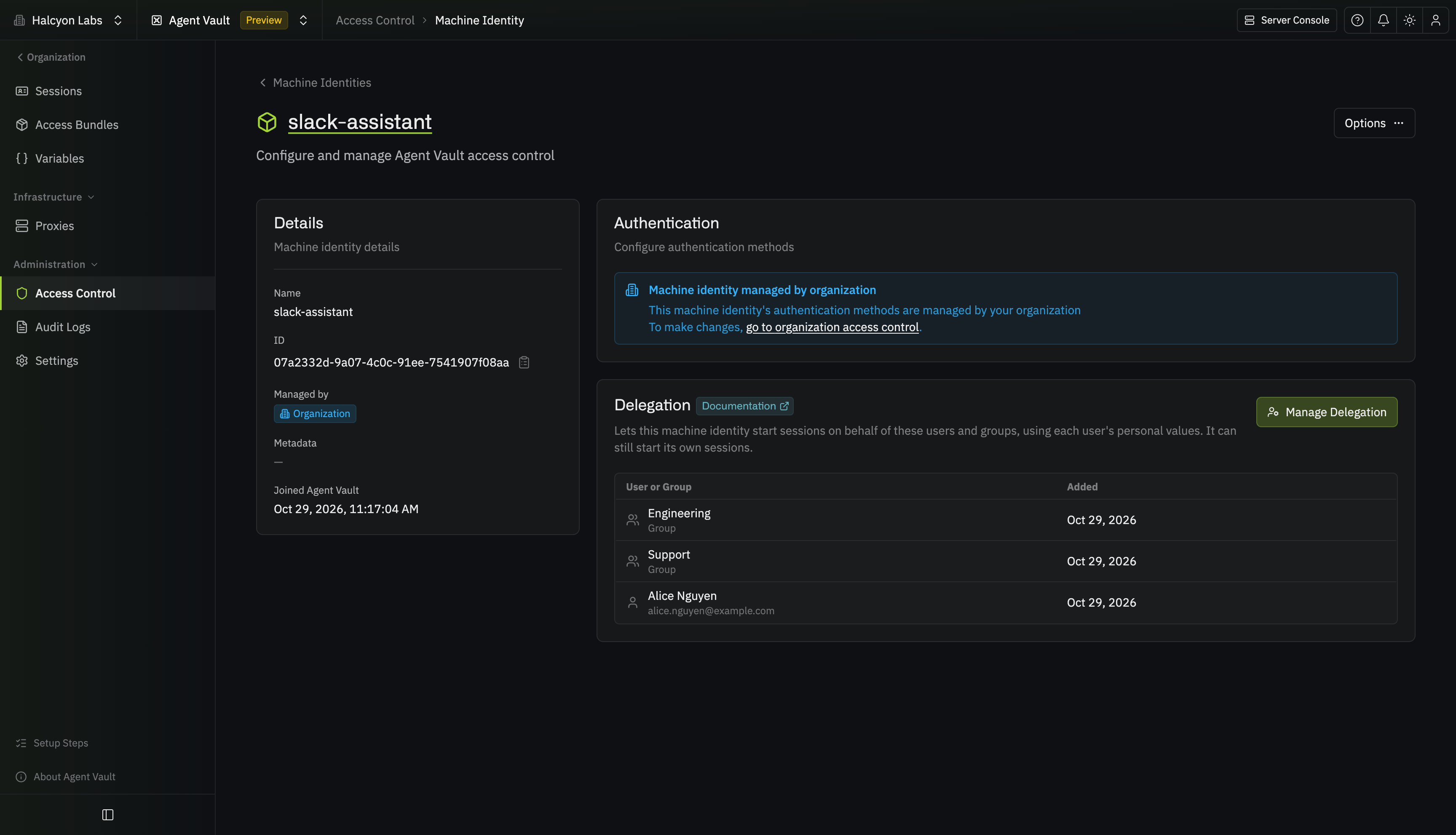
3
Expand Not in Delegation, then select Add next to each user or group to add. A group covers every member of the group. If someone isn’t listed, search for them by name. Changes save as you make them.To cover every current and future user in Agent Vault instead, turn on All Agent Vault Members and select Allow All Members.
Create a session on behalf of a user
Log in as the machine identity, as Step 2 of Create sessions with the API describes. Then call the endpoint that creates a session, and name the user inonBehalfOf:
- In
onBehalfOf, set eitheruserEmailoruserId, not both - In
accessBundles, name a bundle that both the user and the machine identity can use ttldefaults to1h, instead of the7ddefault for other sessions
Find the access bundles a session can use
To choose an access bundle for the user, call the endpoint that lists access bundles as the machine identity, and name the user inonBehalfOfUserEmail or onBehalfOfUserId:
servicesRequiringSetup lists the services the user hasn’t set up their personal values for yet. The proxy refuses the session’s requests to those services, so add requiresSetup=false to list only the bundles the user has set up.
What the session can reach
A session created on behalf of a user can use an access bundle only if both the user and the machine identity can use the bundle, and the session uses the user’s personal values:- The user can use the access bundles granted to them, directly or through a group (if the user is an Agent Vault admin, every bundle)
- The machine identity can use the access bundles granted to it, directly or through a group (if the machine identity is an Agent Vault admin, every bundle)
- The proxy refuses the session’s requests to a service until the user sets up their personal values for it
- In the machine identity’s Delegation section, the row for the user or group shows the number of excluded bundles, and hovering over the number lists them
- The endpoint that reads a delegation returns the bundles in
missingAccessBundles(always empty if a machine identity that isn’t an Agent Vault admin reads its own delegation)
When the session stops working
Infisical checks the delegation again each time the proxy polls, once every poll interval (60 seconds by default). The proxy refuses every request on the session if any of these happen:- An admin removes the delegation, or edits it so it no longer covers the user
- The delegation covered the user only through a group, and either the user leaves that group or the group is removed from Agent Vault
- The user is removed from Agent Vault or from your organization, which also takes the user out of the delegation
- The user or the machine identity is deactivated in your organization
- An admin removes the machine identity from Agent Vault, which also deletes its delegation
- Someone deletes the machine identity or the user (the session then shows as Revoked)
Track sessions created on behalf of users
A session created on behalf of a user belongs to the machine identity, so the user can’t see it. Only the machine identity and Agent Vault admins can see the session, read its session logs, and revoke it:- The machine identity, through the endpoints that read a session, list its session logs, and revoke a session
- Admins, under All Sessions on the Sessions page
onBehalfOfUserId, onBehalfOfUserName, and onBehalfOfUserEmail. The audit events for changing the session’s label and revoking the session include the same three fields. Infisical also writes an audit event when an admin sets up, changes, or removes a delegation.
Troubleshooting
Creating the session fails with "This machine identity isn't allowed to start sessions on behalf of users"
Creating the session fails with "This machine identity isn't allowed to start sessions on behalf of users"
The machine identity has no delegation. Set one up, or ask an Agent Vault admin to.
Creating the session fails with "No access bundle named ... is granted to this machine identity"
Creating the session fails with "No access bundle named ... is granted to this machine identity"
The access bundle isn’t granted to the machine identity, or no access bundle has that name. Grant the bundle to the machine identity, or name a bundle the machine identity already has.
Creating the session fails with "This machine identity can't start sessions on behalf of ..."
Creating the session fails with "This machine identity can't start sessions on behalf of ..."
The delegation doesn’t cover the user, or no active member of your organization has that email or ID. Check the email or ID you sent, then check the users and groups in the machine identity’s delegation.
Creating the session fails with "No access bundle named ... is granted to '...'"
Creating the session fails with "No access bundle named ... is granted to '...'"
The access bundle isn’t granted to the user. Grant the bundle to the user, or name a bundle the user already has.
Next steps
Create sessions with the API
Create, use, and revoke a session from your own code.
HTTP APIs
Leave part of a service’s credential to each member.