

allow or deny. The proxy continues only if your server answers allow.
Use a hook when a service’s methods and paths or allowed tools can’t express your rule, for example to refuse refunds above a set amount, to allow writes to some repositories only, or to check a request against your own ticketing system. Your server gets the agent’s request but never the service’s credential.
Prerequisites
- The Admin role in your Agent Vault project
- A server that accepts
POSTrequests at anhttps://orhttp://URL, and that every proxy in the project can reach
When the proxy asks the hook
The proxy asks the hook at a different point for each service type:- HTTP APIs and MCP servers: Before it sends each request to the service, including MCP calls such as
initializeandtools/list - Databases and SSH servers: Once for each connection the agent opens
Add a hook to a service
You can add a hook when you add a service, or later when you edit it. Each proxy applies a change to a hook at its next check-in, within one poll interval (60 seconds by default).- In Infisical
- Through the API
1
In your Agent Vault project, go to Services. To add a service, select Add Service and pick a template. To change an existing service, open the service’s actions menu and select Edit.
2
Fill in the service’s other steps as usual. On the Hook step, turn on Use a Hook.
3
In Hook URL, enter your server’s URL, such as
https://hooks.example.com/agent-vault/stripe. The URL can’t include a username, a password, a query string, or a fragment. Give each service its own path if the services use different signing secrets (see Pick a signing secret).4
In Signing Secret, enter the secret your server checks signatures with. If you’re editing a service that already has a hook, leave the field as it is to keep the saved secret.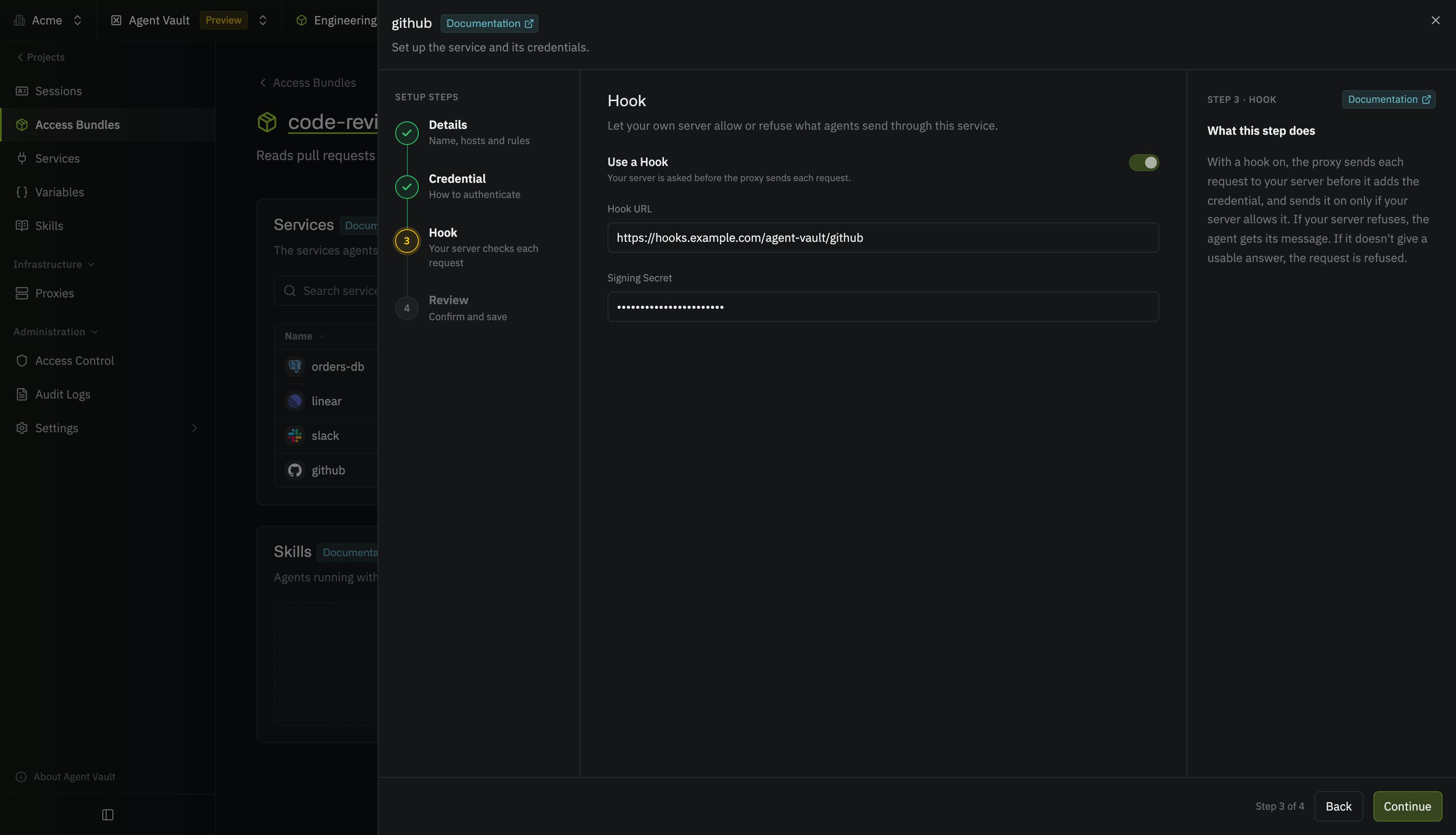
5
Select Continue, then select Add Service, or Save if you’re editing the service.
hook object with the inline service when you call the Create session endpoint.
Pick a signing secret
The proxy signs every request to your server with the signing secret, so your server can check that the request came from your proxy. The secret can be 32 to 512 characters long, using letters, numbers, and symbols, with no spaces. To generate a secret:/agent-vault/stripe and /agent-vault/github. Your server needs the secret before it can trust the body, and the body is the only part of the request that names the service. The URL path tells your server which secret to use.
Change the signing secret
When you replace the secret, each proxy keeps signing with the old secret until its next check-in. So that your server doesn’t reject requests in the meantime:1
On your server, accept a signature made with either the old or the new secret.
2
Replace the secret on the service.
3
After every proxy in the project has checked in (within one poll interval, at most 300 seconds), remove the old secret from your server.
Build the hook server
For each check, your server receives onePOST request, verifies the request’s signature, and answers allow or deny in JSON. The proxy waits at most 3 seconds for the answer.
Verify the signature
The proxy signs requests the way the Standard Webhooks specification describes, so you can verify them with any Standard Webhooks library. Load the library in raw-key mode. In the default mode, the library rejects every signature from the proxy. Verify the raw request body, before any framework parses it. The libraries also refuse a request whosewebhook-timestamp differs from your server’s clock by more than five minutes.
webhook-id, so answer both with the same decision, and if your server records or counts checks, count each webhook-id once.
The request your server receives
Each request has these headers:deliveryId: the same value as thewebhook-idheadersession.actor: the user or machine identity that created the session, as it was when the session was createdsession.onBehalfOf: the user a machine identity created the session on behalf of, ornullservice.accessBundle: the access bundle the session uses the service through, ornullfor an inline servicerequest.path: the path as the agent sent it, still percent-encodedrequest.headers: the headers the agent sent, with names in lowercase, each with a list of valuesrequest.body: the request body as text if it’s valid UTF-8, or as base64 withbodyEncodingset tobase64
request describes the HTTP request, and mcp lists the JSON-RPC calls in the request’s body:
request.body. If parsed is false, the proxy couldn’t read the calls, so deny the request if your rule depends on them.
For a database or SSH service, request is null, and connection describes the server the agent is connecting to:
Answer the request
Answer with a2xx status and a JSON body, for both decisions:
decision:allowordeny, in lowercasemessage(optional): the text the agent gets, up to 2 KB, or 1 KB for databases and SSH servers (say what the agent should do next, such as whether to try again)reason(optional): text for the session logs, up to 512 bytes
- No answer within 3 seconds
- A connection or TLS error
- A status other than
2xx - A redirect
- A body larger than 64 KB
- A body that isn’t valid JSON
- A missing or unknown
decision
What your server sees
Your server sees the agent’s request as the agent sent it, before the proxy changes anything. Keep these points in mind when you write a rule:- No credentials: The request doesn’t include the service’s credential or its custom headers, and if the agent sends a substitution placeholder, your server sees the placeholder, not the real value
- Method overrides: Some APIs accept a header such as
X-HTTP-Method-Overridethat turns aPOSTinto aDELETE, so check those headers as well asmethod - Large bodies: The proxy sends at most the first 1 MB of the body, and sets
bodyTruncatedtotrueif it cut the body short - Compressed bodies: A body sent with a
Content-Encodingheader, such asgzip, arrives still compressed, as base64 - Repeated keys: A header, a query parameter, or a JSON key can appear more than once, and the API might read a different copy than your parser does
Refused requests
If your server denies a request, the agent gets yourmessage. If you sent no message, the agent gets “Your organization’s hook refused this request.” (or “Your organization’s hook refused this connection.” for databases and SSH servers). If your server doesn’t give a usable answer, the agent gets a message saying that the hook server didn’t give a usable answer.
The proxy delivers the refusal differently for each service type:
- HTTP APIs, and
GETandDELETErequests to MCP servers: A403response with thehook_deniederror code, or a503response with thehook_failederror code and aRetry-After: 5header, each with a JSON body like the proxy’s other refusals POSTrequests to MCP servers: A tool result withisErrorset totruefor a tool call, so the agent reads the message as the tool’s answer, or a JSON-RPC error with the same message for any other call- Databases and SSH servers:
infisical agent-vault connectprints the service’s name and the message, as inanalytics: <message>, and the proxy closes the agent’s connection without opening one to the server
In the session logs
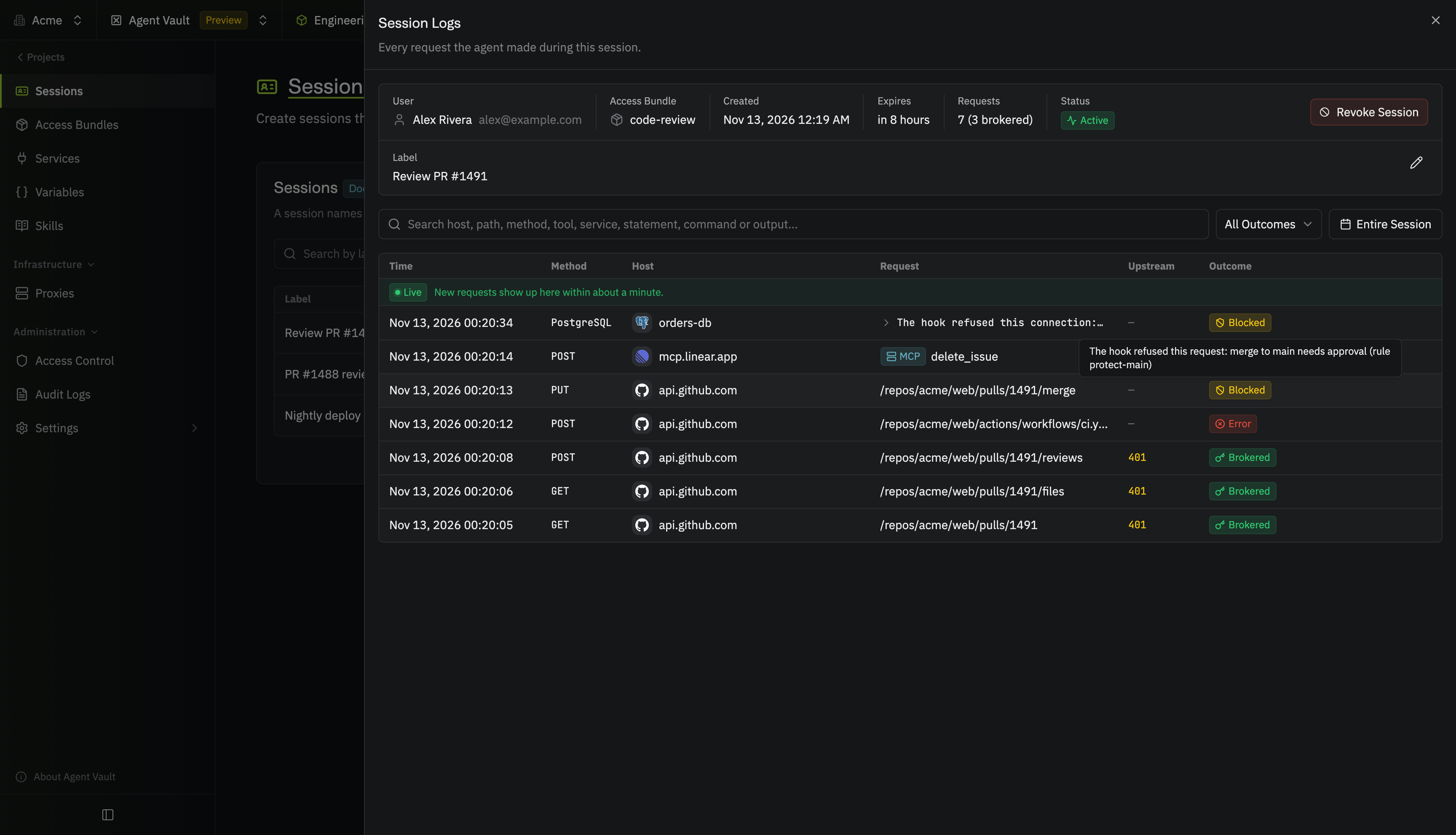
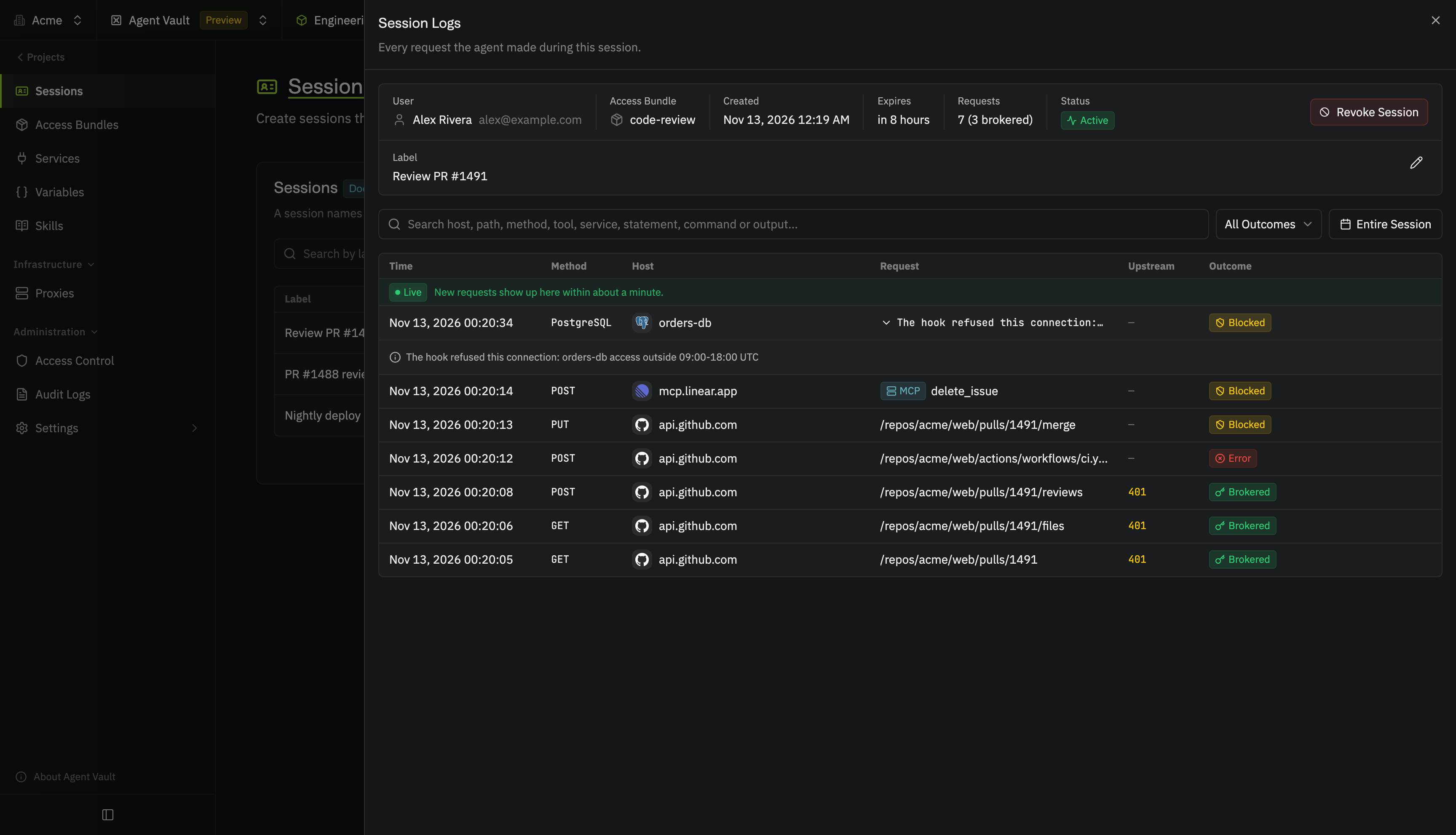
Each refusal adds a row to the session logs:- HTTP APIs and MCP servers: A denied request shows as Blocked with “The hook refused this request:” followed by your
reason, and a failed hook call shows as Error with “The hook didn’t give a usable answer, so the request wasn’t sent.” - Databases and SSH servers: A denied connection shows “The hook refused this connection:” followed by your
reason(or yourmessage, if you sent noreason), and a failed hook call shows “The hook didn’t give a usable answer, so the connection wasn’t opened.”
reason to its own log, so don’t put anything in reason that those readers shouldn’t see.
Limitations
- Session labels aren’t a safe input: The session’s owner and project admins can change the label at any time, so never allow a request because of
session.label - MySQL can switch databases:
connection.databaseis the database the connection opens with, but a MySQL client can switch to any other database the service’s account can reach withUSE, so limit the account’s grants on the server - One MCP tool call can reach the hook more than once: If an MCP server asks the agent for more input during a tool call, the agent sends the tool call again with a new JSON-RPC ID, and the proxy asks the hook again
http://isn’t encrypted: Over anhttp://URL, the request (with the agent’s headers and body) and your server’s answer cross the network unencrypted, so usehttp://only on a network you trust- Private certificate authorities: If your server’s
https://certificate comes from a private certificate authority, every machine that runs a proxy has to trust that authority (on Linux, setSSL_CERT_FILEorSSL_CERT_DIRin the proxy’s environment to the authority’s certificate)
Troubleshooting
Every request is refused with hook_failed
Every request is refused with hook_failed
The proxy couldn’t get a usable answer from your server. Check that:
- Every machine that runs a proxy in the project can reach the hook URL
- Your server answers within 3 seconds, with a
2xxstatus and a JSON body whosedecisionisallowordeny - Your server doesn’t redirect the request, for example from
http://tohttps://
Your server rejects every signature
Your server rejects every signature
Check that:
- Your server loads the library in raw-key mode, as in Verify the signature
- The secret on your server matches the service’s signing secret exactly (if you recently changed it, proxies switch on their next check-in)
- Your server verifies the raw body, before a framework parses or reformats it
- The clocks on the proxy’s machine and on your server are both correct, since the library refuses a timestamp more than five minutes off
The MCP server stops working after you add a hook
The MCP server stops working after you add a hook
The proxy asks the hook about every request to the MCP server, including
initialize, tools/list, and notifications, not only tool calls. Make sure your server allows those requests.