


Add a service
To add a service to an access bundle:1
In Agent Vault, go to Access Bundles. Select your access bundle, then select Add Service.
2
On the Choose a template panel, pick the template for the API you want to reach, or select Custom to configure the host and header yourself.
3
Follow the steps and paste your credentials in the Credential section.To use a value that several services share, type
{{ in a field that accepts variables and select a variable from the list that opens.4
Select Add Service. The service appears in the bundle’s list.
Credential types
When configuring a service, you have the option to set its credential type. This determines what the proxy attaches to outbound requests.Bearer
The proxy attaches one header in the format<header name>: <prefix> <value>, which defaults to Authorization: Bearer <value>.
Bearer is the right choice for most APIs. If the API expects a bare key instead of a Bearer-prefixed one, change the header name to X-API-Key and clear the prefix.
Basic
The proxy attaches the headerAuthorization: Basic <base64 of username:password>. Either the username or the password can be left blank.
Basic is the right choice for APIs behind HTTP basic authentication, including ones that put the entire key in the username field.
Pass-through
The proxy attaches no credential. Unless the service adds custom headers or substitutions, the proxy forwards the agent’s request to the API unchanged. Pass-through is the right choice when the proxy’s strict traffic policy would otherwise block the host. It lets the request reach the API without attaching a credential.For Bearer and Basic services, if the agent’s request already carries a header with the same name as the one the service sends, the proxy replaces it with the service’s credential.
Member-provided values
By default, you set the whole credential and every session uses it. If each member should call the API with their own token or login, such as a personal API key, you can make that part of the credential member provided. Each member then sets a personal value, and a session uses the personal value of the member who created the session. You can make these credential fields member provided: To make a field member provided:1
In Agent Vault, go to Access Bundles and select the access bundle. Open the service’s actions menu and select Edit, then go to the Credential step.
2
Next to the field, turn on Member provided.
3
Select Continue, then select Save.
403 response. Requests to the bundle’s other services still go through.
Host patterns
When configuring a service, you have the option to set which host patterns it matches. A host pattern controls which outbound requests get the service’s credential attached.Multiple hosts
A single pattern can cover multiple hosts by listing them, separated by commas:Default port
A host without a port specified only matches requests to the standard HTTPS port443:
api.github.com:443, but not api.github.com:80 or api.github.com:8080.
Non-standard ports
To match a port other than443, include it in the host:
Plaintext hosts
A service works the same way over plain HTTP as it does over HTTPS. The proxy attaches the credential, the custom headers, and the substitutions either way. Use a plaintext host for an API on your own network that doesn’t serve HTTPS. Leave thehttp:// scheme off the host, and name the port instead:
443:
Wildcards
Wildcards match exactly one label. The pattern below matchesapi.atlassian.net, but not a.b.atlassian.net or atlassian.net.
Host conflicts
Two services within an access bundle can’t cover the same host with the same pattern. For example, if you have a service that defines its host asapi.github.com and you try to create a second service with that same host, Infisical will stop you from saving the second service.
However, two services can match the same host if they define the host pattern differently. When the agent makes a request to that host, the request will match the service that defines the host more explicitly. For example:
- One service defines its host as
api.github.com - Another service defines it as
*.github.com
api.github.com are handled by the first service.
Different access bundles can cover the same host with different credentials, since an agent only gets the credential from the access bundle its session is scoped to.
Methods and paths
By default, a service allows every HTTP method and every path on its hosts. When configuring a service, you have the option to narrow it to only the methods and paths your agent needs.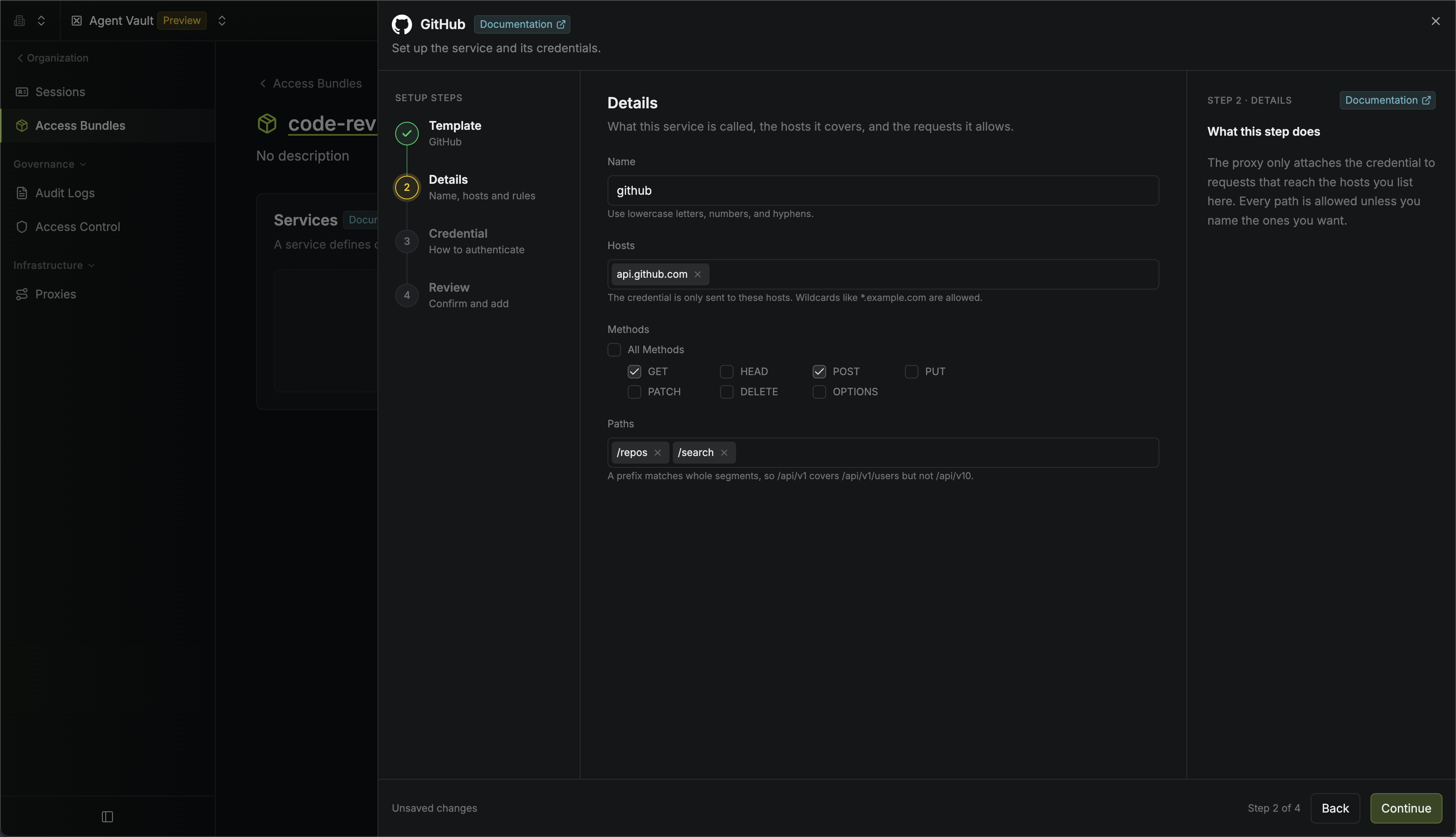
Methods
On the Details step, clear All Methods and select the HTTP methods the service allows. For example, if a service allows onlyGET and HEAD, the proxy refuses a POST or DELETE request before the request leaves your network.
Paths
On the Details step’s Paths field, enter each path prefix the service allows. A path prefix matches whole segments, so/repos covers /repos/octo/hello but not /repositories. Write the path exactly as it appears in the URL.
If a service has path prefixes, the proxy also refuses any path that different servers would resolve differently, such as one containing
.. or an encoded slash. Ordinary paths still work, including ones with a space or a non-ASCII character such as /repos/owner/repo/contents/café.md.Refused requests
If a request breaks either rule, the proxy refuses the request with a 403. The message names the service and the method or path it doesn’t allow:Custom headers
Some APIs need a header alongside the credential, such as an organization ID or an API version. On the Credential step, under Advanced Options, select Add Custom Header and enter a name, an optional prefix, and a value. The proxy attaches it to every request to that service, whatever credential type the service uses.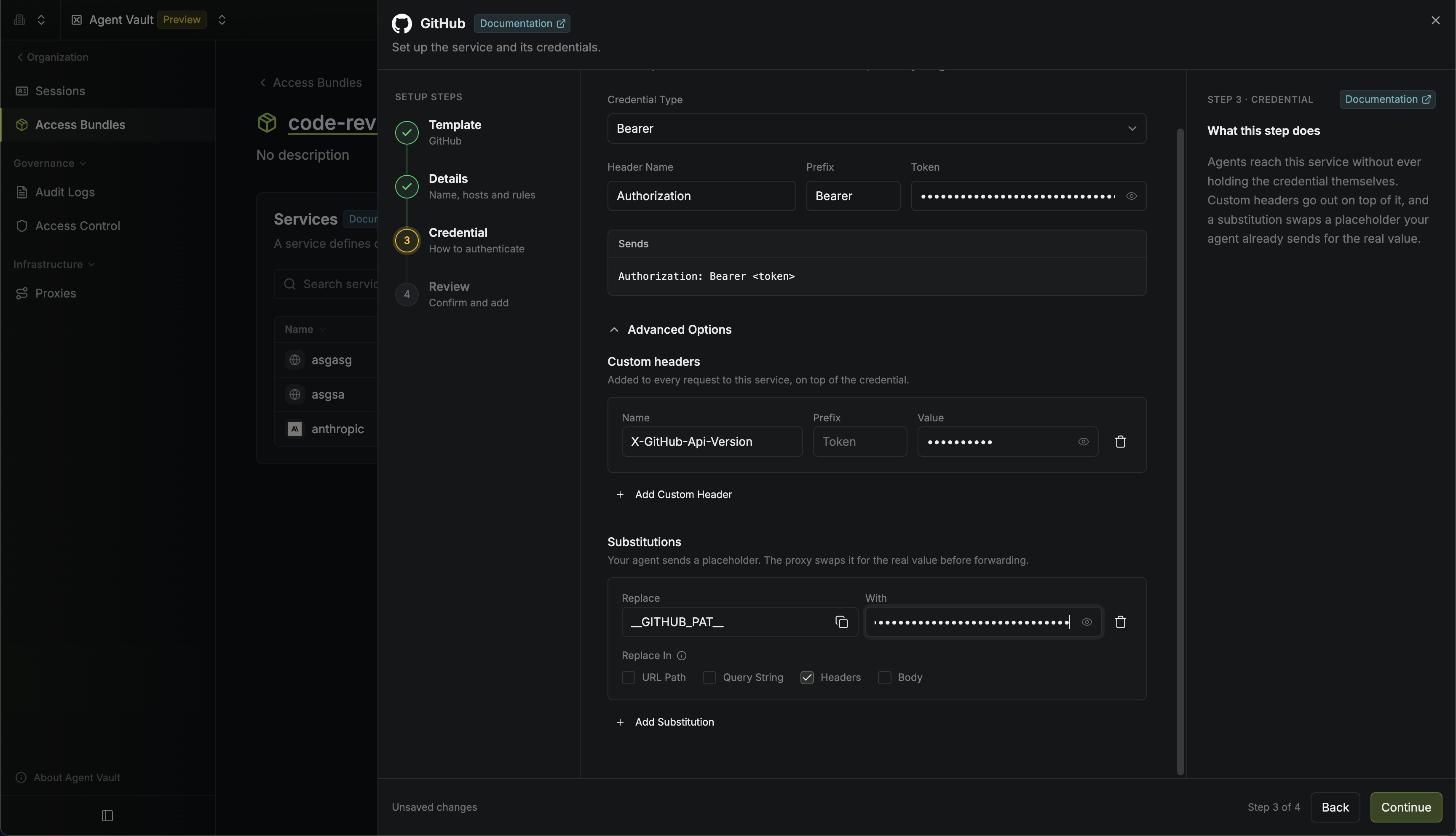
Host, Content-Length, or Connection.
Substitutions
Instead of attaching headers to an agent’s request, you can configure your service to use substitution instead. With a substitution, you give the agent a placeholder instead of the real credential, such as a fake API token. The agent sends the placeholder in its requests, and the proxy replaces it with the real value before forwarding each request. For example, if you set the agent’s GitHub token to__GITHUB_PAT__, the agent sends:
Substitutions work with every credential type, including pass-through.
Add a substitution
1
On the Credential step, expand Advanced Options and select Add Substitution.
2
Enter the placeholder your agent sends in Replace, and the real value in With.
3
Under Replace In, select where the proxy looks for the placeholder: URL Path, Query String, Headers, or Body.
4
In the agent’s environment or configuration, set the credential to the placeholder, such as
GITHUB_TOKEN=__GITHUB_PAT__. Infisical doesn’t set the placeholder for you.Encoding and body limits
- Slashes in the URL path: The proxy sends a
/in the real value as%2F, so a GitLab project likegroup/projectstays one path segment and still passes the service’s path prefixes - Large or compressed bodies: The proxy doesn’t replace placeholders in a body larger than 10 MB or compressed with
Content-Encoding(it forwards the body unchanged and logs a warning that names the service)