How to Manage Environment Variables in Vercel at Scale

It's two in the morning and your checkout flow is failing. Every call to Stripe throws an authentication error, even though nothing in the code changed. The last thing anyone touched was a routine credential rotation: someone regenerated the Stripe secret key and deactivated the old one.
Maybe they forgot to update the environment variable in Vercel. Maybe they did update it and the update landed in the wrong environment or didn't trigger a redeploy. Either way, production keeps serving a deployment with an invalid Stripe key and nobody can pay you.
Vercel's environment variables are easy if it's just you managing simple projects with a few variables. But things get tricky as you scale: changes to environment variables don't apply to existing deployments, only to the next one. A secret rotation requires a fresh deployment to ship and not break anything. This only gets more complex if you handle multiple (sub-)domains, deploy things in parallel, etc.
That example is one version of a bigger problem. Requiring a redeploy to propagate new credentials is a Vercel quirk you can remember. The issue is that keeping environment variables in sync is a manual workflow that becomes a constant chore.
This isn't Vercel's fault. Any growing organization or project eventually struggles to keep secrets in sync across tools and environments.
What Vercel environment variables get right
Vercel's built-in environment variable handling is good for what it's built for:
- Values are encrypted at rest.
- Shared Environment Variables let you define a variable once at the team level and link it to multiple projects to avoid repetitive work.
- Marking a variable Sensitive makes its value non-readable after creation. Not even Vercel's own API can return it once it's set.
- The Activity Log tracks changes across a team on every plan.
If Vercel was the only tool you're using, this would be a great way to manage environment variables. But with the dozens or even hundreds of tools most organizations use, secrets management quickly becomes a mess.
Where Vercel secrets break down at scale
As your count of secrets, tool count, and company headcount grows, you'll eventually find that Vercel environment variables start to cause headaches for a few reasons.
Shared variables are a flat list
Shared Environment Variables solve duplication, but not organization. There's no folder structure and no way to group variables by service or domain. They're one searchable, filterable list.
Vercel's own documentation calls this out: branch-specific values aren't supported for Shared Environment Variables. If you have 40 variables across a dozen projects, you don't want to search to remember which DATABASE_URL belongs to which service.
Local development drifts
Running vercel dev automatically pulls Development environment variables into memory. Other setups like next dev, npm run dev, or a custom script need a manual vercel env pull to catch up.
If a teammate changes a value, your local .env file quietly goes stale, which becomes frustrating if something breaks and you spend 20 minutes debugging application code before realizing the actual problem is a secret rotation.
The audit trail is split
Vercel provides the Activity Log, which is a trail of what changed, when, and by whom. But it doesn't provide exact logs on environment variables: what the value was before, what it became after, and so on.
A more detailed log (a real diff via CSV export) and streaming logs to Datadog or Splunk exist only in the Audit Log, which is enterprise-only. For most teams, when a production incident traces back to an environment variable, reconstructing exactly what changed means asking around in Slack, not looking it up.
Rotation isn't automated for self-managed secrets
Vercel supports secret rotations (regularly switching up a secret), but only for variables owned by a marketplace integration like a managed database add-on that controls its own credential lifecycle.
If you use those variables elsewhere, they also won't propagate back to those other tools, which burdens you with a manual workflow yet again.
For everything you manage yourself, there's no automated rotation path. Most organizations find themselves solving this with a recurring calendar reminder or a Slack message nudging someone to rotate a credential, which often gets forgotten.
The sprawl problem
Secrets management doesn't happen in isolation. Just as an example, if your app deploys from GitHub, you may have the same secrets sitting in GitHub Actions too, like a DATABASE_URL for running migrations in CI, or an API key for integration tests.
Each copy of that secret is managed and updated independently. Every place a plaintext credential lives is an opportunity for it to go stale and break something or to get pasted somewhere it might leak, like a debugging log, a chat message, or a config file committed by mistake.
It's impossible to fix all of this in Vercel. Not because it's a bad tool, but because it's primarily infrastructure for builders, not a secrets management tool like Infisical.
Centralizing with Infisical
The core issue with Vercel environment variables is that secrets live in disparate places that create disparate points of failure, which creates unnecessary manual work at best and leaks and outages at worst.
Infisical is an open source secrets management platform. Secrets live in one place, organized by project and environment, and Infisical pushes them out to wherever they're actually needed, including Vercel. This makes Vercel one of many consumers of secrets, not where they're stored and managed. Change a value once in Infisical, and every connected destination gets the update automatically.
Setting up the sync
Start by creating a project in Infisical's dashboard. Infisical sets you up with three default environments, Development, Staging, and Production, which map cleanly onto Vercel's Development, Preview, and Production.
Add your secrets to each environment, either manually or with an existing .env file to populate them automatically. If you use a secrets manager that doesn't support Vercel (e.g. AWS Secrets Manager, Azure Key Vault, or Google Secret Manager), you can automatically sync your secrets.
Next, connect the two platforms:
- In Vercel, generate an API token from Account Settings > API Tokens.
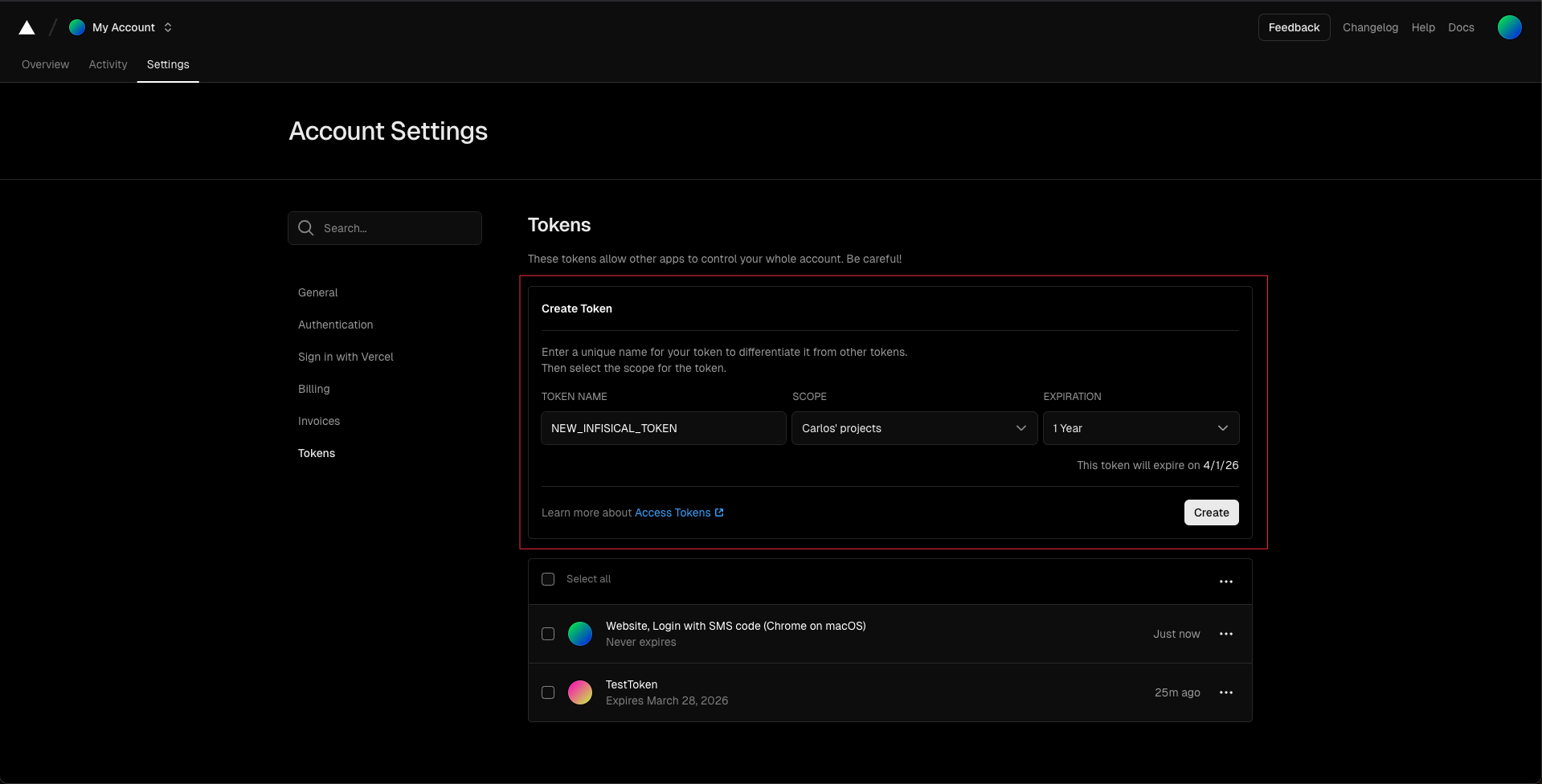
- In Infisical, go to Organization Settings > App Connections, add a new Vercel connection, and paste in that token.
This is a one-time handshake. Every Secret Sync in your organization can reuse the same connection afterward.
With the connection in place, create a Vercel Secret Sync from your Infisical project's Integrations > Secret Syncs tab. First, set the source (which Infisical environment and folder path to pull from) and the destination (which Vercel project and environment to push to).
The one setting worth pausing on is Initial Sync Behavior, which decides what happens to secrets that already exist in Vercel.
For a team migrating existing secrets into Infisical, Import Secrets, Prioritize Infisical is the safest default: it pulls in whatever's already in Vercel, then lets Infisical's values win on any conflict, so nothing gets lost in the transition. Make sure Auto-Sync is enabled, otherwise every change still requires a manual trigger, which defeats the point.
One thing worth knowing: if you have variables marked Sensitive in Vercel, Infisical can't read their values because Vercel's API won't return them. You'll need to add those specific values into Infisical manually. After that, Infisical manages them like everything else.
Repeat the sync setup for each environment you need. A common mapping is:
- Infisical Development to Vercel Development
- Infisical Staging to Vercel Preview
- Infisical Production to Vercel Production
You can map these however you want, of course. After this initial setup, you've centralized secrets management in Infisical, which resolves all of the challenges scaling organizations face with secrets management in Vercel.
Seeing it work
Once the syncs are running, Vercel automatically has whatever secrets you have in Infisical. This resolves the issues growing teams face with secrets management because you can update or create a secret in one place and have it everywhere. If a GitHub Action, CI tool, or just about anything else needs the same secret, Infisical serves that secret to all of them, including local developers.
A secret rotation is a great example. Instead of invalidating an old Stripe key, generating a new one, and then manually copy-pasting the new one into every single tool, Infisical automates the full process.
Change STRIPE_SECRET_KEY in Infisical's Production environment:
Infisical > Production > STRIPE_SECRET_KEY
Updated: sk_live_NEW_VALUE_abc
Switch to Vercel's project settings, and the same variable already carries the new value, with no manual edit and no copy-paste:
Vercel > Project > Environment Variables > STRIPE_SECRET_KEY
Value: sk_live_NEW_VALUE_abc (matches Infisical)

Infisical > Integrations > Secret Syncs
Status: Succeeded
The only manual step in that whole exchange was updating the value once, in one place.
Local development stops drifting
Remember the earlier problem: vercel dev pulls Development variables automatically, but next dev, npm run dev, and custom scripts don't, so a local .env file quietly goes stale until something breaks. Swapping vercel env pull for the Infisical CLI removes the file from the equation entirely:
$ infisical run -- npm run dev
infisical run wraps your dev command and fetches secrets from Infisical at the moment you start it, then injects them straight into the process. There's no .env file sitting on disk to fall out of date (or to accidentally be committed into Git).
If someone rotates STRIPE_SECRET_KEY, any person or machine who runs npm run dev gets the new value automatically, which includes Vercel, developers, and any other tool.
One source of truth
Let's revisit our initial scenario: a rotated key doesn't make it to Vercel for whatever reason and causes an outage that takes time to trace back to a stale environment variable. That failure mode depends on a human remembering every place a secret lives, updating it, and redeploying after.
Centralizing secrets management in Infisical means you can change the value once and it reaches Vercel and anywhere else that secret needs to exist.
Vercel is one destination among many. Infisical supports 50 secret sync integrations across cloud providers, databases, CI/CD, and hosting platforms, including GitHub Actions, Kubernetes, Terraform, and AWS Parameter Store, so the same setup that fixes environment variable sprawl in Vercel scales to the rest of your stack too. If your local development setup still leans on .env files, it's worth combining this with Infisical's CLI for local secret injection instead.
For the full walkthrough on camera, including the live sync demo, the video version of this guide covers the same setup step by step.