Privileged Access Management: The Complete Guide to Securing Admin, Root, and Service Account Access

A single password is enough to take down your entire organization.
This has always been true, but previously accounts with privileged access were always few and far between. Maybe a sysadmin or two had complete access, along with a few other people with access to mission-critical systems. But you could name every person with privileged access.
Today, that list is much longer. Every engineer ends up needing production access sooner or later, to debug an incident or run a migration. Every support agent needs access to customer accounts. Then there are contractors, on-call rotations, and the vendor who manages your firewall.
And you couldn't name everyone on that list, as most probably don't have names. Most companies still think of privileged users as people. They’re not. Your apps authenticate with service accounts, your CI pipeline deploys with an API key, and your SaaS tools talk to each other through OAuth grants someone approved years ago. Machine identities now outnumber humans, with a significant number having privileged access.
Every one of those identities, human or machine, is an attack surface.
- Attackers took down Change Healthcare in 2024 with a single stolen password. The remote access portal it opened had no multi-factor authentication, and the standing access associated with the account was sufficient to reach core systems, stop claims processing for pharmacies and providers across the US, and expose data on roughly 190 million people.
- Marks & Spencer lost an estimated £300 million in 2025 after attackers persuaded a third-party help desk to reset the password on an admin-level account.
- Uber's 2022 breach escalated when the attacker found hardcoded admin credentials for the company's privileged access management tool.
- In the 2025 Salesloft Drift breach, stolen OAuth tokens from a single chatbot integration enabled attackers to pull data from hundreds of companies' Salesforce instances and harvest AWS keys and Snowflake tokens stored in support cases.
All of this access is genuinely needed. Engineers debug production at 2 a.m., run migrations, and rebuild infrastructure, and every minute spent waiting on an access ticket is downtime or delay. So teams take shortcuts. Passwords get pasted into Slack, everyone learns the shared root password, and admin rights that were meant to be temporary quietly become permanent. The convenient way to handle privileged access is unsafe, and the locked-down way is slow enough that people route around it.
Privileged access management (PAM) is the discipline and tooling for resolving that tension. It controls who can perform privileged actions, on which systems, under what conditions, and for how long, and it keeps a complete record of what happened. When done well, it makes privileged access both faster to obtain and much harder to abuse.
What is privileged access management?
Privileged access management is how you control, monitor, and audit every account with elevated permissions, human or machine. NIST puts PAM inside identity and access management (IAM), and its definition covers local and domain admins, emergency accounts, application accounts, and service accounts.
In practice, PAM puts a checkpoint between a person or workload and admin power. Instead of handing someone a permanent admin password, a PAM system checks who's asking, applies whatever policy you've set (maybe an approval, maybe an MFA check, or maybe just a reason and a time limit), opens access to that one resource, records what happens, and shuts everything down when the window closes.
For years, PAM basically meant a vault of admin passwords. A modern PAM platform does a lot more:
- Just-in-time access grants. When you request access to a specific database, server, or cloud account (from the browser, the CLI, or even Slack), approvals and MFA checks kick in where the policy requires them, and the grant expires on its own.
- Brokered connections and short-lived credentials. The platform connects you via a gateway or issues a temporary credential, so nobody ever touches the password itself.
- Session recording and audit logging. Database queries, SSH commands, and full video for Windows RDP all get captured, along with an audit event for every request, approval, and change.
- Account discovery and rotation. The platform finds the privileged accounts you already have across Active Directory, Windows, and Linux, then rotates their credentials on a schedule.
- Scoped roles and policies. Role-based access control decides who can request what, down to individual folders and accounts, with break-glass paths for genuine emergencies.
This is easiest to understand with an example: an engineer needs access to your production Postgres database.
Without a PAM solution, they ask around until a teammate messages them the connection string. The credential is usually a shared admin login that half the team already knows, and it works on everything, not just the one database they need. Nothing records what they run, and the access never expires because nobody remembers to take it back.
With PAM, you grant them access to that one database with a 1-hour expiry, and they connect via psql or the browser, with the credential injected along the way by the PAM platform, so they never see a password. The session gets recorded, and when the hour is up, the access is gone. The same flow can work for an AI agent that needs the same database. It runs in a sandbox, never receives a credential, and its session is recorded and attributed just like a person's.
And you can set policy for each of them specifically. The engineer's access might require MFA at connection, the agent might need approval before its first session, and both run on whatever time limit you set.
What counts as privileged access?
Privileged access is any access that, in the wrong hands, gives an attacker control over your systems, your data, or the security controls protecting them. What makes access privileged is the combination of two things:
- The system: a production database, a staging database, a code repository, a cloud account, or any of a hundred other things.
- The level of access: read-only, write, admin, or anything in between.
Read-only access on a staging database might be unremarkable, while the same permission on the production payments database absolutely counts. Put the two together and privileged access covers a lot more than the IT admin group:
- Administrator accounts. Windows local administrators, Active Directory Domain Admins, database administrators, Kubernetes cluster admins, and cloud account owners can install software, change security settings, create users, and read or destroy sensitive data.
- Root access. Root is the highest level of authority on Linux and Unix systems. Most teams control it through
sudo, so specific commands run under a named user instead of everyone sharing the root password. - Service accounts and workload identities. Applications, CI/CD pipelines, automation tools, and background services authenticate using their own identities, which are often highly privileged. Because no human owns them day-to-day, they're where forgotten privileged access piles up fastest.
- API keys, tokens, and certificates. A credential counts as privileged the moment it can take administrative actions. An AWS access key with broad IAM permissions, a kubeconfig with cluster-admin rights, and a deploy token that can push to production all qualify.
- AI agents. A coding agent tracing a bug through production data needs the same access an engineer would, and the common shortcut is dropping a connection string into its environment. That parks a long-lived credential inside a process built to act on whatever text it reads. Agents are the newest class of privileged machine identity, and they need the same brokering and recording as the rest of this list.
- Break-glass accounts. Emergency accounts exist for scenarios in which normal identity systems are down. They have to work during a real outage, so they bypass the usual controls. That's exactly why they need tightly restricted storage, immediate alerting, and mandatory post-use review.
The line between the human and machine accounts is blurry, too. The same Postgres superuser might be used by a DBA during an incident and by a nightly backup job. A PAM program has to cover both, which is why several newer PAM platforms grew out of secrets management and infrastructure access rather than Windows administration.
PAM vs. IAM vs. PIM
Before we get into the specifics of PAM, where does it sit relative to two other widely used acronyms: IAM (identity and access management) and PIM (privileged identity management)?
Like this:
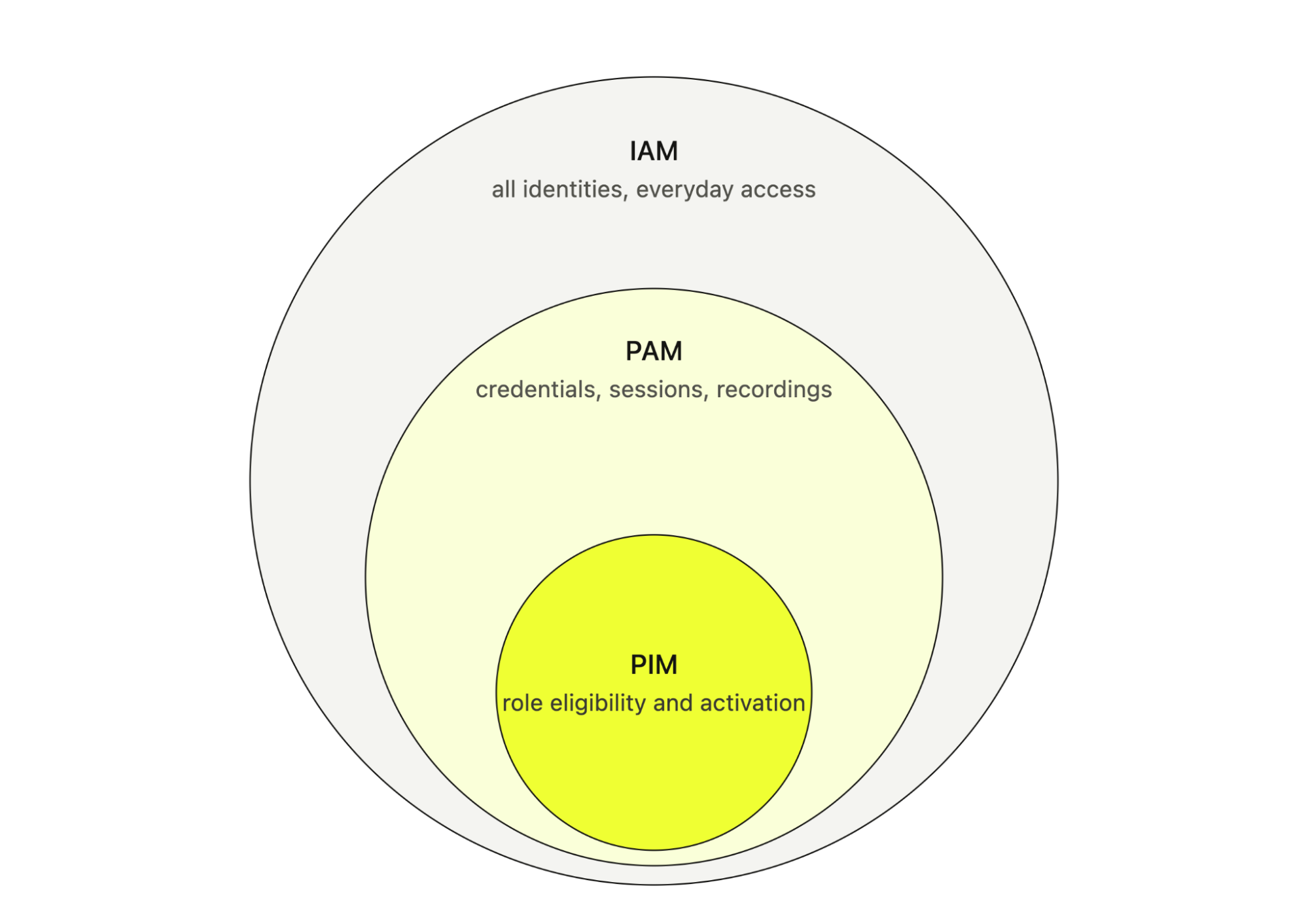
IAM is the widest of the three. It's everything involved in knowing who someone is and what they can normally do: the identity provider, SSO, and the roles and groups every employee and app gets. PAM is the part of IAM that handles the dangerous access, the admin credentials, elevated roles, and privileged sessions at the center of this guide.
PIM is the narrowest. It covers which identities are eligible for a privileged role and when that role actually switches on. Microsoft Entra PIM is the best-known version, with time-bound, approval-based role activation, and just to keep things confusing, Google Cloud calls its own version of the same idea PAM.
| Layer | What it governs | The question it answers |
|---|---|---|
| IAM | Authentication and ordinary access for all identities, human and machine | Who is this, and what can they normally do? |
| PIM | Eligibility for privileged roles and when those roles become active | When is this identity allowed to hold elevated rights? |
| PAM | The full privileged access lifecycle: credentials, sessions, monitoring, rotation, and evidence | What happened while elevated rights were in use? |
So IAM decides who you are and what you can normally do, PIM decides when you get to hold an elevated role, and PAM covers everything that happens while you hold it, from the credential to the session recording.
Why PAM matters
PAM matters because, while you can't stop things from going wrong, you can control how much damage anything that goes wrong can do. A phish will land eventually. Someone will run a script against the wrong environment. A vendor will get compromised. Whether any of that becomes a catastrophe depends almost entirely on the privileges within reach at that moment.
Every incident comes down to an actor and the access they reach. The actor is usually one of three:
- An outside attacker
- One of your own people
- A third party you've let in
You can't fully control any of them. Access is the part you own completely, and standing privileged access makes each of the three worse.
When an attacker gets in
The 2026 Verizon DBIR looked at more than 22,000 confirmed breaches. Attackers most often got in by exploiting a vulnerability (31%) or abusing stolen credentials (13%), and 62% of breaches involved a human somewhere in the chain.
But how attackers get in matters less than what they do next, and the next move is almost always the same. They look for credentials with greater authority. A phished developer account leads to a domain admin credential, which leads to the backup infrastructure. Privileged access is what lets an attacker switch off your security tooling, delete your backups, and steal data in bulk. The blast radius of a breach depends on which privileges are reachable from where it initially landed.
Standing access is what makes that escalation easy. If an account holds admin rights around the clock, whoever steals it inherits everything it can do, around the clock. If the same account only becomes an admin after an MFA check and approval, a stolen password alone doesn't get an attacker very far.
When it's your own people
Sometimes an admin deliberately misuses access, but far more often the damage is an honest mistake, like a script run against the wrong environment or a table dropped in production instead of staging. When everyone holds standing admin rights, every one of those mistakes runs with full authority.
When it is deliberate, standing access is still the issue. The Coinbase breach disclosed in 2025 came from support contractors who were paid to look up customer records they had every technical right to see. Purpose-bound, monitored access doesn't remove insider risk, but it shrinks what any one insider can quietly take.
When the access belongs to a third party
Third parties are the actor you control least. The 2026 DBIR found a third party involved in 48% of breaches, up 60% in a year. Your vendors and managed service providers maintain remote access that tends to outlive the contract, spans all their customers, and is on no one's offboarding checklist.
That's how the M&S breach happened, through a contractor's help desk. CISA publishes guidance on securing remote access software because the legitimate tools have become a standard way in.
Why does standing privileged access survive?
If standing access is the common thread, the obvious question is why everyone still has so much of it. Managing privileged access by hand is painful enough that leaving access in place usually wins:
- Access requests sit in ticket queues, so teams over-provision up front to avoid asking twice, and nobody revokes access because re-granting it is painful.
- Shared accounts mean nobody knows who did what. When five engineers know the root password, the logs just show root and an IP address.
- Offboarding is never quite complete. An engineer's SSO account is deactivated the day they leave, while the shared passwords and SSH keys they knew remain active.
- Audits turn into spreadsheet projects, because there's no system of record for who can access what, who approved it, and when it was last reviewed.
Good PAM flips all four. A self-serve request with auto-approval for low-risk stuff is faster than hunting down whoever holds the password, expiry replaces the need to remember to revoke, and the audit trail writes itself.
How PAM works: the privileged access lifecycle
PAM treats privileged access as a lifecycle rather than a single yes-or-no at login. Whatever tool you use, the work breaks into the same six stages.

The first two are setup:
- Discover privileged accounts. First, you need to find everything. Accounts live everywhere: local admins, cloud roles, database users, service accounts, API keys, vendor logins, and credentials hardcoded in old scripts. Each one needs an owner, a purpose, and a note on what depends on it.
- Vault or replace credentials. Static passwords and keys might initially be stored in an encrypted vault, with rotation and controlled retrieval. Ideally though, the PAM will broker the connection, so a gateway fetches and injects the credential and nobody sees it at all. The best option is to replace static credentials with ephemeral ones, such as temporary cloud roles, short-lived database users, and SSH certificates that expire within minutes.
Then the next four run as a loop on every request:
- Enforce least privilege. Every grant is scoped to the task at hand: permission to restart one service instead of root, or read-only access to one database instead of a global admin account. The decision looks at who's asking, for which resource, why, and for how long.
- Grant access just-in-time. Nothing is active by default. An engineer (or service) is eligible for elevated access, but elevation occurs on request with an MFA check, and approval is granted if the target is sensitive, with access expiring on its own.
- Monitor and record sessions. Every connection routes through the PAM, so activity is tied back to a real person or workload rather than a shared account. Database query logs are monitored, SSH command logs are monitored, and remote desktop access gets recorded. If something looks wrong, security can block a command or kill the session live.
- Revoke, rotate, and audit. When the window closes, access disappears, credentials rotate, and the whole process (who asked, who approved, what happened, when it ended) is recorded in the audit log and flows to your SIEM.
The idea is simple: zero standing privileges. Nothing holds always-on authority, and every elevation is temporary, scoped, and recorded.
What are the core PAM capabilities?
A PAM program is built from a handful of capabilities, each of which performs a specific job. Some protect the credential itself, some control when access exists and how far it reaches, and some prove what happened afterward.
1. Credential vaulting
The vault is the oldest part of PAM. It's an encrypted store for privileged passwords, SSH keys, and tokens, with policies governing who can retrieve what and a log of every access attempt. Good implementations go a step further with credential injection, where the vault or a gateway in front of it feeds the credential straight into the connection. So, you finish your task without ever seeing a password that could end up in Slack or a shell history.
Vaulting alone isn’t PAM, though. A vaulted credential can still be overprivileged, checked out for hours, or used over a connection nobody's watching. That's why a PAM platform needs to include the rest of this list.
2. Least privilege access control
Least privilege access control is the simple idea that everyone gets the minimum access required for their task, and nothing more. PAM enforces it in two places:
- The broker decides who can open a connection to which account
- The target (database roles,
sudoersrules, cloud IAM policies, Kubernetes RBAC) decides what that account can do once connected.
This isn’t just on PAM. Admins should always create narrow roles on the target systems, then put PAM in front to help protect them.
3. Just-in-time access
JIT is the switch from having admin access to being able to get it. Nothing stays active, and the grant only exists after a request with a reason, an MFA check, an approval where the policy wants one, and a set duration. When the window ends, the access removes itself.
There are two different JIT models:
- With ephemeral credentials, the credential itself is temporary, like an AWS STS session, a short-lived GCP token, or an SSH certificate that's valid for minutes. There's no standing credential left to steal.
- With brokered persistent credentials, your permission to connect expires, but the account and password stay on the target. That's still a big improvement, though the standing credential needs rotation and protection.
Prefer the first wherever the platform supports it, and keep the second as the fallback for systems that only understand passwords.
4. Privileged remote access
Admins, on-call engineers, and vendors all need to reach internal systems from outside the office. The insecure defaults are a VPN account with broad network access or a password sent over email. PAM architecture gives them a controlled path instead. You get a brokered SSH, remote desktop protocol (RDP), or database connection to one named resource, gated by MFA and approval, recorded, and set to expire on its own.
5. Service account management
Service accounts are usually the least governed identities in most companies. Someone creates one for an integration, grants it broad permissions to make the integration work, and then everyone forgets it exists. Managing them properly means identifying where they run (services, scheduled tasks, CI/CD jobs, application pools), assigning an owner to each, mapping what depends on the credential, and rotating it without breaking those dependencies.
This is where PAM and secrets management converge into a single discipline. A workload fetching a credential at runtime and a human requesting privileged access are the same problem with the same answer. Issue short-lived, scoped, audited credentials on demand.
6. Credential rotation
Credential rotation limits how long a leaked credential stays useful. Shared and vaulted passwords should rotate on a schedule and after every checkout, since a credential nobody currently knows can't leak through a person.
The risk everyone worries about is breaking things mid-rotation, and that's fair, which is why mature rotation is dual-phase. The new credential is staged and verified before the old one is revoked, so nothing dependent on it ever hits an invalid password.
7. Session recording and auditing
An access log tells you a session happened. A session recording tells you what happened inside it. The capture takes whatever form the protocol allows, so database queries and terminal commands become searchable text, while anything with a screen becomes video. You can watch a session live or replay it afterward. Add immutable audit events for requests, approvals, grants, and terminations related to the session, so an incident responder can reconstruct the whole thing instead of guessing from a timestamp.
The recordings themselves are sensitive, though. They can hold customer data, secrets typed into terminals, and regulated records, so their retention, encryption, masking, and access control should be subject to the same rigor as the access they document.
8. MFA and identity provider integration
Your PAM tool shouldn't have its own user database. Your identity provider handles authentication through SSO. Each group membership drives who is eligible for what, and identity management keeps joiners, movers, and leavers in sync. When someone leaves the company, they lose PAM access the minute their IdP account is disabled.
Within PAM, MFA works at the moment of elevation, every elevation. A session that was authenticated eight hours ago shouldn't be enough on its own to open a production database. And for the highest-risk roles, use phishing-resistant factors instead of push notifications, which attackers wear down through MFA fatigue.
What does PAM look like in different environments?
The principles don't change between environments, but the details do. Root on a Linux server, Domain Admin in Active Directory, and an admin role in AWS are all forms of privileged access, and each comes with its own controls and its own path to removing standing access.
Cloud PAM (AWS, GCP, and Azure)
Cloud providers already ship some privileged access management natively. AWS recommends using temporary credentials through IAM roles instead of long-lived access keys, for humans and workloads alike. Microsoft Entra PIM and Google Cloud PAM both support time-bound role activation with justification, approval, and automatic revocation within their respective ecosystems.
A third-party PAM layer works with those pieces rather than around them. It should issue temporary role sessions instead of hoarding more static cloud keys, and it should provide a consistent request, approval, and evidence workflow that native tools can't span across providers. The same goes for workloads, which can authenticate using their native cloud identities instead of holding a stored key just to fetch other credentials.
PAM for Linux
On Linux, the idea is to remove a shared root. This can mean a few things:
- Administrators use
sudowith tightly scopedsudoersrules, so specific commands run under their own names. - Long-lived SSH keys give way to short-lived SSH certificates that get issued per session.
- Privileged hosts record their sessions.
- Local account passwords are managed centrally and rotated.
Sudo policy, SSH certificate authorities, and ephemeral credentials have all been around for years in Linux. You mainly need to ensure that no engineer has a permanent root path on any production host.
PAM for Windows and Active Directory
Active Directory concentrates more risk than almost anything else you run. Domain Admin, Enterprise Admin, or directory replication rights effectively grant control over the entire environment.
Most mitigations have been standard advice for years:
- Administrators get separate identities for privileged work, ones that never touch email or a browser.
- The most sensitive work happens from dedicated privileged access workstations.
- Windows LAPS manages and rotates local administrator passwords.
- Service accounts, including group managed service accounts (gMSAs), have owners and are regularly reviewed.
- Membership in privileged groups becomes just-in-time instead of permanent.
A PAM platform layers brokered, recorded RDP on top, so domain admin activity actually ties back to a person and can be reviewed.
Multi-cloud and hybrid PAM
Every provider brings its own role model, approval mechanism, and audit log, and your on-prem systems add directories and appliances on top of that. Run a separate privileged access workflow for each one, and you get inconsistent controls, with unmanaged standing access collecting in the gaps.
The goal that actually works is a single governance layer over all of it, handling requests, justification, approvals, durations, MFA, and evidence. At the same time, each platform's own IAM remains the underlying authorization system. Flattening everything into one universal admin credential would recreate the exact problem PAM exists to solve.
What does PAM mean for compliance?
Every major security framework asks for privileged access controls. PAM won't make you compliant by itself, but it's how you can enforce controls consistently and automatically maintain your audit trail. When an auditor asks who could reach the payments database on March 19, 2025, who approved it, and what they did while connected, you’ll find the answer in your PAM platform.
| Framework | What it expects around privileged access | Where PAM helps |
|---|---|---|
| NIST SP 800-53 | Account management (AC-2), least privilege (AC-6), authenticator management (IA-5), MFA (IA-2), and audit and accountability (AU family). | Account inventory, scoped time-bound access, credential rotation, MFA, session logs |
| SOX | Effective internal controls over systems that feed financial reporting (Section 404) | Approval records, segregation of duties, individual attribution, and change evidence for financial systems |
| HIPAA Security Rule | Access controls, unique user identification, audit controls, and emergency access procedures for systems holding ePHI | Individual attribution, MFA, break-glass governance, session records |
| PCI DSS v4 | Need-to-know access (Req. 7), strong authentication with MFA for all access into the cardholder data environment (Req. 8), logging and monitoring (Req. 10) | MFA at elevation, elimination of shared credentials, privileged session logs |
| SOC 2 / ISO 27001 | Logical access controls, restriction of privileged access, and periodic access review | A system of record for grants, automatic expiry, review-ready reporting |
Important: PAM only satisfies a requirement for systems that actually connect through it. If half the servers in scope still accept direct SSH, the control doesn't cover them.
The evidence needs protecting too. If an administrator can edit the audit log or delete a recording, it doesn't prove much, so logs need to be immutable and the recordings need their own access controls.
How to choose a PAM solution
The right PAM product is the one that covers your actual privileged pathways without creating friction that leads people to route around it. A tool with a long feature list that engineers avoid loses to shared passwords.
And you have plenty of options. The market runs from long-standing enterprise suites with deep Windows roots, to the role-activation tools built into each cloud provider, to newer platforms built around how engineers actually connect to infrastructure. Most of them will genuinely improve on the use of shared passwords in a spreadsheet. Where they differ is in the questions that follow:
- Does it cover everything you actually run? Linux, Windows and AD, your specific databases, Kubernetes, cloud roles, service accounts, and vendor access. Storing a credential and being able to discover, rotate, broker, record, and revoke it are very different levels of support.
- Which targets get truly ephemeral credentials, and which get brokered access to a persistent account? That split determines how close you can get to zero standing privileges.
- Can your engineers do their work without ever seeing a credential, and where do credentials and encryption keys live? Self-hosting and external KMS or HSM support matter in regulated environments.
- Does it fit how your engineers already work? If the daily path runs through
psql,ssh, andkubectl, a product built around a separate operator console will get bypassed. - How deep does the governance go? Look for multi-stage approvals, separation of duties, MFA at elevation, break-glass handling, and automatic revocation.
- What do session recordings actually capture for each protocol, where are they stored, and how long are they retained?
- Does it consolidate your stack or extend it? A platform that also handles secrets management and certificates gives you a single vendor and a single audit trail instead of three separate ones.
- What's the total cost of ownership? You have to count gateways or appliances, recording storage, the remediation work of migrating credential dependencies, and the administrator time the product itself consumes.
During evaluation, you should run the proof of concept on real workflows. Test a routine database session, a cloud role elevation, a credential rotation with dependencies, a denied request, an expired grant, a gateway failure, and an export of evidence for an auditor. The failure modes only show up against your own infrastructure, and a vendor demo can't stand in for that.
Where Infisical fits
Infisical approaches PAM from the platform it already provides for secrets, certificates, SSH, and key management, so human privileged access and machine credentials sit in one platform with one audit trail instead of in a separate PAM silo.
Infisical PAM is built on a gateway architecture. A lightweight proxy deploys once per network, connects outbound only, and needs no agents on individual targets. You connect from the browser or the CLI, the gateway fetches and injects the credential, and you never see it.
- Access is just-in-time with justification, approval, and MFA policies per resource.
- Sessions are recorded by default, with query logs for databases, command logs for SSH, and full video for Windows RDP.
- AWS and GCP access uses genuinely ephemeral credentials through STS role assumption and service account impersonation.
- The platform is open source and self-hostable, with PAM Pro listed at $20 per user per month and an Enterprise tier that adds privileged account discovery, Windows and RDP resources, SCIM and LDAP, and SIEM streaming.
Agents get the same treatment as people. An AI agent runs inside a sandbox, connects through brokered local ports, and never receives a credential, with its sessions recorded and attributed like anyone else's. And for the rotation problem, dependency mapping tracks which services and scheduled tasks rely on each credential, so a rotation doesn't quietly break them.
PAM implementation best practices
A PAM rollout fails more often due to poor sequencing than to poor tooling. These practices come up in most programs that work:
- Start with an inventory. You can't manage accounts you haven't found. Catalog privileged access across your directories, local systems, cloud providers, databases, CI/CD, and vendors, and record who owns each account, what it's for, and what depends on it. Then remove or downscope, because a surprising share of what the inventory turns up no longer needs to exist.
- Prioritize by blast radius. Go after the accounts that can do the most damage first. These are likely domain and cloud org admins, root, production database admins, security tooling, backup platforms, CI/CD deploy credentials, and vendor accounts. Shared accounts with no known owner and anything exempt from MFA belong early too.
- Integrate with your identity provider. Authenticate through SSO, drive eligibility from IdP groups, and wire up SCIM so someone who leaves loses access automatically. A PAM tool with its own user list is just one more identity silo to govern.
- Roll out in phases. Start with important but well-understood systems, prove the workflow, then expand. One early outage from a botched rotation costs the program more credibility than a slow rollout does.
- Replace standing access with eligibility. Move admins from permanent membership to requestable access, with short durations and approvals that scale with risk. Pre-approve the low-risk, high-frequency stuff so just-in-time access doesn't turn into a ticket queue.
- Design break-glass access. You need a tested emergency path that works when the IdP, the PAM platform, or the network itself is down. Keep it to a small set of custodians, tamper-evident storage, immediate alerting, and a mandatory review and rotation after every use.
- Treat the PAM platform as tier-0 infrastructure. Its admins, gateways, encryption keys, and recordings are privileged assets in their own right. Keep PAM administration separate from routine approvals, restrict who can change policy, and watch the platform's own audit trail.
- Measure outcomes. Track standing admin accounts removed, the share of credentials rotating automatically, median grant duration, time to revoke, and orphaned accounts found each quarter. The number of passwords sitting in the vault tells you very little on its own.
Privileged access management with Infisical
Infisical brings PAM into the same open source platform that already handles secrets management, certificate management, SSH, and key management:
- Access to databases, SSH servers, Kubernetes, Windows over RDP, and AWS, GCP, and Azure accounts is routed through a gateway that connects only outbound, with no agents on individual targets.
- Credentials are injected into the connection, so engineers work from the browser or their usual CLI tools without ever holding a password.
- Just-in-time policies gate each resource with justification, approval workflows, MFA at connection time, and automatic expiry.
- Sessions are recorded by default, with searchable query and command logs, full video for RDP, and storage in Infisical or your own S3 bucket.
- Cloud access is ephemeral through AWS role assumption and GCP service account impersonation, and static account credentials rotate automatically.
Infisical PAM runs on Infisical Cloud or fully self-hosted. Explore the PAM documentation, start for free, or talk to an expert to walk through your environment.