Microsoft AD CS Alternatives: Where Does Active Directory Certificate Services Hit Its Limits and What Should You Use Instead?

If you are a Windows shop, you know Active Directory Certificate Services (AD CS), both the good and the bad.
AD CS has been the default internal public key infrastructure (PKI) for Windows for almost twenty years, and, if Windows was your whole world, it worked admirably. If your domain-joined machines need digital certificates for Wi-Fi, VPN, or smart card logon, Group Policy auto-enrolls them from a certificate template, and nobody thinks about it again. That part works.
But there is a world outside the window. A Kubernetes ingress, a Linux web server, a CI runner, a fleet of phones in mobile device management (MDM): if they aren't in the domain, an AD CS Group Policy can't do anything for them. You have Simple Certificate Enrollment Protocol (SCEP), but no Automated Certificate Management Environment (ACME) or Enrollment over Secure Transport (EST), so you can't talk to cert-manager or Certbot.
So what do people do? They do it by hand. Someone generates a certificate signing request (CSR), pushes it through certreq or the web enrollment page, converts the result with OpenSSL into whatever format the appliance wants, copies it over, and puts the expiry date in a calendar. Then again next year, for every one of them.
Or they find an alternative, which means one of two things: a different certificate authority, or something that sits above Active Directory Certificate Services and handles enrollment and renewal for the systems it can't reach. If you have many certificate templates and many Windows machines, start with the second option, because nothing you've already issued has to change.
What Active Directory Certificate Services does
Microsoft Active Directory Certificate Services is a Windows Server role. You install it when you want your own certificate authority.
But it’s more than a CA, though. You get a full PKI wired straight into the directory you already run. As an example, let's say a new laptop joins the domain:
- Group Policy applies to the laptop.
- Because of the group it's in, the laptop can see a certificate template that lets it request a machine certificate.
- The laptop asks the CA for one.
- The CA checks the request against the template and issues the certificate.
- The laptop uses that certificate to get onto the corporate Wi-Fi.
- When the certificate gets close to expiring, the laptop renews it by itself.
The laptop owner didn’t have to file a ticket, and nobody in IT had to walk them through a setup. AD CS worked magically because everything was Windows.
It works for more than laptops. You use AD CS for all the internal stuff: SSL/TLS for internal sites, code signing, digital signatures on documents and email, smart card logon, and machine identity for 802.1X and VPN. To do all of this, Active Directory Certificate Services isn’t really one thing. Yes, it is one “server role,” but under that umbrella, there are six different installable components:
| Component | What it does |
|---|---|
| Certification Authority | Issues certificates from certificate templates, as a root CA or an issuing CA |
| Certificate Enrollment Policy and Web Services (CEP and CES) | Enrollment over HTTPS for machines that aren't domain-joined or aren't on the network |
| Network Device Enrollment Service (NDES) | SCEP, for network equipment and MDM-managed devices |
| Certification Authority Web Enrollment | A browser page for manual requests |
| Online Responder | OCSP (Online Certificate Status Protocol) |
The CA is the only one you definitely need. Still, the others help you reach things that aren't sitting in the domain waiting for Group Policy: a laptop on hotel Wi-Fi, a switch, a phone in Intune, or a person who just needs a certificate and a web page to request it.
All of it runs on Windows Server, and you manage all of it the Windows way, with MMC snap-ins, certutil, and PowerShell. The CA keys can live in hardware security modules (HSMs) if you have them, and everything issued or revoked gets logged. Just like other PKI services, you have an offline root CA and an online issuing CA, so for a Windows-centric organization that’s a complete enterprise PKI at no extra licensing cost, which is exactly why AD CS has been so popular.
Six limitations of Microsoft AD CS
AD CS isn't going anywhere, but it covers less of your world every year. Linux servers, Kubernetes, containers, cloud load balancers, and the Macs and phones in your MDM never join a domain, and a growing number of Windows machines are Entra-joined with no on-prem Active Directory.
Microsoft sees this too. In 2024, it launched Cloud PKI in the Intune Suite, which issues device certificates without Active Directory Certificate Services and without an NDES server anywhere.
But even that Cloud PKI only helps with the devices Intune manages. People do call AD CS “Windows only” (which isn't quite fair, since CEP, CES, and NDES do reach machines outside the domain), but the CA itself, the certificate templates, the permissions, and the automation all live in Windows and Active Directory. That leads to six core problems.
1. No ACME and no EST
cert-manager, Certbot, Caddy, and Traefik all renew certificates by talking to an ACME endpoint, and AD CS doesn't have one. So a Kubernetes cluster ends up on one of three paths:
- It gets its certificates from some other CA, and those certificates never touch AD CS.
- You run a third-party ACME gateway in front of AD CS.
- You script certreq and copy the files into secrets.
All three happen, often in the same company. EST is missing too, which is what IoT devices and network equipment use.
2. SCEP through NDES hasn't changed since 2008
NDES is how AD CS does SCEP. It has been since its 2008 inception.
One NDES server talks to one CA and hands out three certificate templates at most, set in the registry. The only identity in the whole flow is a domain account. A domain-joined machine can use its own, but a switch, a Linux box, or an MDM can't, so the challenge password or the service account's credentials end up hardcoded into configs. And the CA never sees the device. It sees the NDES service account on every request.
3. Automation stops at the domain
Group Policy auto-enrollment is good automation. It just only works for domain-joined Windows. Everything else gets a fallback:
| Client | What it gets from AD CS |
|---|---|
| Domain-joined Windows | Group Policy auto-enrollment |
| Laptop off the network | CES, over HTTPS |
| Network device or MDM phone | NDES, over SCEP |
| Linux server or container | A script around certreq, or an agent you find yourself |
| DevOps pipeline | Nothing native. There's no REST API, only DCOM, the SOAP service behind CES, and certutil |
The bottom two rows are where the manual work comes in.
4. Scaling means more Windows servers
AD CS does scale. HSM-backed deployments issue to millions of endpoints. But every step up adds another Windows server, because each issuing CA, NDES server, and CES endpoint is its own box, and each one needs certificate revocation list (CRL) and OCSP publishing set up too.
5. No view across the estate
Open the Certification Authority console, and you get a list of what this CA issued and revoked, with expiry dates. That's basically it. It can't tell you:
- Where a certificate is actually installed, or whether anything is serving it
- Which team owns the service using it
- That the copy on a load balancer in AWS is about to expire
- Anything at all about the certificates people bought from DigiCert or Let's Encrypt and installed by hand
There's no discovery and no built-in expiry alerting, so teams script certutil -view on a schedule or keep a spreadsheet.
6. Nothing for multi-cloud
Active Directory Certificate Services has no concept of multi-cloud and no idea that a service has endpoints in AWS, Azure, and GCP and needs the same certificate in all three. What happens instead:
| Cloud | How the certificate gets there today |
|---|---|
| AWS | Someone exports a PFX from a Windows box and imports it into AWS Certificate Manager (ACM), then does it again at renewal |
| Azure | Same export, uploaded to Key Vault |
| GCP | Same export, uploaded to Certificate Manager as a self-managed certificate |
| Any of them | Or the cloud issues its own certificate, and AD CS never hears about it |
Either way, you end up with two or more PKIs, the one in the domain and the ones in the cloud, and nothing that shows them all.
ADCS alternatives for certificate management
What is AD CS doing for you today? The answer to this question determines your alternatives. If it's mostly issuing internal SSL/TLS certificates for web servers and services, you can rip it out and replace it outright. If it's issuing smart card and 802.1X certificates through Group Policy, you probably can't, or at least not soon, and the question becomes what to put on top of it.
Replace AD CS with a private CA if the domain is a small part of your estate
A full CA replacement swaps out the issuing layer. EJBCA, HashiCorp Vault PKI, step-ca, and AWS Private CA each run a root CA or an issuing CA, and they were built for the world AD CS wasn't. You get:
- ACME, EST, and SCEP built in, so cert-manager, Certbot, and your MDM just work
- A REST API, so a DevOps pipeline can request a certificate like any other resource
- Linux, containers, and cloud as first-class clients instead of the awkward exception
What you don't get is the AD integration. Certificate templates and Group Policy auto-enrollment don't come with you (AWS Private CA is the one exception, through its Active Directory connector), so anything that depends on them either gets redesigned or stays behind on AD CS.
Keep AD CS and add certificate lifecycle management if Windows auto-enrollment still matters
The other route leaves the CA where it is. A certificate lifecycle management (CLM) platform sits above whatever CAs you already have, AD CS included, and connects to each of them as an issuer. The CLM layer takes over everything Active Directory Certificate Services is bad at: inventory across every cloud and server, policy, ACME and SCEP enrollment for systems that can't do Group Policy, renewal, and delivery wherever the certificate is used.
The CA underneath can change later, or never. That's the point. Nothing already issued has to move, Windows auto-enrollment keeps working exactly as before, and you fix the Linux and cloud problem without touching the domain.
| Alternative | Type | Enrollment | Where it fits |
|---|---|---|---|
| EJBCA (Keyfactor) | Full CA | ACME, EST, SCEP, CMP (Certificate Management Protocol), REST | Regulated PKI, telecom, IoT devices, complex hierarchies |
| HashiCorp Vault PKI | Full CA | ACME, EST, REST, SCEP in Enterprise | Workload certificates and service mTLS alongside secrets |
| step-ca and Smallstep | Full CA | ACME, SCEP, API | Kubernetes, internal TLS, device identity |
| AWS Private CA | Full CA, AWS-managed | AWS API, SCEP and AD auto-enrollment through connectors | AWS-heavy estates that want to keep Windows auto-enrollment |
| Venafi (CyberArk) | CLM | ACME, SCEP, EST, REST | Large enterprises with many CAs and applications |
| Sectigo Certificate Manager | CLM | ACME, EST, SCEP, REST | Managed public and private PKI |
| DigiCert Trust Lifecycle Manager | CLM | ACME, SCEP, EST, REST, AD auto-enrollment | Enterprise PKI on DigiCert CAs |
| Infisical | CLM and private CA | ACME, EST, SCEP, API | One platform for certificates, secrets, and delivery into cloud services |
Most Windows-centric orgs end up on the CLM route first, because it's the one where nothing breaks on day one. Some then replace the CA underneath once they've moved or retired the domain-dependent certificates.
Putting Infisical in front of Active Directory Certificate Services
Infisical does both halves. It starts as the CLM layer above AD CS, and later, if you want, it becomes the CA that replaces it. Same platform, same inventory, no forklift.
Step one: AD CS stays the CA, Infisical does the enrolling
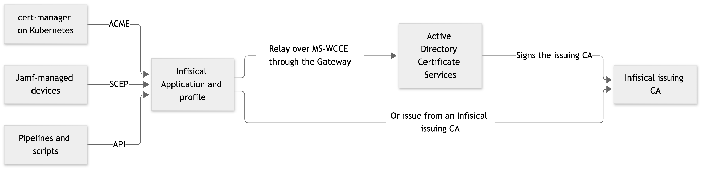
Infisical connects to AD CS as an external CA. It talks to the CA over MS-WCCE (the Windows Client Certificate Enrollment Protocol), the same protocol a Windows client uses, through an Infisical Gateway you run inside your network. The CA is never reachable from the internet, and you don't open anything on the firewall. The Gateway needs a domain account with Enroll permission on the certificate templates you plan to use, and that's the whole Windows-side setup.
From there, Infisical reads the certificate templates published on the CA, and you build on top of them:
- A certificate profile picks a template and sets the defaults.
- An Application, one per service, attaches the profile.
- The Application gets an enrollment method: ACME, EST, SCEP, or a REST API.
So when cert-manager on a Kubernetes cluster renews over ACME, the certificate request goes to Infisical, through the Gateway, into AD CS, and comes back issued from the profile template. Phones managed in Jamf enroll over SCEP the same way. A pipeline calls the API. The CA doesn't know anything changed, and it just got ACME.
Step two: move issuance without moving trust
Once that's running, you can take issuance off AD CS too. Infisical runs its own issuing CA with a certificate signed by AD CS, using a subordinate CA template (the built-in SubCA template works, as long as it lets the subject be supplied in the request). Trust stays on the root CA every machine already has, because the chain still ends there.
Sysadmins already build this by hand: a second intermediate under the AD CS root run by something that speaks ACME. Then they're on the hook for renewing the intermediate themselves. Infisical generates the CSR, sends it through the Gateway, imports the signed certificate, and renews the issuing CA before it expires. Later, if you want AD CS gone entirely, an Infisical private root CA takes over and the old root ages out.
What you get either way
Everything issued through either path lands in the same inventory, and that inventory is the part AD CS never had:
- Discovery scans find the certificates installed outside the domain, including the ones bought from public CAs and installed by hand.
- Certificate syncs push renewed certificates into AWS Certificate Manager, Azure Key Vault, GCP Certificate Manager, Cloudflare, and Windows and Linux servers, so the PFX export in the multi-cloud section stops happening.
- Expiry alerts fire before anything runs out.
Two things stay with AD CS. Certificate templates that need a manager to approve each request can't go through Infisical, because Infisical issues straight away. And Group Policy auto-enrollment for domain-joined Windows keeps working straight from the CA, which was never the part that needed fixing.
Where this leaves Active Directory Certificate Services
Back to the Windows shop from the top. The domain-joined machines still get their certificates from Group Policy, the smart cards still work, and nobody has touched that part. What changed is the world outside the window. The clusters, the Linux boxes, the phones, and the cloud load balancers now get their certificates through Infisical, from the same root CA, on a schedule, and one inventory knows where each one is installed and when it expires. Nobody generates a CSR by hand for a web server anymore, and nobody exports a PFX to upload to AWS.
Infisical Certificate Management runs as a cloud service or self-hosted and connects to Microsoft AD CS through a Gateway inside your network. If you're mapping out the move, watch the webinar on preparing for 47-day certificates. For the rest of the PKI lifecycle, from discovery to revocation, read the certificate management guide.