Microsoft Cloud PKI: What It Is, What It Costs, and Where It Stops

Microsoft Cloud PKI is a hosted certificate authority inside Microsoft Intune (their endpoint management solution). It issues certificates to Intune-enrolled devices so they can authenticate to Wi-Fi, VPN, and internal services, and it does that without an on-premises certificate authority, a Network Device Enrollment Service (NDES) server, or the Intune certificate connector.
It launched in 2024 as a paid add-on, but Microsoft moved it into Microsoft 365 E5 in 2026. This means many organizations now have a cloud CA switched on in their tenant that they never chose or consciously decided to use.
That makes two questions worth answering carefully:
- What does Cloud PKI cover?
- Where does Cloud PKI fall short?
Some organizations can use Cloud PKI to create their internal PKI, but others need additional tooling to cover their full use case.
What is Microsoft Cloud PKI?
Microsoft Cloud PKI is a two-tier certificate authority (CA) hosted by Microsoft and managed from the Intune admin center. You create a root CA and an issuing CA (or multiple), assign trusted certificate profiles and Simple Certificate Enrollment Protocol (SCEP) certificate profiles (a mechanism to automatically issue, renew, and revoke certificates) to device groups. Then devices receive certificates on every check-in.
The issuance flow is standard SCEP. Nearly every device platform and MDM tool supports SCEP, which follows a simple workflow:
- A client proves it is allowed to ask
- It submits a certificate signing request
- It receives a signed certificate.
The protocol is deliberately simple. It has no account model or revocation, so whether a device gets a certificate depends on a shared secret called a challenge password, which each MDM vendor solves differently.
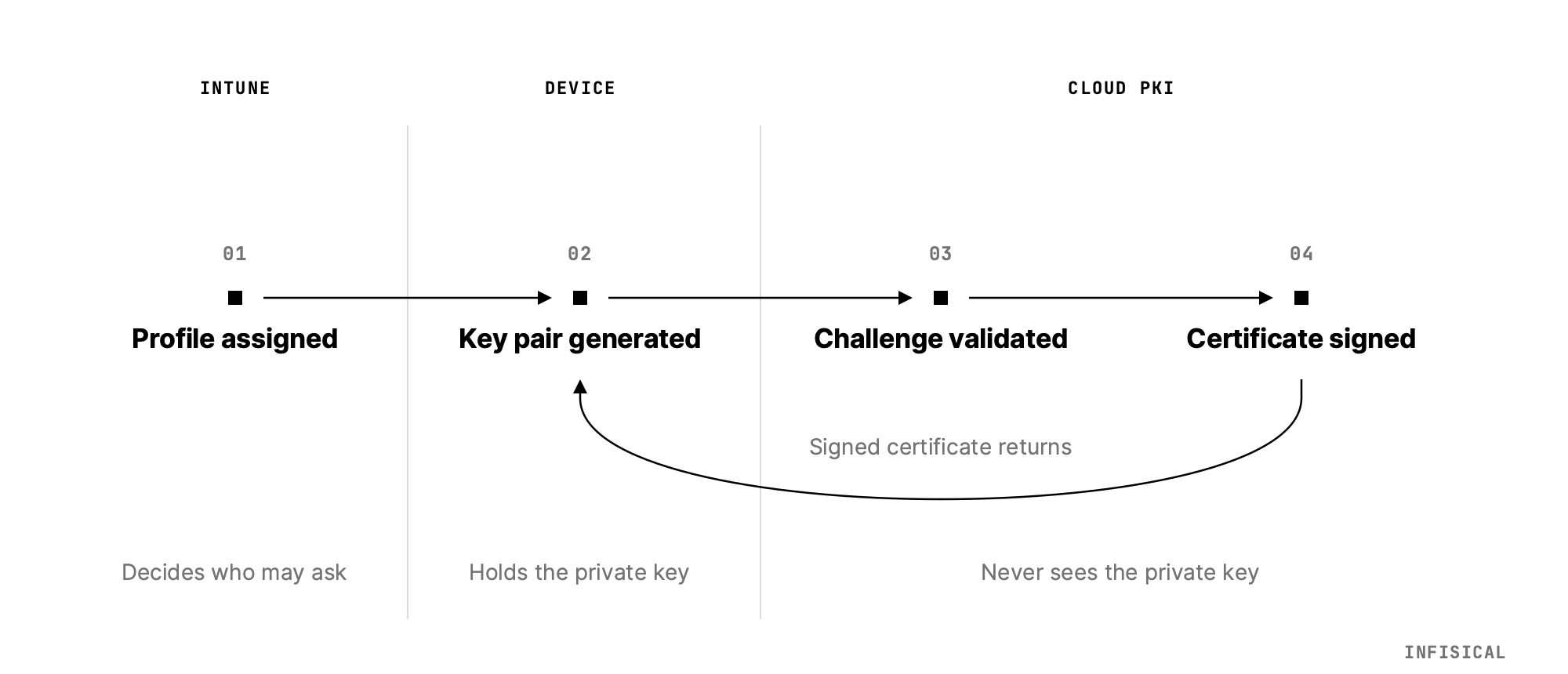
Cloud PKI puts an Intune-specific authorization step in front of that. A managed device receives its SCEP profile, generates a key pair locally, and sends a certificate signing request (CSR) along with a single-use challenge that Intune issued. A validation service confirms the challenge came from an enrolled device and has not been tampered with, then asks the issuing CA to sign. The private key is generated on the device and never leaves it.
Cloud PKI removes three pieces of infrastructure required for conventional Intune certificate deployment:
- Active Directory Certificate Services on a Windows server
- An NDES server published to the internet through a reverse proxy,
- the Intune certificate connector to keep the two in sync.
Cloud PKI replaces these with a single service, which means avoiding parallel governance, certificate management, and patching. Cloud PKI is relatively broad, but also has limits.
Which devices and platforms it supports
Cloud PKI issues to devices using Android, iOS/iPadOS, macOS, and Windows. The device must be enrolled in Intune, and the platform must support the Intune SCEP certificate profile. Nothing outside that set can enroll against it.
This covers many devices, but also means Linux devices can’t be covered.
What Microsoft manages for you
| Capability | What Microsoft provides |
|---|---|
| CA hierarchy | Root and issuing CA created in the Intune admin center, up to three CAs per tenant |
| Bring your own CA | An issuing CA anchored to an existing external root, including AD CS and non-Microsoft hierarchies |
| Key protection | Signing and encryption keys in Azure Managed HSM, with no Azure subscription required |
| Enrollment | A hosted SCEP registration authority per issuing CA |
| Revocation | A hosted CRL distribution point, seven-day validity, refreshed every 3.5 days and on each revocation |
| Chain building | A hosted Authority Information Access endpoint per issuing CA |
| Reporting | Active, expired, and revoked certificate counts in the admin center, refreshed every 24 hours |
| Access control | Custom Intune roles for reading CAs, creating CAs, and revoking leaf certificates, plus scope tags |
That list is close to what a certificate manager is expected to do, with the scope limited to devices Intune manages. Algorithm support is RSA at 2048, 3072, or 4096 bits, with SHA-256, SHA-384, or SHA-512. This makes it relatively broad and makes the inclusion in E5 look logical.
Is Microsoft Cloud PKI included in E5?
Yes, since July 2026. Microsoft added Cloud PKI to Microsoft 365 E5 alongside Endpoint Privilege Management and Enterprise App Management. E3 did not get it, and Cloud PKI still requires a separate purchase.
How much does Microsoft Cloud PKI cost?
If you are not on E5, Cloud PKI is a per-user add-on that sits on top of Intune Plan 1 or Plan 2. Microsoft's pricing page lists it at $2.00 per user per month paid yearly as a standalone capability, or bundled into the Microsoft Intune Suite at $10.00 per user per month, which also carries Remote Help, Endpoint Privilege Management, and Advanced Analytics.
There is one gotcha: CAs created during a trial of the Intune Suite or standalone Cloud PKI use software-backed keys, not Azure Managed Hardware Security Module (HSM) keys. Those CAs keep working after you buy a license, but the keys stay software-backed and cannot be converted. Make sure your trial CAs don’t become production CAs if you need HSM storage because you will need to rebuild them.
Whether to choose this solution or evaluate others depends on your use case. Microsoft Cloud PKI is a simple solution for a limited task, which it accomplishes well. Once you move beyond Intune or want to manage all of your certificates in one platform, it does start to falter.
What Microsoft Cloud PKI does well
Compared to the traditional setup, Cloud PKI is much faster:
- Setup is done quickly.
- There are no servers to patch, no NDES instance exposed to the internet, and no connector service to watch.
- The CRL and AIA endpoints are hosted for you, which are some bits of infrastructure you don’t need to maintain.
- Bring-your-own-CA means you can keep an existing root and put a cloud issuing CA underneath it. Device certificates chain to a trust anchor your estate already recognizes.
- Keys sit in Azure Managed HSM without you provisioning one.
If every certificate your organization issues goes to an Intune-managed laptop or phone for Wi-Fi, VPN, or device identity, Cloud PKI covers you.
Most organizations are not in that position because they manage certificates beyond Intune.
Where Microsoft Cloud PKI stops
Cloud PKI issues certificates to Intune-managed devices over SCEP. That is the whole product. This means Cloud PKI has many limitations:
- It only issues over SCEP. It doesn’t support other protocols like ACME or EST. ACME automates certificate management across many forms of cloud infrastructure, so its absence means most software won’t work.
- It does not issue server certificates. Internal TLS between services, a server's own certificate, an internal web application, a database requiring mTLS, and the rest are not Intune-enrolled devices.
- It covers Intune-managed devices only. Macs managed by Jamf, Linux endpoints and servers, domain controllers, network switches, firewalls, printers, and IoT devices are out of scope.
- Revocation is CRL-only. Microsoft's documentation describes a hosted CRL distribution point with a seven-day validity refreshed every 3.5 days, and an AIA endpoint for chain building.
- CAs are limited. Root, issuing, and bring-your-own-CA all count against a three-CA limit. If you want multiple tiers, separate business units or environments, you’ll be over that limit quickly.
- Visibility is a 24-hour dashboard scoped to what Cloud PKI issued. Reports refresh daily, and the issuing CA view caps at the first 1,000 certificates. It can tell you about the certificates it issued, but not about the rest of your estate.
- It’s another CA to maintain. You need to secure yet another root key, understand yet another place issuing certificates, etc.
This means using Cloud PKI keeps a lot of the work with you.
What this leaves you holding
Turning Cloud PKI on solves device certificates and nothing else. Everything else in the certificate lifecycle, from discovery through issuance to renewal, stays where it was. If your only problem is the complexity of device certificates, this is a great solution.
But most organizations also manage certificates for cloud resources and workloads or devices Intune can’t cover. That means Cloud PKI can never be an all-in-one certificate management solution that covers every certificate and keeps it valid.
In most organizations, certificate management is messy:
- Cloud resources are managed with an internal, cloud vendor-hosted CA
- A commercial CA for public certificates
- cert-manager in Kubernetes clusters
- a wiki page of
opensslcommands
And it’s all tracked with a spreadsheet with renewal dates and a few calendar reminders. This messiness is getting more expensive. Public TLS certificate lifetimes are contracting toward 47 days by 2029, and every manual renewal step in your estate gets multiplied by the same factor. A yearly reissue becomes a manual task that recurs eight times a year.
Cloud PKI is good for the niche use cases it serves, but if you want to fully automate certificate management across infrastructure, you need to look into a system that can cover your whole infrastructure.
How Infisical solves what Cloud PKI doesn’t
Infisical Certificate Management covers the certificate lifecycle across a whole estate rather than one device fleet and includes automating certificate management with Intune.
You can keep Intune as the device management layer and put Infisical Certificate Management behind it. Infisical runs a SCEP service that Intune's certificate profiles point at, with Intune performing the same device authorization and single-use challenge validation it does today. Devices keep enrolling exactly as they do now, and Infisical signs.
Any Infisical CA can also automate certificate management via
- ACME to servers, ingress controllers, and Kubernetes workloads
- over EST or SCEP to network hardware
- Over the API to anything scripted.
One trust hierarchy covers laptops, load balancers, and any other device or workload.
Certificate discovery also scans your infrastructure for certificates nobody registered anywhere, which is the part no CA can do for you because by definition it did not issue them.
Certificates also sync outward to other tools like AWS Certificate Manager, Azure Key Vault, and Cloudflare, and every renewal syncs after them. This means you can use Infisical to centralize a disparate set of ways to manage certificates. If you already run ADCS, Infisical can front it as an external CA or use it to sign an Infisical-managed intermediate, so you don’t have to abandon your root CA.
To work out what Cloud PKI leaves uncovered in your environment, sign up or talk to an expert.