The Complete Guide to Private Certificate Management: How to Build and Run an Internal PKI

In most TLS environments, every time a service proves who it is or encrypts a connection, there's a certificate doing that, and a public key infrastructure (PKI) deciding whether to trust it. PKI is the system of certificate authorities (CAs), keys, and trust relationships that lets two parties verify each other without sharing a secret in advance.
Issuing a certificate is easy. You don't need a service or anything fancy. A single OpenSSL command produces a syntactically valid X.509 certificate, and self-hosted CA tools will sign them all day.
The work is everything around that certificate. You've got a root key that has to stay secure for a decade, revocation that can't go offline, renewal that keeps pace as certificate lifetimes shrink, an accurate inventory of everything you've ever issued, and an audit trail that holds up under scrutiny. None of that comes from running OpenSSL.
That surrounding work is what it takes to run an always-on service correctly, and the modern answer to most of it is automation: issuing, renewing, and revoking certificates with as little manual intervention as possible. Done well, that's what PKI certificate management looks like in practice.
What is PKI, and what problem does it solve?
Public key infrastructure exists to answer one question:
When a client connects to a server, how does it know the server is genuine rather than an impostor sitting in the middle?
PKI answers it with a trust anchor. A certificate authority signs certificates, but a client accepts a certificate only if it chains back to a trusted CA and passes the checks the client requires: identity, validity dates, allowed uses, CA constraints, and any applicable revocation or policy checks.
A working PKI has a handful of moving parts:
- Certificates (X.509) are signed documents that bind a public key to an identity, with metadata such as validity dates and the uses to which the certificate is allowed. X.509 is the standard format, including the TLS (Transport Layer Security) certificates that secure web traffic.
- Key pairs sit behind every certificate: a private key, held by the owner and never shared, and a public key, embedded in the certificate for anyone to use.
- Certificate authorities issue and sign certificates and vouch for the identities within them.
- Trust stores are the lists of CAs a system trusts, shipped with operating systems, browsers, and language runtimes. A certificate is trusted only if it chains back to a CA already in that store.
- Revocation and validation services allow a client to check whether a certificate is still valid before relying on it, in case it was compromised or revoked early.
Public PKI uses CAs that browsers and operating systems already trust. An internal PKI is the same machinery run privately, with different trust stores: a Java keystore, a container image, a Kubernetes bundle, or a service mesh configuration can all be where trust surfaces.
These become the trusted authority for your organization, which means you take on every responsibility a public CA carries, including those that can cause outages when handled poorly.
The internal PKI operating model
Before choosing a root CA, creating intermediates, or wiring up automation, it helps to separate PKI into the tasks it must perform. An internal PKI is more than a CA that signs certificates. It has to operate as a trust system with several connected layers.
- The first layer is the trust anchor. This is the root certificate your organization decides to trust and distribute to systems that need to validate internal certificates. Everything else in the PKI depends on this decision because a certificate is only useful if the relying party can build a chain of trust back to a trusted root.
- The second layer is the issuing path. The root usually does not directly sign certificates for everyday services. Instead, it delegates that work to one or more intermediate CAs. Those issuing CAs apply certificate profiles, check whether a requester is authorized to obtain the requested certificate, and sign the certificate if the request is valid.
- The third layer is distribution. Trust has to be established on both sides of the connection: clients need the right root certificates in their trust stores, and servers, devices, or users need their own leaf certificates installed so applications can use them. This is often where internal PKI gets hardest, because the systems involved each store and trust certificates differently.
- The fourth layer is validation and revocation. Before a client trusts a certificate, it has to verify that the certificate is genuine and still valid. Revocation is how you invalidate one before its expiry date, for example, when a key is compromised. Certificate Revocation Lists (CRLs), the Online Certificate Status Protocol (OCSP), and short-lived certificates are the main ways to manage that risk.
- The fifth layer is lifecycle operations. Certificates are created, deployed, renewed, revoked, rotated, discovered, audited, and eventually replaced. This is the part that turns PKI from a cryptographic mechanism into an operational system. A PKI without lifecycle management can still issue certificates, but it cannot reliably prevent outages, enforce policy, or prove what happened later.
A useful way to think about internal PKI is this: the hierarchy creates trust, issuance delegates trust, distribution spreads trust, validation checks trust, and lifecycle management keeps that trust from decaying over time.
Root CAs and intermediate CAs
At the top of the hierarchy sits the root CA. Its certificate is self-signed, meaning it vouches for itself, and its public key is what gets distributed to every trust store. The root's private key is the most valuable secret in the system because any certificate that key signs is automatically trusted. If it leaks, every certificate in your PKI becomes suspect, and the whole structure has to be rebuilt.
Because that key is so valuable, you do not use it for everyday issuance. Instead, the root signs one or more intermediate CA certificates, and those intermediate CAs, also called issuing CAs, handle the actual work of issuing certificates to servers and clients. The root signs intermediates and almost nothing else.
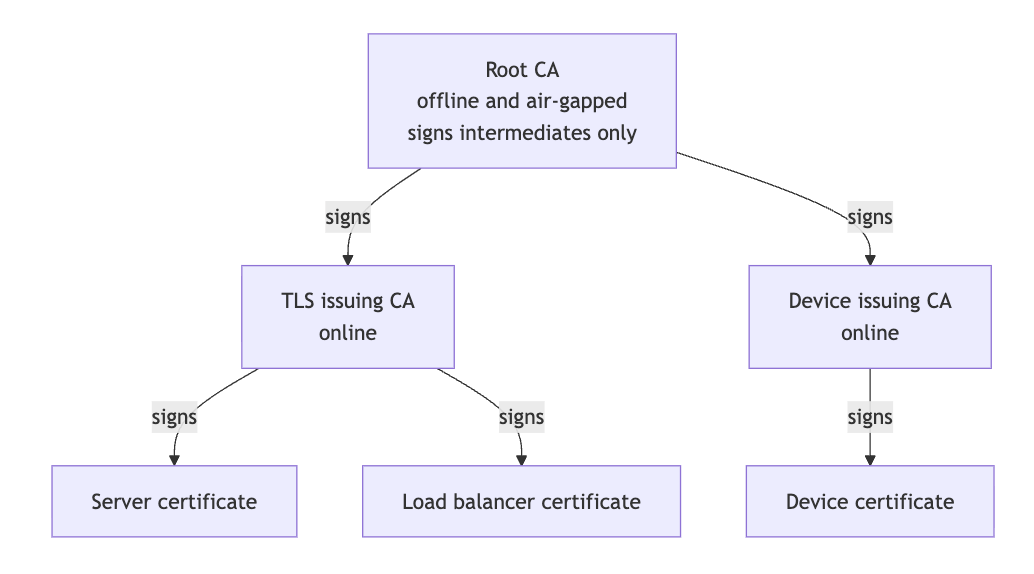
This separation buys two things. The root key can stay offline and physically disconnected, far from any network an attacker could reach. And if an intermediate is ever compromised, you revoke that one intermediate and issue a replacement, without touching the root or pushing new trust to every machine in your fleet.
The result is a chain of trust, the linked path from a certificate up to a root that the client already trusts. An intermediate signs a server's certificate, the root signs the intermediate, and the root lives in the client's trust store.
When a client receives a server's certificate, it follows this chain upward to see whether it ends at a root it trusts. If it does, the chain holds, and the certificate can be accepted. If it does not, the client rejects it.
Designing the CA hierarchy
Hierarchy is the organizing principle of certificate authority management, because certificates work through inheritance. There are three common designs, and for most organizations, only one is the right answer.
| Design | Structure | Use it for |
|---|---|---|
| Single-tier | One CA issues everything | Labs and testing only. There is no containment, so compromising the CA compromises the entire PKI. |
| Two-tier | An offline root plus one or more online issuing CAs | Almost every production environment. You get containment and an offline root. |
| Three-tier | Adds a policy CA between the root and the issuing CAs | Large enterprises with many teams or strict regulatory separation. The extra ceremony is more than most need. |
For nearly everyone the answer is two-tier: an air-gapped root, meaning one kept physically off the network, whose only job is signing intermediates, and online issuing CAs that do the daily work.
You can run a single issuing CA or several. Splitting issuance across multiple intermediates lets you scope each one, for example, a separate issuing CA per environment, per business unit, or per certificate type, such as TLS server certificates versus device enrollment. A problem or a policy change in one branch then stays contained to that branch instead of affecting everything. The trade is that every additional CA is one more key to protect and one more service to operate.
How certificates get issued: X.509, CSRs, and the chain of trust
Issuance is where X.509 certificates, certificate signing requests (CSR), and the CA hierarchy come together.
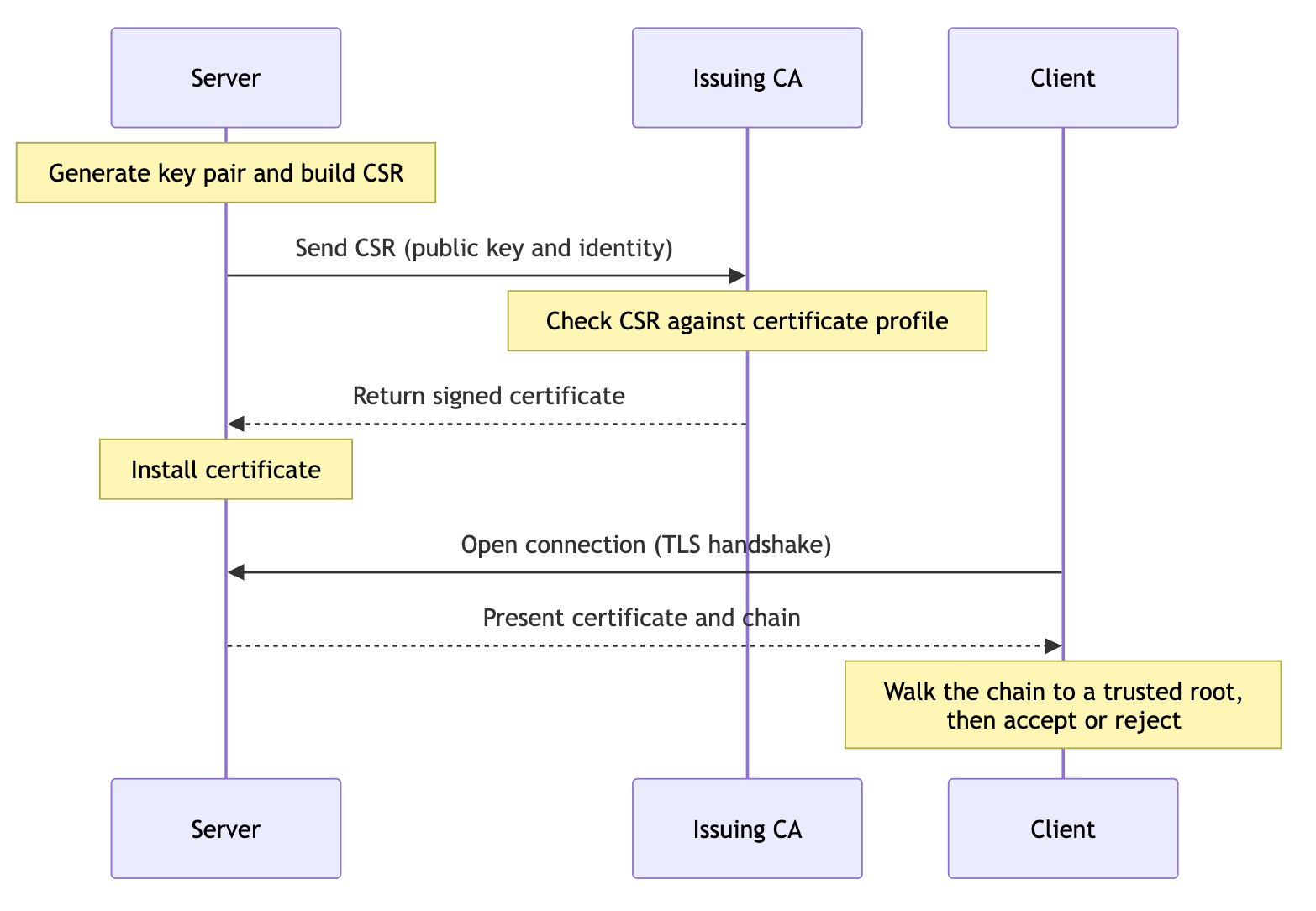
Start with a service that needs a certificate, for example, an internal API called api.example.com.
The service first generates a private key and a CSR. The private key stays with the service and should never be sent to the CA. The CSR contains the corresponding public key and the identity the service is asking the CA to certify, such as api.example.com.
The CA receives that CSR, but it should not blindly sign whatever a requester submits. A CSR is only a request. Before issuing the certificate, the CA checks the request against a certificate profile.
For a TLS server certificate, that profile might say:
| Property | Example policy |
|---|---|
| Allowed identity | api.example.com |
| Certificate type | TLS server certificate |
| Maximum lifetime | 30 days |
| Key usage | Server authentication only |
| CA capability | Not allowed to issue other certificates |
| Approval | Automatic for approved workloads, manual for sensitive names |
If the request fits the profile, the issuing CA signs the certificate. That signature binds the service's public key to its identity. The service then installs the certificate and presents it to clients during a TLS handshake, usually together with the intermediate certificate needed to build the chain.
When a client connects, it validates the certificate before trusting it. It verifies that the certificate chains back to a trusted root, that each signature in the chain is valid, that the certificate has not expired, that it is allowed for TLS server authentication, and that the identity in the certificate matches the service the client expected to reach.
That is the chain of trust in practice:
api.example.com certificate
signed by
TLS issuing CA
signed by
Root CA trusted by the client
The important part is that the CA controls the final certificate.
This small flow hides the real operational work. It assumes the issuing CA key is protected, that the root certificate has already been distributed to clients, that certificates are renewed before they expire, and that revocation or replacement is possible when a key is compromised. Someone knows where each certificate is deployed. Those assumptions are where PKI certificate management begins.
Standing up a private CA
Setting up a private CA correctly is mostly about protecting keys and distributing trust. Generating and signing certificates is a small part.
It begins with the root key ceremony. The root key is generated offline, ideally on a hardware security module (HSM), a dedicated device that generates and stores keys internally and never lets the private key be extracted.
This isn't a one-time setup. The root has to come back online periodically just to re-sign its CRL, and each of those is another planned, witnessed ceremony with the same controls.
The rest of the setup builds out from there:
- Key protection for issuing CAs. The issuing CA's key is online and therefore exposed to whatever can reach the server. So it should live in an HSM, CloudHSM, or an HSM-backed key management service that supports the signing workflow and prevents private key extraction.
- Intermediate creation. The root signs the CA certificate, which establishes the chain that every certificate underneath it inherits.
- Certificate profiles. Each profile constrains what a requester may request: the allowed key usages, the maximum validity period, and the domains it can cover. Profiles enforce least privilege, so a CI pipeline that only needs a certificate for one service cannot mint one for a domain it has no business issuing.
A private CA is useless until the systems that depend on it trust its root. Those systems are the relying parties: the servers, clients, and devices that validate your certificates. Getting the root certificate into each of their trust stores is ongoing work.
That work spans configuration management like Ansible or Puppet for servers and workstations, base images or init containers for containers, mobile device management (MDM) for managed phones and laptops, and ConfigMaps or trust-manager for Kubernetes.
Revoking certificates: CRLs and OCSP
Certificates stay valid until they expire, which is a problem when a private key is compromised or a certificate was issued in error.
There are two mechanisms:
- Certificate Revocation Lists (CRLs) are signed, scheduled lists of revoked serial numbers, published to a highly available endpoint that clients download. They are the universal baseline, and they grow large and slow to fetch as the number of revoked certificates climbs.
- The Online Certificate Status Protocol (OCSP) lets a client ask about a single certificate and get a near-real-time answer, which matters when CRLs become unwieldy. OCSP stapling improves on this further: the server fetches the signed status response itself, caches it, and presents it during the TLS handshake, so the client never has to contact the responder at all. That removes both a round trip and the privacy leak of telling a third party which sites a client visits.
The deeper problem is the gap between revoking a certificate and its rejection. Here is what actually happens when you revoke one:
- You tell the CA to revoke the certificate by serial number and with a reason.
- The CA records it and either publishes it in the next CRL or updates the OCSP responder.
- Relying parties see the change only when they next fetch the CRL or query OCSP, which can lag by the publish interval.
- Even then, clients that soft-fail, proceeding when the revocation service is unreachable, accept the certificate anyway.
So a certificate you have “revoked” can keep working for minutes to hours, or indefinitely on a soft-fail client. That gap is a large part of why short-lived certificates are attractive: if the certificate expires on its own within days, the revocation path barely matters.
PKI certificate lifecycle management at scale
Managing a single certificate is straightforward. You can generate it, install it, monitor its expiry date, and renew it manually. The difficulty is that no real environment has just one. It has hundreds or thousands of them, issued by different teams, sitting on servers, load balancers, and devices, each with its own expiry and its own owner, and many that no one remembers creating. PKI certificate lifecycle management is the discipline of tracking each one and keeping it current.
At that scale, you need:
- A complete, continuously updated inventory. Every certificate, its owner, its expiry, its issuing CA, and the services that depend on it. A certificate you do not know about is the one that expires on a Saturday and takes a service down, because no alert was ever set for it.
- Automated renewal is triggered well ahead of expiry by the system itself, rather than a calendar reminder that one busy week will swallow.
- Expiry and lifecycle alerting are wired into the tools your team already watches, such as Slack, PagerDuty, or webhooks, so a failed renewal surfaces loudly rather than silently.
- Discovery of unmanaged certificates that appeared outside your process, usually through network scanning that finds what the inventory missed. These shadow certificates cause both surprise outages and security gaps, since they expire without warning and may have been issued under no real policy.
- Policy documentation. A Certificate Policy that describes what the PKI is allowed to do, and a Certification Practice Statement that describes how the CA actually meets it. Auditors will ask for both, and so will a serious customer security review.
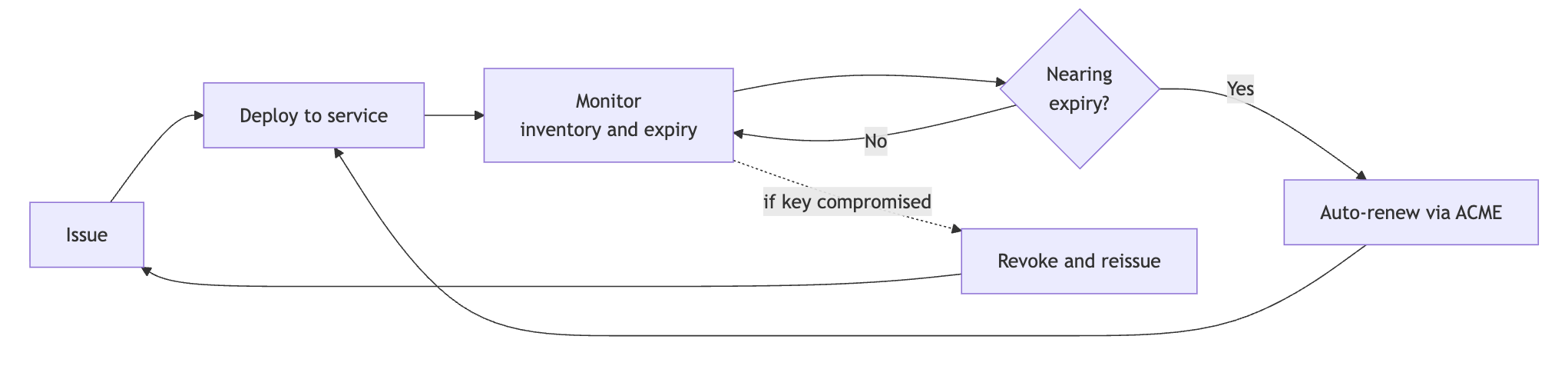
There is also a clock running on all of this. The maximum lifetime of a public TLS certificate is now 200 days, down from 398, and the CA/Browser Forum's approved schedule takes it to 100 days in March 2027 and 47 days in March 2029. Let's Encrypt is moving its default certificate to 45 days in 2028 and already offers a six-day option.
Those limits do apply only to public certificates issued by CAs in browser trust stores. Certificates from your own internal CA sit outside the CA/Browser Forum's authority, so nothing forces your internal lifetimes down to 47 days. But this trend pulls internal expectations along. Many teams shorten internal lifetimes on their own, because a certificate that lives for days rather than a year leaves a much smaller window for bad actors. Whichever cadence you choose, the direction is toward renewing far more often, and the manual habits that feel fine today stop working well before you would like. That pressure is the main reason teams automate this.
What a developer-friendly PKI looks like
All of this can be built internally. You can generate a key and a CSR with OpenSSL, get them signed, install the certificate, and put together automation for the entire sequence.
But everything that keeps that reliable is yours to build and keep running.
Either way, the target is the same. A developer-friendly PKI is one where issuing, renewing, and revoking a certificate require no human in the loop, and where renewal, in particular, is something the application owner never has to remember. A few interfaces make that possible:
- ACME (Automated Certificate Management Environment) is the most common of these interfaces, and its strength is the ecosystem around it. ACME clients, like Certbot, mean that a service can request and rotate its own certificates using existing software.
- A REST API covers the cases ACME does not reach, such as CI/CD pipelines, Terraform runs, and application startup scripts that need a certificate on the fly.
- EST and SCEP handle device enrollment. EST (Enrollment over Secure Transport) and SCEP (Simple Certificate Enrollment Protocol) are standards that network equipment and IoT (Internet of Things) devices use to obtain and renew certificates without requiring a person to configure each one.
- Self-service inside guardrails. Developers issue their own certificates directly, while certificate profiles hold the boundaries on what each request is allowed to contain.
At small scale, OpenSSL plus a few scripts will hold. Beyond that, a managed PKI certificate management system provides the same interfaces plus the operational layer behind them, so the team uses the service instead of running it.
A platform like Infisical serves as a PKI certificate manager that directly covers the developer-facing side.
Build versus buy: who carries the operational load
The decision, then, is whether to own that operational layer or hand it to someone else.
- Sovereignty, an air gap, or regulation rules out a SaaS control plane touching your certificate operations at all.
- You already run the substrate. A team already operating HashiCorp Vault can use Vault's PKI engine as the issuing CA with cert-manager on top, reusing the infrastructure and skills it already has.
- Your requirements are genuinely unusual, such as uncommon algorithms or a hierarchy shape that no product will accommodate.
- The economics invert at a very large scale, where per-certificate or per-seat pricing can eventually cost more than a dedicated PKI team.
Even when building is the right call, the carrying cost is real. Choosing to build is choosing to staff and sustain that whole operational layer indefinitely, through staff turnover and audits, for as long as the PKI exists.
For most teams, the parts of a PKI worth their attention are the policy and the integration with their own systems, and re-implementing revocation availability and key ceremonies add little that is specific to them. When no hard constraint forces a build, the reasonable default is to hand off the undifferentiated operational layer and spend the team's time on what only they can do.
Where to start
Running an internal PKI is an exercise in operations far more than cryptography. The signing is solved and trivial. The lasting work is keeping certificates trustworthy and up to date across a large, changing fleet, and the consistent way teams manage this today is to automate as much of it as the tools allow.
A reasonable order is to settle the hierarchy first, because everything inherits it, and a two-tier suit suits almost everyone.