A Complete Guide to SSL/TLS & mTLS Certificate Management

"It's hard to believe such a basic mistake could happen. Personal websites usually have auto-renewal bots, right? But this one doesn't! It's hilarious. The world really is a big, makeshift operation." — GitHub comment on Bazel issue #28101
On December 26, 2025, the SSL certificates covering the Bazel release, registry, and mirror subdomains expired at 07:35 UTC. Bazel is Google's open-source build tool, and those subdomains sit in the path of nearly every build.
This looks like a basic mistake to outsiders. But managing certificates is complex, especially at Google's scale, where it's hard to maintain a unified overview.
Certificate management is complex and failure directly causes outages, security gaps, or operational inefficiencies: builds broke for thousands of Bazel users worldwide, and recovery took about thirteen hours.
What happened to Bazel can happen to any organization, no matter their resources. The remedy is good certificate management.
What is SSL/TLS certificate management?
SSL/TLS certificate management is the practice of keeping the certificates (also called certs) that secure your traffic valid, trusted, and deployed where they belong.
A general certificate management process contains the following steps:
- Issuing certificates from a Certificate Authority (a trusted entity)
- Deploying them to whatever terminates TLS (Transport Layer Security)
- Tracking its expiry date
- Renewing it before it expires
- Revoking those which can no longer be trusted
The actual TLS certificate is a small file in the X.509 format that binds a public key to an identity, usually a domain name, an organization, or a workload. A Certificate Authority (CA) signs it. A CA is a trusted issuer, and its signature is what makes a certificate trustworthy, so any client that recognizes the CA will trust what it signed.
Managing an individual certificate lifecycle doesn't require tooling: a calendar reminder to renew before expiry is enough. Simple tools like certbot can help with this manual process. But most people who professionally work with SSL/TLS certificates don't spend much time monitoring individual certificate lifecycles.
Even mid-sized companies usually manage hundreds or thousands of certificates. At this scale, certificate management involves problems that arise from the population of certificates rather than any individual cert:
- Visibility. You need a reliable way to answer what certificates you have and where they are installed.
- Ownership. No one person knows all certs, and people and services on the team keep creating more. Each certificate needs an owner.
- Distribution. A renewed certificate needs to reach every place that serves it: load balancers, CDNs, ingress controllers, and gateways.
- Notifications. You need alerting that flags a certificate approaching expiry or a failed renewal, with enough lead time to fix it before anything breaks.
- Governance. Define who can issue certificates, from which CA, for how long, and which sensitive ones need human approval.
A maintainer revealed that Bazel's certificate went unrenewed because:
it was an auto-renewal being bricked due to some new subdomain additions, and the renewal failures didn't send notifications for whatever reason. And then it took some Bazel team members who were very unfamiliar with this whole area to scramble to read documentation and secure permissions... and the SSL certs taking ages to propagate as usual.
This is a microcosm of the challenges of certificate management: New subdomains weren't visible to the certificate manager. Notifications failed, so the team didn't become aware that auto-renewal didn't work. Ownership wasn't clear and the team had to scramble to resolve the issue. The list goes on.
Manual management doesn't scale, and at that point an unnoticed expiry is all but guaranteed, which is why automated certificate management tooling is essential rather than a nice-to-have.
Why is SSL certificate management so painful at scale?
Certificates use TLS to encrypt traffic so it cannot be read in transit and proof of identity so each side knows with whom it is communicating. Almost everything in a modern stack needs a certificate to provide secure connections, including plenty of things that never touch a browser. This includes:
- Internal services that need to securely connect, like databases, load balancers, and most backend services.
- Public-facing services like websites, apps, and documentation sites.
Public certificates come from a public CA like Let's Encrypt or DigiCert, whose roots already sit in browser and operating-system trust stores. Anyone can trust them with no setup, which is why they go on the public edge. Every public website or app has a public certificate.
Private certificates are more recent. Companies used to implicitly trust any device or service inside their network. But cloud computing, microservices architectures, and other computing paradigms have led to the zero-trust model: Nothing gets implicit trust. This is why private certificates exist. They're issued by certificate authorities you run yourself, trusted only inside the systems you control. They cover internal traffic, workloads, and device fleets.
This means almost anything that sends or receives traffic requires a certificate.
What services need a certificate?
- The public edge. The website and its subdomains, public APIs, the load balancers, and the CDN in front of them.
- Service-to-service traffic. With mTLS and a service mesh (such as Istio or Linkerd), workloads can obtain their own certificates, allowing services to prove their identities to one another.
- Data infrastructure. TLS for connections to Postgres, Kafka, and Redis, as well as between the nodes inside each cluster. Managed databases increasingly turn it on by default.
- The orchestration layer. Kubernetes runs on its own certificates: the API server, etcd, and the kubelets. They expire on their own schedule, and if kubelet certificate rotation fails, the kubelet can lose the certificate it uses to authenticate to the API server.
- Devices and clients. Internet of Things (IoT) fleets, payment terminals, and internal machines that log in with a client certificate instead of a password.
Across all of these categories, it makes sense that certificate management spreads across the whole stack as a standing operational load: hundreds or thousands of certificates, from different issuers, on different renewal schedules.
What makes certificate management hard is the volume and complexity.
What makes the volume dangerous?
High volume makes managing anything tedious, especially something as consequential as certificates. Three conditions compound that problem:
- Ownership is often distributed. Certificates were created by different people, with different tools, at different times. There's no single inventory of what exists or when it expires. Maybe the data team worries about your Kafka connections while the platform team manages ingress. Certificates can outlive the person who set them up, so a renewal can run untouched for years until it breaks. Whoever responds has never seen it and may not even have access to the CA account it came from.
- Certificates fail abruptly. A broken renewal doesn't surface right away: the job errors or the chain of trust comes back incomplete, but the old certificate is still valid and keeps serving as if nothing's wrong. With nothing watching the renewal itself, no alert fires. When the old certificate expires, there's no degraded mode or warning. Every connection behind it fails the same moment, and the first anyone hears of it is a 2am page.
- It widens your attack surface. Certificate blind spots carry a security cost. A private key (which keeps your certificates safe) you've lost track of can leak, and with no inventory you can't revoke or rotate it, so it stays trusted and usable long after the person who set it up has gone. Worse, when expiry forces a scramble, the quick fix is often not a long-term solution and only sets up future problems.
To understand how to better manage them, it's important to understand their anatomy.
What does a SSL/TLS certificate look like?
When people say SSL certificate, TLS certificate, or SSL/TLS certificate, they usually mean an X.509 certificate used by TLS. But X.509 is the format, not a synonym for TLS: the same format is also used outside web TLS.
An X.509 certificate is just a file. On disk, it almost always looks like this, a Base64 block known as PEM (Privacy-Enhanced Mail):
-----BEGIN CERTIFICATE-----
MIIEPDCCAySgAwIBAgIUY4oTUTE5JdAlYHUwa09Aa4t07gwwDQYJKoZIhvcNAQEL
BQAwaDELMAkGA1UEBhMCVVMxHzAdBgNVBAoMFkV4YW1wbGUgVHJ1c3QgU2Vydmlj
ZXMxHjAcBgNVBAsMFUNlcnRpZmljYXRlIEF1dGhvcml0eTEYMBYGA1UEAwwPRXhh
bXBsZSBSb290IENBMB4XDTI2MDYwNTAyMDY1MFoXDTI2MDcyMjAyMDY1MFowgYsx
CzAJBgNVBAYTAlVTMRMwEQYDVQQIDApDYWxpZm9ybmlhMRYwFAYDVQQHDA1TYW4g
RnJhbmNpc2NvMRkwFwYDVQQKDBBBY21lIENvcnBvcmF0aW9uMRQwEgYDVQQLDAtF
bmdpbmVlcmluZzEeMBwGA1UEAwwVd3d3LmFjbWUtY29ycC5leGFtcGxlMIIBIjAN
BgkqhkiG9w0BAQEFAAOCAQ8AMIIBCgKCAQEAoIFKAU+3aaqeRL0/TxRxIPtWOSK6
xKqe9C/cYFQnMGkDQftfY4mrK+8YxM9yt5f+qsx4O4eoleZtIGwOItHKISw5ZqcW
dRXPcjenbrTebQprTt7kANcWan4S9HJkhh/ZdXmi7fgOzlUGBL2iaXi711UI3tfu
6NZ59TW9Nggp4jl9VXRuMkYIhe2SR1jyB4RIaYESSPz0GaO1edO9wNTloqzQ5Aj0
T9NtLHvwuAGwZXhDF2SJkEnN5DjCj7lQTsPaPiJ3Jju57jqGv4k5wBvQM8lGcLHQ
EXT41RqPak+j+g1XHVN50K9secVLT0KaSc6lbi6zwxHTINbfbu9DPekU/QIDAQAB
o4G5MIG2MDcGA1UdEQQwMC6CFXd3dy5hY21lLWNvcnAuZXhhbXBsZYIVYXBpLmFj
bWUtY29ycC5leGFtcGxlMA4GA1UdDwEB/wQEAwIFoDAdBgNVHSUEFjAUBggrBgEF
BQcDAQYIKwYBBQUHAwIwDAYDVR0TAQH/BAIwADAdBgNVHQ4EFgQUtMLYiwDx5BEM
xwb2/qAFglZvkI8wHwYDVR0jBBgwFoAUH9b55KP2PVf+vfjHlLmBis9t0nUwDQYJ
KoZIhvcNAQELBQADggEBACNkOu0Diz+QzjZWFXUtY2JPV4CqyQAayv73AoPEB8as
ZDH0irGPf1a3K+V6jeqUd9joMYExOS/ZgNGiA3DDLzQw51ajEwrTjYAnhZVNzN39
3JGKVP2CdbLGliCaFytf1Y938ylsQLd03XuK6e9n3ZyxkB56dZC4D70gIXOfU6U5
5HMmPcR9wFIWIgrnCFrKrNDiZI5Texi5hekjpzd3f2v9VilMqg9/LBzNpJQn3hM+
/Ro4VRAikQTMS8UfyHCJkg/nggqmxVudnQw75CWq65/bWSmeh5Ynrz/8KxhsJPtc
cudXewPasvESGgUC1XD/Wzs4+U0fA5pZkN0X32V7+QI=
-----END CERTIFICATE-----
That block is the certificate encoded in binary (DER) and wrapped in Base64, which is why it's unreadable on its own. Decode it (here with openssl x509 -in cert.pem -text -noout) and the fields map to the concepts described earlier:
Certificate:
    Data:
        Version: 3 (0x2)
        Serial Number:
            63:8a:13:51:31:39:25:d0:25:60:75:30:6b:4f:40:6b:8b:74:ee:0c
        Signature Algorithm: sha256WithRSAEncryption
        Issuer: C=US, O=Example Trust Services, OU=Certificate Authority, CN=Example Root CA
        Validity
            Not Before: Jun  5 02:06:50 2026 GMT
            Not After : Jul 22 02:06:50 2026 GMT
        Subject: C=US, ST=California, L=San Francisco, O=Acme Corporation, OU=Engineering, CN=www.acme-corp.example
        Subject Public Key Info:
            Public Key Algorithm: rsaEncryption
                Public-Key: (2048 bit)
                Modulus:
                    00:a0:81:4a:01:4f:b7:69:aa:9e:44:bd:3f:4f:14:
                    71:20:fb:56:39:22:ba:c4:aa:9e:f4:2f:dc:60:54:
                    27:30:69:03:41:fb:5f:63:89:ab:2b:ef:18:c4:cf:
                    72:b7:97:fe:aa:cc:78:3b:87:a8:95:e6:6d:20:6c:
                    0e:22:d1:ca:21:2c:39:66:a7:16:75:15:cf:72:37:
                    a7:6e:b4:de:6d:0a:6b:4e:de:e4:00:d7:16:6a:7e:
                    12:f4:72:64:86:1f:d9:75:79:a2:ed:f8:0e:ce:55:
                    06:04:bd:a2:69:78:bb:d7:55:08:de:d7:ee:e8:d6:
                    79:f5:35:bd:36:08:29:e2:39:7d:55:74:6e:32:46:
                    08:85:ed:92:47:58:f2:07:84:48:69:81:12:48:fc:
                    f4:19:a3:b5:79:d3:bd:c0:d4:e5:a2:ac:d0:e4:08:
                    f4:4f:d3:6d:2c:7b:f0:b8:01:b0:65:78:43:17:64:
                    89:90:49:cd:e4:38:c2:8f:b9:50:4e:c3:da:3e:22:
                    77:26:3b:b9:ee:3a:86:bf:89:39:c0:1b:d0:33:c9:
                    46:70:b1:d0:11:74:f8:d5:1a:8f:6a:4f:a3:fa:0d:
                    57:1d:53:79:d0:af:6c:79:c5:4b:4f:42:9a:49:ce:
                    a5:6e:2e:b3:c3:11:d3:20:d6:df:6e:ef:43:3d:e9:
                    14:fd
                Exponent: 65537 (0x10001)
        X509v3 extensions:
            X509v3 Subject Alternative Name:
                DNS:www.acme-corp.example, DNS:api.acme-corp.example
            X509v3 Key Usage: critical
                Digital Signature, Key Encipherment
            X509v3 Extended Key Usage:
                TLS Web Server Authentication
            X509v3 Basic Constraints: critical
                CA:FALSE
            X509v3 Subject Key Identifier:
                B4:C2:D8:8B:00:F1:E4:11:0C:C7:06:F6:FE:A0:05:82:56:6F:90:8F
            X509v3 Authority Key Identifier:
                1F:D6:F9:E4:A3:F6:3D:57:FE:BD:F8:C7:94:B9:81:8A:CF:6D:D2:75
    Signature Algorithm: sha256WithRSAEncryption
    Signature Value:
        23:64:3a:ed:03:8b:3f:90:ce:36:56:15:75:2d:63:62:4f:57:
        80:aa:c9:00:1a:ca:fe:f7:02:83:c4:07:c6:ac:64:31:f4:8a:
        b1:8f:7f:56:b7:2b:e5:7a:8d:ea:94:77:d8:e8:31:81:31:39:
        2f:d9:80:d1:a2:03:70:c3:2f:34:30:e7:56:a3:13:0a:d3:8d:
        80:27:85:95:4d:cc:dd:fd:dc:91:8a:54:fd:82:75:b2:c6:96:
        20:9a:17:2b:5f:d5:8f:77:f3:29:6c:40:b7:74:dd:7b:8a:e9:
        ef:67:dd:9c:b1:90:1e:7a:75:90:b8:0f:bd:20:21:73:9f:53:
        a5:39:e4:73:26:3d:c4:7d:c0:52:16:22:0a:e7:08:5a:ca:ac:
        d0:e2:64:8e:53:7b:18:b9:85:e9:23:a7:37:77:7f:6b:fd:56:
        29:4c:aa:0f:7f:2c:1c:cd:a4:94:27:de:13:3e:fd:1a:38:55:
        10:22:91:04:cc:4b:c5:1f:c8:70:89:92:0f:e7:82:0a:a6:c5:
        5b:9d:9d:0c:3b:e4:25:aa:eb:9f:db:59:29:9e:87:96:27:af:
        3f:fc:2b:18:6c:24:fb:5c:72:e7:57:7b:03:da:b2:f1:12:1a:
        05:02:d5:70:ff:5b:3b:38:f9:4d:1f:03:9a:59:90:dd:17:df:
        65:7b:f9:02
A few fields are worth pointing out:
- Subject is the person or entity for whom the certificate is issued (
CN=www.acme-corp.example). This is the identity a public key gets bound to. - Issuer is the CA that signed it (e.g.,
Example Trust Services), which is why it differs from the subject. A CA vouching for you is the whole point of the chain. - Validity is the fixed window.
Not Beforeis when it starts, often set slightly in the past to tolerate clock skew.Not Afteris the expiry, the date that takes everything down when it passes. - Subject Public Key Info is the actual public key being bound to that identity.
- Subject Alternative Name lists the names or identities for which the certificate is valid. For a web server certificate, this is the field clients use for hostname matching.
Everything above is signed by the CA, and the Signature Value at the bottom is that signature over all of it, so changing a single byte invalidates the certificate.
What is mTLS (mutual TLS)?
Ordinary TLS only checks one direction. The client verifies the server's certificate, and the server accepts whoever connects.
Mutual TLS (mTLS) adds the missing half. Both server and client request each other's certificate and verify it, so both ends prove their identities in the same handshake. The connection is still encrypted, and now the server knows exactly which client it's talking to.
That extra half shows up as two added steps in the handshake: the server's request for a client certificate, and the client's signed reply proving it holds the matching private key.
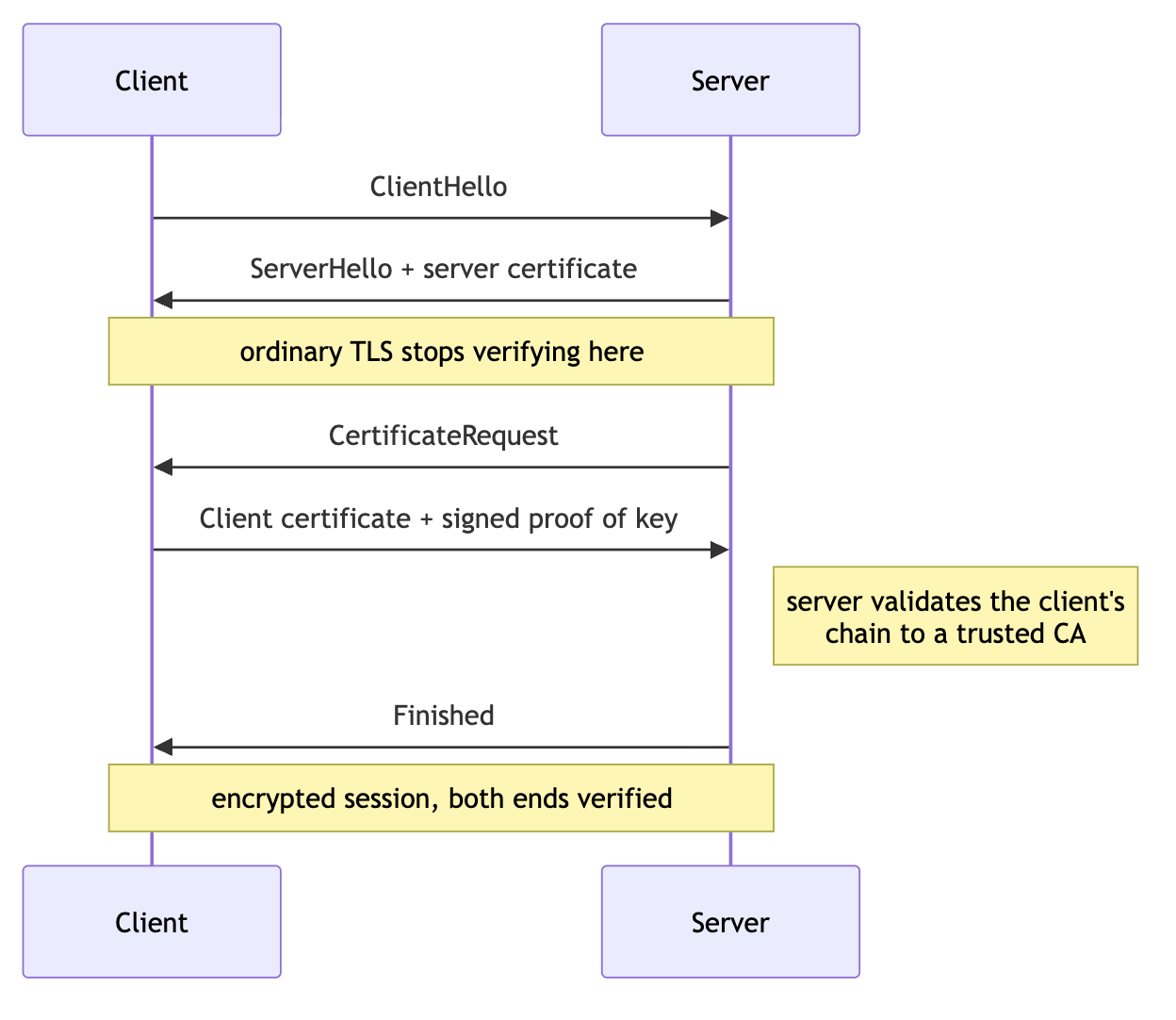
If the client can't present a valid certificate, the handshake fails. No data is transferred.
The point is identity. mTLS gives each service a credential it proves on every connection: during the handshake, each side shows it holds a private key without ever sending it, and that key is bound to an identity a CA has signed. The private key stays on the host, and the certificate carries its own expiry.
That's a different model from a shared secret like an API key or bearer token, where anyone holding a copy can use it. Secrets Management, and keeping secrets rotated, scoped, and short-lived, is a separate, but adjacent discipline.
A certificate fits anywhere both ends are infrastructure you control, such as service-to-service traffic or device fleets, and it's overkill for the public web.
At any real scale, nobody wires this into application code by hand. Two pieces handle it:
- A service mesh like Istio or Linkerd puts a sidecar proxy beside each service to run the handshake for every call, while the control plane issues and rotates a certificate per workload. The application code never sees it.
- SPIFFE (Secure Production Identity Framework for Everyone) and SPIRE (SPIFFE Runtime Environment) give each workload an identity. A SPIFFE ID, such as
spiffe://prod.example.com/ns/payments/sa/checkout, is in a short-lived certificate called an SVID (SPIFFE Verifiable Identity Document), which SPIRE issues and rotates automatically. Since an SVID can live for just an hour, revocation mostly takes care of itself: stop issuing to a compromised workload, and its certificate lapses quickly.
One thing mTLS won't do is decide what a client is allowed to do. A valid handshake proves who's calling, not whether they should have access, so authentication still needs authorization behind it. Many systems still combine mTLS with tokens, scopes, or policy checks.
What are the different types of certificates?
There isn't one clean list of certificate types. The same certificate can be classified in several ways. The two that matter most are how strictly the CA checked who you are, and what job the certificate does:
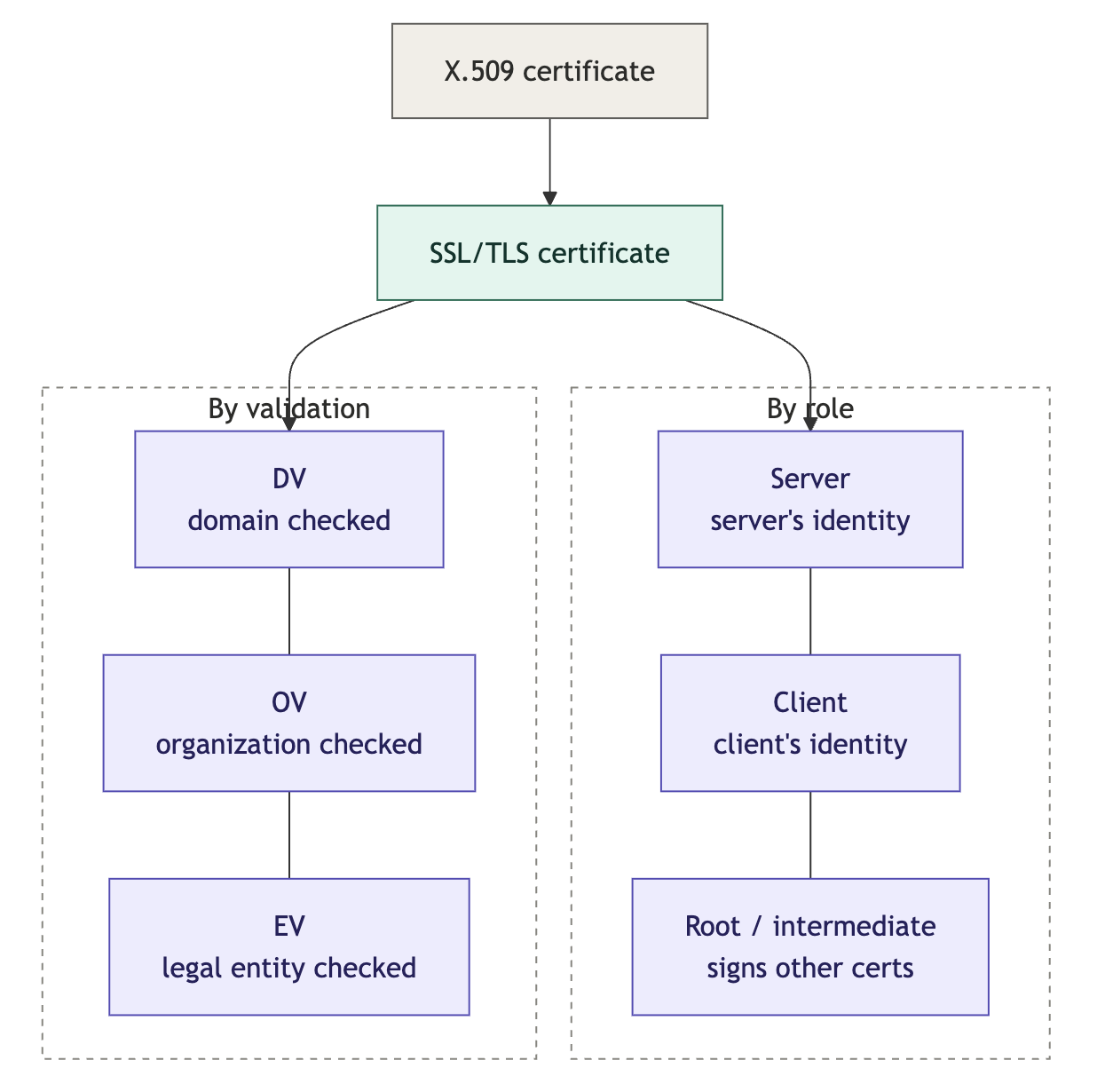
Broken down by how strictly it was validated:
- DV (Domain Validation). The CA only confirms you control the domain. It's fast, automated, and free through Let's Encrypt, and it covers most of the public web. For a typical site, it's all you need.
- OV (Organization Validation). The CA also checks that your organization is a real legal entity and writes that verified name into the certificate. Anyone who inspects the cert then sees a vetted company behind the domain, not just the domain. The usual reason to want that is policy: enterprise procurement, security reviews, and some regulated industries require a vetted certificate on public services.
- EV (Extended Validation). The same idea with the strictest vetting of the legal entity, down to its registered name and jurisdiction. Its old draw was the green address bar, which browsers stopped showing, so the everyday edge has faded. What keeps it around is compliance: sectors like finance and government sometimes still require it, and the vetted identity stays in the certificate for anyone who checks.
We can also break it down by role. A server certificate is what a server presents to prove its identity and encrypt the connection. The cert on your website is this one. It can cover a single hostname, a whole subdomain level as a wildcard (*.example.com), or several names at once through its Subject Alternative Name (SAN) field. A client certificate is the mirror image. It identifies the client to the server, used in mTLS, so a service or device can authenticate without a password.
For public websites, root and intermediate certificates belong to public CAs. In private certificate management, they may belong to you, and managing them is one of the most sensitive parts of the system: root protection, intermediate rotation, and trust-bundle distribution.
What is the chain of trust?
Validation and role describe a single certificate. There's also a structural dimension every certificate shares: where it sits in the chain of trust. A certificate is trusted because it's signed by one above it, which is signed by one above that, up to a root that's trusted on its own. Three positions make up that chain:
- Root. The trust anchor at the top. It's self-signed, and browsers and operating systems trust it because its public key already ships in their trust stores. Root keys are kept offline and used rarely.
- Intermediate. Signed by the root, and used to sign certificates day to day so the root key can stay offline. A chain can have more than one. If an intermediate is compromised, it can be revoked without burning the root.
- Leaf. The end-entity certificate, the one installed on a server, client, workload, or device. It's signed by an intermediate, and it's what secures the live connection. This is the certificate most of this guide is about.
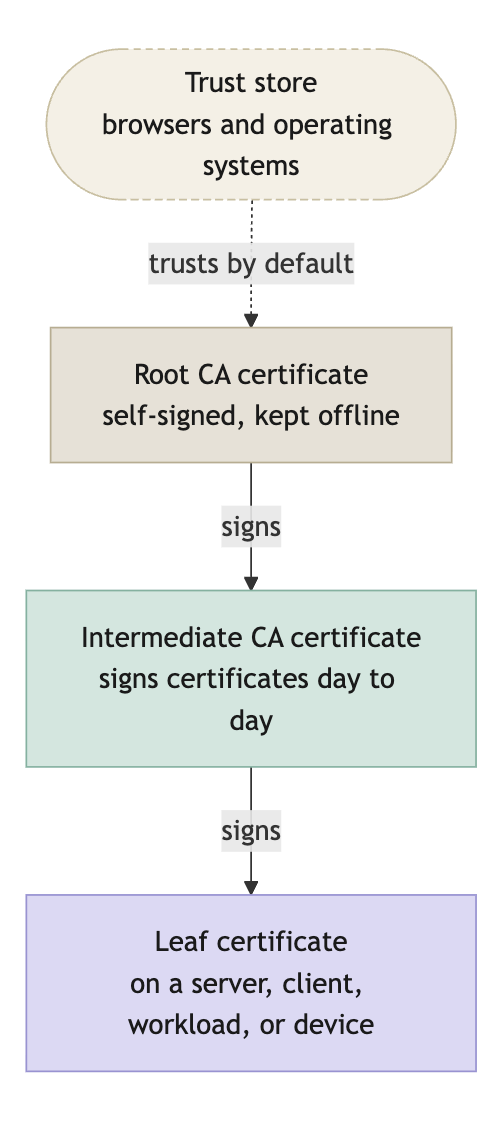
When a client connects, the server presents its leaf certificate along with the intermediates above it. The client builds a path from the leaf up to a root it already trusts, checking each signature on the way. If that path reaches a trusted root and every certificate along it is valid, the leaf is trusted. If the server forgets to send an intermediate, the path can't complete, which is a common way a chain comes back broken even though the leaf itself is fine.
Each of these leaf certificates have their own lifecycle.
What is the SSL certificate lifecycle?
Every certificate moves through the same sequence, from request to retirement. Naming the stages shows where each one can quietly break.
The stages fall into three phases:
1. Issuing and deploying
- Request. Someone, or some agent, decides that a certificate is needed, creates or reuses a key pair, and sends a certificate signing request (CSR), which bundles the public key with the names or identities it should cover. The private key stays with the owner, never the CA, and it has to be treated as a secret, since anyone who obtains it can impersonate the certificate's identity.
- Issuance. The CA validates whatever its policy requires, domain control for a public DV certificate, organization checks for OV or EV, workload or device identity for internal certificate management, then signs and returns the certificate with the intermediates needed to build the chain.
- Deployment. You install the certificate, its chain, and the private key on whatever terminates TLS. This is where "issued" becomes "in use."
2. Keeping it valid
- Tracking. Once the certificate exists, someone needs to know where it's installed, what it covers, who owns it, which CA issued it, and when it expires. The CA knows it issued the certificate, but doesn't know every load balancer, pod, or appliance the certificate landed on.
- Monitoring. You watch the certificate and the systems serving it: expiry, chain validity, hostname coverage, and whether the renewal and deployment jobs are actually succeeding. This is the stage teams skip, and skipping it is what turns an expiry date into an outage. At scale, this runs as automation, an alert the moment a renewal job fails, not a dashboard someone remembers to open.
- Renewal. Before the expiry date, you issue a replacement and deploy it. A new file from the CA isn't the end of it. The replacement has to reach the right system, and the service has to reload before the old certificate lapses.
3. Revoking and retiring
- Revocation. If a private key leaks, a certificate is mis-issued, or an identity should no longer be trusted, you revoke it before expiry. The CA publishes that status via CRLs (Certificate Revocation Lists) or OCSP (Online Certificate Status Protocol), but client behavior varies, so revocation doesn't replace key rotation and cleanup.
- Retirement. When a service, device, or domain is removed, its certificate and private key should be removed with it. Left behind, they're still live credentials, and they still need cleaning up.

This is the everyday loop for leaf certificates, the ones on servers, clients, workloads, and devices. The root and intermediate CA certificates above them follow a slower, more sensitive lifecycle of their own, offline storage, trust distribution, and careful rotation, which is still certificate management but not the renewal loop most teams fight day to day.
The stages are simple. The hard part is the transitions between them, and that's what certificate management handles: running the whole loop on purpose, across every certificate at once, so quiet failures get caught early rather than surfacing as outages.
How does a certificate get issued?
Issuing a certificate is always some version of the same exchange: you prove whatever the CA policy asks for, the CA signs, and you get the certificate back. For a public DV certificate, that proof is domain control. For OV or EV, it includes organization checks. For internal certificate management, it might be workload identity, device enrollment, or an approval rule.
For one server or a handful, an engineer does this by hand: openssl makes the key and CSR, you request the certificate from a CA portal or ticket, install it, and set a reminder to renew before it expires. For public certificates, certbot removes most of that, fetching from a CA like Let's Encrypt over ACME and renewing on a timer so nothing depends on someone remembering. Either tool only reaches its own host, not the rest of your estate.
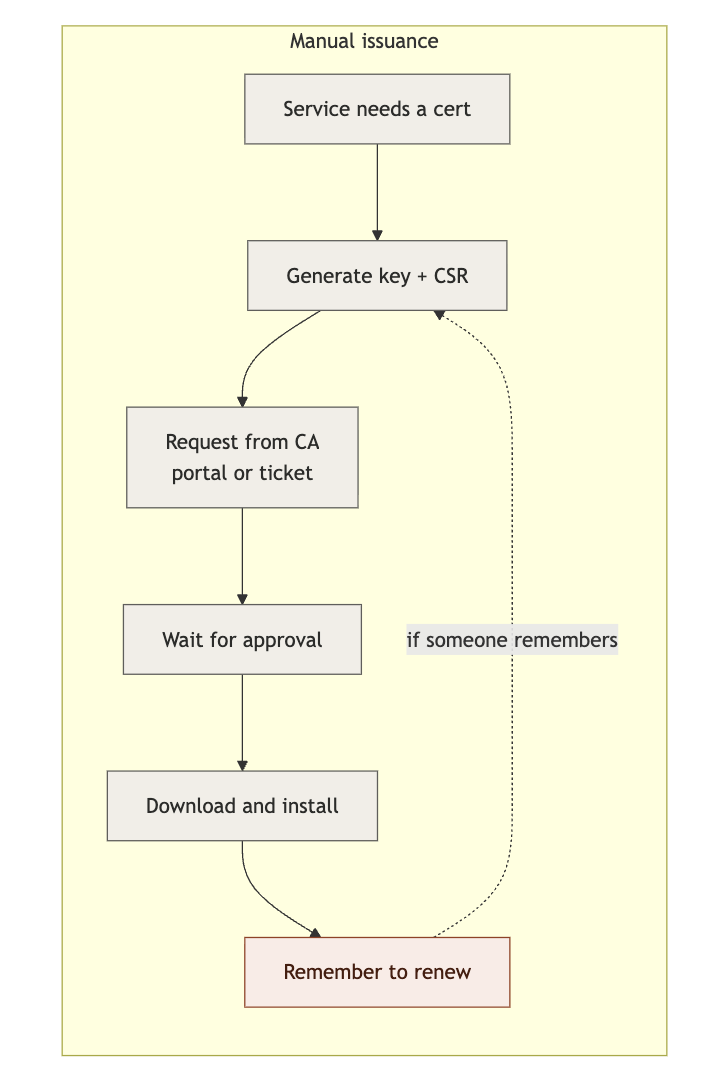
Automation takes the human off that routine path, so issuance and renewal become a non-event. With thousands of certificates, with validity windows now measured in weeks, it's the only thing that keeps up.
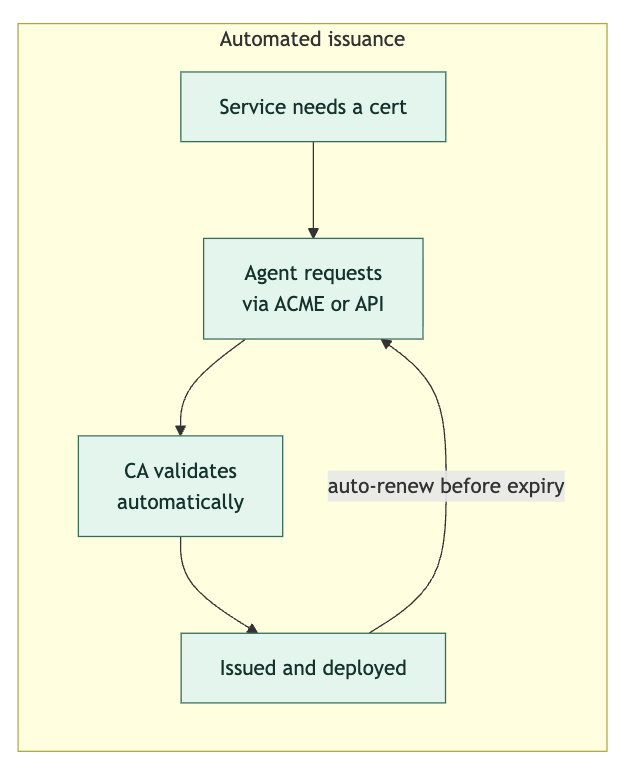
The automation runs on enrollment protocols, and which one fits depends on what you're enrolling. Fair warning, you are about to enter acronym hell:
- ACME (Automatic Certificate Management Environment). The modern default for fully automated issuance and renewal, no human in the loop. It started on the public web with Let's Encrypt and certbot and is increasingly run internally too. If you're automating today, you usually start here.
- SCEP (Simple Certificate Enrollment Protocol). The legacy way to enroll network gear and mobile devices. Simple and widely supported, but its security is dated, so it's something you inherit rather than choose now.
- EST (Enrollment over Secure Transport). SCEP's successor, running over TLS with stronger security. The current choice for device and IoT enrollment.
- CMPv2 (Certificate Management Protocol). This covers the full lifecycle: issuance, renewal, revocation, and key updates. Entrenched in telecom and older enterprise PKI, powerful but complex to run.
Centralizing that automation also adds policy: the system enforces who's allowed to request what, and which sensitive certificates need human approval, all without anyone clicking a button.
What are certificate renewal best practices?
Renewal has to be automatic. That part's obvious by now. The harder part is that automation alone isn't enough. Bazel's renewal was automatic, yet it still caused a thirteen-hour outage because no one was watching when it quietly started failing.
So a renewal setup you can actually trust has a few properties:
- It renews early. Reissue at about a third of the lifetime remaining, not the day before, so a failed attempt has room to retry before anything expires.
- It alerts on failure, not just on expiry. This is the exact gap that took down Bazel. Watching for "expires in seven days" is too late if renewal has been failing for a month, so watch for the failures themselves.
- It covers everything, including internal certs. The certificates that cause outages are the ones nobody monitors: internal services, mesh workloads, infrastructure.
- It leaves real lead time. When something does need a human, the alert should fire with enough runway to fix it calmly rather than minutes before expiry.
For public certificates, lifetimes are shrinking on a fixed schedule. The CA/Browser Forum is cutting the maximum from 398 days to 200 in March 2026, 100 in 2027, and 47 by 2029, and browsers enforce it. A 47-day certificate can't be renewed by hand on any reasonable schedule, so short lifetimes make automated renewal and routine rotation the only workable approach.
Internal certificates aren't bound by that rule, so you can set them to any lifetime you want, but you still shouldn't reach for years. A long-lived internal certificate sits unrotated and untracked until it becomes the forgotten credential behind an outage, so keep them short by choice.
All of it rests on one thing: knowing what certificates you actually have. In practice, certificate discovery is the first problem you solve, because you can't renew, monitor, or secure a certificate you don't know exists.
What is centralized certificate management?
Certificates proliferate. They come from different CAs, are issued by different teams, expire on their own schedules, and mTLS multiplies the count. The way to stay on top of that is to manage them centrally, with a single system that handles the whole estate instead of a different process per team and per tool.
Concretely, that system runs the jobs a scattered setup can't: it discovers the certificates you already have, issues and renews them automatically from internal or public CAs, watches for a failing renewal rather than only a looming expiry, and enforces who is allowed to issue what. The result is a single source of truth, one place that knows about every certificate you run.
When to use Infisical for certificate management
Infisical's Certificate Management is one tool built this way. It runs your own private CA hierarchy and connects to public CAs like DigiCert and Let's Encrypt over ACME, so internal and public certificates sit in one place. In practice that enables three things:
- No surprise expiries. Discovery surfaces the certificates you've lost track of, and renewal and expiry alerts run across all of them, so a stalled renewal shows up as a warning weeks ahead instead of a 2am outage.
- One workflow, not a dozen. Internal certificates, public certificates, and the CAs behind them live in a single system, which removes the per-team sprawl of separate portals, scripts, and spreadsheets that makes certificates easy to lose.
- Policy without the bottleneck. Certificate profiles set who can issue what and which certificates need approval, so governance is enforced automatically rather than slowing down every request.
For advanced workflows, Infisical also directly integrates with HSMs, Infisical KMS, and offers privileged access management and secrets management products to centralize identity security.
Start free or talk to an expert to see it run against your own estate.