KMIP: How It Works, When You Need It, and How Infisical Implements It

Rotating a compromised key should take minutes, but can take days at enterprise scale. The key doesn't live in one place. It's in the storage array, the database, the backup system, and the object storage, each one managed by a different vendor with a different API and a different admin portal. So rotating a single key means doing the same job four times, in four systems that don't share a record of who changed what. Miss one, and you've either left a compromised key live or knocked a system offline. When an auditor asks for a single inventory of every key and who touched it, nobody can produce one.
That's what the Key Management Interoperability Protocol (KMIP) was designed to eliminate. KMIP gives every system one shared language for requesting, creating, and managing keys, so a single manager can serve all of them.
What is KMIP and how does it work?
Before KMIP, every key management vendor had their own API. Nothing else could connect to it. Encrypt your storage array with one vendor's key manager and your Oracle database with another's, and you've got two separate key management systems with no connection between them. Not one console, not one policy, not one record of who accessed what. There's no way to centralize any of it, so every key operation, rotation, audit, access review has to be done twice, once in each system. Multiply that across a large enterprise, dozens of systems each with its own siloed key manager, and when an auditor asks for a single account of every key and who touched it, there's no way to produce one.
KMIP is an open standard that gives every system a single language for requesting, creating, and managing keys. If both sides speak KMIP, they work together. The vendor on either end stops mattering.
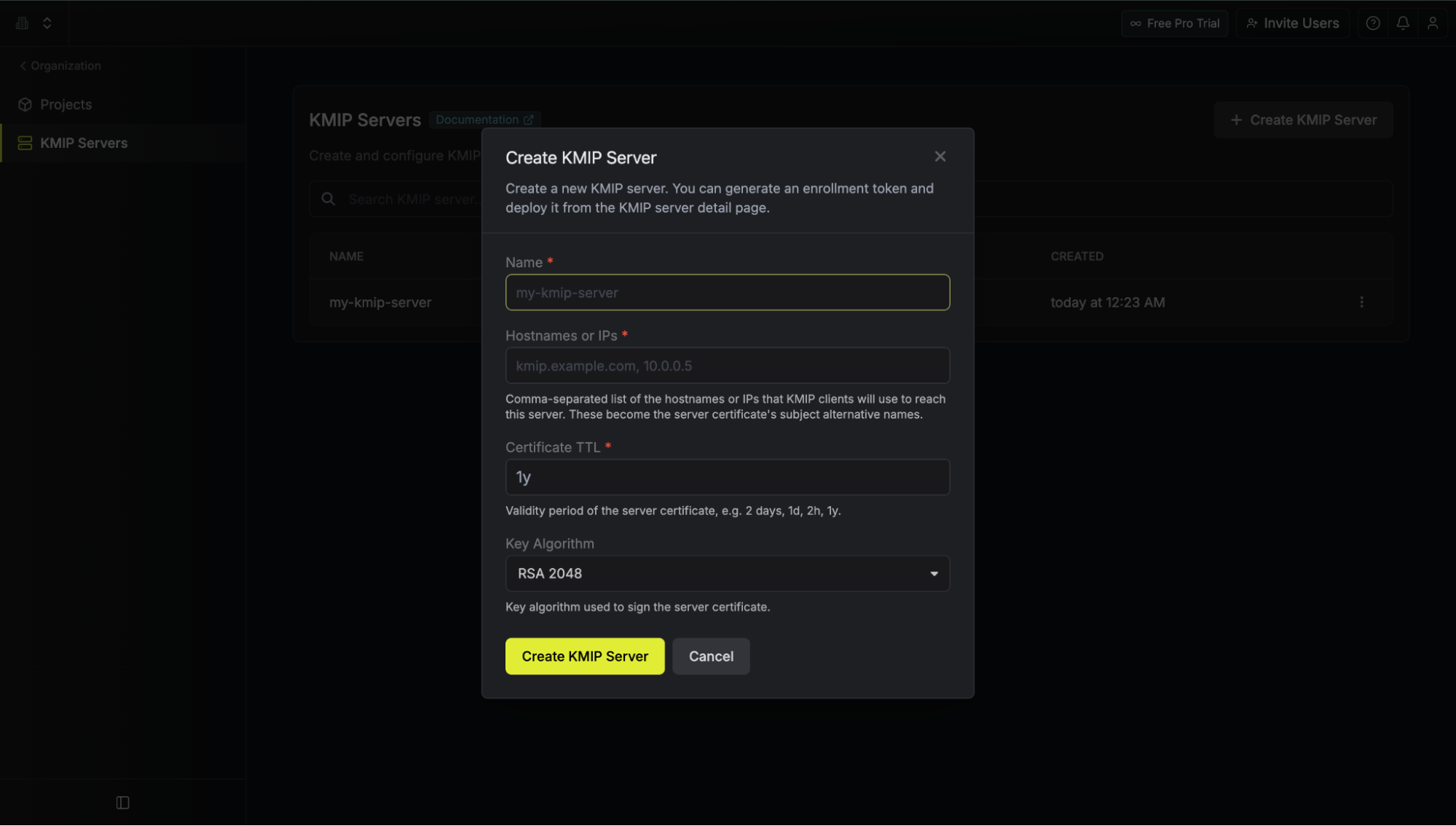
Figure 1. Without KMIP, every system manages its own keys. With KMIP, they all share one manager.
Take a routine task: your policy says every encryption key gets rotated every 90 days. Here's what that looks like on each side.
Without KMIP, the key exists separately in each system. You log into the storage array's console and rotate it there. Then the database's. Then the backup system's. Three systems, three consoles, three chances to make a mistake. If you rotate two and miss the third, that system is now running an old key while the others have moved on, and nothing tells you they've drifted apart. You find out when something fails to decrypt.
With KMIP, you set the rotation policy once, in the key manager. It pushes the change to every system that speaks the protocol. One action, one place to confirm it worked, one log showing it happened across all three. The 90-day rotation stops being a three-system chore and becomes a setting.
How KMIP works
KMIP's default port is 5696. It's a client-server protocol running over TCP on that port, secured with mTLS (mutual TLS). Because keys are what's moving across this channel, both ends have to prove who they are: the server only serves clients it trusts, and each client has to know it's reaching the real key manager, not an impostor. Ordinary TLS authenticates only the server, mTLS authenticates both, which is what this kind of service-to-service trust requires.
The core operations cover the full key lifecycle: Create, Get, Register, Locate, Activate, Revoke, Destroy, Get Attributes, and Query.
| Operation | What it does |
|---|---|
| Create | Generates a new key on the server and stores it. |
| Register | Brings an existing key under the server's management. |
| Locate | Finds a key by its attributes, without needing its ID. |
| Get | Retrieves a key, or asks the server to encrypt or decrypt on the client's behalf so the key never leaves. |
| Activate | Marks a key usable, so it can start protecting data. |
| Revoke | Pulls a key out of active use, either to retire it or because it's compromised. |
| Destroy | Permanently deletes the key material. |
| Get Attributes | Retrieves a key's metadata without retrieving the key material itself. |
| Query | Asks the server which operations and capabilities it supports. |
Applications can ask the server to encrypt or decrypt data without ever seeing the key itself.
KMIP vs. PKCS#11
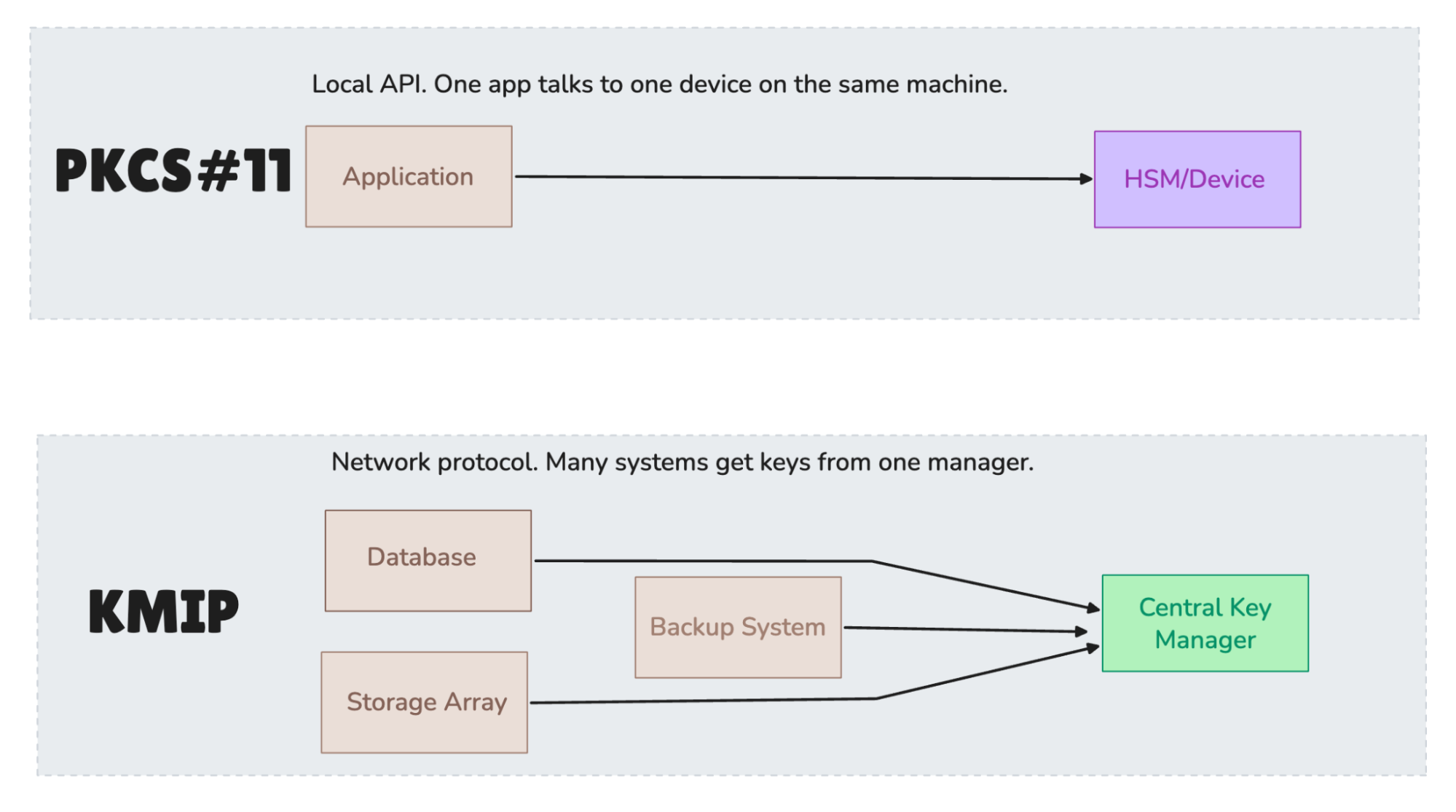
KMIP isn't the only standard in this space, and one comes up often enough that it's worth clearing up early. If you've been researching KMIP, you've almost certainly run into PKCS#11 (Public-Key Cryptography Standard #11), and probably wondered whether you need one, the other, or both. They solve different problems at different layers.
PKCS#11 is a low-level API that a single application uses to talk to a cryptographic device, usually an HSM (Hardware Security Module), usually on the same machine or network. It's a library you link against. It answers the question of how one application performs crypto operations with one device.
KMIP works at a different level. It's a network protocol for managing keys centrally across many systems from many vendors. It answers how all of those systems get and manage their keys from one place.
In practice, plenty of enterprises run both. PKCS#11 handles the local crypto operations inside a given application or HSM. KMIP handles the centralized lifecycle, distribution, and audit across the whole fleet. They're complementary, not competing. If you find yourself choosing between them, that's usually a sign the question is wrong, because they sit at different layers of the same stack.
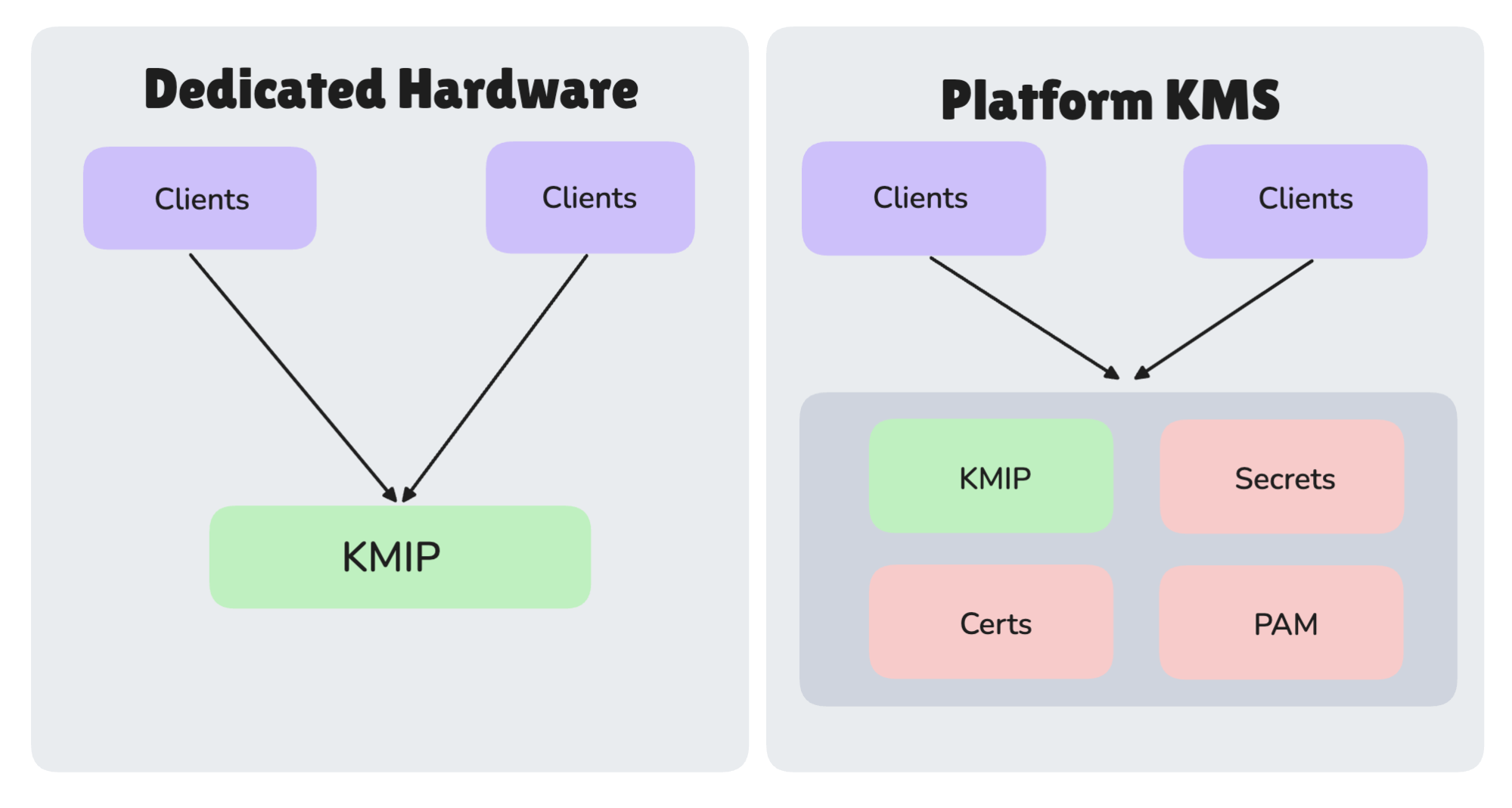
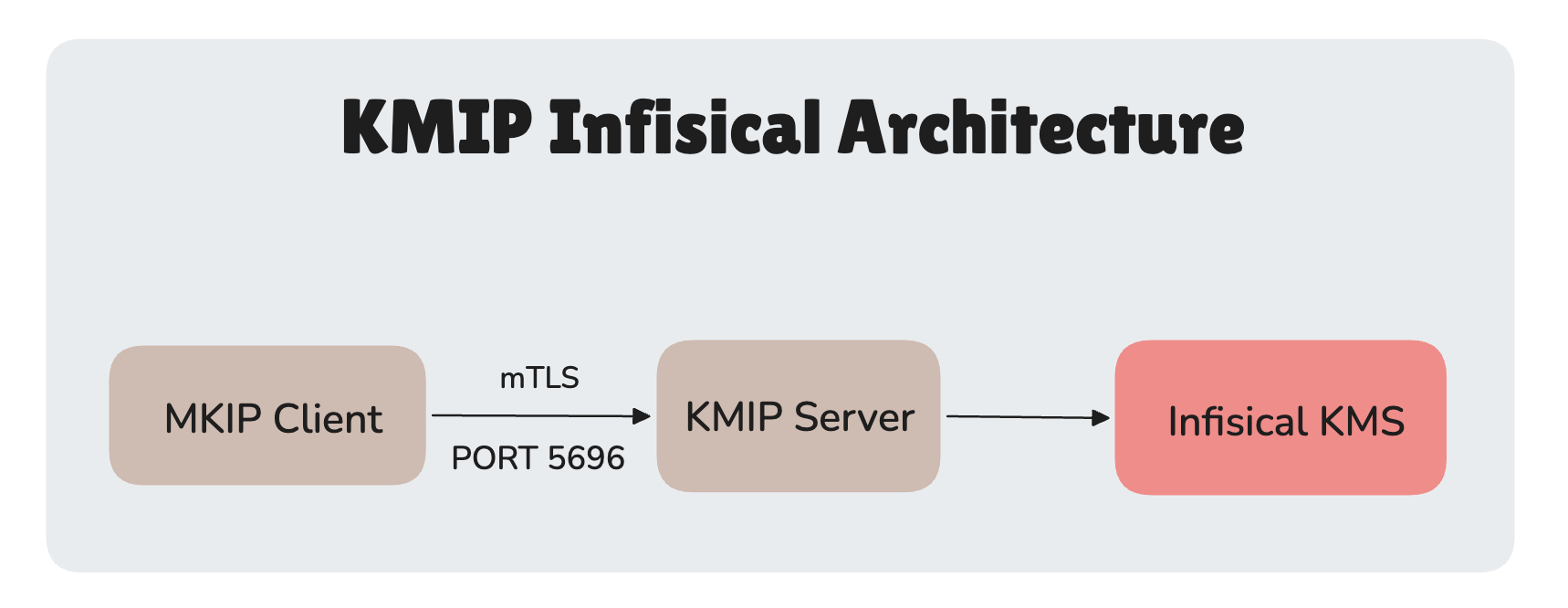
Figure 2. PKCS#11 is one app to one device, locally. KMIP is many systems to one manager, over the network.
When to use KMIP
KMIP isn't something every team needs. Using it means running a key manager that speaks the protocol and pointing your existing systems at it instead of at each vendor's built-in tool. That's worth doing under a few specific conditions.
Your infrastructure spans multiple vendors.
When your storage array, your database, and your backup system each have their own key manager, every routine task, rotation, access review, revocation, happens separately in each one. Point them all at a single KMIP key manager and it becomes one workflow instead of three.
Compliance is forcing the issue.
PCI-DSS, HIPAA, FedRAMP, and FIPS 140-2 all require documented, auditable key management. A PCI-DSS QSA (Qualified Security Assessor) asking for rotation records is far easier to satisfy when you pull one log from one key manager than when you export from several vendor portals and hope they line up.
You want to stop being locked into a vendor's products.
Most storage and database vendors ship both their own key management tool and a KMIP integration. Using KMIP lets you centralize key management across all of them in one place, rather than running a separate key manager per vendor. Swap a storage array or add a new system, and the key management layer stays put.
You have too many keys to track by hand.
A handful of keys across a few systems is fine to manage by hand. As the count grows into the hundreds across dozens of systems, that stops scaling. A KMIP key manager gives you one place to find any key, see its history, and enforce rotation everywhere.
When you don’t need KMIP
Everything lives in one cloud.
Your cloud provider's own native key manager integrates natively with every service on that platform and needs almost no operational overhead. It doesn't support KMIP, but inside a single cloud you don't need it, the native tool already covers everything that touches encrypted data. KMIP only starts to matter when one provider's tooling ends and the rest of your infrastructure, another cloud or your own data center, begins.
You're a small team with simple infrastructure and no compliance burden.
If you're not managing encryption keys across multiple systems and have no PCI-DSS, HIPAA, or FedRAMP obligations, KMIP is likely more protocol than you need. It earns its complexity at scale, across mixed infrastructure, under regulatory pressure. Without those conditions, it's overhead.
KMIP earns its complexity at scale, across mixed infrastructure, under regulatory pressure. Without those conditions, it's more protocol than you need.
How Infisical implements KMIP
Infisical offers a dedicated KMS that supports KMIP: a full key management system in its own right, covering:
- Encrypting/decrypting operations, for application data like database fields or files that need to stay encrypted at rest without the application ever handling the key directly
- Signing/verifying data, for use cases like code signing or document signing, where you need to prove something hasn't been tampered with
- Bulk import and export of keys, for migrating existing key material in from another system, or exporting for backup and disaster recovery
- CSR-based (Certificate Signing Request) signing of KMIP clients, for issuing the mTLS client certificates a KMIP client (a storage array, a database, a hardware device like an iDRAC-managed server) needs to authenticate to the server
- Encrypting data at rest in kubernetes
etcd, so Kubernetes Secrets are encrypted before they're ever written to the cluster's datastore, not sitting there in plaintext
You can back it with your own HSM for root key storage if your security posture requires it. Infisical's core is open source, the codebase is on GitHub and auditable, and teams in regulated industries can self-host the whole platform with no dependency on Infisical's cloud.
KMIP support specifically is an Enterprise-licensed feature on top of that self-hosted core, so using it still means purchasing a license, but the deployment itself, including the KMIP server, stays entirely within your own infrastructure. For anyone with a data sovereignty requirement, that's the difference between a usable tool and a non-starter.
Mechanically, KMIP splits into two roles: clients and servers. Clients are the systems consuming keys, storage arrays, databases like MySQL and MongoDB, backup platforms, and hypervisors. Infisical acts as the server: it runs KMIP as a lightweight, stateless proxy, deployed via the Infisical CLI. The proxy sits on your infrastructure, listens on port 5696, and forwards key operations to Infisical KMS on the backend, which handles the full key lifecycle. The proxy itself holds no keys, it just forwards requests and stays out of the way.
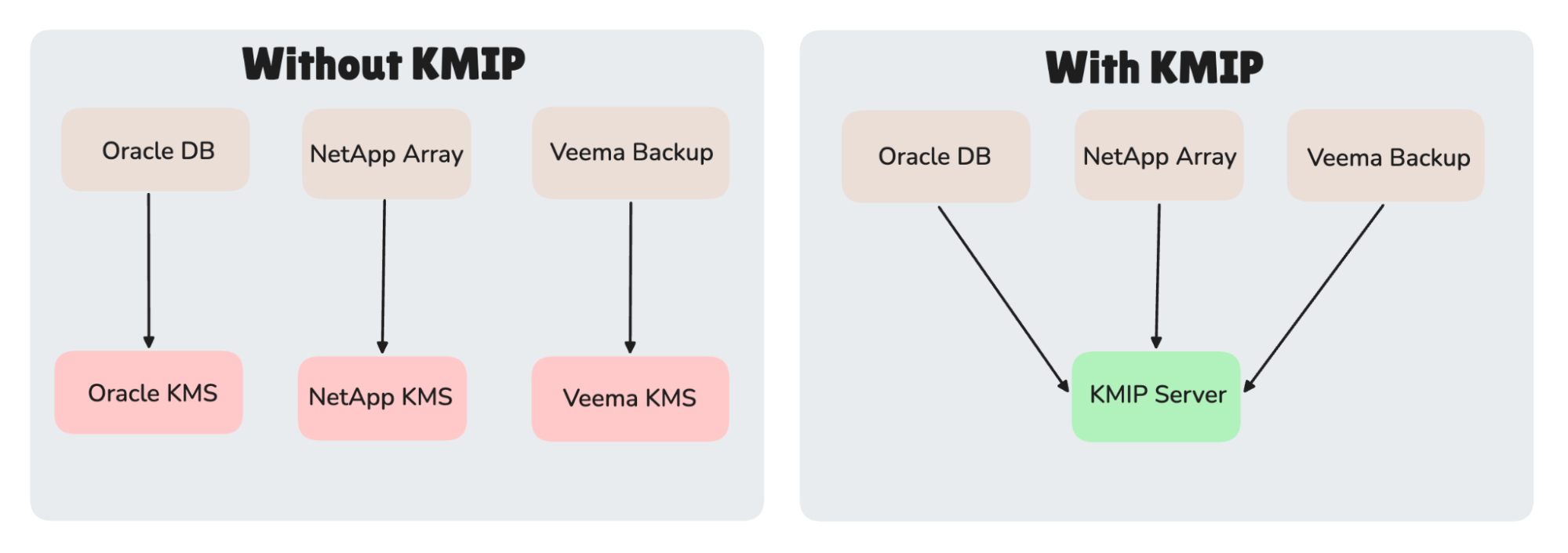
Figure 4. Infisical runs KMIP as a stateless proxy. Clients connect over mTLS, the proxy forwards to the KMS. No keys live on the proxy.
Before you start, open two network paths: KMIP clients to the server on port 5696, and the server to your Infisical instance over HTTPS on port 443.
If you're already running Infisical for secrets or certificate management, KMIP is one more capability on that same platform, same login, same access controls, same audit log, nothing new to stand up. It can also run on top of what you already have, backing onto your own HSM or sitting alongside an existing KMIP-compatible key manager, so adopting it doesn't have to mean replacing your current setup.
Getting started
Create a KMIP server in the Infisical dashboard under Infisical KMS > KMIP Servers. Once created, Infisical generates a deploy command for you.
Install the CLI, run the command on any machine that can reach your Infisical instance, and the server is live:
infisical kmip start my-kmip-server \
  --enroll-method=token \
  --token=<enrollment-token> \
  --listen-address="0.0.0.0:5696" \
  --domain=https://app.infisical.com
For production on Linux, install it as a systemd service so it starts on boot:
sudo infisical kmip systemd install my-kmip-server \
  --enroll-method=token \
  --token=<enrollment-token> \
  --listen-address="0.0.0.0:5696" \
  --domain=https://app.infisical.com

sudo systemctl start infisical-kmip
From there, you register your KMIP clients inside the Infisical dashboard and generate certificates for each.
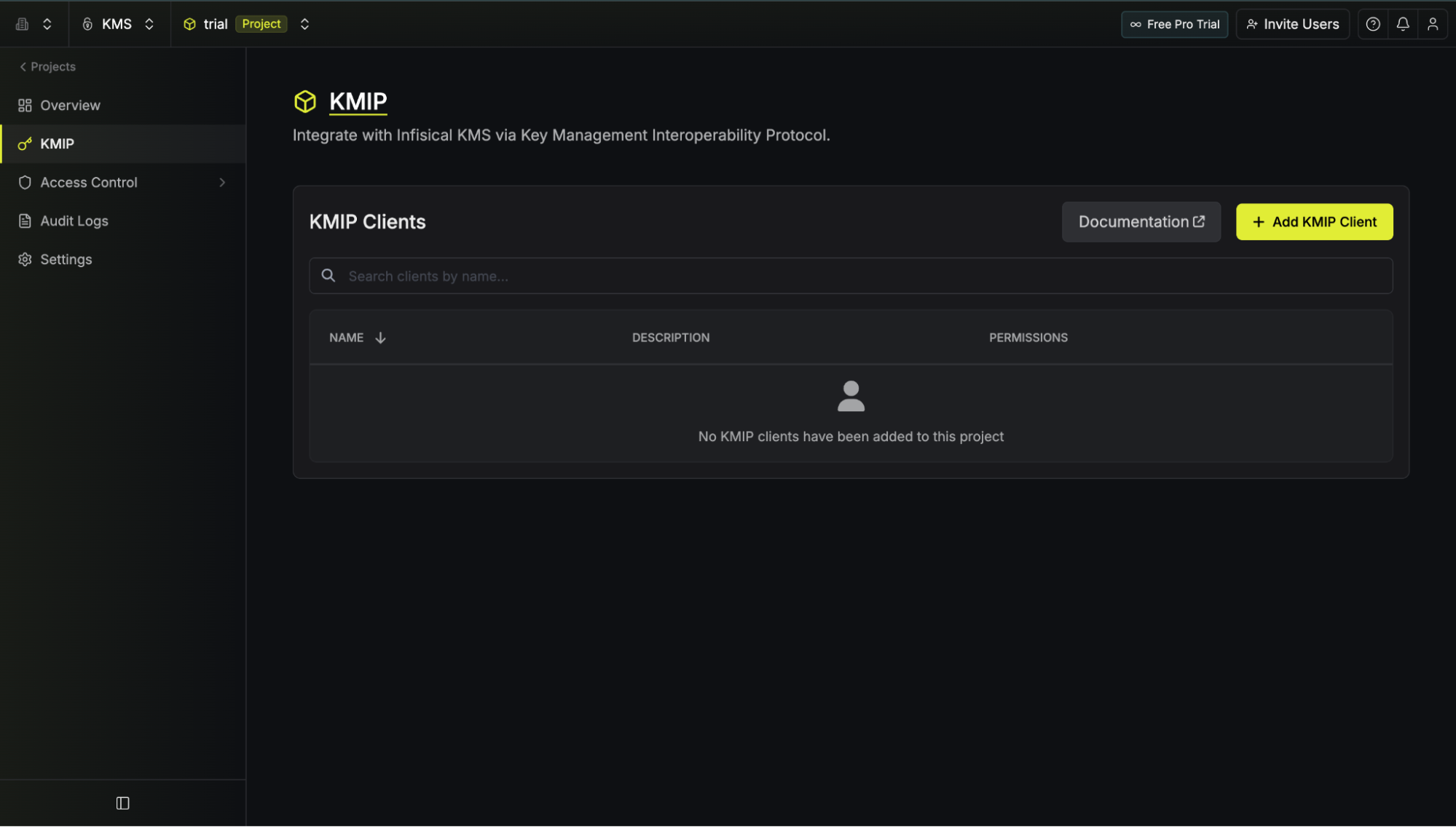
Your client application connects using those certificates on port 5696.
Summary
KMIP solves key management fragmentation by giving every system one shared language for requesting and managing keys.
Infisical KMS is a complete, dedicated KMIP-capable key management system on its own, encryption, signing, bulk key operations, and the KMIP server itself, deployable in minutes. If you're already running Infisical for secrets or certificate management, it's one more capability on that same platform rather than a separate product to stand up, but nothing about it depends on that.
If your encrypted systems span multiple vendors, you're under rules that demand central, auditable key management, or you want out of a vendor's own key tool, KMIP is the right base, and Infisical is one way to run it.
If you want to explore the broader Infisical platform first, you can start for free without a sales conversation. For KMIP specifically, reach out to the team to discuss enterprise access. Full setup details are in the Infisical KMIP documentation.

Mostafa Ibrahim
Guest Contributor