How to Manage GitHub Actions Secrets

GitHub Actions workflows need sensitive credentials to build, test, and deploy applications. But as engineering teams scale, managing those credentials natively inside GitHub becomes a major chore. Mature organizations do things like setting granular access controls, regularly rotating secrets, and auditing access logs. Unfortunately, GitHub’s secrets model makes it difficult or even impossible to enforce these best practices.
GitHub Secrets serve an important role in the GitHub ecosystem, but if you are part of a growing team, you may want to consider a dedicated secret manager for managing secrets in GitHub Actions.
Native GitHub secret management
When starting out, many individuals and teams use GitHub's native secrets to reduce complexity up front. "Secrets" are a standard GitHub tool across Actions, Codespaces, Agents, and Dependabot to grant automated systems access to credentials.
In GitHub Actions, the primary purpose of secrets is to prevent accidental exposure in GitHub Action logs. In a platform that is built for developing open-source software, keeping your secrets out of public logs is a pretty critical control. We can start to imagine what could go wrong if we compare GitHub secrets with non-protected GitHub variables. Variables are exposed in plaintext, which means they could be exposed to anyone who can reach the repository.
| Feature | ${{ secrets }} | ${{ vars }} |
|---|---|---|
| Encryption at Rest | Encrypted client-side before sending to GitHub | Plaintext in GitHub database |
| UI & API Visibility | Write-only (Values hidden after saving) | Read/Write (Plaintext visible in UI) |
| Log Scrubber Redaction | Automatically redacted from logs, best-effort | Visible in GitHub Action logs |
Registered secrets are redacted from workflow logs automatically, with no workflow command required. The ::add-mask:: command exists for the opposite case: masking a value that is not stored as a secret. It is worth knowing the limits of this redaction. GitHub's own documentation notes that because "there are multiple ways a secret value can be transformed, this redaction is not guaranteed," and that "the runner can only redact secrets used within the current job."
Sorting data into secrets and variables determines visibility inside workflow logs, but it does not determine access control. For organizations, it’s important to consider who can access a secret once it's created. With native GitHub secrets, the accessibility depends entirely on where that secret is scoped within the GitHub hierarchy.
Secret scopes: org, repo, and environment
If you want to restrict access to a secret, GitHub offers three different ways to scope its accessibility. A secret can be created at the organization, repository, or environment level, with each level becoming more specific about the conditions that allow access to the secret. Making the wrong choice here could lead to developers unintentionally gaining access to secrets they shouldn’t have.
The different scopes of GitHub secrets form an inheritance structure, where a workflow could potentially be receiving secrets from all three scopes at each level of specificity.
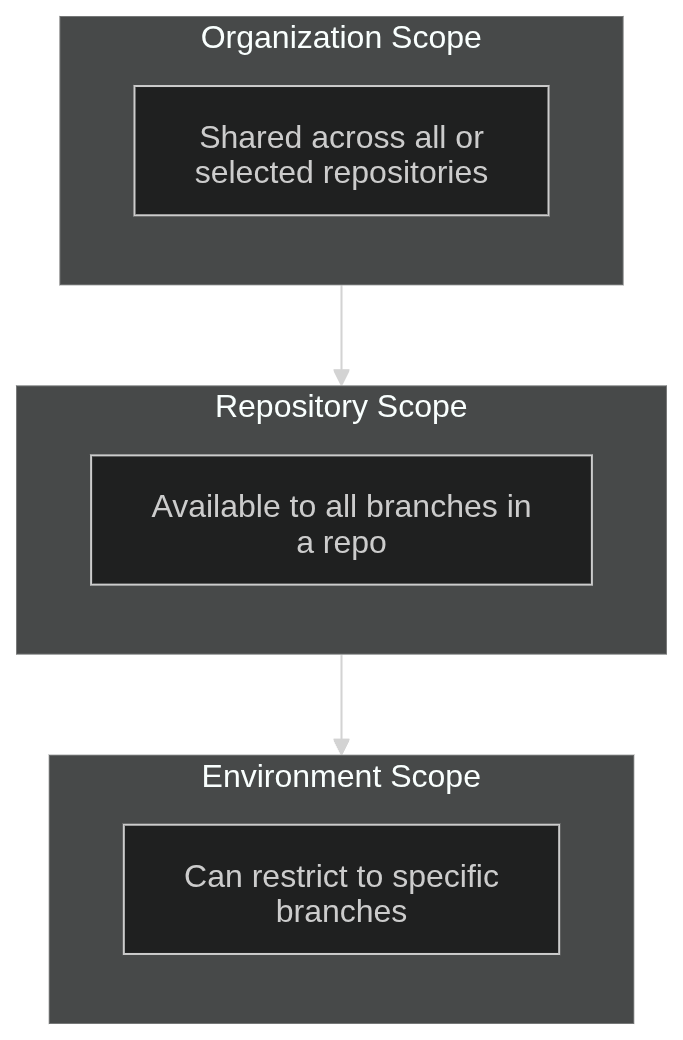
While GitHub offers some flexibility in scoping access to secrets, that flexibility comes at the cost of complexity. As org-level, repo-level, and environment-level secrets accumulate, managing this multi-tiered hierarchy across dozens of repositories leads to something called “secret sprawl,” where credentials are duplicated, configurations drift, and forgotten secrets remain exposed where they are no longer needed. Secret sprawl leads to negative outcomes down the line:
- increased attack surface
- accidental secret exposure
- hours wasted debugging configuration drift
- losing track of where a credential is used
Where native GitHub secrets fall short
Secret sprawl isn’t the only challenge with native GitHub secrets. Native secrets cannot perform automated rotation, which is a big security gap. If a secret is leaked or stolen, there is typically no cap on how long the attacker can abuse that credential. By regularly rotating secrets, we can limit the damage from a compromised credential even if we don’t know it’s compromised. Updating credentials requires manual edits across repository settings tabs and environment configurations.
Another challenge with native GitHub secrets is that GitHub does not keep an audit trail of when secrets are accessed. In a security breach involving compromised GitHub repositories, you’ll need a complete record of secret access to determine the full scope of what was compromised. Attackers will abuse the credentials they find, so you need to determine which ones need to be revoked and in which order.
Resolving these challenges requires utilizing a dedicated secret management platform that can automate the rotation of secrets and become the source of truth as they are changed and accessed over time. Infisical is a feature-rich secret manager that integrates closely with GitHub Actions, providing a natural developer experience without the challenges that come from scaling.
Centralizing credentials with Infisical secret sync
Infisical offers a couple ways to work with secrets in GitHub Actions. Secret sync is the approach that offers the lowest friction for teams migrating from native GitHub secrets. With secret sync, Infisical is the source of truth for secrets, but those secrets are automatically pushed to GitHub to be used as native secrets.
The best part of Infisical secret sync is that it avoids modifying existing GitHub Actions workflow files. Workflows continue accessing credentials via standard ${{ secrets.MY_SECRET }} syntax while developers manage values centrally across multiple cloud providers and environments.
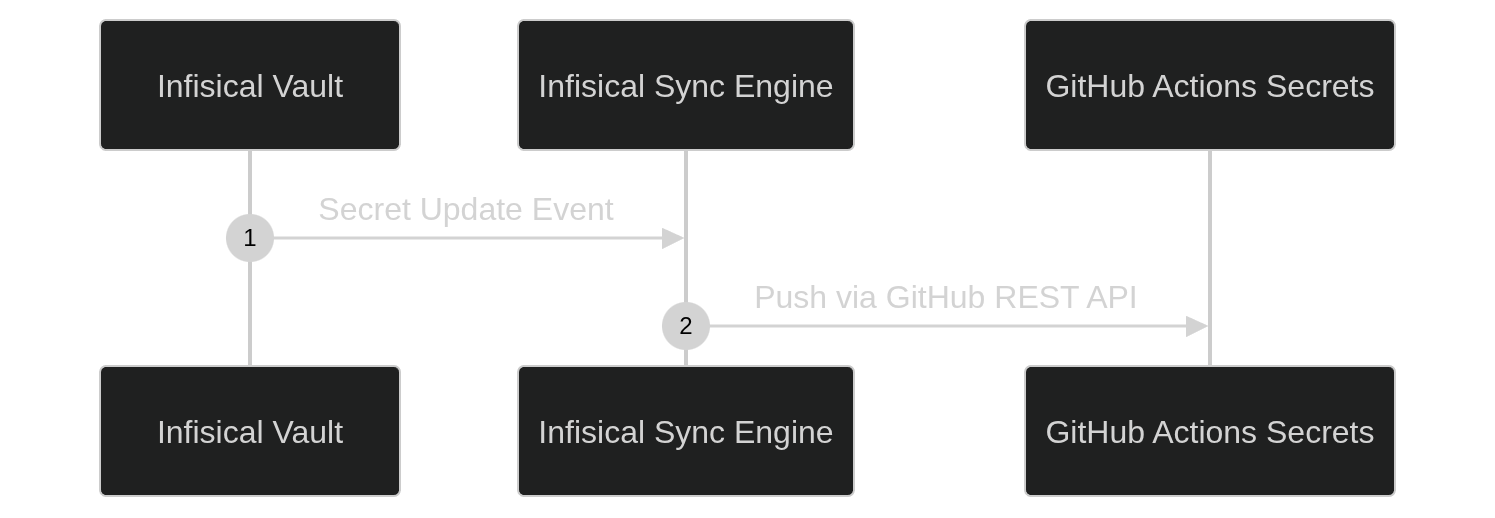
Since the secrets come from Infisical, we can utilize features like automated secret rotation and even one-time-use dynamic secrets to solve the challenge of regularly rotating credentials. We also get a more consolidated management experience. Instead of configuring secrets across organization, repository, and environment settings, we have a single page per project to create secrets and scope their access.
The Infisical secret sync approach helps with rotation and secret sprawl, but because we are still using native GitHub secrets to consume the credentials, there are a couple of challenges left.
Infisical tracks when it pushes synced secrets to GitHub, but once they are there, GitHub keeps no record of when, where, or which workflow accessed those secrets during execution. This means we still don’t have an audit trail of secret access to rely on if a GitHub account or repository is compromised.
We are also at the mercy of GitHub’s hierarchical structure for access control. Environments can provide some granularity, but secret managers like Infisical can go deeper and restrict access based on attributes from the GitHub Actions workflow.
Infisical secret sync is the most low-friction way to enable automated secret rotation and centralized secret management, but eliminating the access security gap requires completely shifting away from native GitHub secrets.
Infisical action and OIDC authentication
Instead of pushing secrets to GitHub Actions where they can’t be audited, we can pull secrets directly from an external secret manager from within the workflow. Infisical achieves this through Infisical/secrets-action. By fetching secrets directly from Infisical, we get granular access control and full auditability of every action.
If we want GitHub Actions to pull secrets from Infisical, we need a credential for that access. Rather than configuring a GitHub Secret (which we are trying to get away from in the first place), we can authenticate to Infisical using a temporary OIDC (OpenID Connect) token that uniquely identifies our workflow and is accessible only on the Actions runner.
This temporary machine identity token is possible because GitHub can act as an Identity Provider, issuing JSON Web Tokens (JWTs) to running jobs. When your workflow kicks off, GitHub signs a JWT with "claims" about your workflow's identity, and that token can be accepted by Infisical as a valid credential.
Before Infisical will accept a JWT from GitHub, we need to configure OIDC federation inside Infisical.
Create an Infisical machine identity with OIDC auth
Because a GitHub Actions workflow is an automated system, we will be tying its OIDC credential to a Machine Identity in Infisical:
- Navigate to Access Control > Machine Identities in your Infisical project dashboard and create a machine identity.
- Add OIDC Auth as the authentication method.
- Define the claims that restrict authentication to your repository and target environment. Set the issuer (
iss) tohttps://token.actions.githubusercontent.comand the subject (sub) torepo:your-org/your-repo:environment:production. - Grant the machine identity access permissions to access your project's secrets.
- Copy the Machine Identity ID and Project Slug, then save them as repository variables (
INFISICAL_IDENTITY_IDandINFISICAL_PROJECT_SLUG) under Settings > Secrets and variables > Actions > Variables in your GitHub repository.
Now, when OIDC is used for authentication, Infisical looks for the following information:
iss: Confirms the token originated fromhttps://token.actions.githubusercontent.com.sub: Matches exact repository name and environment name (repo:your-org/your-repo:environment:production).
OIDC gives us more granular access control than we had with GitHub environment secrets, including options like workflow name and runner IP. Full claim options are available in the GitHub OIDC documentation.
Once Infisical is configured to accept JWTs from GitHub Actions workflows, we just need to configure our workflows to use them.
Configure the GitHub Actions workflow
Let's say we have a Terraform deployment pipeline that requires a Cloudflare API key to create a Cloudflare Tunnel. We can use Infisical/secrets-action to fetch that secret, and we need to configure the workflow to issue a JWT to log in.
First, we make sure that we have set permissions: id-token: write to allow the runner to request an OIDC JWT.
# .github/workflows/deploy.yml
name: Production Deployment Pipeline

on:
  push:
    branches:
      - main

permissions:
  id-token: write
  contents: read
Then, we can call the Infisical GitHub Action.
jobs:
  deploy:
    name: Deploy Application Services
    runs-on: ubuntu-latest
    environment: production

    steps:
      - name: Checkout Source Code
        uses: actions/checkout@v7

      - name: Fetch Runtime Credentials from Infisical
        uses: Infisical/secrets-action@v1
        with:
          method: oidc
          identity-id: ${{ vars.INFISICAL_IDENTITY_ID }}
          project-slug: ${{ vars.INFISICAL_PROJECT_SLUG }}
          env-slug: prod
When Infisical/secrets-action runs, it gets a JWT from GitHub and uses that to authenticate to Infisical and fetch the secrets:
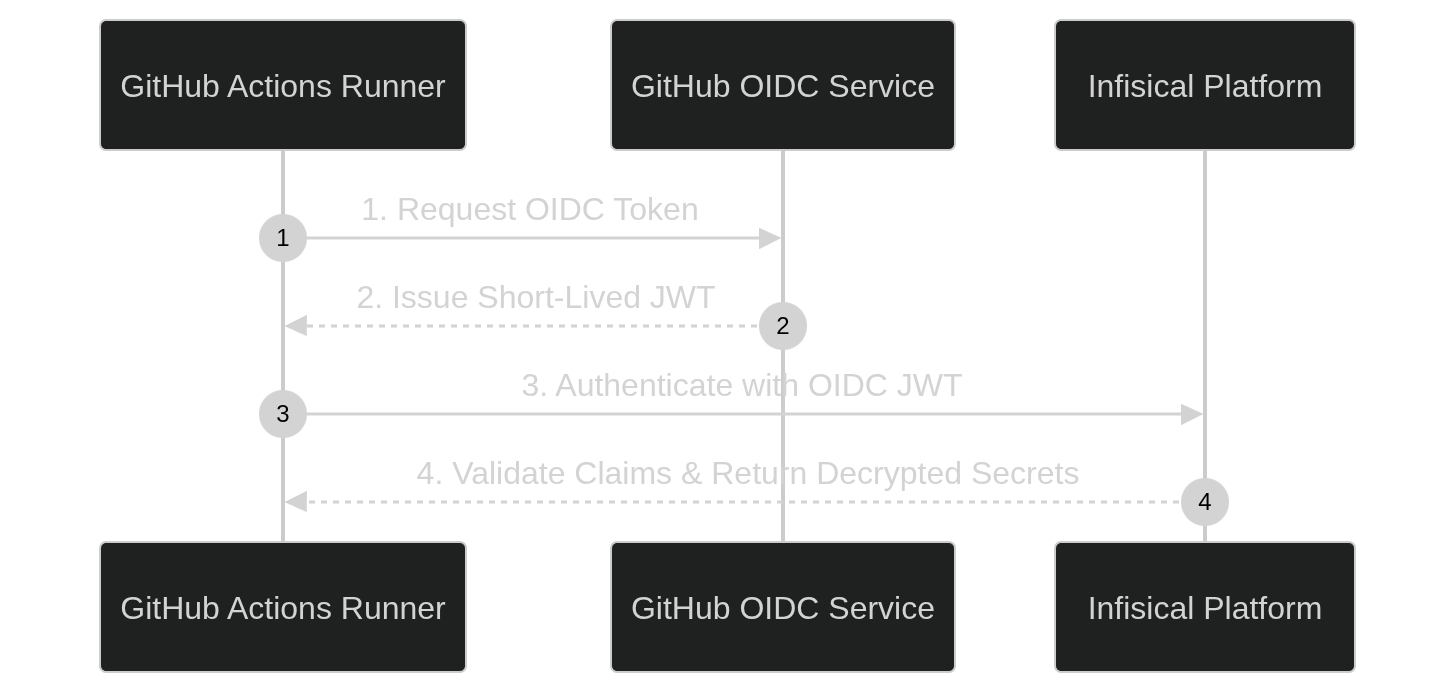
Once the secrets are retrieved by the workflow, they are exported to $GITHUB_ENV. The subsequent steps set up and execute the terraform deployment, reading the injected secrets from the environment variables.
      - name: Setup Terraform
        uses: hashicorp/setup-terraform@v4

      - name: Terraform Deploy
        run: |
          terraform init
          terraform plan -out=plan.out
          terraform apply -auto-approve plan.out
With this workflow in place, credentials exist in runner memory only for the duration of the job step. GitHub stores no static secrets, and Infisical logs an exact audit record tied to the specific runner and workflow execution.
Conclusion
Native secrets storage works when you're managing a handful of repositories, but static credentials quickly become a liability as engineering organizations scale. Relying on manually synced API keys across environments guarantees credential drift, leaves secrets exposed in CI databases, and provides no runtime visibility into who accessed what secret.
Moving to a secret vault like Infisical shifts your pipelines from static secret storage to an ephemeral, identity-driven trust model. GitHub OIDC and centralized secret management allow you to draw granular trust boundaries while maintaining complete execution auditability across every build step. For growing teams requiring scalable protection, moving beyond native GitHub Actions secrets is a must.