How we rebuilt complex permissions without migrating to Zanzibar

I recently built a simple feature most customers might never notice as a complex bit of engineering: Infisical users can now grant/deny access to single folders. This is the kind of thing that gets a brief mention in the all-hands and a one-line changelog entry.
RBAC, permissions, and authorization are the same class of engineering project as billing, schema migrations, and audit logs:
- They're expected utilities
- Users spend as little time on them as possible
- They're tricky engineering projects, even when they look simple
The best case is no complaints and that the system is correct. It can never excel. There's no 10x RBAC system people rave about on Twitter. Access controls are a box a product checks, but not a killer feature.
That doesn’t make them less important. Enterprise buyers will never sign an order form without them. And in secrets management (one of the categories Infisical operates in), getting access wrong means someone sees credentials they shouldn't, or a customer’s deployment fails at three in the morning because a service lost access to a secret.
Tailscale and Oso have both written about why authorization is harder than it looks. Building folder-based access taught me the same thing from a different direction.
Why we built folder access
Conceptually, RBAC is simple. Each identity, human or machine, has a role (e.g. admin, member, or guest) which carries permissions:
- Actions: What you can do
- Subjects: What you can take the actions on.
We use CASL, in which a basic permission attached to a role can look something like this:
{
  "action": ["readValue", "create"],
  "subject": "secrets",
  "conditions": { "environment": "staging" }
}
This identity can read and create secrets in staging environments. CASL automatically denies anything not explicitly allowed. A role with the permission above could never touch secrets in production environments.
Role-based access is popular because humans intuitively get it. Roles in RBAC map to roles in teams, and granting/denying privileges in bulk saves time compared to manually setting permissions for each team member, which would turn access controls into a full-time job.
But not all access control changes perfectly match roles. There are two special cases for why we built folder-based access:
Take an engineer who is the only one on his team with Netsuite experience, so they’ve been condemned to earned the privilege of building the Netsuite integration.
They need the engineer role’s credentials plus Netsuite credentials.
Other cases require stripping a given role of a privilege. A specialist contractor brought in to refactor AWS Lambda functions needs engineering credentials, but there’s no reason to let them see financial data.
They need the engineer role’s credentials minus billing credentials.
In both of these cases, someone’s role doesn’t change, but their access requirements do. Solving this with conventional RBAC gives us two dissatisfying options:
- Editing the
engineerrole grants unnecessary access or takes necessary access away. - Creating a modified custom role based on
engineercreates parallel configuration for a one-off use case and might lead to drift.
At Infisical, we had a third option called Additional Privileges, which folder-based RBAC is now replacing. It was a per-person grant that sits on top of a role. It worked, but was too convoluted (it showed every possible permission you could possibly grant) and could not subtract privileges.
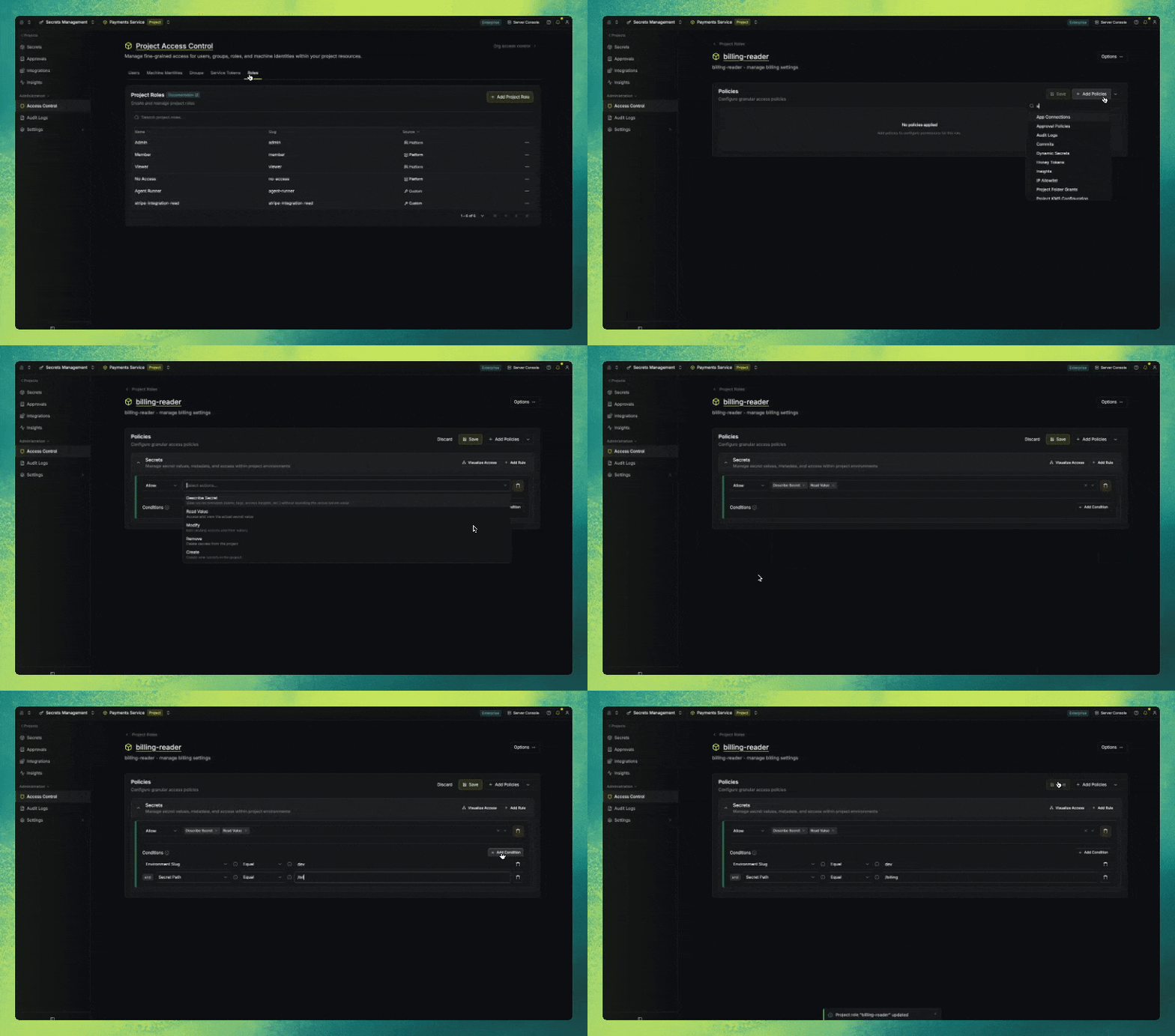
This was powerful, but not intuitive. It required understanding every Infisical concept, our data hierarchy, and that specific instance’s setup. We can’t assume this of every user, so additional privileges risked two failure modes:
- Users could misconfigure the privileges they wanted to provision and provide too much or too little access.
- Users could say “I don’t have time for that” and grant broader access, which would compromise their security posture.
Additional privileges also stored paths as strings, and renaming a folder broke them. Folders have a folderID UUID, which means renaming a folder or moving it from one environment to another won’t break the folder-based access grant.
We needed a solution that was intuitive to users. Folders were the right place because we ship no default folder structure. If a folder exists, users know why and what’s in it, because they put it there. Folder-based RBAC simplifies the translation of the access problem in the user’s mind to a configuration in Infisical.
The user-facing outcome is simpler, but the engineering work was complex because we couldn’t just extend our existing model.
Why our RBAC system was too complex to extend
We couldn’t add yet another way to grant access that only works for folders because there are already many ways someone may have access to a secret. Here are just a few ways to define access in Infisical:
- A user can be a member of a project directly, and so can a machine identity.
- A group can hold the membership instead and contain both human and machine identities. They often arrive from SCIM, SAML, OIDC, or LDAP.
- Roles can be built-in or custom.
- Deprecated service tokens have a separate scope model we still evaluate.
This may seem messy, but most RBAC systems accumulate complexity after many yeses to customer requests. Infisical is open-source, so we can’t deprecate any of these without potentially causing an issue in a self-hosted instance somewhere. Secrets are also mission-critical, which means mistakes can cause outages or grind an engineering org to a halt.
That’s also because we didn’t migrate to a Zanzibar-style system like SpiceDB or OpenFGA. Adopting one would mean rewriting every permission check and asking every self-hosted customer to run another stateful service and introduce breaking changes.
Any access system we’d build needed to work with everything that already existed. That meant we had to tackle this project in two phases:
First, we needed to standardize permissions, then the logic to apply the correct permission. The latter was the harder engineering problem, but the former was the foundation for it to work.
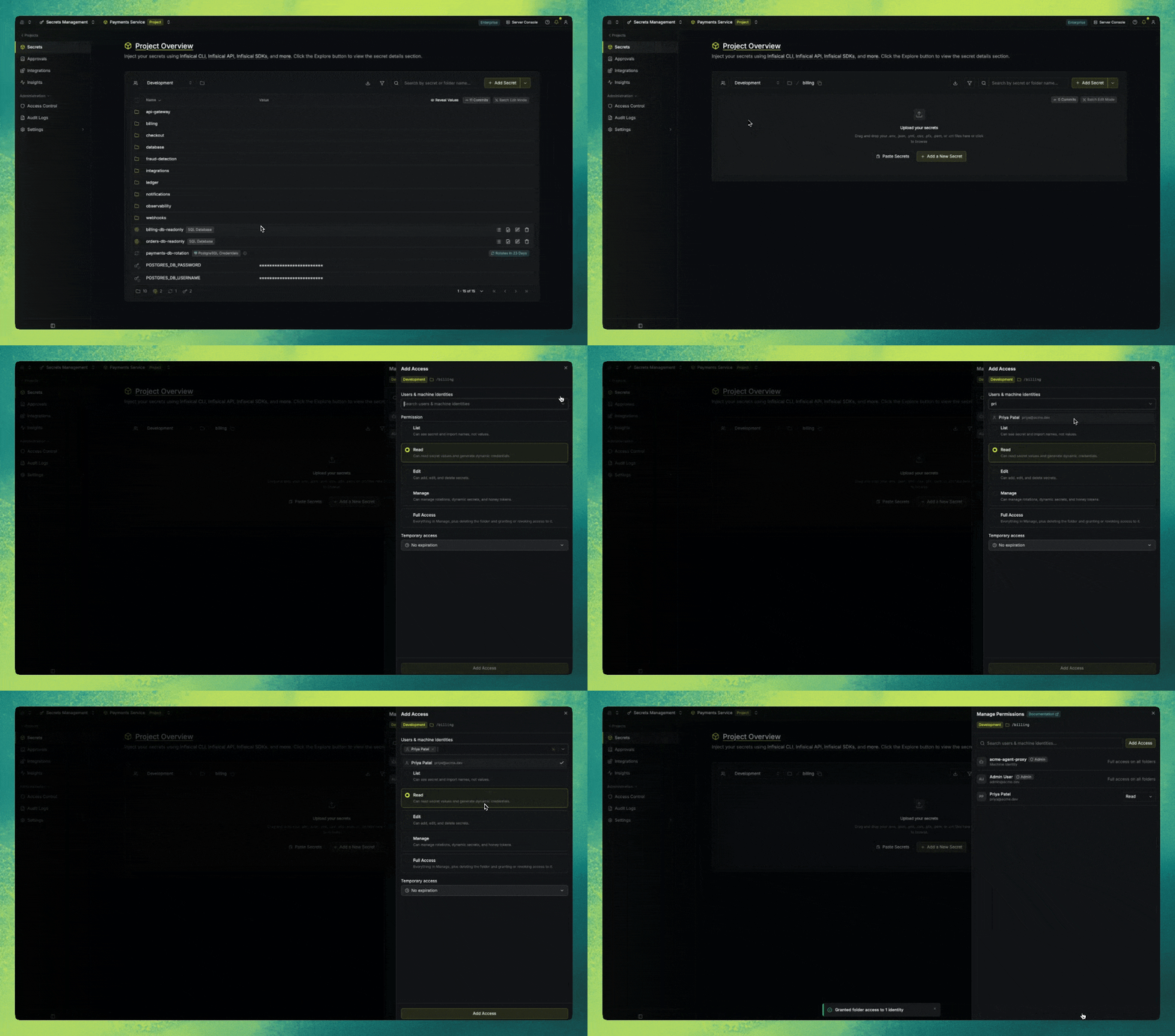
The five standard permission tiers we built
We first built a list of five tiers of permissions. These are more custom than generic read and write permissions, but quite intuitive.
| Tier | What it adds |
|---|---|
| List | See which secrets exist, and their names, without their values |
| Read | Read values, view commit history, take a dynamic secret lease |
| Edit | Create, edit, and delete secrets and imports |
| Manage | Configure rotations, dynamic secrets, syncs, and honey tokens |
| Full Access | Grant folder access to other people |
These permissions are the building blocks for our implementation of folder-based access. Technically, folder-based RBAC is stored as an Additional Privilege. They exist as a row in the additional_privileges table and reuse some columns like the user’s identity and whether a grant is temporary.
The feature introduces two new columns:
roleis the privilege tier from the table above.folderIDis the folder the grant gives access to.
Legacy Additional Privileges will have null in either new column, which distinguishes them from newer folder-based grants. This lets Additional Privileges keep working for existing users, while some checks ensure no row attempts to use both models.
This meant we had configured folder-based privileges. Then came the logic required for those permissions to apply.
Making folder-based access “win”
Deliberately setting access on a folder supersedes everything inherited from roles, groups, and other privileges. Ensuring this wasn’t straightforward because the entire reason we’re building it is a collision with the access an identity’s role confers and the access it should have. An identity may have their access to any given object configured in multiple places, so we needed to ensure the folder-based access grant always won.
In CASL checks, the last matching rule wins and a deny beats an allow. So to keep all existing systems functional, we separated folder access into two layers:
- Layer one keeps the existing rules.
- Layer two is appended after it: it’s a block of deny rules covering every action on that folder, then the allow rules for whichever tier the grant carries.
[
  // from the contractor's "engineer" role, untouched
  {
    "action": ["readValue", "create", "delete"],
    "subject": "secrets",
    "conditions": { "environment": "prod" }
  },

  // layer two: deny everything inside /payments
  {
    "action": ["readValue", "create", "delete"],
    "subject": "secrets",
    "inverted": true,
    "conditions": { "environment": "prod", "secretPath": { "$eq": "/payments" } }
  },

  // then allow back only what the Read tier permits
  {
    "action": ["readValue"],
    "subject": "secrets",
    "conditions": { "environment": "prod", "secretPath": { "$eq": "/payments" } }
  }
]
The deny block is always identical and the tier only decides what gets allowed back. No tier is responsible for denying. That deny list is verified by a test that fails if anyone adds a new path-scoped permission without extending it.
We still support custom roles and permissions, as well as legacy Additional Privileges still exist, but this logic meant that the more intuitive folder-based RBAC superseded other grants.
Finally, we needed to ensure our cache stored the correct permissions.
How we solved cache invalidation
Caching permissions that are subject to change is hard (cache invalidation always is) because we needed to ensure any updates take immediate effect without slowing down response time.
In Infisical, permission checks happen on essentially every request, so we cache results and validate them with a fingerprint. Folder grants broke that, and fixing it required multiple attempts:
- First attempt: fingerprint the grant rows like everything else. A grant stores the folder ID, but the rules need a path, so we resolve the ID at compile time. This meant renaming a folder made every grant on it compile differently.
- Second attempt: fingerprint the folders the grants point at. This failed because a path is built by walking up an ancestor chain. Renaming
/achanges what a grant on/a/bresolves to while/a/b's own row sits untouched. You'd have to fingerprint most of the tree.
We finally shipped a version counter per project. It’s bumped up with each write operation to the given row, including every folder rename, move, and delete. It's read into the fingerprint instead of the cache key.
Conclusion
Building RBAC is not glamorous, but it’s important. And while people are unlikely to remark on how great any product’s RBAC, billing, or similar system is, the reverse is true: getting anything wrong here is certain to create complaints.
That’s why it’s important to make things “just work”.

Adilson
Engineering, Infisical