--- title: "Multi-Cloud Certificate Management: One Lifecycle Across AWS, Azure, GCP, and Windows" canonical: "https://infisical.com/blog/multi-cloud-certificate-management" published: "2026-10-20" tags: ["Technical"] source-index: https://infisical.com/llms.txt --- # Multi-Cloud Certificate Management: One Lifecycle Across AWS, Azure, GCP, and Windows Certificate management is built into every cloud provider. It has to be. If you have an Application Load Balancer on AWS, it needs a certificate. If you're using CloudFront as your CDN, it needs a certificate. If you are using App Runner as your container host, it needs a certificate. So AWS needs to offer a solution to issue those certificates, renew them, and attach them to the resource. The same goes for all other cloud providers. But what if your web tier sits behind AWS load balancers, your apps run on a fleet of legacy Windows hosts, and every company-issued laptop and phone carries its own certificate for Wi-Fi and VPN? Then you have AWS Certificate Manager for the load balancers, certificates someone installed by hand on each Windows host, and mobile device management (MDM) pushing Simple Certificate Enrollment Protocol (SCEP) profiles to a few hundred devices. That's three tools on three renewal schedules, and someone has to manage them all. Multi-cloud [certificate management](https://infisical.com/blog/certificate-management) solves this problem. The name says clouds, and in practice it covers everything that holds a certificate, including servers in a datacenter and devices in an MDM. With multi-cloud certificate management, you can set certificate policy once, in a single place, and issue and renew every certificate from there. Renewal becomes one process instead of three, and one system knows where every certificate is and when it's due. ## Why the cloud-native tools aren't enough on their own Each platform's certificate tool is scoped to that platform. AWS Certificate Manager issues and renews certificates for AWS resources, Key Vault does it for Azure, and GCP Certificate Manager for Google Cloud. If you are completely loyal to a single cloud provider, you can use that provider’s certificate tool. But most enterprises don’t have such loyalty (at least once the AWS credits run out). You might have a primary cloud, a second for failover, a CDN in front, and servers in a random data center running a critical legacy workload. For a relevant example, check out [Infisical’s subprocessors](https://infisical.com/subprocessors). 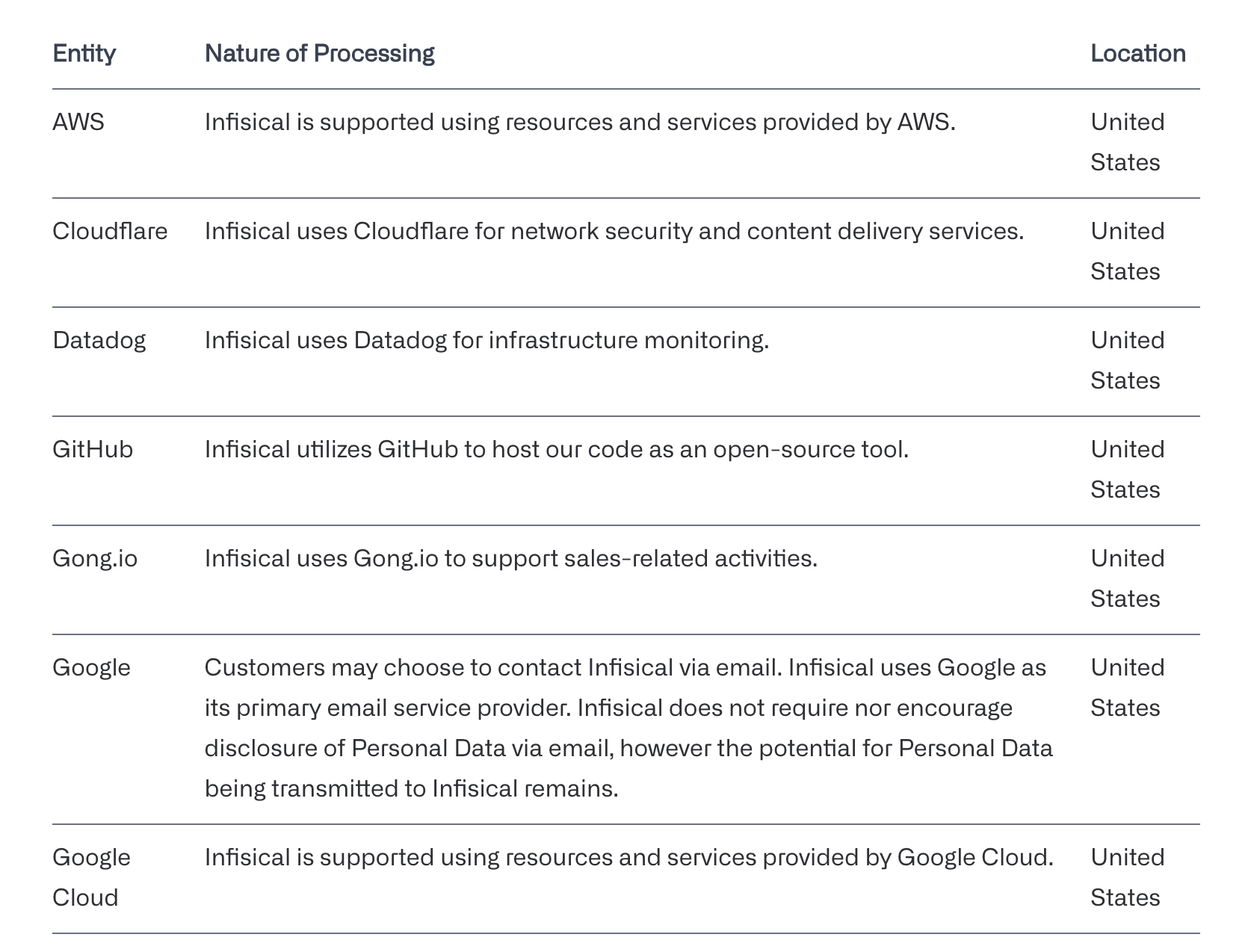 You’ll see AWS, Cloudflare, and Google Cloud on the list. Multiple cloud providers are normal, and as companies grow, having redundancy or multi-cloud options for your customers is not just normal, but contractual. Even a single hostname ends up with more than one certificate. Say api.example.com is served through Cloudflare, your CDN. The browser connects to Cloudflare, which presents a certificate for api.example.com. Cloudflare then connects to your origin, an Application Load Balancer in AWS, which presents its own certificate for the same name. That's two certificates for one hostname: one managed by Cloudflare and one by ACM, each with its own private key and renewal.  These tools can’t see each other. No single place shows every certificate, whether they follow the same policy, or whether the last renewal reached every environment. So the answers live in a spreadsheet. Expiry dates go in a shared calendar, and someone checks each environment by hand. That was workable when a public certificate lasted a year. But here is the spanner in your carefully-crafted spreadsheet: the maximum lifetime is now 200 days, drops to 100 in March 2027, and hits 47 days in March 2029. So the same coordination has to happen every few weeks instead of once a year. Public TLS is only part of it. The same organization is issuing internal service certificates, mTLS identities for a service mesh, VPN and network-device certificates, and device certificates through MDM. Those come from private CAs and enroll through ACME, SCEP, or EST. This is another layer of certificate management that every enterprise has to build. ## The two types of certificate management tools Single-platform tools are the certificate managers each cloud provides for its own resources. They issue certificates, renew them, and attach them to whatever runs on that platform.
](https://images.ctfassets.net/rzezkvk1rm65/6XpbAlkwIVd12yZPml4kUH/45c5b05bfc3a32b95dec87913a4fabaf/infisical-subprocessors-multi-cloud.png)
](https://images.ctfassets.net/rzezkvk1rm65/3LfhdVNUYLb6wr4sPxjRs4/d400c9c50aeebecd0afc3401942c809b/one-hostname-two-certificates.png)
| Tool | Where it works |
|---|---|
| AWS Certificate Manager | Certificates for AWS resources such as load balancers, CloudFront, and API Gateway |
| Azure Key Vault certificates | Certificates for Azure resources such as App Service and Application Gateway |
| Google Cloud Certificate Manager | Certificates for Google Cloud load balancers |
| Cloudflare Advanced Certificate Manager | Certificates Cloudflare presents at its edge, with control over the CA, validity period, and hostnames |
| Active Directory Certificate Services | Certificates for domain-joined Windows hosts and users, through Group Policy |
We’re not here to tell you these tools are bad: they’re not. They are great if you are contained within a single cloud ecosystem. ACM/Key Vault/Certificate Manager will all renew a certificate on a load balancer/CDN/API without anyone touching it. They just don't see anything outside their own platform.

A multi-cloud certificate manager sits above those tools and runs the whole certificate lifecycle from one place:

- It keeps one inventory of every certificate, where each one is deployed, and when it expires. Discovery scans fill in the ones nobody recorded.
- It holds one policy for which certificate authorities are allowed, what names a certificate can carry, how long it's valid, and what key type it uses.
- It issues certificates from a private CA or an external one such as Let's Encrypt or DigiCert, and renews them on schedule before they expire.
- It pushes each renewed certificate into the store the cloud already reads, in the form that cloud expects.

The push will be different for every destination:
| Destination | What deployment means |
|---|---|
| AWS | Importing the certificate into ACM, where load balancers, CloudFront, and API Gateway pick it up |
| Azure | Writing it to Key Vault, where App Service and Application Gateway read it |
| GCP | Updating the certificate in Certificate Manager, which the load balancer serves |
| Cloudflare | Replacing the custom certificate on the zone |
| Windows hosts | Copying the certificate to each server over WinRM and binding it to the site or service that uses it |
Company-issued devices work the other way round. The MDM profile tells each device where to enroll, and the device requests its own certificate over SCEP and renews it itself. So, you keep the single-platform tools. They still attach the certificate to the end service and serve it. But the multi-cloud tool turns separate renewal processes into a single workflow, lets you see every certificate in one place, renews them all on one schedule, and confirms each renewal reached every destination. ## How multi-cloud certificate management works with Infisical Infisical starts from the policy side. - You connect [certificate authorities](https://infisical.com/docs/documentation/platform/pki/ca/overview), either private CAs that Infisical runs or external ones such as Let's Encrypt, DigiCert, AWS Private CA, Microsoft Active Directory Certificate Services, and Venafi. - [Certificate profiles](https://infisical.com/docs/documentation/platform/pki/settings/profiles) set the rules for what they can issue, such as allowed names, validity, and key type. - Each service gets an [Application](https://infisical.com/docs/documentation/platform/pki/applications/overview). Profiles attach to the Application, and every certificate for that service lives under it. Infisical gets certificates into each cloud with [certificate syncs](https://infisical.com/docs/documentation/platform/pki/applications/certificate-syncs/overview). Infisical renews the certificate, delivers it to the destination, and automatically sends every later renewal to the same place. Destinations include AWS Certificate Manager and Elastic Load Balancer listeners, Azure Key Vault, GCP Certificate Manager, Cloudflare, and Windows and Linux servers over WinRM or SSH. Company-issued devices aren't synced. Their MDM profile points them at Infisical's [SCEP endpoint](https://infisical.com/docs/documentation/platform/pki/applications/enrollment-methods/overview), and each device requests and renews its own certificate, which then shows up in the same inventory. Put together, the whole thing looks like this: 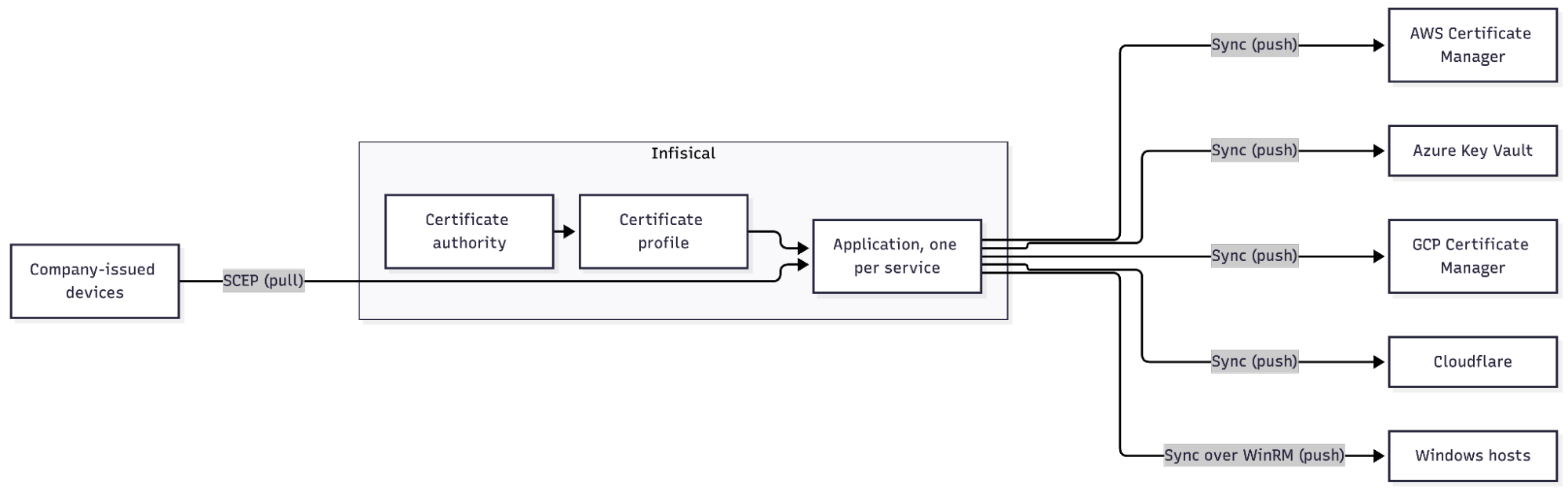 For certificates that already exist outside all of this, [certificate discovery](https://infisical.com/docs/documentation/platform/pki/discovery/overview) scans your domains and IP ranges, records where each certificate is installed, and matches what it finds to the inventory. Anything it finds that Infisical doesn't know about can be imported and managed from there. [Alerts](https://infisical.com/docs/documentation/platform/pki/applications/alerting/overview) cover expiry for both. Across clouds and servers, renewal becomes a sequence: 1. Request the new certificate from the CA. 2. Deliver the certificate and chain to each destination. 3. Update the reference in each destination so it serves the new certificate. 4. Confirm that each endpoint is serving it. 5. Retire the old certificate. Done by hand, step 2 or 3 gets missed. Say you get a certificate from DigiCert for api.example.com and install it everywhere yourself. At renewal, the new certificate reaches Cloudflare and the AWS load balancers, but two Windows hosts are missed.
](https://images.ctfassets.net/rzezkvk1rm65/2Fhntg0Lm0WpZjRwcefeHf/df794ba4969095fa5870eac2a3dffec4/infisical-multi-cloud-certificate-flow.png)
| Destination | Install | Certificate being served |
|---|---|---|
| Cloudflare | Done | New |
| AWS | Done | New |
| Windows hosts | Missed | Old |
Two hosts are still serving the old certificate. ACM has no idea those hosts exist, and the updated hosts don't know about the two that weren't. The old certificate keeps working on them until it expires, which is when anyone finds out.

With Infisical, steps 2 and 3 run automatically. When a certificate renews, every sync configured for it pushes the new certificate to its destination, and each sync handles its own cloud's reference. In AWS, the renewed certificate lands under the same ARN, so the listener doesn't need to be repointed. In Azure, it becomes a new version of the same Key Vault certificate. In GCP, the existing resource is updated in place. On a Windows host, the sync copies the certificate over WinRM and binds it to the site or service, so IIS picks it up without a login.

A sync can still fail if the destination rejects it, say because a permission was removed or a host is off the network. When that happens, the old certificate stays in place rather than being removed, the other clouds are unaffected, and you re-run that one sync. Confirming that every endpoint is actually serving the new certificate is a separate step. Discovery scans do that from the outside, by connecting to each hostname and checking which certificate it presents.

## Setting this up across an existing multi-cloud workflow

The cloud tools renew the certificates they issue themselves. They don't renew imported ones, a Windows host doesn't renew anything on its own, and a certificate that has to be the same in more than one place is always imported. At 47 days, that means replacing it on every load balancer and every host every month, which is [where manual renewal stops scaling](https://infisical.com/webinar/certificate-management).

Those are the certificates to move into Infisical first. The setup involves:

1. Find every place TLS terminates. A discovery scan across your public domains and internal IP ranges catches the certificates nobody wrote down, including the ones on hosts.
2. Create an Application per service and import or issue its certificates.
3. Set the profile for each one, including the CA and the allowed names.
4. Configure a sync to each cloud and each Windows host that serves the certificate, with auto-sync on.
5. Point the MDM's SCEP profile at Infisical, so company-issued devices enroll and renew there instead.
6. Turn on expiry alerts.
7. Test a full renewal and a failover (if you run a standby) before the 100-day limit takes effect in March 2027.

Once that's in place, each certificate that spans more than one place is issued once, renewed on one schedule, and carried into every cloud and onto every host by its syncs. The device certificates renew themselves from the SCEP profile and land in the same inventory. The move to 100-day and then 47-day lifetimes only changes how often the first part happens.

## Where this leaves the three certificates

The load balancers on AWS, the fleet of Windows hosts, and the few hundred company-issued devices are still there, along with ACM, the hosts' certificate stores, and the MDM. The load balancer and host certificates are now issued from one place, renew on one schedule, and land in ACM and on every host without anyone logging in. The devices enroll and renew themselves over SCEP, and every one of them shows up in the same inventory as the rest. Nobody keeps the spreadsheet, because the inventory already knows where each certificate is and when it's due.

By 2029, whatever renewal process you run by hand today runs every few weeks. [Infisical Certificate Management](https://infisical.com/platform/certificate-management) runs it for you, in the cloud or self-hosted, with syncs to ACM, Key Vault, GCP Certificate Manager, Cloudflare, and Windows and Linux servers, and SCEP enrollment for devices.

If you're planning that move, [watch the webinar on preparing for 47-day certificates](https://infisical.com/webinar/certificate-management). For everything before and after the multi-cloud part, from discovery to revocation, [read the certificate management guide](https://infisical.com/blog/certificate-management).
/blog/multi-cloud-certificate-management.md · raw source