> ## Documentation Index
> Fetch the complete documentation index at: https://infisical.com/docs/llms.txt
> Use this file to discover all available pages before exploring further.
# Cloudflare Secrets Store sync
> Learn how to configure a Cloudflare Secrets Store sync for Infisical.
A Cloudflare Secrets Store Sync pushes secrets from Infisical into your Cloudflare account's [Secrets Store](https://developers.cloudflare.com/secrets-store/), where Workers, AI Gateway, and Containers can use them. Each Infisical secret becomes a Secrets Store secret, with the same name unless you customize key names to add a prefix or suffix.
## Prerequisites
* A [project with secrets configured](/docs/documentation/platform/secrets-mgmt/quick-starts/deliver-first-secret)
* A [Cloudflare app connection](/docs/integrations/app-connections/cloudflare#cloudflare-secrets-store) whose API token has the Secrets Store permissions
* A store in your Cloudflare account (Cloudflare creates it the first time a Super Administrator or Secrets Store Admin opens **Secrets Store** in the Cloudflare dashboard)
## Set up the sync in Infisical
To create the sync using the API, use the [Create Cloudflare Secrets Store Sync](/docs/api-reference/endpoints/secret-syncs/cloudflare-secrets-store/create) endpoint.
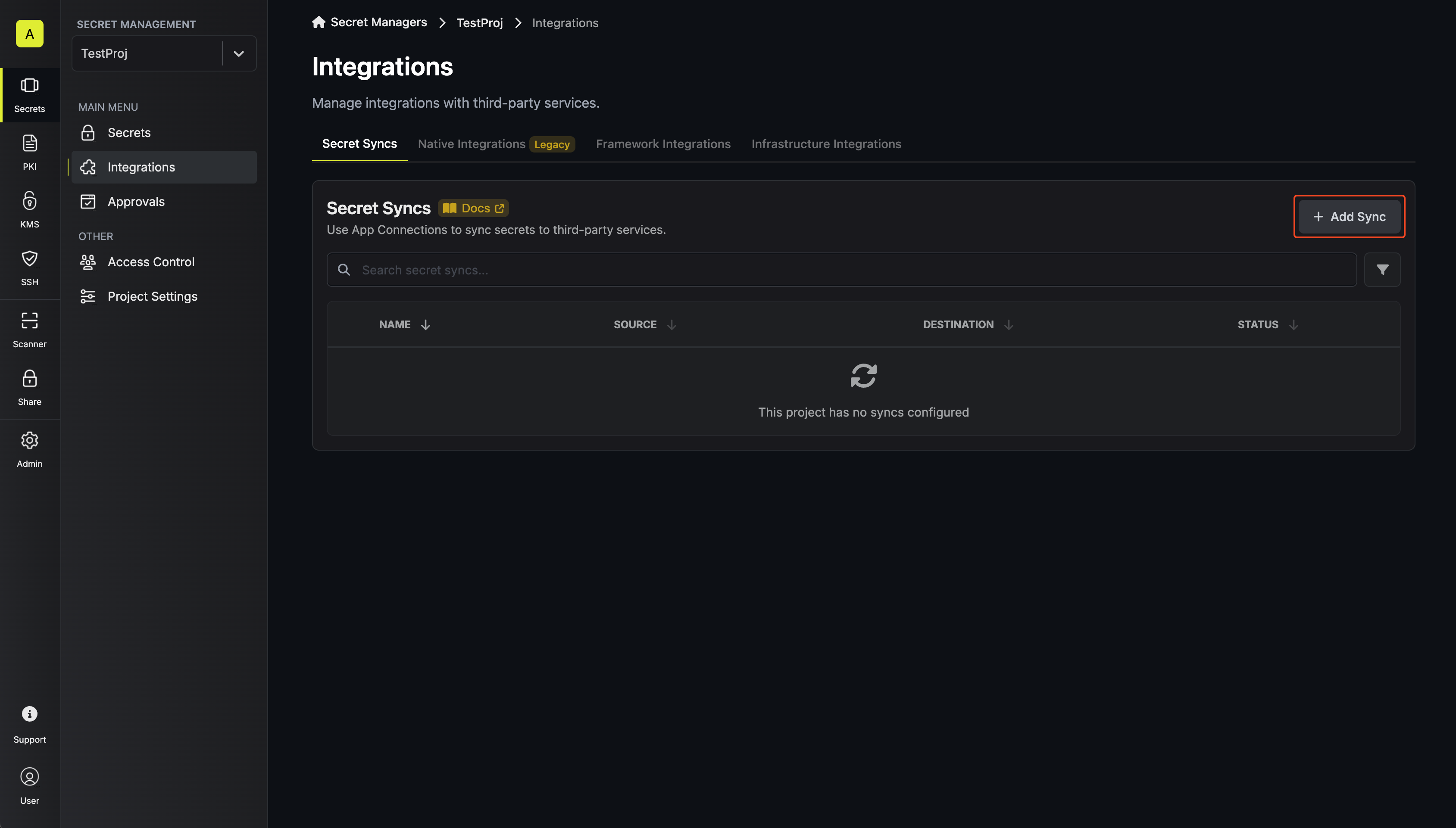
In your project, go to **Integrations** and open the **Secret Syncs** tab. Select **+ Add Sync**.
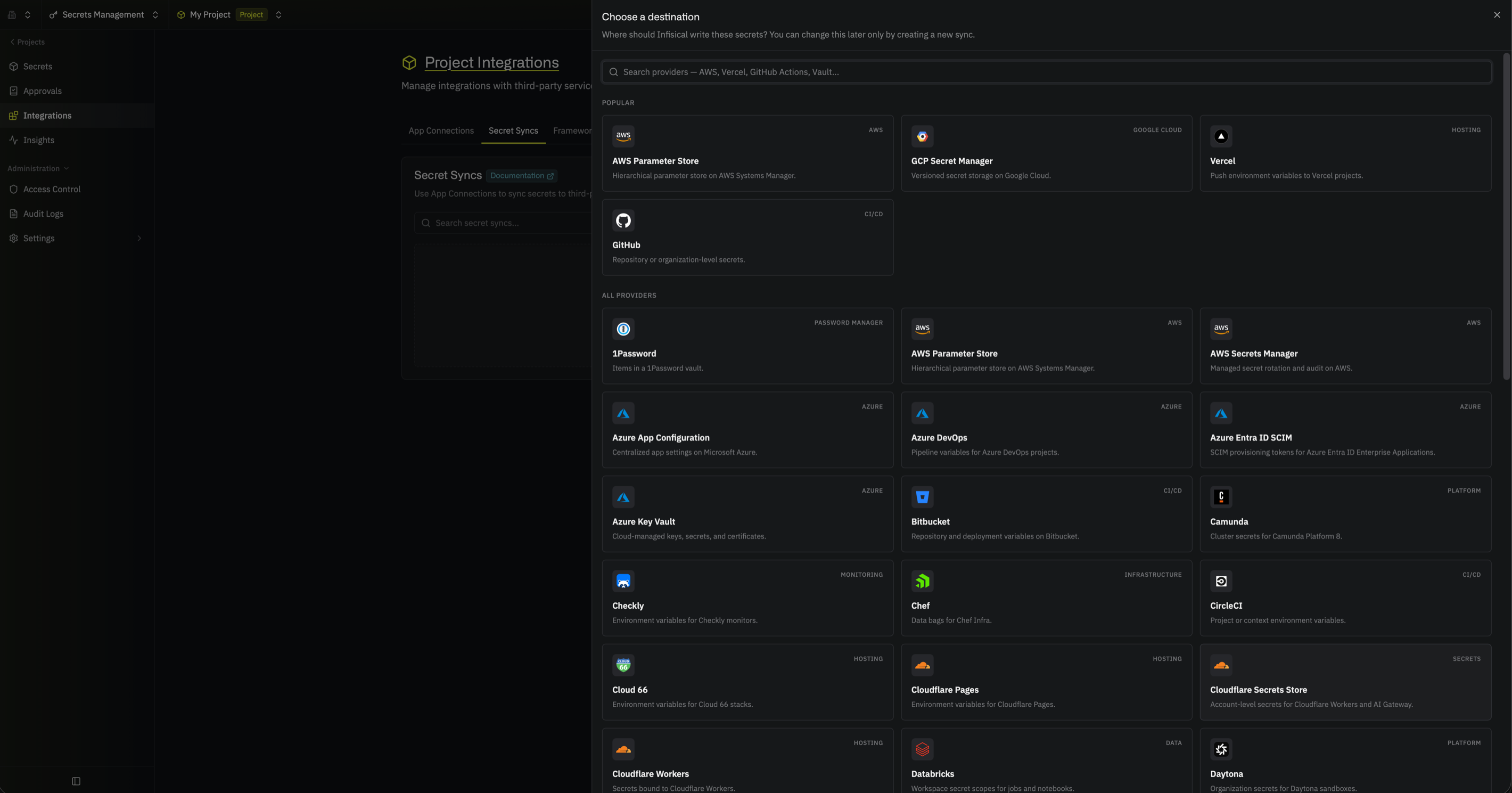
 Then, select the **Cloudflare Secrets Store** sync.
 Under **Source**, choose which secrets to sync from Infisical:
* **Environment**: The project environment to retrieve secrets from
* **Secret Path**: The folder path to retrieve secrets from
* **Include secrets from all subfolders**: Also syncs the secrets in every folder beneath the path (secret names must be unique across all of them)
Secrets Store secret names can contain only letters, digits, hyphens, and underscores, and so can the prefix or suffix you add when you customize key names. If any secret at this path has a name Cloudflare rejects, the sync fails without writing any secrets, and the error names each rejected key.
If you need to sync secrets from multiple folder locations, use [secret imports](/docs/documentation/platform/secret-reference#secret-imports).
Then select **Continue**.
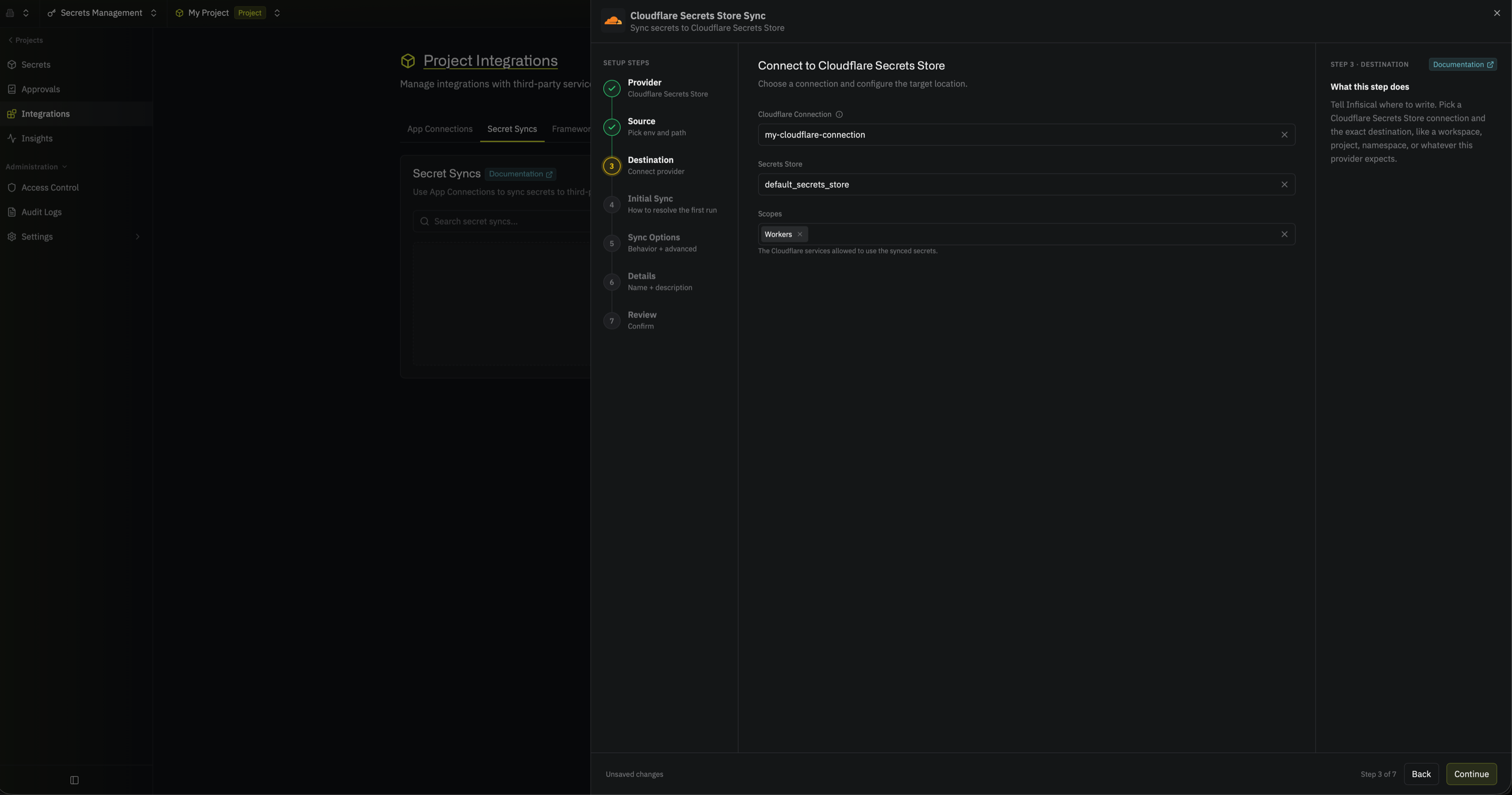
Under **Destination**, select the Cloudflare app connection the sync will use, then choose where secrets go in Cloudflare. To create a connection here, select **Create Connection** in the **Cloudflare Connection** dropdown and fill in the fields described in the [Cloudflare app connection guide](/docs/integrations/app-connections/cloudflare).
* **Secrets Store**: The store to sync secrets to
* **Scopes**: The Cloudflare products allowed to use the synced secrets: **Workers**, **AI Gateway**, or **Containers** (defaults to **Workers**)
Infisical applies these scopes every time it syncs, so if you remove a scope from the sync, every secret the sync manages loses that scope.
Under **Source**, choose which secrets to sync from Infisical:
* **Environment**: The project environment to retrieve secrets from
* **Secret Path**: The folder path to retrieve secrets from
* **Include secrets from all subfolders**: Also syncs the secrets in every folder beneath the path (secret names must be unique across all of them)
Secrets Store secret names can contain only letters, digits, hyphens, and underscores, and so can the prefix or suffix you add when you customize key names. If any secret at this path has a name Cloudflare rejects, the sync fails without writing any secrets, and the error names each rejected key.
If you need to sync secrets from multiple folder locations, use [secret imports](/docs/documentation/platform/secret-reference#secret-imports).
Then select **Continue**.
Under **Destination**, select the Cloudflare app connection the sync will use, then choose where secrets go in Cloudflare. To create a connection here, select **Create Connection** in the **Cloudflare Connection** dropdown and fill in the fields described in the [Cloudflare app connection guide](/docs/integrations/app-connections/cloudflare).
* **Secrets Store**: The store to sync secrets to
* **Scopes**: The Cloudflare products allowed to use the synced secrets: **Workers**, **AI Gateway**, or **Containers** (defaults to **Workers**)
Infisical applies these scopes every time it syncs, so if you remove a scope from the sync, every secret the sync manages loses that scope.
 Then select **Continue**.
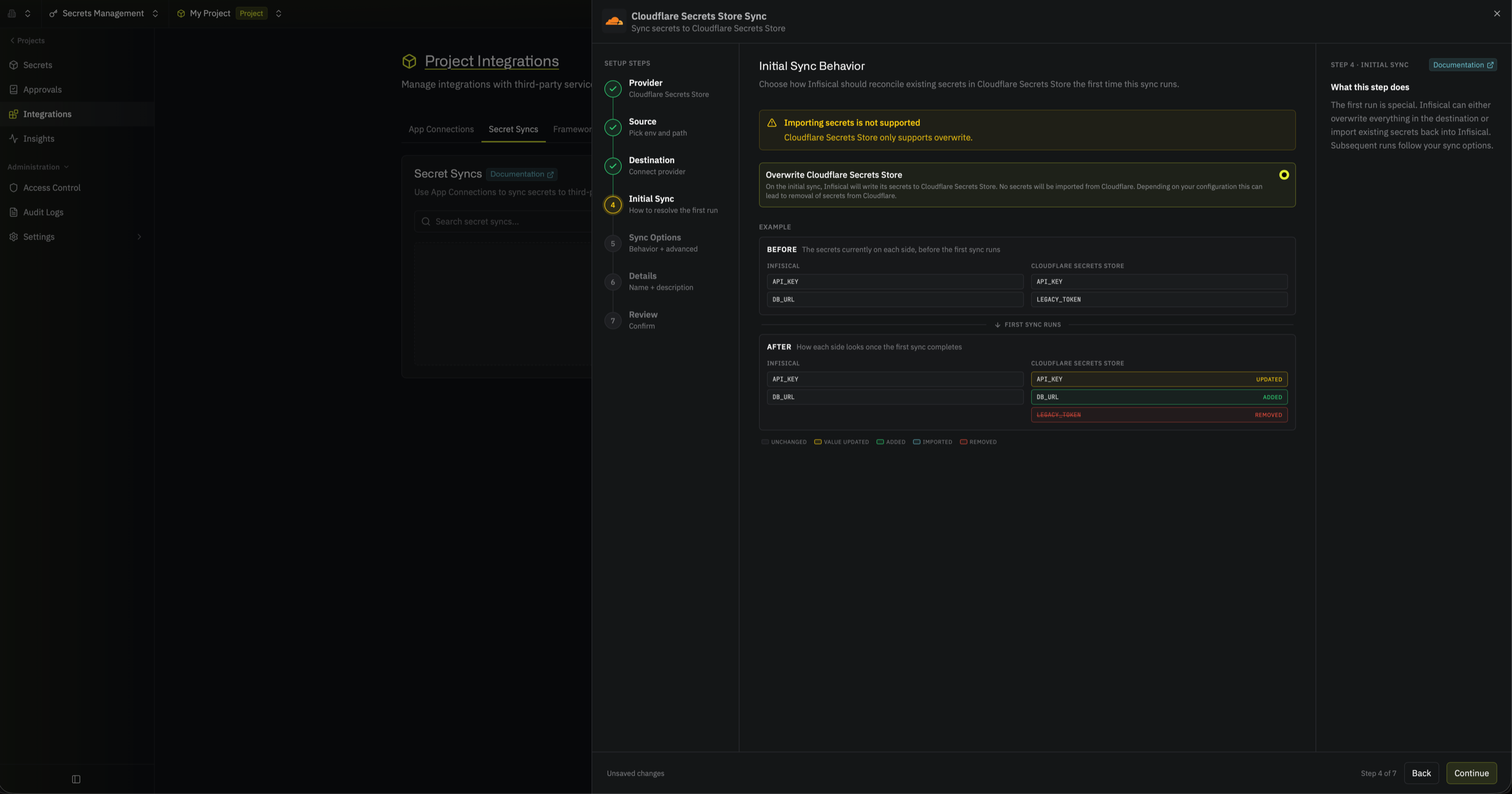
Under **Initial Sync Behavior**, select **Overwrite Cloudflare Secrets Store**, then select **Continue**.
Cloudflare never returns a secret's value, so this sync can't import existing Secrets Store secrets into Infisical. **Overwrite Cloudflare Secrets Store** is the only option.
Then select **Continue**.
Under **Initial Sync Behavior**, select **Overwrite Cloudflare Secrets Store**, then select **Continue**.
Cloudflare never returns a secret's value, so this sync can't import existing Secrets Store secrets into Infisical. **Overwrite Cloudflare Secrets Store** is the only option.
 Under **Sync Options**, choose how secrets are synced:
* **Prevent secret deletion**: When enabled, Infisical adds and updates secrets in Cloudflare but never deletes them; enable this if you manage some Secrets Store secrets outside of Infisical
* **Auto-sync on changes**: When enabled, secrets sync to Cloudflare automatically as the source changes; turn it off to sync manually only
* **Customize key names**: Adds a prefix or suffix to every synced name, using `{{secretKey}}` for the original name and `{{environment}}` for the environment slug
Secrets Store secrets belong to the whole Cloudflare account, so a sync can change secrets that were created outside Infisical. If you don't customize key names, the sync treats every secret in the store as one it manages:
* If a Secrets Store secret has the same name as an Infisical secret, the sync overwrites the Secrets Store secret's value and scopes
* If **Prevent secret deletion** is off, every Secrets Store secret that isn't in Infisical is deleted
With customized key names, the sync writes only names with your prefix or suffix, and deletes only Secrets Store secrets whose names match it.
Before the first sync, customize key names or keep **Prevent secret deletion** on. **Prevent secret deletion** is on by default when you create the sync in the UI, but off unless you set `disableSecretDeletion` when you create it through the API.
Under **Sync Options**, choose how secrets are synced:
* **Prevent secret deletion**: When enabled, Infisical adds and updates secrets in Cloudflare but never deletes them; enable this if you manage some Secrets Store secrets outside of Infisical
* **Auto-sync on changes**: When enabled, secrets sync to Cloudflare automatically as the source changes; turn it off to sync manually only
* **Customize key names**: Adds a prefix or suffix to every synced name, using `{{secretKey}}` for the original name and `{{environment}}` for the environment slug
Secrets Store secrets belong to the whole Cloudflare account, so a sync can change secrets that were created outside Infisical. If you don't customize key names, the sync treats every secret in the store as one it manages:
* If a Secrets Store secret has the same name as an Infisical secret, the sync overwrites the Secrets Store secret's value and scopes
* If **Prevent secret deletion** is off, every Secrets Store secret that isn't in Infisical is deleted
With customized key names, the sync writes only names with your prefix or suffix, and deletes only Secrets Store secrets whose names match it.
Before the first sync, customize key names or keep **Prevent secret deletion** on. **Prevent secret deletion** is on by default when you create the sync in the UI, but off unless you set `disableSecretDeletion` when you create it through the API.
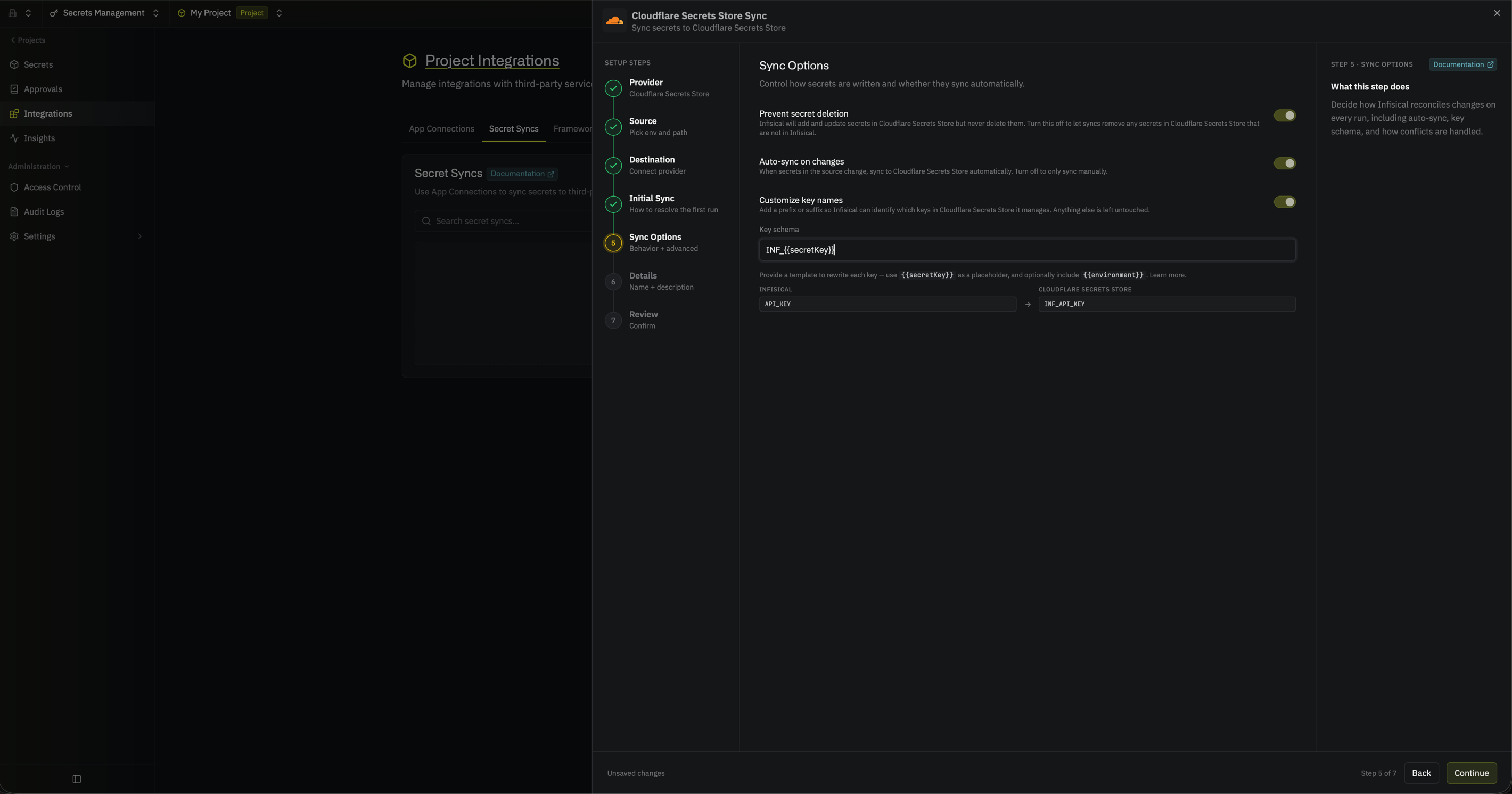 Then select **Continue**.
Give the sync a **Name** and an optional **Description**. The name must be slug-friendly.
Then select **Continue**.
Give the sync a **Name** and an optional **Description**. The name must be slug-friendly.
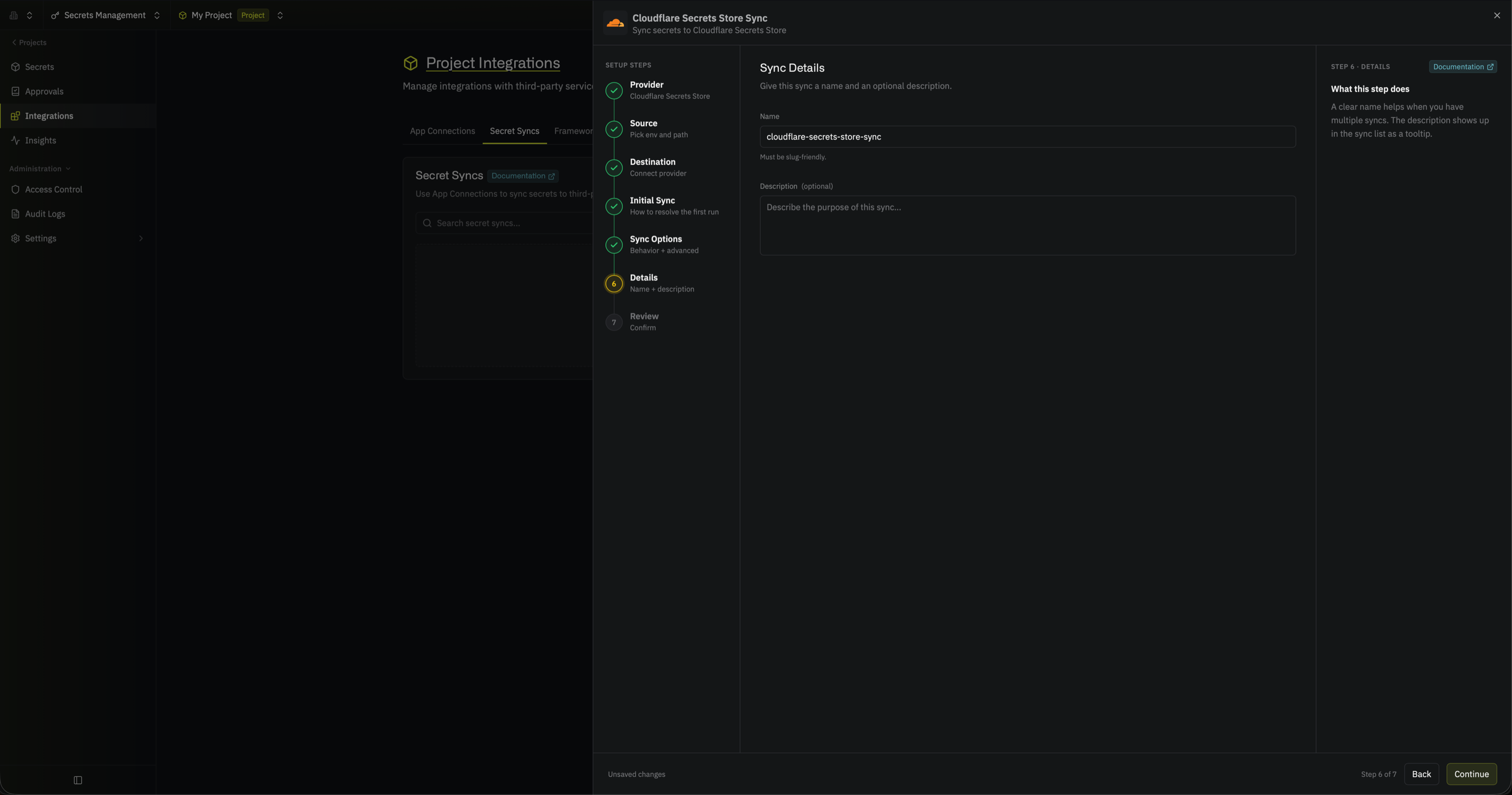 Then select **Continue**.
Review your Cloudflare Secrets Store Sync configuration, then select **Create Sync**.
Then select **Continue**.
Review your Cloudflare Secrets Store Sync configuration, then select **Create Sync**.
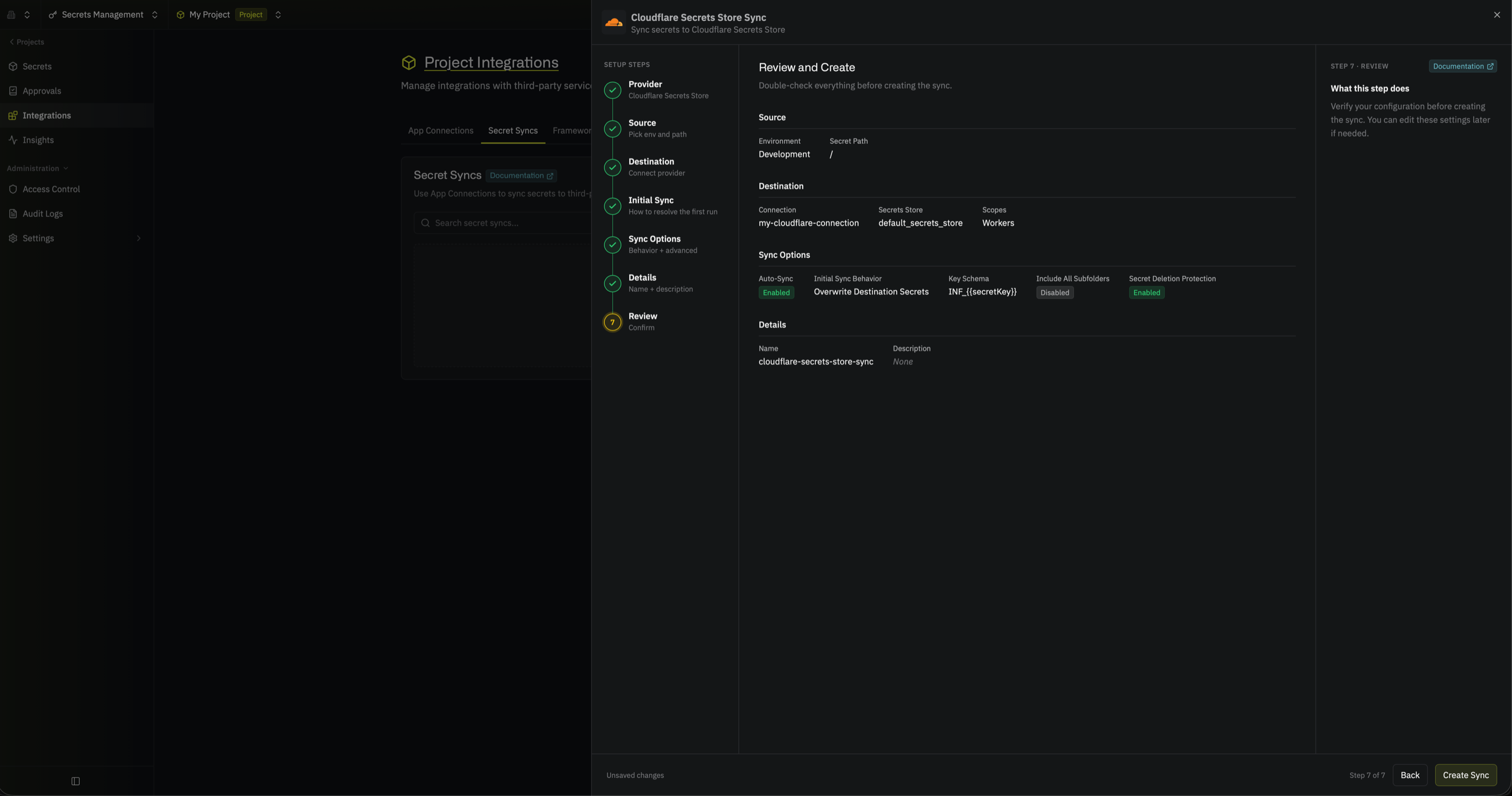 The sync is created. If **Auto-sync on changes** is enabled, it begins syncing secrets to your Secrets Store right away.
## FAQ
While Secrets Store is in open beta, a Cloudflare account can hold 100 Secrets Store secrets in total, including secrets that other syncs and tools created. Before writing anything, the sync checks whether its new secrets fit. If they don't fit, the sync fails without writing any secrets. Secrets that the sync removes are deleted only after the new secrets are created, so they still count toward the limit during that sync.
Cloudflare can't rename a secret, so the sync creates a secret with the new name. If **Prevent secret deletion** is off, the sync then deletes the secret with the old name. Update the `secret_name` in any [Worker binding](https://developers.cloudflare.com/secrets-store/integrations/workers/) that used the old name.
## Next steps
Manage the API token and permissions the sync uses.
Learn how syncs run, how key schemas work, and how to sync subfolders.
This documentation is built and hosted on [Mintlify](https://mintlify.com), a developer documentation platform.
The sync is created. If **Auto-sync on changes** is enabled, it begins syncing secrets to your Secrets Store right away.
## FAQ
While Secrets Store is in open beta, a Cloudflare account can hold 100 Secrets Store secrets in total, including secrets that other syncs and tools created. Before writing anything, the sync checks whether its new secrets fit. If they don't fit, the sync fails without writing any secrets. Secrets that the sync removes are deleted only after the new secrets are created, so they still count toward the limit during that sync.
Cloudflare can't rename a secret, so the sync creates a secret with the new name. If **Prevent secret deletion** is off, the sync then deletes the secret with the old name. Update the `secret_name` in any [Worker binding](https://developers.cloudflare.com/secrets-store/integrations/workers/) that used the old name.
## Next steps
Manage the API token and permissions the sync uses.
Learn how syncs run, how key schemas work, and how to sync subfolders.
This documentation is built and hosted on [Mintlify](https://mintlify.com), a developer documentation platform.