> ## Documentation Index
> Fetch the complete documentation index at: https://infisical.com/docs/llms.txt
> Use this file to discover all available pages before exploring further.
# Azure App Configuration Sync
> Learn how to configure an Azure App Configuration Sync for Infisical.
**Prerequisites:**
* Set up and add secrets to [Infisical Cloud](https://app.infisical.com)
* Create an [Azure App Configuration Connection](/integrations/app-connections/azure-app-configuration)
* Ensure your network security policies allow incoming requests from Infisical to this secret sync provider, if network restrictions apply.
The Azure App Configuration Secret Sync requires the following permissions to be set on the user / service principal
for Infisical to sync secrets to Azure App Configuration: `Read Key-Value`, `Write Key-Value`, `Delete Key-Value`.
Any role with these permissions would work such as the **App Configuration Data Owner** role. Alternatively, you can use the **App Configuration Data Contributor** role for read/write access.
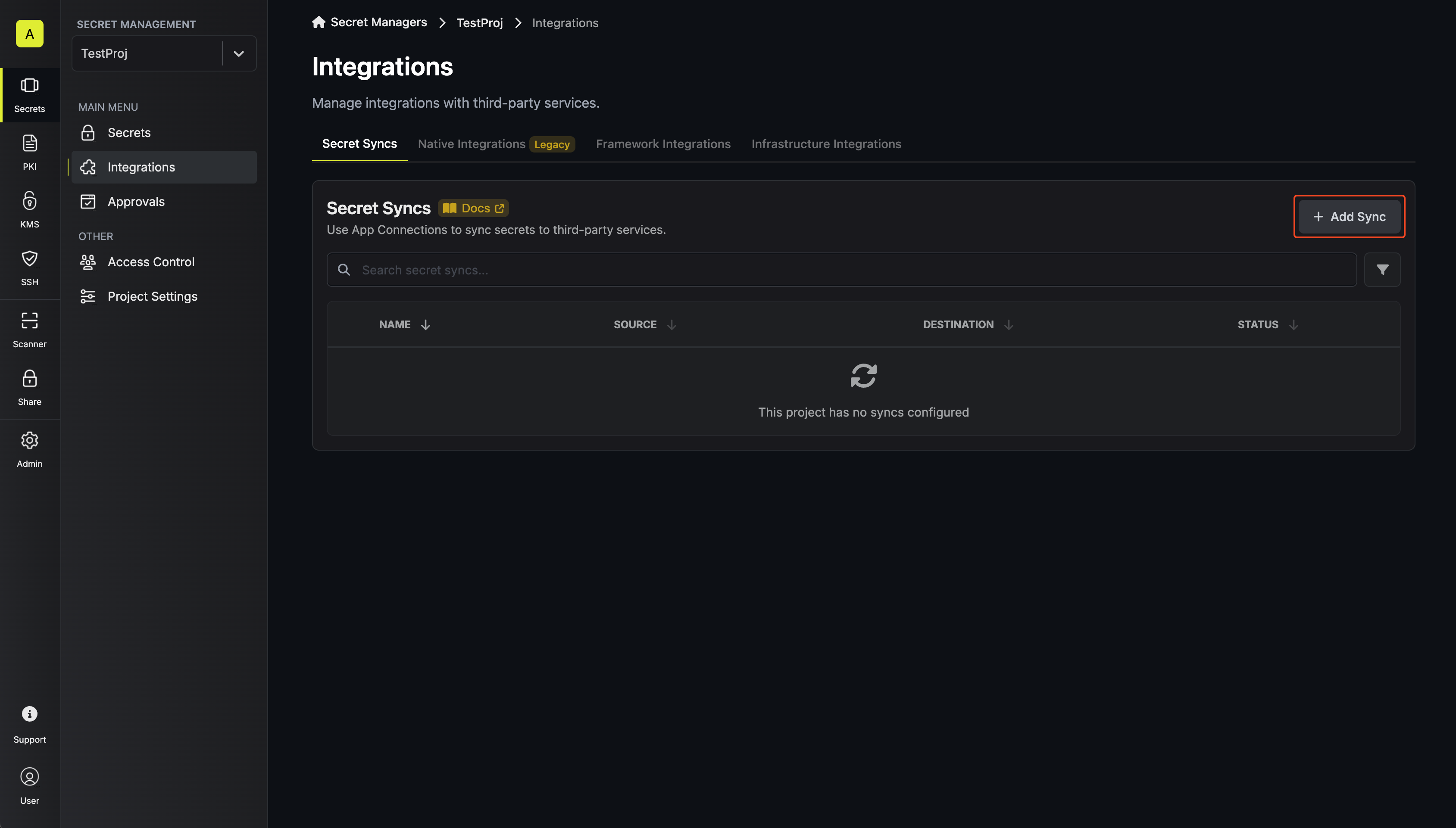
1. Navigate to **Project** > **Integrations** and select the **Secret Syncs** tab. Click on the **Add Sync** button.
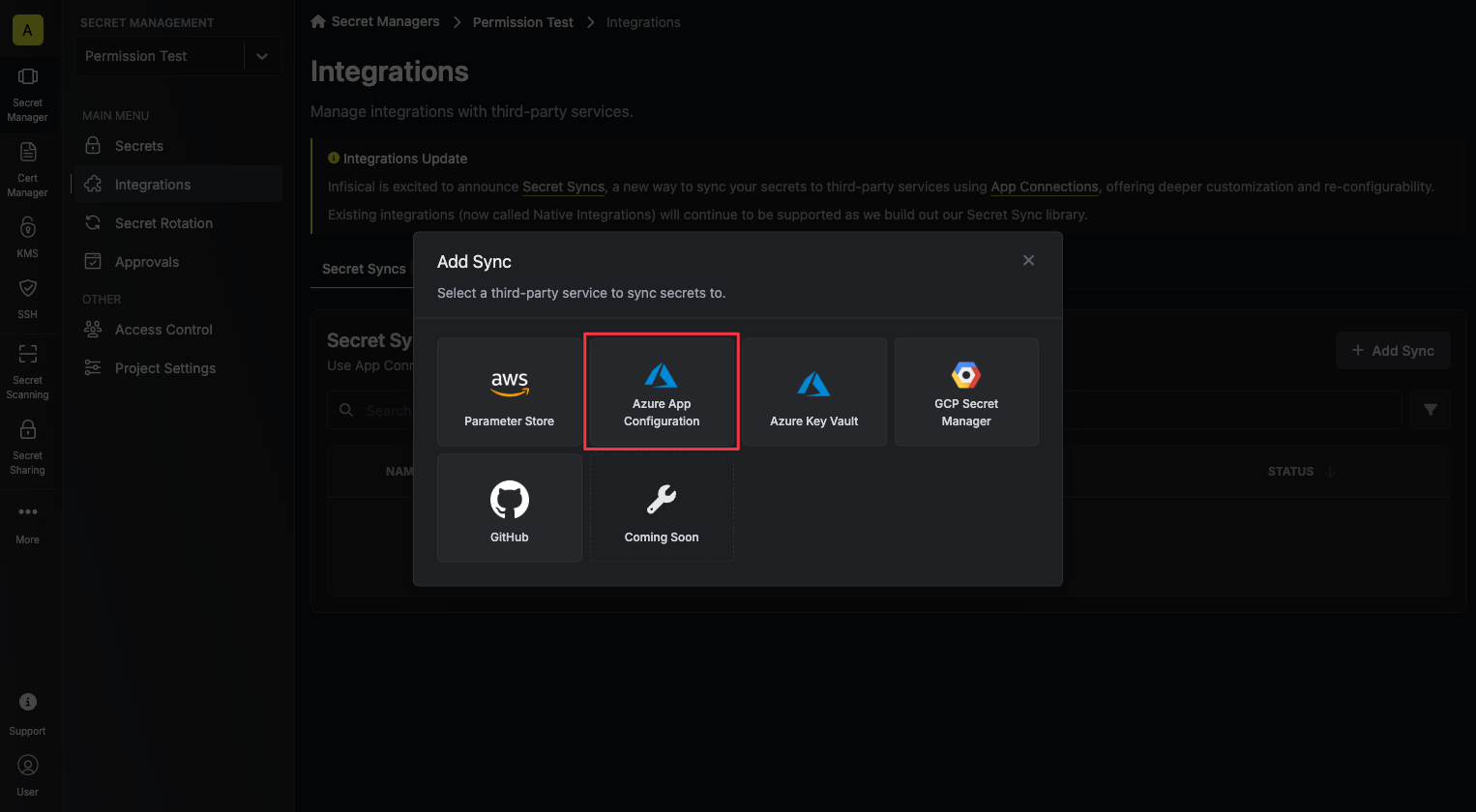
 2. Select the **Azure App Configuration** option.
 3. Configure the **Source** from where secrets should be retrieved, then click **Next**.
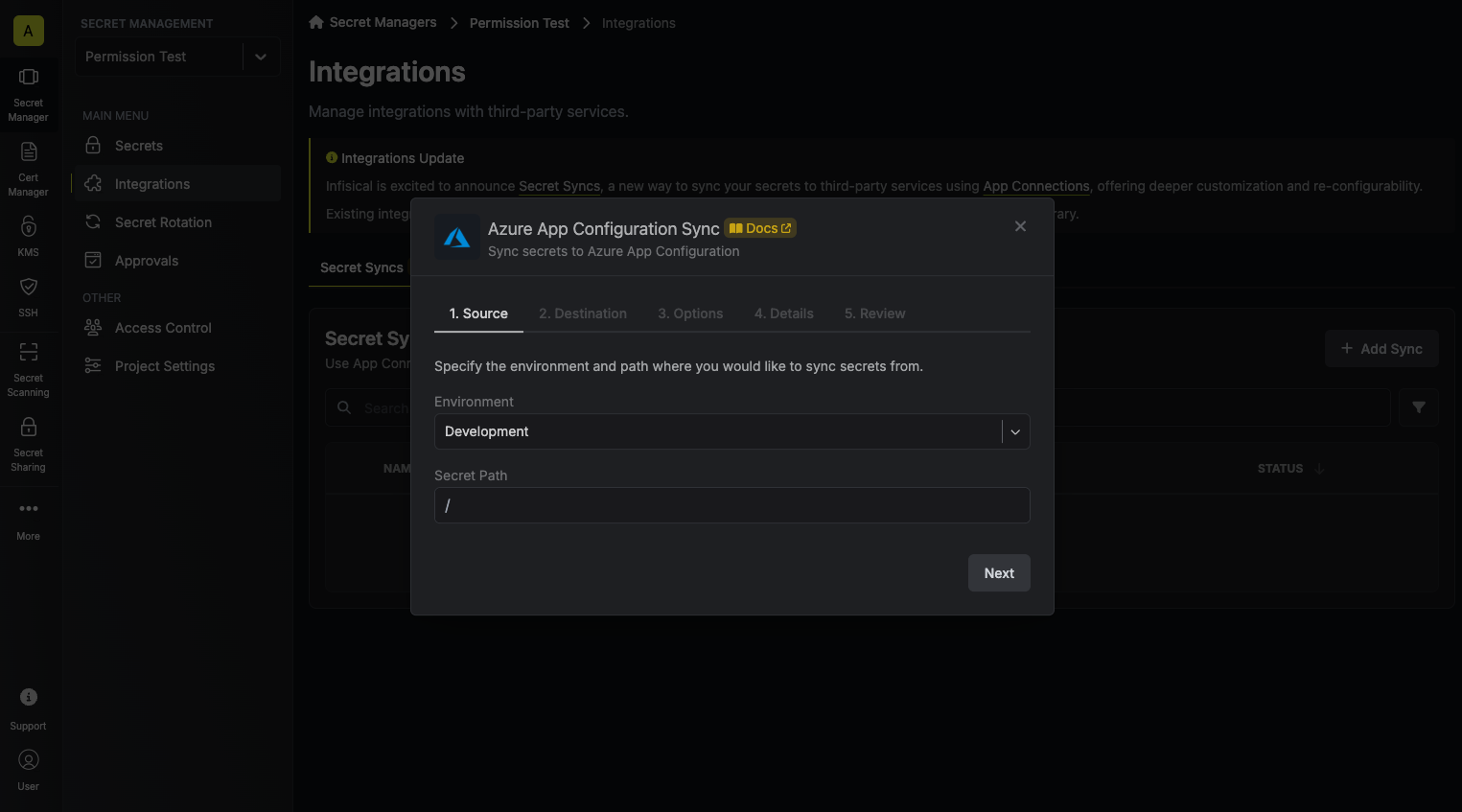 * **Environment**: The project environment to retrieve secrets from.
* **Secret Path**: The folder path to retrieve secrets from.
If you need to sync secrets from multiple folder locations, check out [secret imports](/documentation/platform/secret-reference#secret-imports).
4. Configure the **Destination** to where secrets should be deployed, then click **Next**.
* **Environment**: The project environment to retrieve secrets from.
* **Secret Path**: The folder path to retrieve secrets from.
If you need to sync secrets from multiple folder locations, check out [secret imports](/documentation/platform/secret-reference#secret-imports).
4. Configure the **Destination** to where secrets should be deployed, then click **Next**.
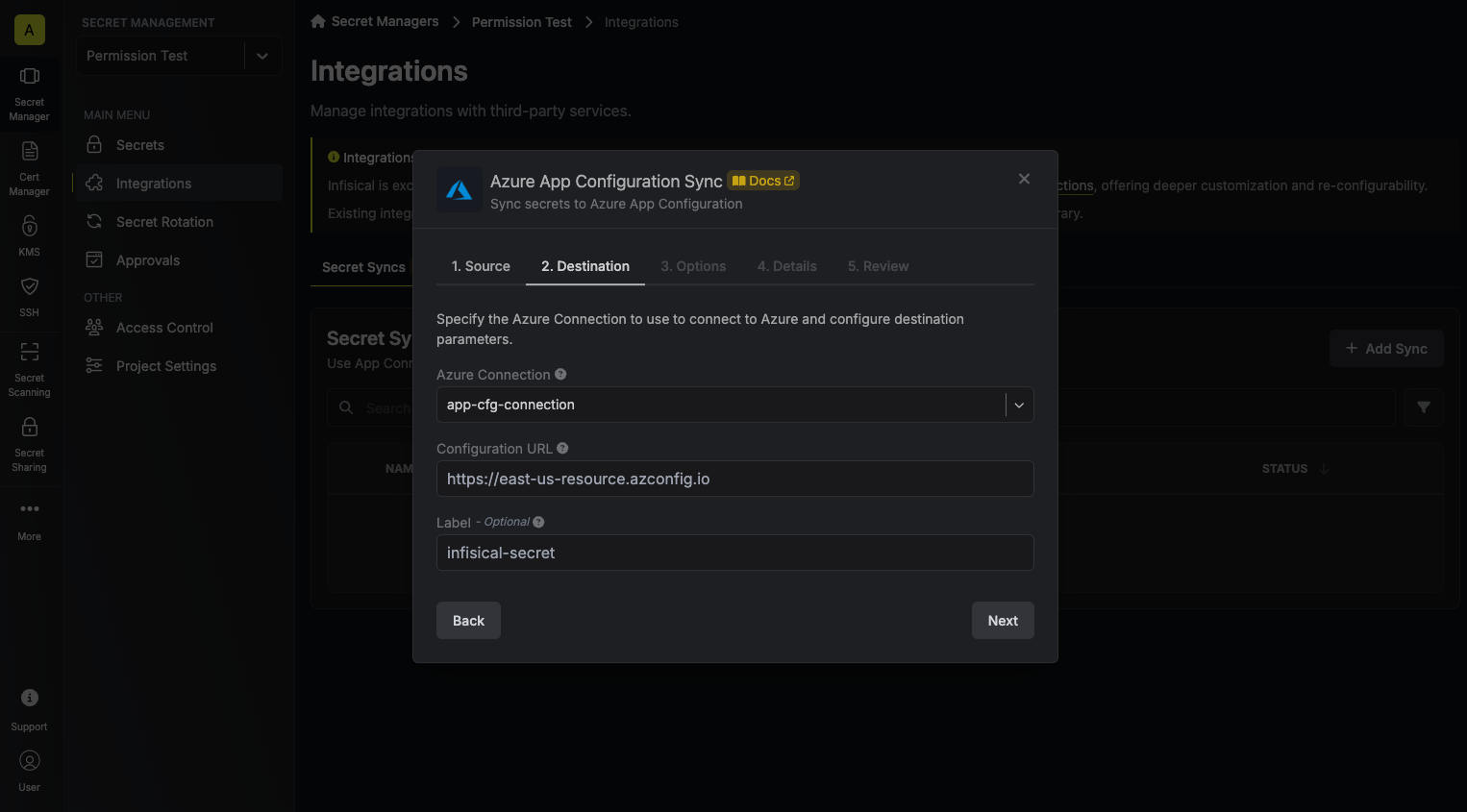 * **Azure Connection**: The Azure Connection to authenticate with.
* **Configuration URL**: The URL of your Azure App Configuration.
* **Label**: An optional label to attach to all secrets created by Infisical inside your Azure App Configuration.
5. Configure the **Sync Options** to specify how secrets should be synced, then click **Next**.
* **Azure Connection**: The Azure Connection to authenticate with.
* **Configuration URL**: The URL of your Azure App Configuration.
* **Label**: An optional label to attach to all secrets created by Infisical inside your Azure App Configuration.
5. Configure the **Sync Options** to specify how secrets should be synced, then click **Next**.
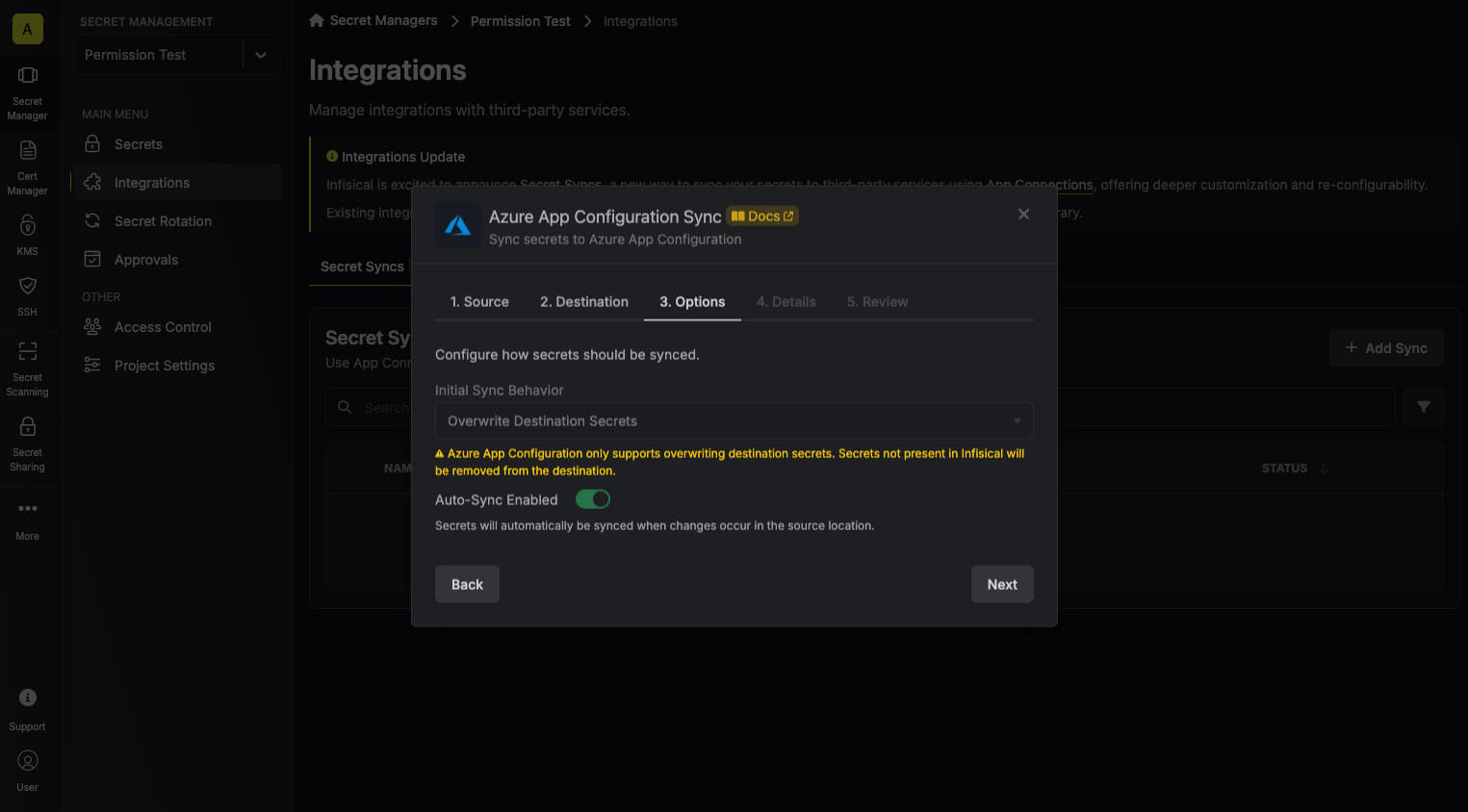 * **Initial Sync Behavior**: Determines how Infisical should resolve the initial sync.
* **Overwrite Destination Secrets**: Removes any secrets at the destination endpoint not present in Infisical.
* **Import Secrets (Prioritize Infisical)**: Imports secrets from the destination endpoint before syncing, prioritizing values from Infisical over Secrets Manager when keys conflict.
* **Import Secrets (Prioritize Azure App Configuration)**: Imports secrets from the destination endpoint before syncing, prioritizing values from Secrets Manager over Infisical when keys conflict.
* **Key Schema**: Template that determines how secret names are transformed when syncing, using `{{secretKey}}` as a placeholder for the original secret name and `{{environment}}` for the environment.
We highly recommend using a Key Schema to ensure that Infisical only manages the specific keys you intend, keeping everything else untouched.
* **Auto-Sync Enabled**: If enabled, secrets will automatically be synced from the source location when changes occur. Disable to enforce manual syncing only.
* **Disable Secret Deletion**: If enabled, Infisical will not remove secrets from the sync destination. Enable this option if you intend to manage some secrets manually outside of Infisical.
6. Configure the **Details** of your Azure App Configuration Sync, then click **Next**.
* **Initial Sync Behavior**: Determines how Infisical should resolve the initial sync.
* **Overwrite Destination Secrets**: Removes any secrets at the destination endpoint not present in Infisical.
* **Import Secrets (Prioritize Infisical)**: Imports secrets from the destination endpoint before syncing, prioritizing values from Infisical over Secrets Manager when keys conflict.
* **Import Secrets (Prioritize Azure App Configuration)**: Imports secrets from the destination endpoint before syncing, prioritizing values from Secrets Manager over Infisical when keys conflict.
* **Key Schema**: Template that determines how secret names are transformed when syncing, using `{{secretKey}}` as a placeholder for the original secret name and `{{environment}}` for the environment.
We highly recommend using a Key Schema to ensure that Infisical only manages the specific keys you intend, keeping everything else untouched.
* **Auto-Sync Enabled**: If enabled, secrets will automatically be synced from the source location when changes occur. Disable to enforce manual syncing only.
* **Disable Secret Deletion**: If enabled, Infisical will not remove secrets from the sync destination. Enable this option if you intend to manage some secrets manually outside of Infisical.
6. Configure the **Details** of your Azure App Configuration Sync, then click **Next**.
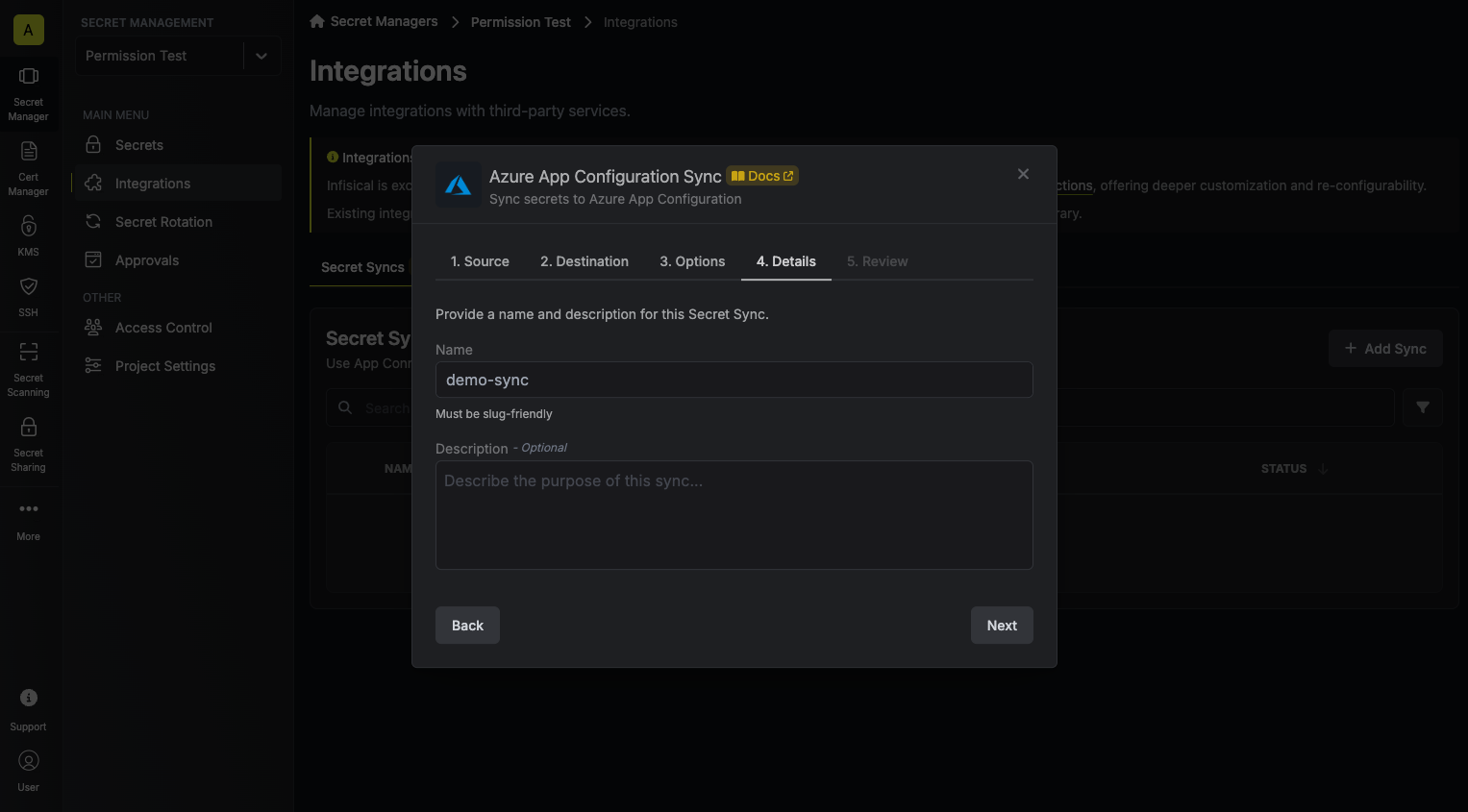 * **Name**: The name of your sync. Must be slug-friendly.
* **Description**: An optional description for your sync.
7. Review your Azure App Configuration Sync configuration, then click **Create Sync**.
* **Name**: The name of your sync. Must be slug-friendly.
* **Description**: An optional description for your sync.
7. Review your Azure App Configuration Sync configuration, then click **Create Sync**.
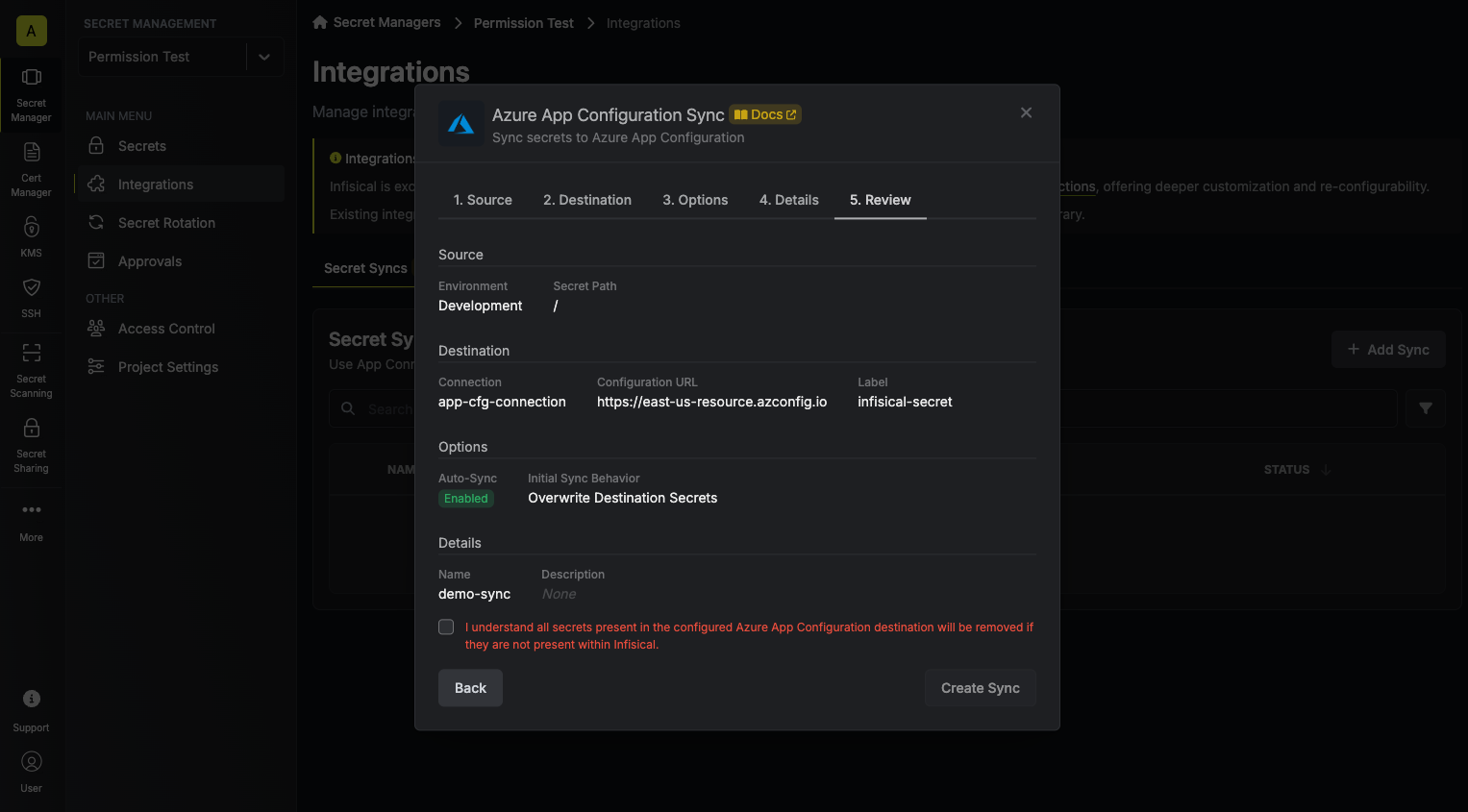 8. If enabled, your Azure App Configuration Sync will begin syncing your secrets to the destination endpoint.
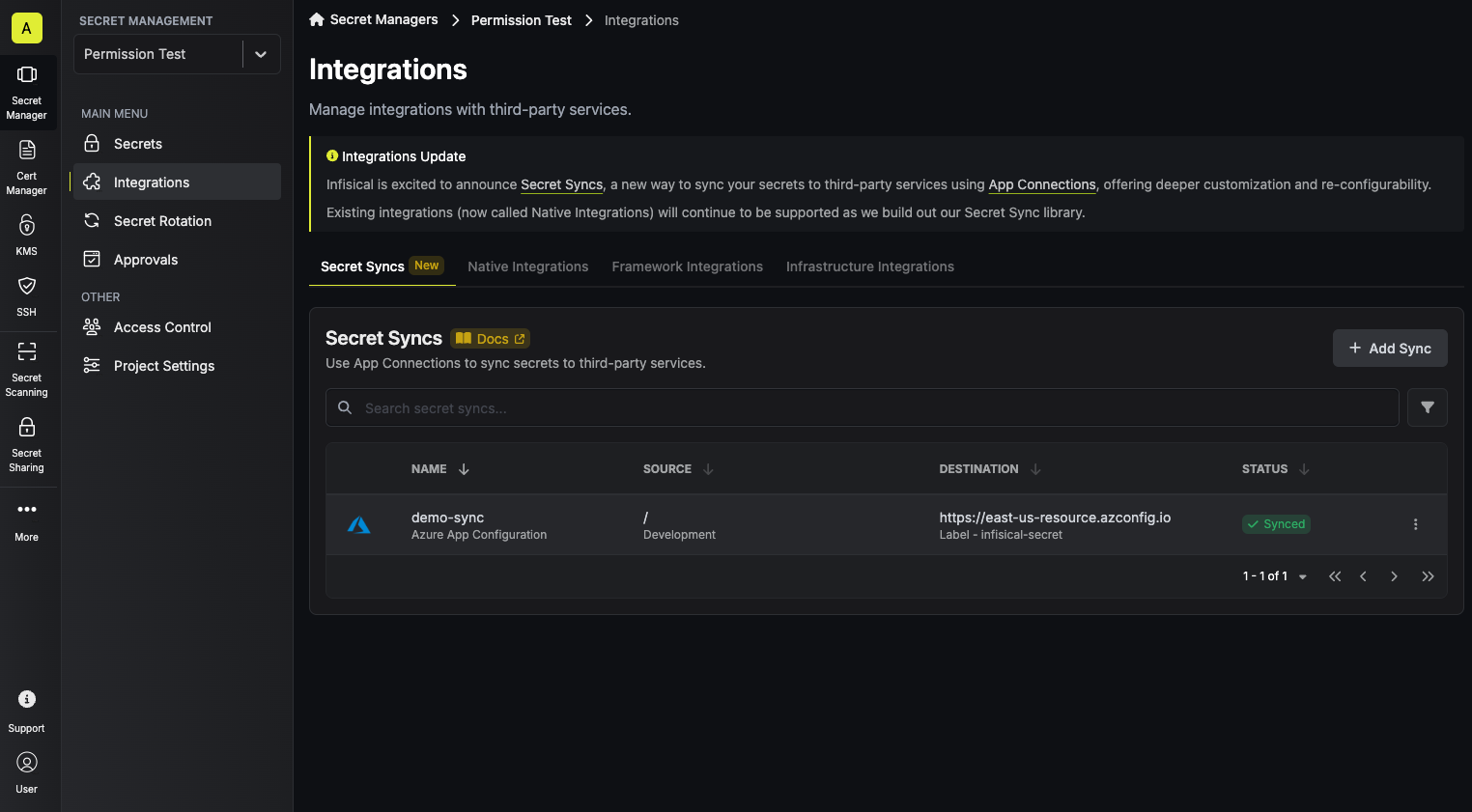 To create an **Azure App Configuration Sync**, make an API request to the [Create Azure App Configuration Sync](/api-reference/endpoints/secret-syncs/azure-app-configuration/create) API endpoint.
### Sample request
```bash Request theme={"dark"}
curl --request POST \
--url https://app.infisical.com/api/v1/secret-syncs/azure-app-configuration \
--header 'Content-Type: application/json' \
--data '{
"name": "my-azure-app-configuration-sync",
"projectId": "3c90c3cc-0d44-4b50-8888-8dd25736052a",
"description": "an example sync",
"connectionId": "3c90c3cc-0d44-4b50-8888-8dd25736052a",
"environment": "dev",
"secretPath": "/my-secrets",
"isEnabled": true,
"syncOptions": {
"initialSyncBehavior": "overwrite-destination"
},
"destinationConfig": {
"configurationUrl": "https://my-azure-app-configuration.azconfig.io",
"label": "my-label"
}
}'
```
### Sample response
```json Response theme={"dark"}
{
"secretSync": {
"id": "3c90c3cc-0d44-4b50-8888-8dd25736052a",
"name": "my-azure-app-configuration-sync",
"description": "an example sync",
"isEnabled": true,
"version": 1,
"folderId": "3c90c3cc-0d44-4b50-8888-8dd25736052a",
"connectionId": "3c90c3cc-0d44-4b50-8888-8dd25736052a",
"createdAt": "2023-11-07T05:31:56Z",
"updatedAt": "2023-11-07T05:31:56Z",
"syncStatus": "succeeded",
"lastSyncJobId": "123",
"lastSyncMessage": null,
"lastSyncedAt": "2023-11-07T05:31:56Z",
"importStatus": null,
"lastImportJobId": null,
"lastImportMessage": null,
"lastImportedAt": null,
"removeStatus": null,
"lastRemoveJobId": null,
"lastRemoveMessage": null,
"lastRemovedAt": null,
"syncOptions": {
"initialSyncBehavior": "overwrite-destination"
},
"projectId": "3c90c3cc-0d44-4b50-8888-8dd25736052a",
"connection": {
"app": "azure",
"name": "my-azure-connection",
"id": "3c90c3cc-0d44-4b50-8888-8dd25736052a"
},
"environment": {
"slug": "dev",
"name": "Development",
"id": "3c90c3cc-0d44-4b50-8888-8dd25736052a"
},
"folder": {
"id": "3c90c3cc-0d44-4b50-8888-8dd25736052a",
"path": "/my-secrets"
},
"destination": "azure-app-configuration",
"destinationConfig": {
"configurationUrl": "https://my-azure-app-configuration.azconfig.io",
"label": "my-label"
}
}
}
```
To create an **Azure App Configuration Sync**, make an API request to the [Create Azure App Configuration Sync](/api-reference/endpoints/secret-syncs/azure-app-configuration/create) API endpoint.
### Sample request
```bash Request theme={"dark"}
curl --request POST \
--url https://app.infisical.com/api/v1/secret-syncs/azure-app-configuration \
--header 'Content-Type: application/json' \
--data '{
"name": "my-azure-app-configuration-sync",
"projectId": "3c90c3cc-0d44-4b50-8888-8dd25736052a",
"description": "an example sync",
"connectionId": "3c90c3cc-0d44-4b50-8888-8dd25736052a",
"environment": "dev",
"secretPath": "/my-secrets",
"isEnabled": true,
"syncOptions": {
"initialSyncBehavior": "overwrite-destination"
},
"destinationConfig": {
"configurationUrl": "https://my-azure-app-configuration.azconfig.io",
"label": "my-label"
}
}'
```
### Sample response
```json Response theme={"dark"}
{
"secretSync": {
"id": "3c90c3cc-0d44-4b50-8888-8dd25736052a",
"name": "my-azure-app-configuration-sync",
"description": "an example sync",
"isEnabled": true,
"version": 1,
"folderId": "3c90c3cc-0d44-4b50-8888-8dd25736052a",
"connectionId": "3c90c3cc-0d44-4b50-8888-8dd25736052a",
"createdAt": "2023-11-07T05:31:56Z",
"updatedAt": "2023-11-07T05:31:56Z",
"syncStatus": "succeeded",
"lastSyncJobId": "123",
"lastSyncMessage": null,
"lastSyncedAt": "2023-11-07T05:31:56Z",
"importStatus": null,
"lastImportJobId": null,
"lastImportMessage": null,
"lastImportedAt": null,
"removeStatus": null,
"lastRemoveJobId": null,
"lastRemoveMessage": null,
"lastRemovedAt": null,
"syncOptions": {
"initialSyncBehavior": "overwrite-destination"
},
"projectId": "3c90c3cc-0d44-4b50-8888-8dd25736052a",
"connection": {
"app": "azure",
"name": "my-azure-connection",
"id": "3c90c3cc-0d44-4b50-8888-8dd25736052a"
},
"environment": {
"slug": "dev",
"name": "Development",
"id": "3c90c3cc-0d44-4b50-8888-8dd25736052a"
},
"folder": {
"id": "3c90c3cc-0d44-4b50-8888-8dd25736052a",
"path": "/my-secrets"
},
"destination": "azure-app-configuration",
"destinationConfig": {
"configurationUrl": "https://my-azure-app-configuration.azconfig.io",
"label": "my-label"
}
}
}
```