> ## Documentation Index
> Fetch the complete documentation index at: https://infisical.com/docs/llms.txt
> Use this file to discover all available pages before exploring further.
# Daytona connection
> Learn how to configure a Daytona connection for Infisical.
[Daytona](https://www.daytona.io/) runs sandboxes that read organization-scoped secrets at runtime. Infisical connects to Daytona with an API key, which is used to push secrets into a Daytona organization through the [Daytona secret sync](/docs/integrations/secret-syncs/daytona).
A Daytona API key belongs to exactly one organization. The key you choose therefore decides which organization your secrets are written to.
## Prerequisites
* A [Daytona account](https://app.daytona.io/) with an organization you can manage
## Create a Daytona API key
In the Daytona dashboard, select **API Keys** in the sidebar, then select **Create Key**.
Give the key a name. Under **Permissions**, select **Restricted**, then set **Secrets** to **Manage**. **Full Access** also works.
Infisical needs this permission to create, update, and delete secrets. A key without it is rejected when you create the connection.
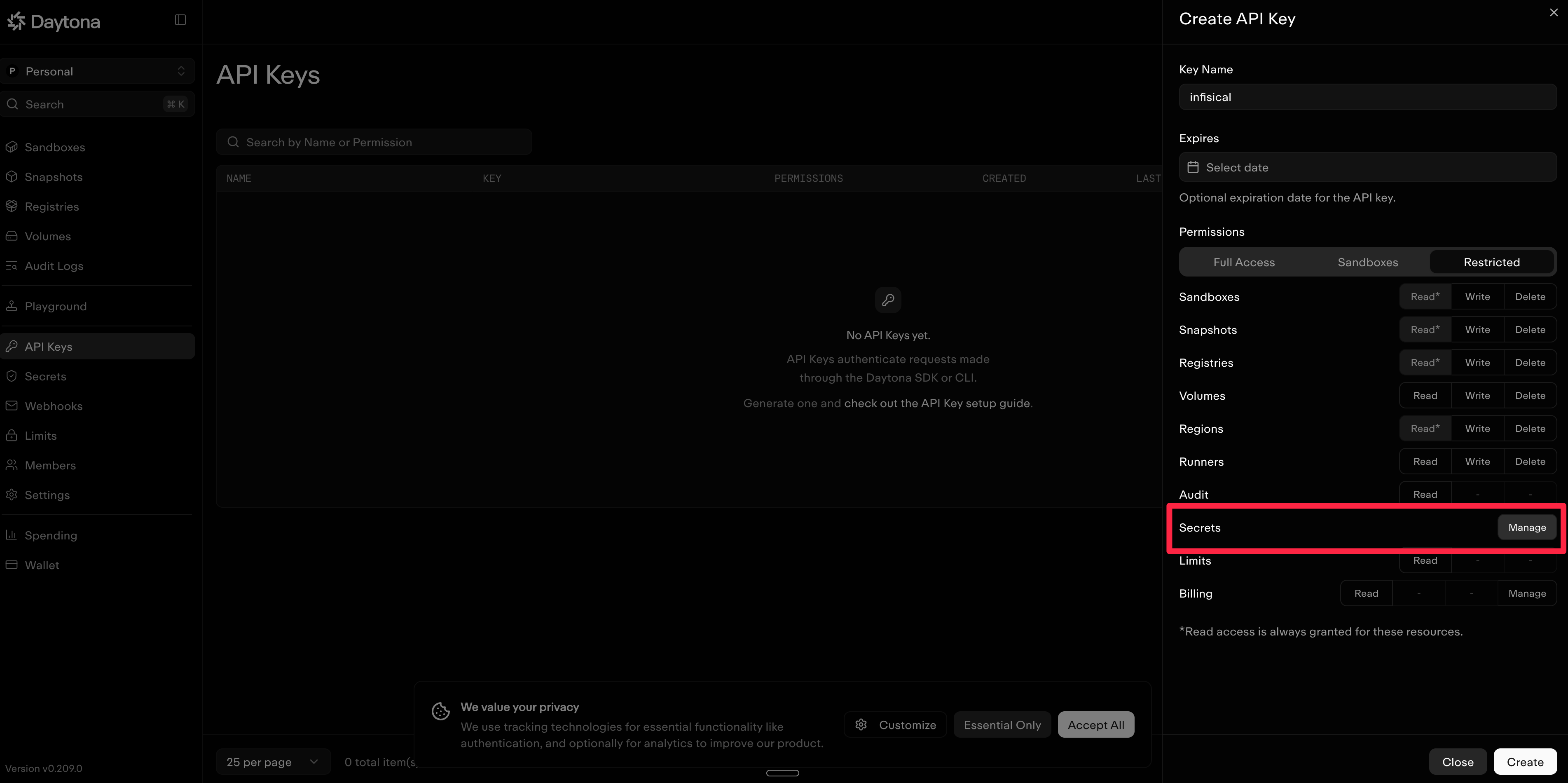 Select **Create**. Daytona shows the key once, immediately after creation. Copy it and store it securely. You need it in the next section.
## Create a Daytona connection in Infisical
In your Infisical dashboard, go to **Organization Settings** → **App Connections** (or the **Integrations** → **App Connections** tab in your project).
Select **Create**. Daytona shows the key once, immediately after creation. Copy it and store it securely. You need it in the next section.
## Create a Daytona connection in Infisical
In your Infisical dashboard, go to **Organization Settings** → **App Connections** (or the **Integrations** → **App Connections** tab in your project).
 Select **Add Connection** and choose **Daytona** from the list of available connections.
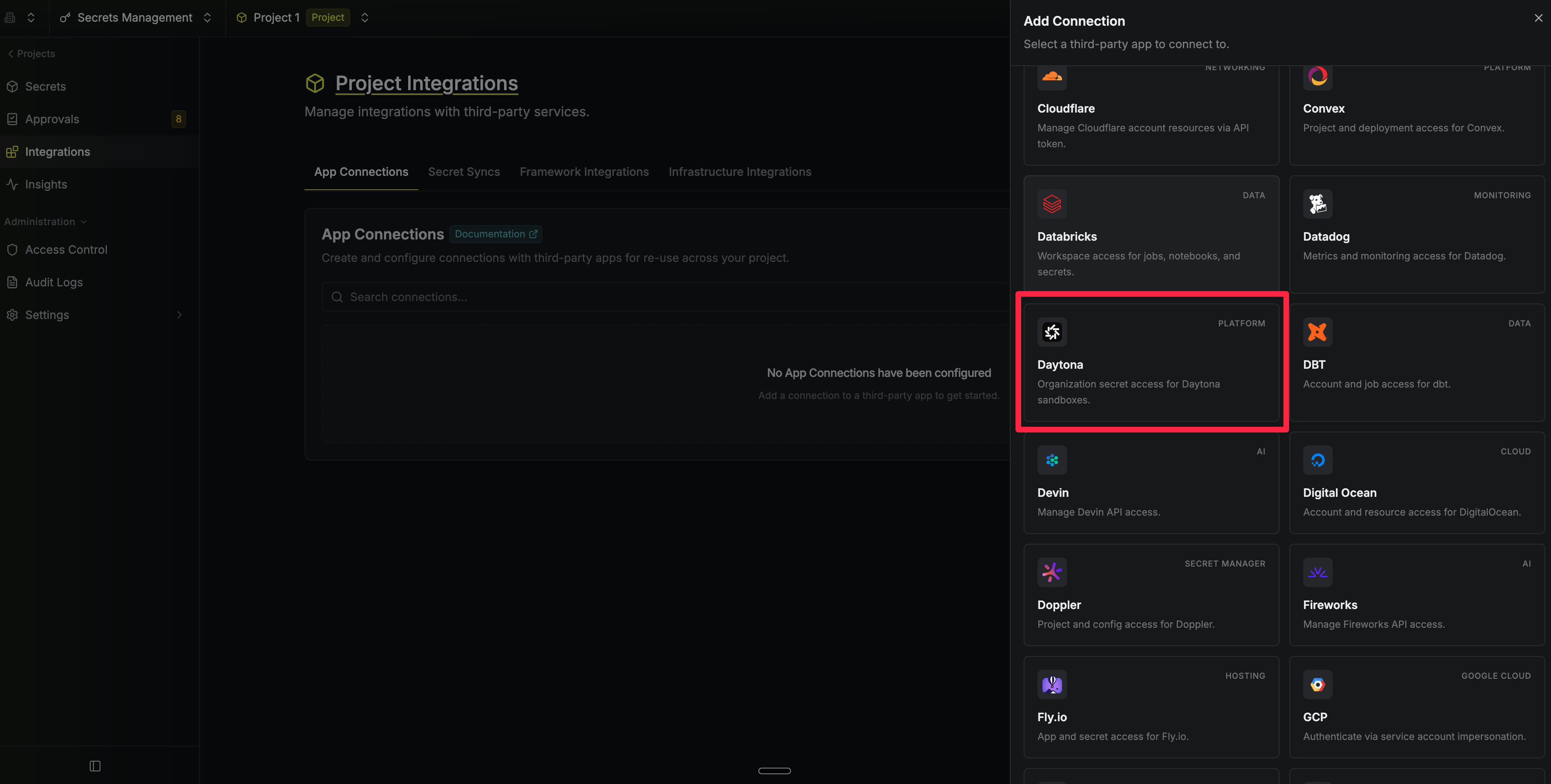 Complete the form with:
* A **name** for the connection (for example `daytona-prod`)
* An optional **description**
* Your **Daytona API key**
Complete the form with:
* A **name** for the connection (for example `daytona-prod`)
* An optional **description**
* Your **Daytona API key**
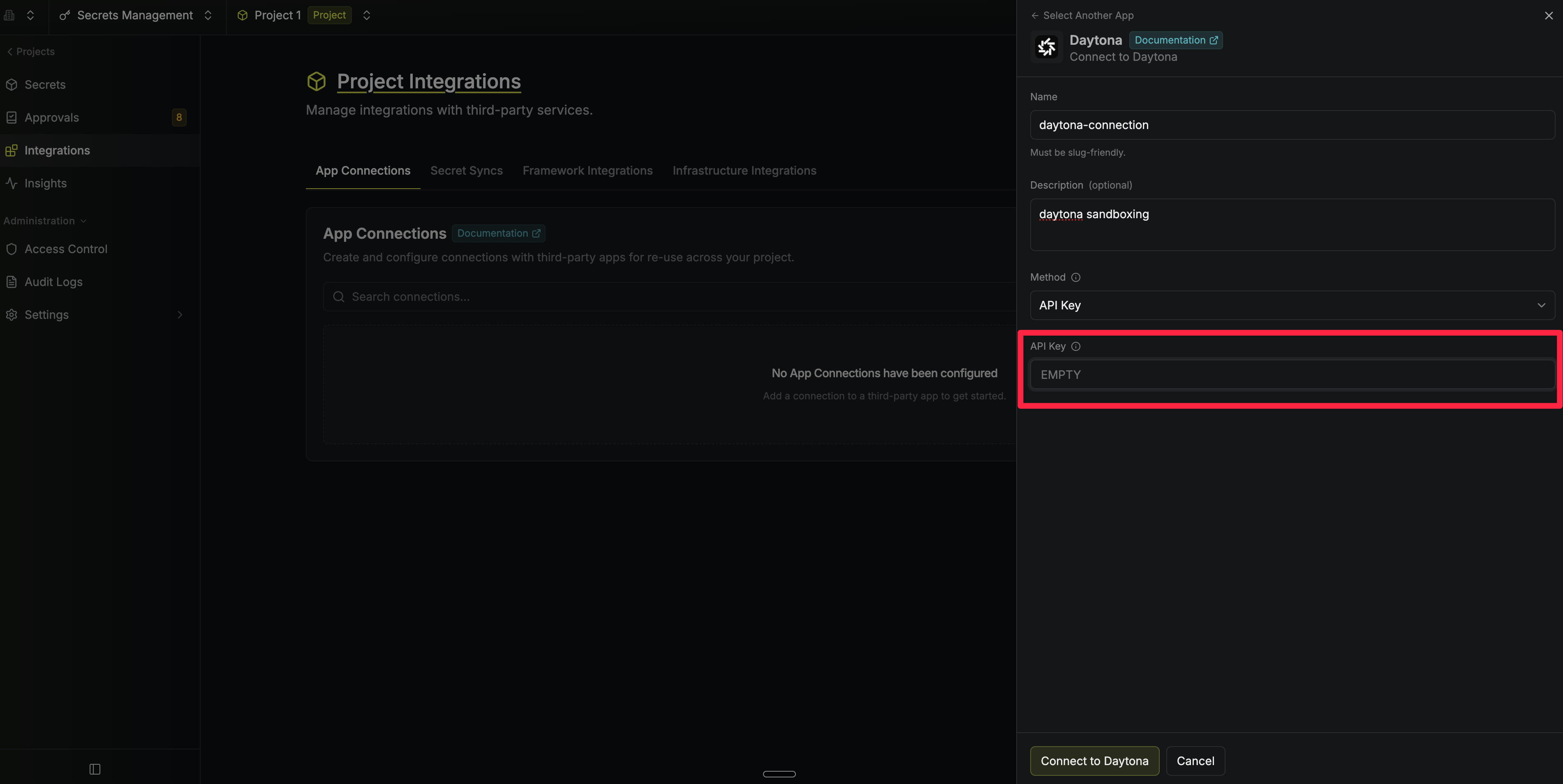 Infisical validates the key against Daytona. Once it passes, the connection is ready to use in your project.
To create a Daytona connection, make an API request to the [Create Daytona Connection](/docs/api-reference/endpoints/app-connections/daytona/create) API endpoint.
### Sample request
```bash Request theme={"dark"}
curl --request POST \
--url https://app.infisical.com/api/v1/app-connections/daytona \
--header 'Content-Type: application/json' \
--data '{
"name": "my-daytona-connection",
"method": "api-key",
"credentials": {
"apiKey": ""
}
}'
```
### Sample response
```bash Response theme={"dark"}
{
"appConnection": {
"id": "e5d18aca-86f7-4026-a95e-efb8aeb0d8e6",
"name": "my-daytona-connection",
"description": null,
"version": 1,
"orgId": "6f03caa1-a5de-43ce-b127-95a145d3464c",
"createdAt": "2026-08-28T19:46:34.831Z",
"updatedAt": "2026-08-28T19:46:34.831Z",
"isPlatformManagedCredentials": false,
"app": "daytona",
"method": "api-key",
"credentials": {}
}
}
```
Infisical validates the key against Daytona. Once it passes, the connection is ready to use in your project.
To create a Daytona connection, make an API request to the [Create Daytona Connection](/docs/api-reference/endpoints/app-connections/daytona/create) API endpoint.
### Sample request
```bash Request theme={"dark"}
curl --request POST \
--url https://app.infisical.com/api/v1/app-connections/daytona \
--header 'Content-Type: application/json' \
--data '{
"name": "my-daytona-connection",
"method": "api-key",
"credentials": {
"apiKey": ""
}
}'
```
### Sample response
```bash Response theme={"dark"}
{
"appConnection": {
"id": "e5d18aca-86f7-4026-a95e-efb8aeb0d8e6",
"name": "my-daytona-connection",
"description": null,
"version": 1,
"orgId": "6f03caa1-a5de-43ce-b127-95a145d3464c",
"createdAt": "2026-08-28T19:46:34.831Z",
"updatedAt": "2026-08-28T19:46:34.831Z",
"isPlatformManagedCredentials": false,
"app": "daytona",
"method": "api-key",
"credentials": {}
}
}
```