> ## Documentation Index
> Fetch the complete documentation index at: https://infisical.com/docs/llms.txt
> Use this file to discover all available pages before exploring further.
# Azure Entra ID Connection
> Learn how to configure an Azure Entra ID Connection for Infisical.
Infisical's Azure Entra ID Connection lets you authenticate with Microsoft Entra ID (formerly Azure Active Directory) using Client Secrets.
**Prerequisites:**
* Set up an [Azure](https://portal.azure.com) account with an existing Azure Entra ID tenant.
* Register an App Registration in Azure with the necessary Microsoft Graph API permissions for your use case.
The permissions required for your Azure Entra ID Connection depend on what you intend to use it for.
**For SCIM Token Secret Sync:**
Your App Registration must have the following **Microsoft Graph API Application permissions**:
* `Application.ReadWrite.All` — Required to read and update synchronization secrets (SCIM tokens) on enterprise application service principals.
* `Synchronization.ReadWrite.All` — Required to list synchronization jobs on service principals and to write SCIM provisioning tokens.
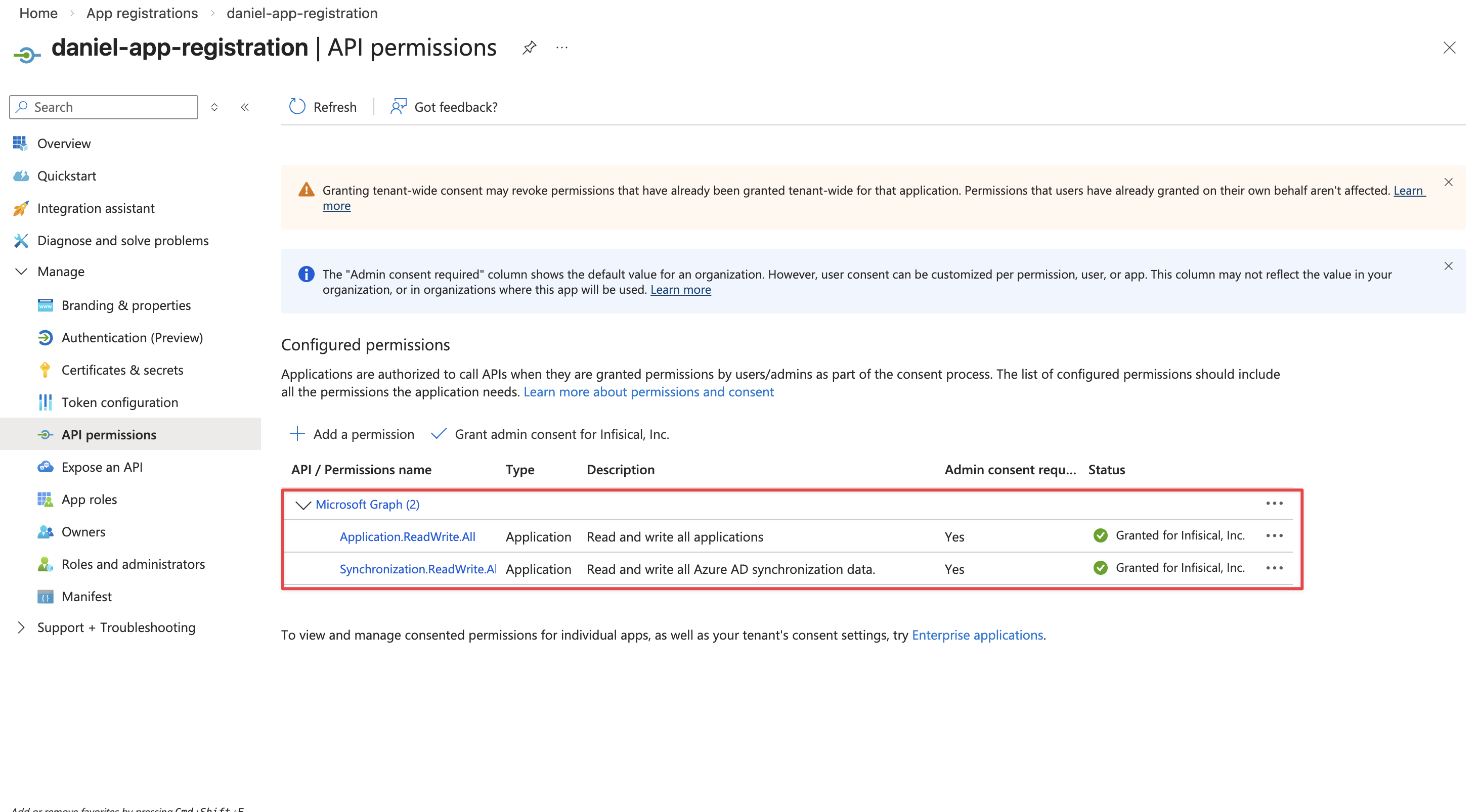 After adding the permission, an admin must **Grant admin consent** for the permission to take effect.
## Setup Azure Entra ID Connection in Infisical
Navigate to the **Organization Settings** page, then select **App Connections**. Click on the **Add Connection** button.
After adding the permission, an admin must **Grant admin consent** for the permission to take effect.
## Setup Azure Entra ID Connection in Infisical
Navigate to the **Organization Settings** page, then select **App Connections**. Click on the **Add Connection** button.
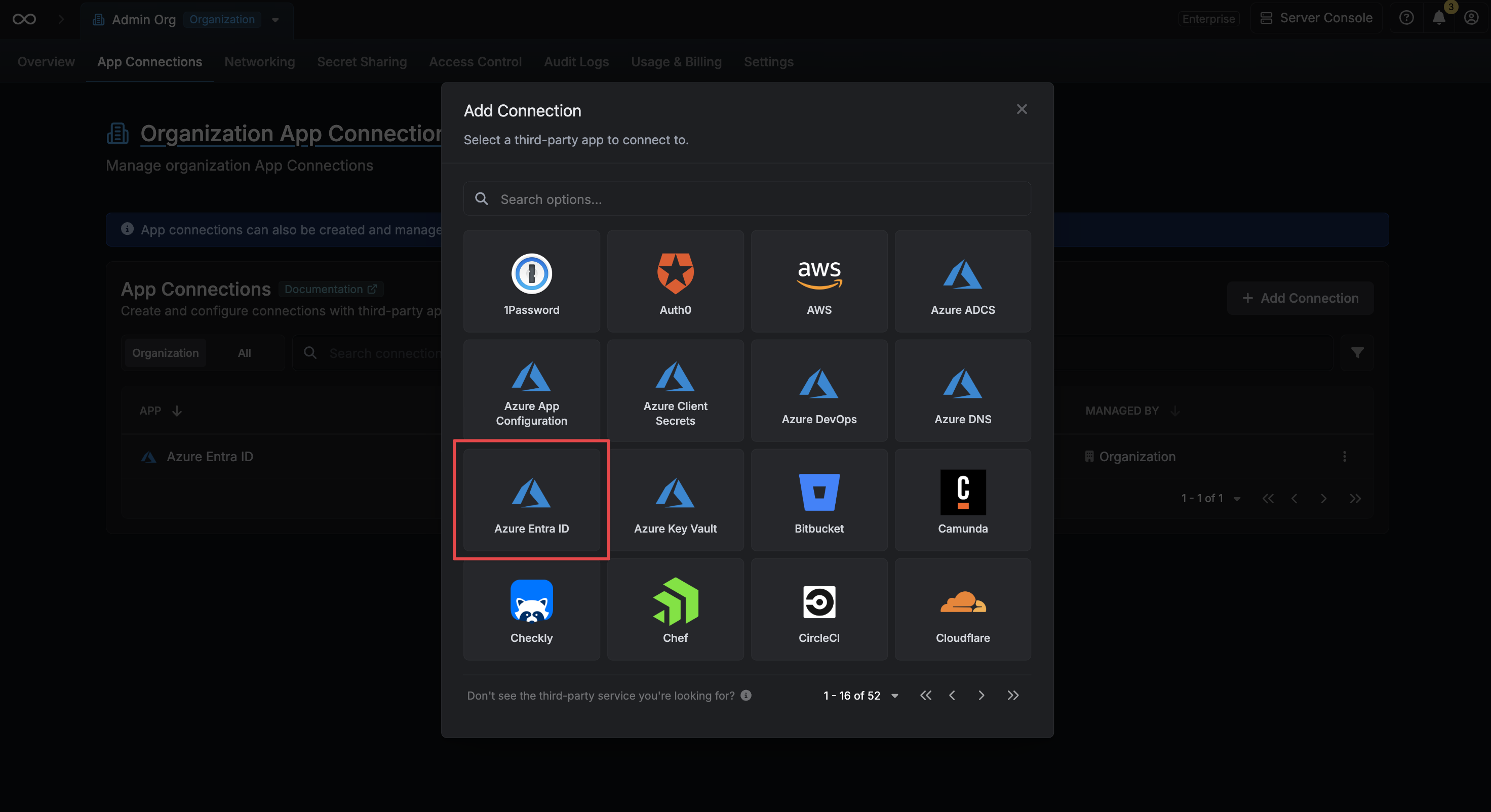
 Select the **Azure Entra ID** option from the connection options modal.
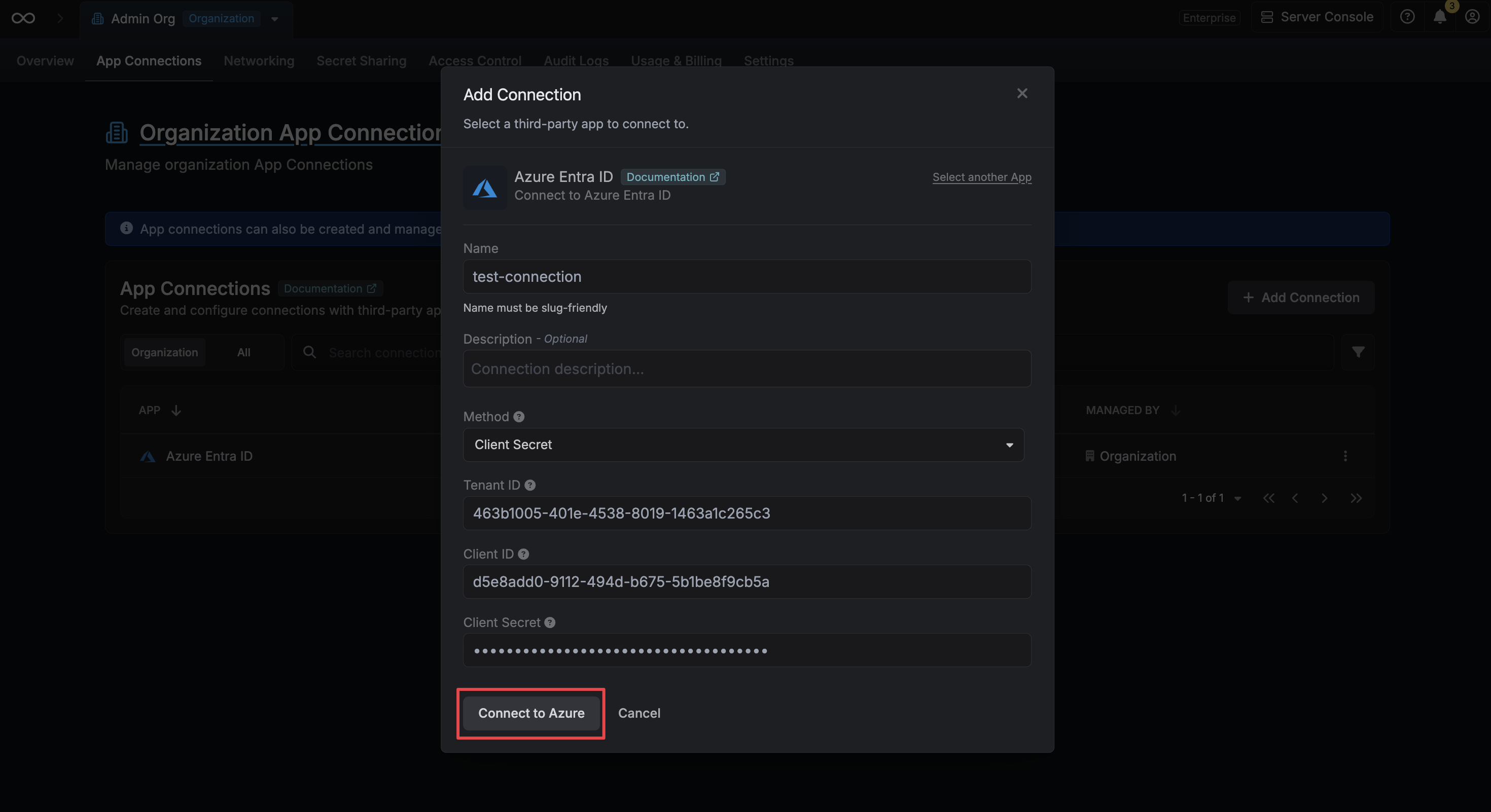
 Fill in the following fields with the credentials from your Azure App Registration:
* **Tenant ID**: The Directory (Tenant) ID of your Azure Entra ID tenant.
* **Client ID**: The Application (Client) ID of your registered application.
* **Client Secret**: A client secret generated for your registered application.
Click **Connect** to create the connection.
Fill in the following fields with the credentials from your Azure App Registration:
* **Tenant ID**: The Directory (Tenant) ID of your Azure Entra ID tenant.
* **Client ID**: The Application (Client) ID of your registered application.
* **Client Secret**: A client secret generated for your registered application.
Click **Connect** to create the connection.
 Your **Azure Entra ID Connection** is now available for use with features such as the Azure Entra ID SCIM Secret Sync.
To create an Azure Entra ID Connection via API, send a request to the [Create Azure Entra ID Connection](/api-reference/endpoints/app-connections/azure-entra-id/create) endpoint.
### Sample request
```bash Request theme={"dark"}
curl --request POST \
--url https://app.infisical.com/api/v1/app-connections/azure-entra-id \
--header 'Content-Type: application/json' \
--data '{
"name": "my-azure-entra-id-connection",
"method": "client-secret",
"credentials": {
"tenantId": "your-tenant-id",
"clientId": "your-client-id",
"clientSecret": "your-client-secret"
}
}'
```
### Sample response
```json Response theme={"dark"}
{
"appConnection": {
"id": "3c90c3cc-0d44-4b50-8888-8dd25736052a",
"name": "my-azure-entra-id-connection",
"description": null,
"version": 1,
"orgId": "6f03caa1-a5de-43ce-b127-95a145d3464c",
"createdAt": "2023-11-07T05:31:56Z",
"updatedAt": "2023-11-07T05:31:56Z",
"isPlatformManagedCredentials": false,
"app": "azure-entra-id",
"method": "client-secret",
"credentials": {}
}
}
```
Your **Azure Entra ID Connection** is now available for use with features such as the Azure Entra ID SCIM Secret Sync.
To create an Azure Entra ID Connection via API, send a request to the [Create Azure Entra ID Connection](/api-reference/endpoints/app-connections/azure-entra-id/create) endpoint.
### Sample request
```bash Request theme={"dark"}
curl --request POST \
--url https://app.infisical.com/api/v1/app-connections/azure-entra-id \
--header 'Content-Type: application/json' \
--data '{
"name": "my-azure-entra-id-connection",
"method": "client-secret",
"credentials": {
"tenantId": "your-tenant-id",
"clientId": "your-client-id",
"clientSecret": "your-client-secret"
}
}'
```
### Sample response
```json Response theme={"dark"}
{
"appConnection": {
"id": "3c90c3cc-0d44-4b50-8888-8dd25736052a",
"name": "my-azure-entra-id-connection",
"description": null,
"version": 1,
"orgId": "6f03caa1-a5de-43ce-b127-95a145d3464c",
"createdAt": "2023-11-07T05:31:56Z",
"updatedAt": "2023-11-07T05:31:56Z",
"isPlatformManagedCredentials": false,
"app": "azure-entra-id",
"method": "client-secret",
"credentials": {}
}
}
```