> ## Documentation Index
> Fetch the complete documentation index at: https://infisical.com/docs/llms.txt
> Use this file to discover all available pages before exploring further.
# Salesforce OAuth Credentials Rotation
> Learn how to automatically rotate Salesforce External Client App consumer secrets.
**Rotation Type: Dual-Phase**
This rotation maintains two active credential sets with overlapping validity, ensuring zero-downtime during rotation cycles.
## Prerequisites
* Create a [Salesforce Connection](/integrations/app-connections/salesforce). That connection authenticates Infisical against your Salesforce org and is used to issue and revoke staged consumer credentials during rotation.
* The target **External Client App** must have the OAuth Client Credentials flow enabled and a configured **Run-As user**, the same as the connection's own ECA.
* The Run-As user backing the Salesforce Connection must be permitted to read and modify the target ECA's OAuth credentials (the rotation calls `/services/data/v65.0/apps/oauth/credentials/{appId}` and the staged-credentials URL returned by Salesforce).
**Use a different External Client App than the one your Salesforce Connection authenticates with.**
Rotating the consumer secret of the same ECA that the connection itself uses would immediately invalidate the connection's credentials, breaking this rotation and any subsequent ones. Infisical refuses this configuration at runtime.
If the target ECA has more than one consumer, only the **first** consumer is rotated and a warning is logged. Assign each consumer to its own External Client App if all of them need rotation.
## Create a Salesforce OAuth Credentials Rotation in Infisical
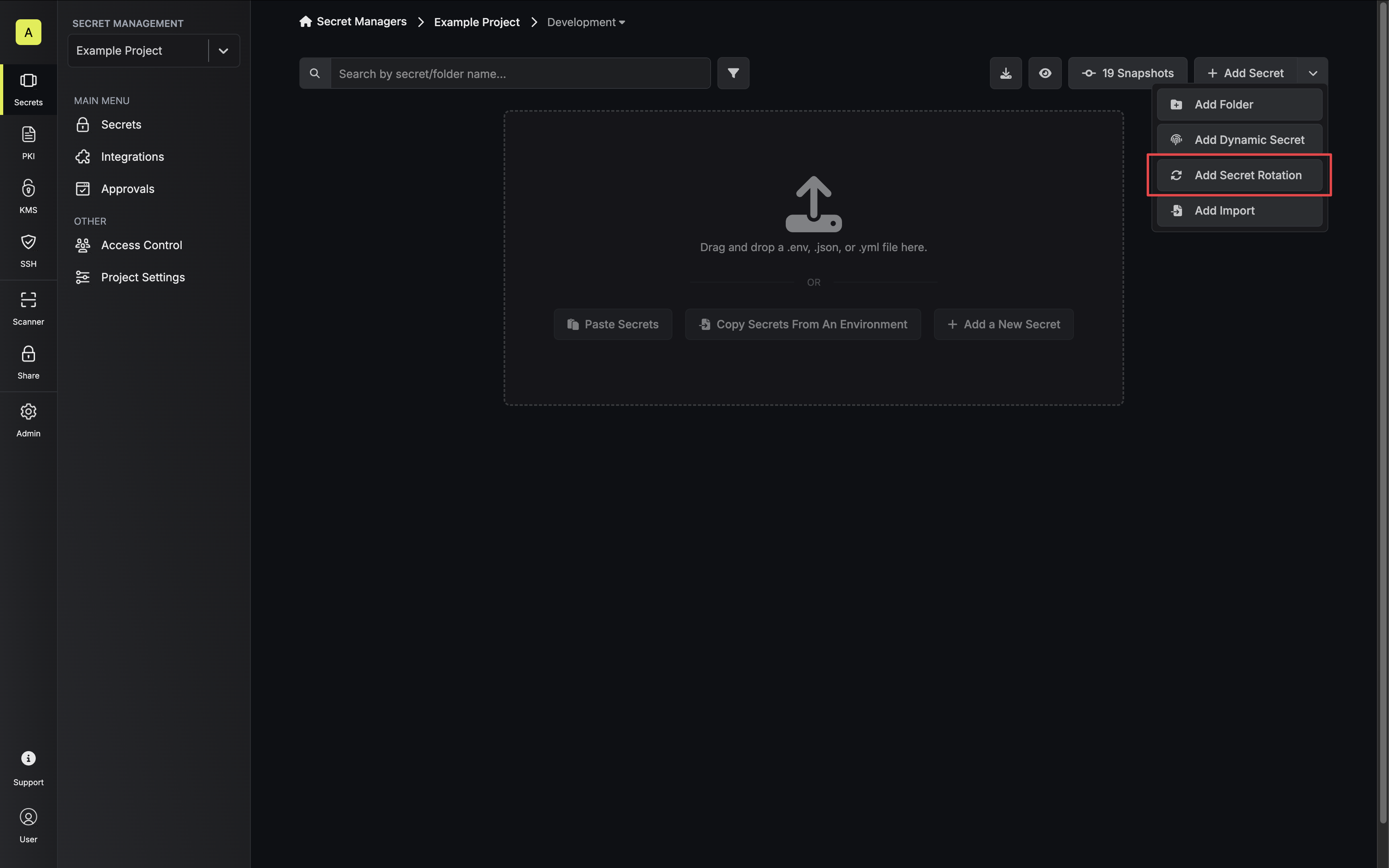
1. Navigate to your Secret Manager Project's Dashboard and select **Add Secret Rotation** from the actions dropdown.
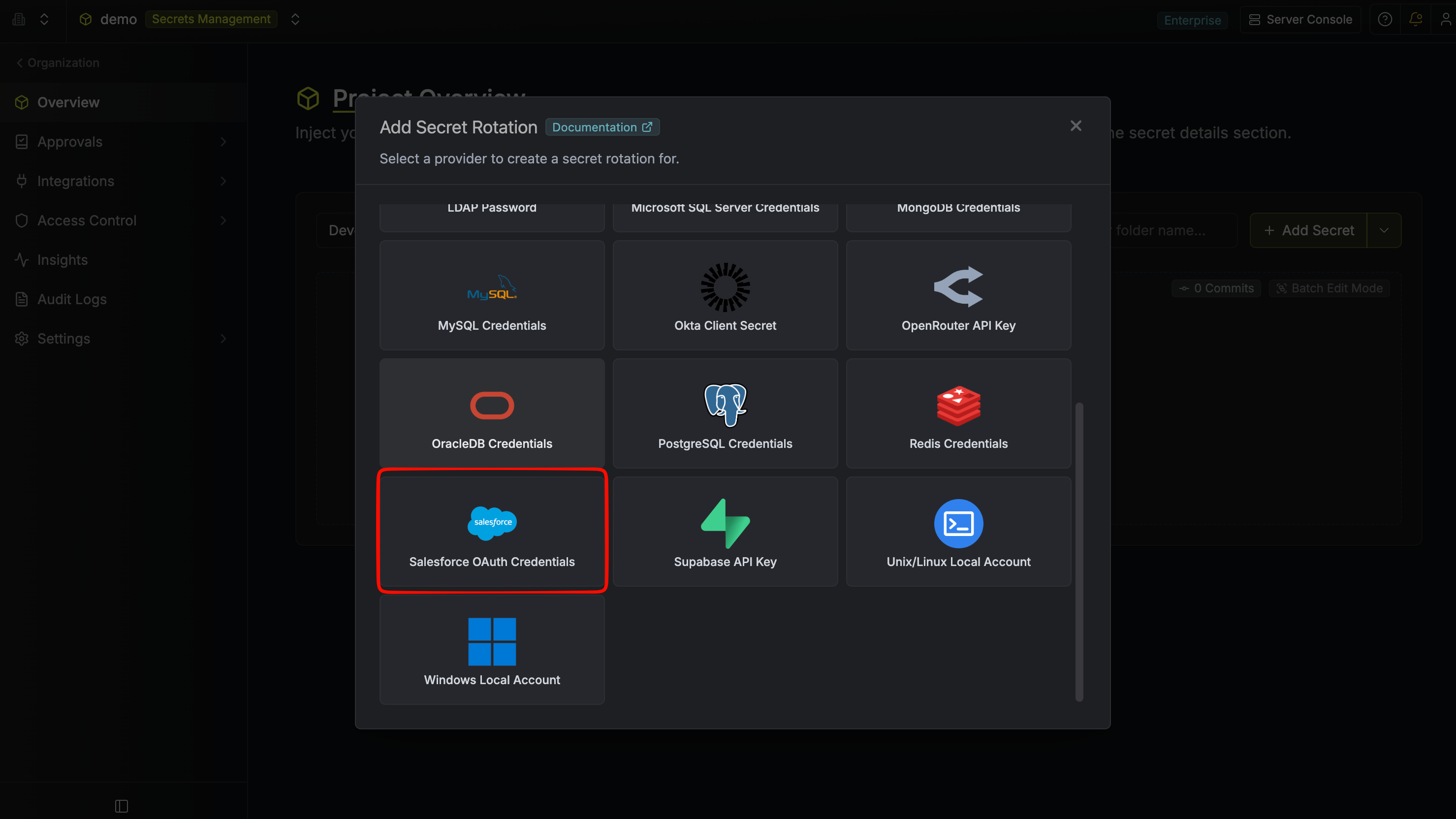
 2. Select the **Salesforce OAuth Credentials** option.
 3. Configure the rotation behavior, then click **Next**.
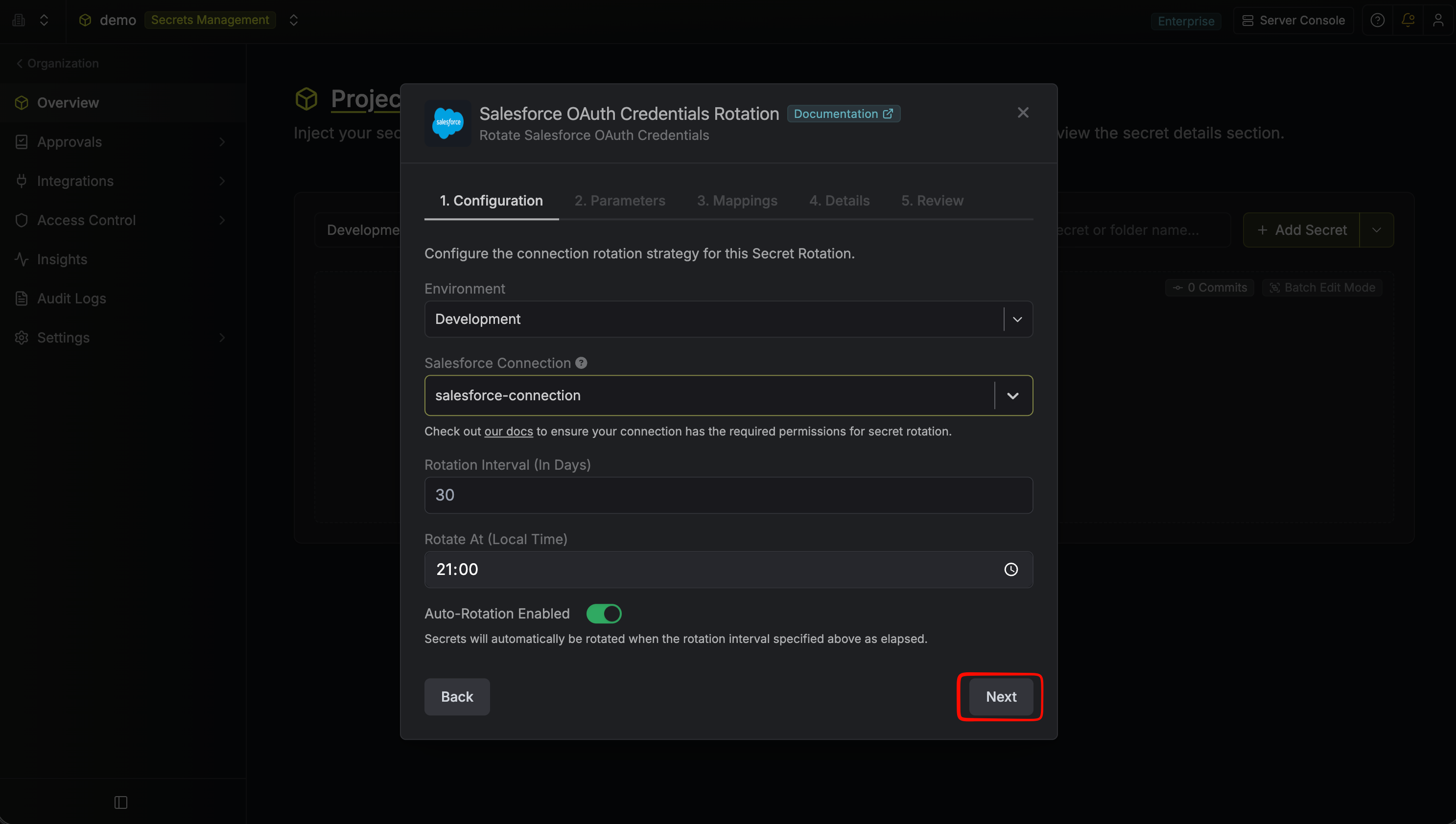 * **Salesforce Connection** – The connection that will perform the rotation of the target External Client App's consumer secret.
* **Rotation Interval** – The interval, in days, after which a rotation is triggered.
* **Rotate At** – The local time of day when rotation runs once the interval has elapsed.
* **Auto-Rotation Enabled** – Whether to rotate automatically on the schedule. Turn off to rotate only manually or pause rotation.
4. Select the External Client App whose consumer secret you want to rotate, then click **Next**.
* **Salesforce Connection** – The connection that will perform the rotation of the target External Client App's consumer secret.
* **Rotation Interval** – The interval, in days, after which a rotation is triggered.
* **Rotate At** – The local time of day when rotation runs once the interval has elapsed.
* **Auto-Rotation Enabled** – Whether to rotate automatically on the schedule. Turn off to rotate only manually or pause rotation.
4. Select the External Client App whose consumer secret you want to rotate, then click **Next**.
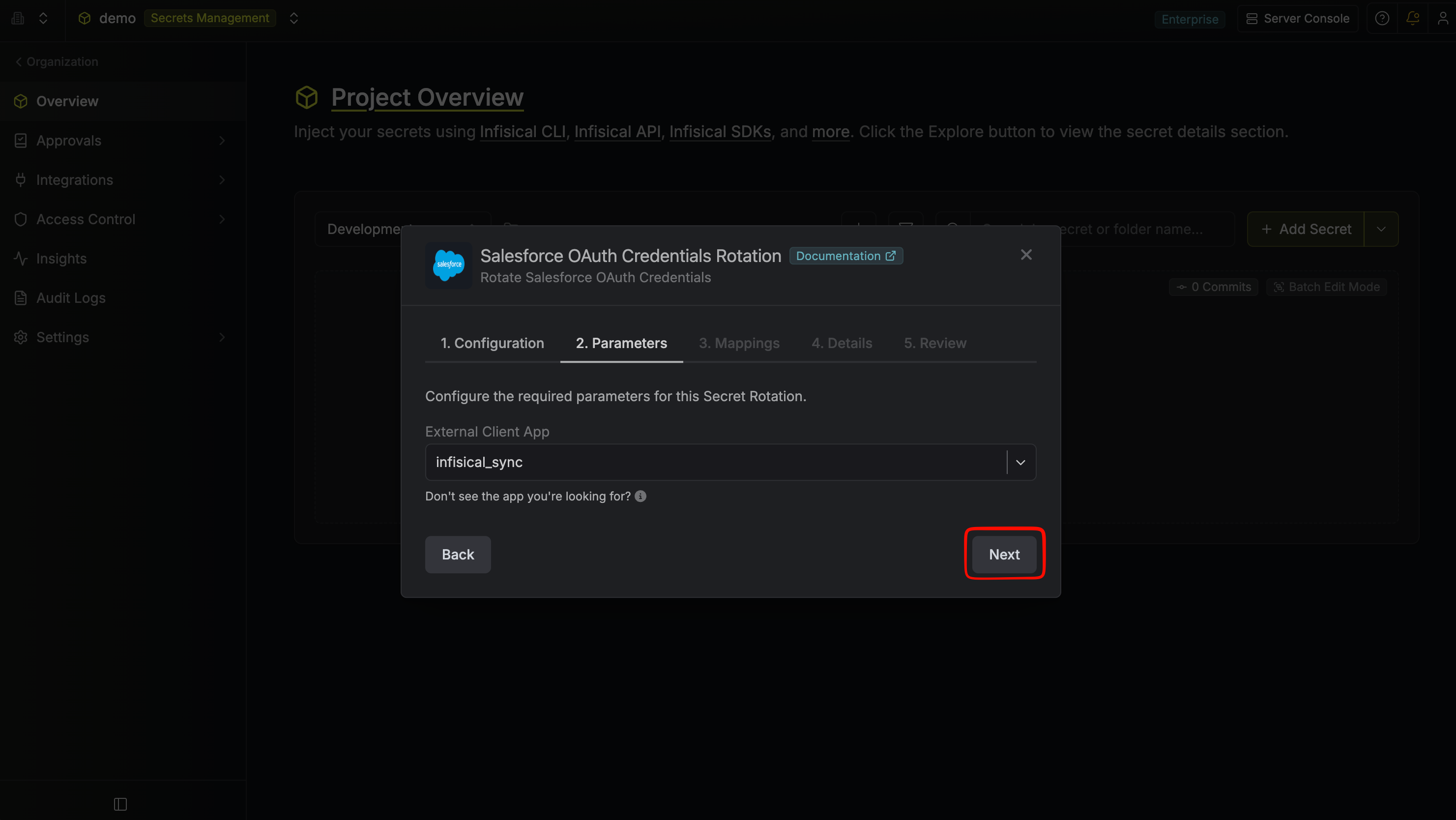 * **External Client App** – The Salesforce ECA whose consumer secret will be rotated. The dropdown is populated from the connected org via the connection — only ECAs with OAuth client credentials enabled and reachable by the connection appear.
5. Specify the secret names that the rotated consumer credentials should be mapped to, then click **Next**.
* **External Client App** – The Salesforce ECA whose consumer secret will be rotated. The dropdown is populated from the connected org via the connection — only ECAs with OAuth client credentials enabled and reachable by the connection appear.
5. Specify the secret names that the rotated consumer credentials should be mapped to, then click **Next**.
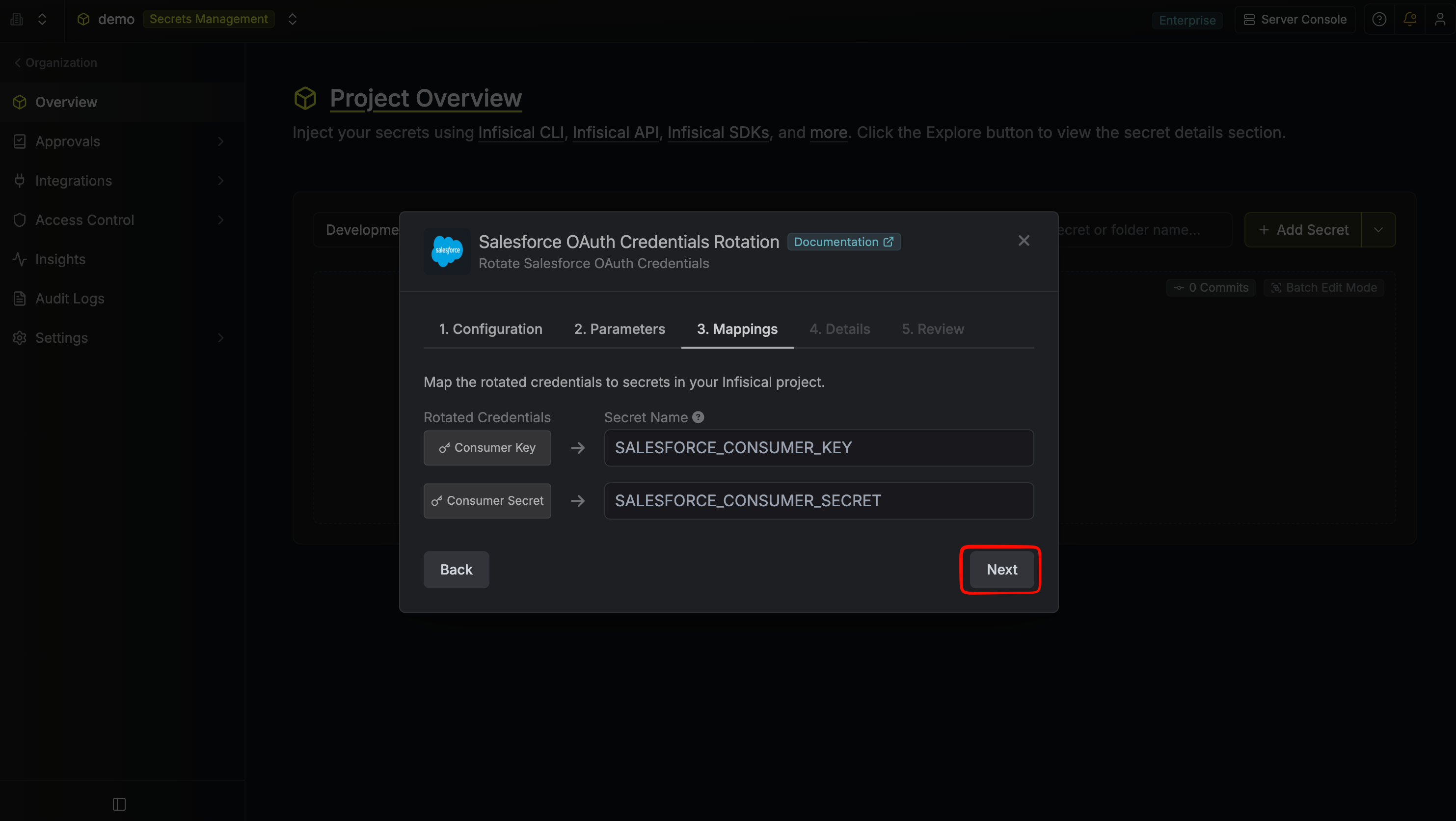 * **Consumer Key** – The name of the secret in Infisical that the rotated consumer key will be mapped to (default: `SALESFORCE_CONSUMER_KEY`).
* **Consumer Secret** – The name of the secret in Infisical that the rotated consumer secret will be mapped to (default: `SALESFORCE_CONSUMER_SECRET`).
6. Give your rotation a name and description (optional), then click **Next**.
* **Consumer Key** – The name of the secret in Infisical that the rotated consumer key will be mapped to (default: `SALESFORCE_CONSUMER_KEY`).
* **Consumer Secret** – The name of the secret in Infisical that the rotated consumer secret will be mapped to (default: `SALESFORCE_CONSUMER_SECRET`).
6. Give your rotation a name and description (optional), then click **Next**.
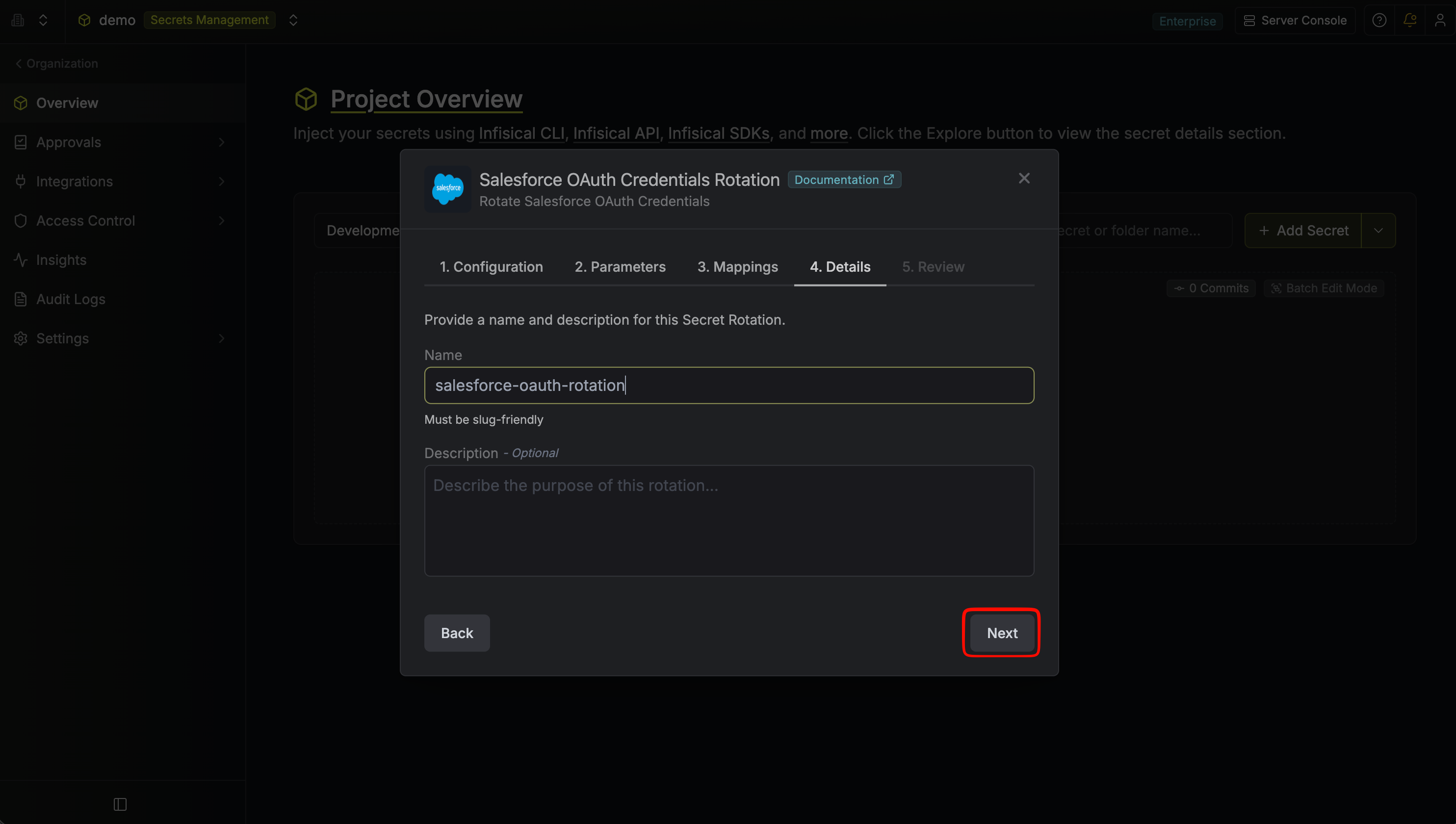 * **Name** – A slug-friendly name for this rotation configuration.
* **Description** (optional) – Notes about this rotation.
7. Review your configuration, then click **Create Secret Rotation**.
* **Name** – A slug-friendly name for this rotation configuration.
* **Description** (optional) – Notes about this rotation.
7. Review your configuration, then click **Create Secret Rotation**.
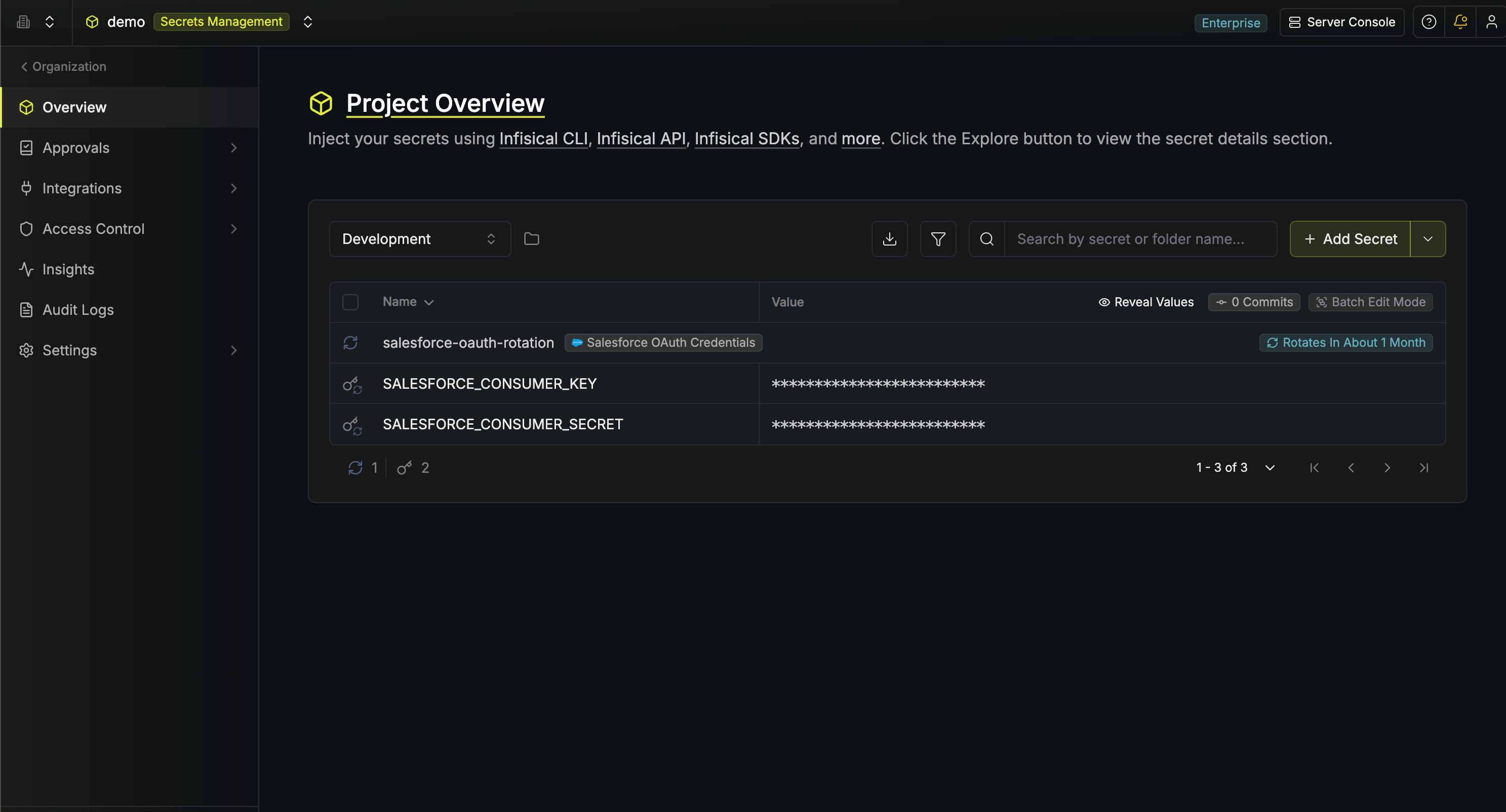
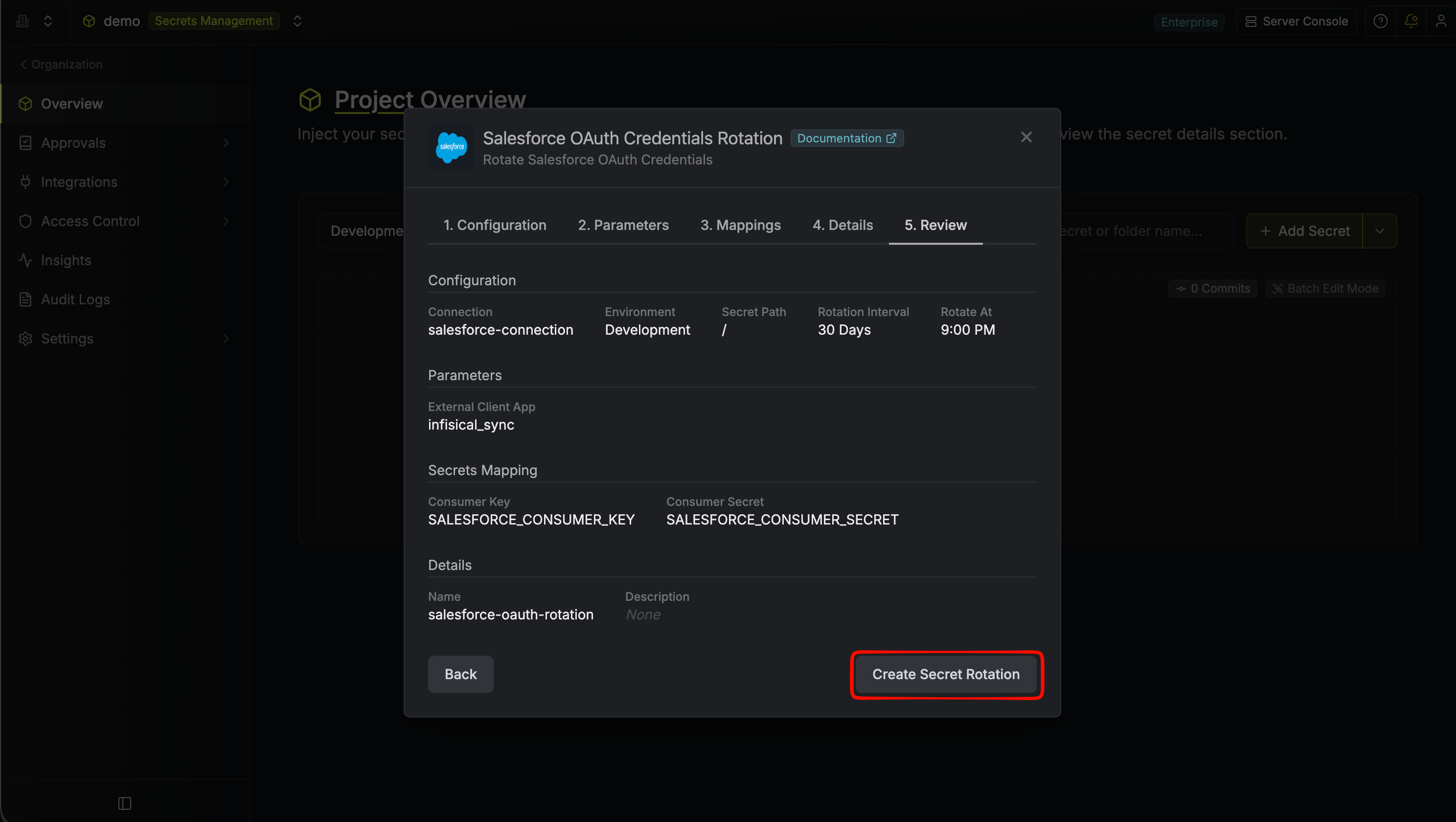 8. Your **Salesforce OAuth Credentials** rotation is created. The current consumer key and consumer secret are available as secrets at the mapped paths. Subsequent rotations issue a new staged credential, switch the active secrets to it, then revoke the previous credential for zero-downtime rotation.
 To create a Salesforce OAuth Credentials rotation, call the [Create Salesforce OAuth Credentials Rotation](/api-reference/endpoints/secret-rotations/salesforce-oauth-credentials/create) API endpoint.
You will need both the **identifier** and the **developer name** of the target External Client App. These are returned together by the connection's `GET /api/v1/app-connections/salesforce/{connectionId}/oauth-apps` endpoint.
### Sample request
```bash Request theme={"dark"}
curl --request POST \
--url https://us.infisical.com/api/v2/secret-rotations/salesforce-oauth-credentials \
--header 'Content-Type: application/json' \
--data '{
"name": "my-salesforce-rotation",
"projectId": "3c90c3cc-0d44-4b50-8888-8dd25736052a",
"description": "Salesforce ECA consumer secret rotation",
"connectionId": "3c90c3cc-0d44-4b50-8888-8dd25736052a",
"environment": "dev",
"secretPath": "/",
"isAutoRotationEnabled": true,
"rotationInterval": 30,
"rotateAtUtc": {
"hours": 0,
"minutes": 0
},
"parameters": {
"appId": "0CiSb000000XXXXXXX",
"appName": "My_External_Client_App"
},
"secretsMapping": {
"consumerKey": "SALESFORCE_CONSUMER_KEY",
"consumerSecret": "SALESFORCE_CONSUMER_SECRET"
}
}'
```
### Sample response
```bash Response theme={"dark"}
{
"secretRotation": {
"id": "3c90c3cc-0d44-4b50-8888-8dd25736052a",
"name": "my-salesforce-rotation",
"description": "Salesforce ECA consumer secret rotation",
"secretsMapping": {
"consumerKey": "SALESFORCE_CONSUMER_KEY",
"consumerSecret": "SALESFORCE_CONSUMER_SECRET"
},
"isAutoRotationEnabled": true,
"activeIndex": 0,
"folderId": "3c90c3cc-0d44-4b50-8888-8dd25736052a",
"connectionId": "3c90c3cc-0d44-4b50-8888-8dd25736052a",
"createdAt": "2026-05-04T05:31:56Z",
"updatedAt": "2026-05-04T05:31:56Z",
"rotationInterval": 30,
"rotationStatus": "success",
"lastRotationAttemptedAt": "2026-05-04T05:31:56Z",
"lastRotatedAt": "2026-05-04T05:31:56Z",
"lastRotationJobId": "3c90c3cc-0d44-4b50-8888-8dd25736052a",
"nextRotationAt": "2026-06-03T05:31:56Z",
"connection": {
"app": "salesforce",
"name": "my-salesforce-connection",
"id": "3c90c3cc-0d44-4b50-8888-8dd25736052a"
},
"environment": {
"slug": "dev",
"name": "Development",
"id": "3c90c3cc-0d44-4b50-8888-8dd25736052a"
},
"projectId": "3c90c3cc-0d44-4b50-8888-8dd25736052a",
"folder": {
"id": "3c90c3cc-0d44-4b50-8888-8dd25736052a",
"path": "/"
},
"rotateAtUtc": {
"hours": 0,
"minutes": 0
},
"lastRotationMessage": null,
"type": "salesforce-oauth-credentials",
"parameters": {
"appId": "0CiSb000000XXXXXXX",
"appName": "My_External_Client_App"
}
}
}
```
To create a Salesforce OAuth Credentials rotation, call the [Create Salesforce OAuth Credentials Rotation](/api-reference/endpoints/secret-rotations/salesforce-oauth-credentials/create) API endpoint.
You will need both the **identifier** and the **developer name** of the target External Client App. These are returned together by the connection's `GET /api/v1/app-connections/salesforce/{connectionId}/oauth-apps` endpoint.
### Sample request
```bash Request theme={"dark"}
curl --request POST \
--url https://us.infisical.com/api/v2/secret-rotations/salesforce-oauth-credentials \
--header 'Content-Type: application/json' \
--data '{
"name": "my-salesforce-rotation",
"projectId": "3c90c3cc-0d44-4b50-8888-8dd25736052a",
"description": "Salesforce ECA consumer secret rotation",
"connectionId": "3c90c3cc-0d44-4b50-8888-8dd25736052a",
"environment": "dev",
"secretPath": "/",
"isAutoRotationEnabled": true,
"rotationInterval": 30,
"rotateAtUtc": {
"hours": 0,
"minutes": 0
},
"parameters": {
"appId": "0CiSb000000XXXXXXX",
"appName": "My_External_Client_App"
},
"secretsMapping": {
"consumerKey": "SALESFORCE_CONSUMER_KEY",
"consumerSecret": "SALESFORCE_CONSUMER_SECRET"
}
}'
```
### Sample response
```bash Response theme={"dark"}
{
"secretRotation": {
"id": "3c90c3cc-0d44-4b50-8888-8dd25736052a",
"name": "my-salesforce-rotation",
"description": "Salesforce ECA consumer secret rotation",
"secretsMapping": {
"consumerKey": "SALESFORCE_CONSUMER_KEY",
"consumerSecret": "SALESFORCE_CONSUMER_SECRET"
},
"isAutoRotationEnabled": true,
"activeIndex": 0,
"folderId": "3c90c3cc-0d44-4b50-8888-8dd25736052a",
"connectionId": "3c90c3cc-0d44-4b50-8888-8dd25736052a",
"createdAt": "2026-05-04T05:31:56Z",
"updatedAt": "2026-05-04T05:31:56Z",
"rotationInterval": 30,
"rotationStatus": "success",
"lastRotationAttemptedAt": "2026-05-04T05:31:56Z",
"lastRotatedAt": "2026-05-04T05:31:56Z",
"lastRotationJobId": "3c90c3cc-0d44-4b50-8888-8dd25736052a",
"nextRotationAt": "2026-06-03T05:31:56Z",
"connection": {
"app": "salesforce",
"name": "my-salesforce-connection",
"id": "3c90c3cc-0d44-4b50-8888-8dd25736052a"
},
"environment": {
"slug": "dev",
"name": "Development",
"id": "3c90c3cc-0d44-4b50-8888-8dd25736052a"
},
"projectId": "3c90c3cc-0d44-4b50-8888-8dd25736052a",
"folder": {
"id": "3c90c3cc-0d44-4b50-8888-8dd25736052a",
"path": "/"
},
"rotateAtUtc": {
"hours": 0,
"minutes": 0
},
"lastRotationMessage": null,
"type": "salesforce-oauth-credentials",
"parameters": {
"appId": "0CiSb000000XXXXXXX",
"appName": "My_External_Client_App"
}
}
}
```