> ## Documentation Index
> Fetch the complete documentation index at: https://infisical.com/docs/llms.txt
> Use this file to discover all available pages before exploring further.
# Certificates
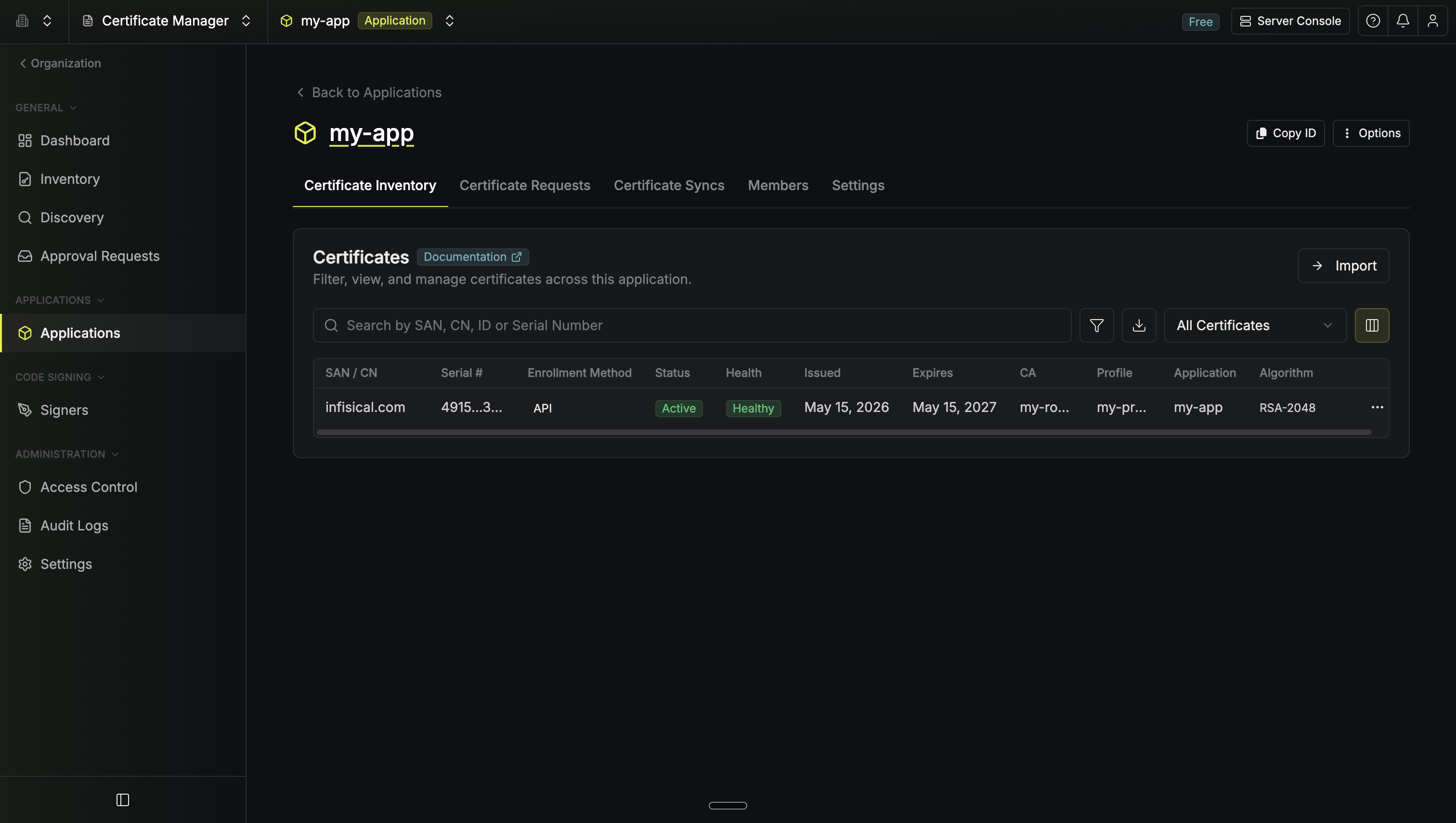
> View and manage the certificate inventory for your Application.
The certificate inventory shows all certificates issued within your Application. From here you can inspect details, trigger renewals, revoke certificates, and export in various formats.
To issue certificates, you'll need an [enrollment method](/documentation/platform/pki/applications/enrollment-methods/overview) configured for your Application.
 ## Certificate Details
Click any certificate to view its details:
| Section | What's Included |
| ----------------- | ---------------------------------------------------- |
| **Overview** | Common name, status, serial number, validity period |
| **Subject** | DN components, Organization, OU, Country, SANs |
| **Extensions** | Basic constraints, Key Usage, Extended Key Usage |
| **Cryptographic** | Key algorithm, signature algorithm, fingerprints |
| **Metadata** | Custom key-value pairs for organization and tracking |
Metadata is preserved across renewals and can be used to filter the certificate list.
## Actions
From the certificate details page, use the **Options** menu:
| Action | Description |
| ----------------------- | ---------------------------------------------------------------------- |
| **Export** | Download as PEM (individual files) or PKCS12 (single encrypted bundle) |
| **Enable Auto-Renewal** | Infisical renews automatically before expiration |
| **Renew Now** | Manually trigger renewal |
| **Manage Syncs** | Push to cloud destinations (ACM, Key Vault, etc.) |
| **Revoke** | Revoke with a reason code; certificate appears in CRL |
| **Delete** | Remove from inventory |
## Issuing Certificates
Go to the **Certificate Requests** tab and click **Request Certificate**. Select a certificate profile and choose a request method:
| Method | Description |
| ----------- | ------------------------------------------------ |
| **Managed** | Infisical generates and stores the private key |
| **CSR** | You provide your own Certificate Signing Request |
For automated issuance, configure an [enrollment method](/documentation/platform/pki/applications/enrollment-methods/overview):
* [API](/documentation/platform/pki/applications/enrollment-methods/api) — Direct API calls or Infisical Agent
* [ACME](/documentation/platform/pki/applications/enrollment-methods/acme) — Certbot, cert-manager, and ACME clients
* [EST](/documentation/platform/pki/applications/enrollment-methods/est) — RFC 7030 enrollment
* [SCEP](/documentation/platform/pki/applications/enrollment-methods/scep) — Mobile device management (Jamf, Intune)
## Renewal
| Type | How It Works |
| ----------------- | ------------------------------------------------------------------------------------------------------------------------------------------- |
| **Client-driven** | The client (Certbot, cert-manager, Infisical Agent) monitors expiration and requests renewal |
| **Server-driven** | Infisical automatically renews before expiration and pushes to [syncs](/documentation/platform/pki/applications/certificate-syncs/overview) |
Server-driven renewal requires [API enrollment](/documentation/platform/pki/applications/enrollment-methods/api) with Infisical-managed keys. Enable it on the [enrollment method](/documentation/platform/pki/applications/enrollment-methods/api) or toggle it per-certificate.
## Export Formats
| Format | Use Case |
| ---------- | ------------------------------------------------------------------------------- |
| **PEM** | Nginx, Apache, Docker, load balancers — separate files for cert, chain, and key |
| **PKCS12** | Java apps, Windows IIS, mobile apps — single encrypted file with password |
## Revocation
Revoke a certificate when it's compromised or no longer needed. Specify a [reason code](https://datatracker.ietf.org/doc/html/rfc5280#section-5.3.1) (key compromise, superseded, etc.).
Revoked certificates are added to the issuing CA's [CRL](/documentation/platform/pki/ca/crl-distribution). Verify revocation status:
```bash theme={"dark"}
openssl verify -crl_check -CAfile chain.pem -CRLfile crl.pem cert.pem
```
## What's Next?
Push certificates to AWS ACM, Azure Key Vault, and other destinations.
Get notified before certificates expire.
Require human review before issuance.
Configure how certificates are requested.
## Certificate Details
Click any certificate to view its details:
| Section | What's Included |
| ----------------- | ---------------------------------------------------- |
| **Overview** | Common name, status, serial number, validity period |
| **Subject** | DN components, Organization, OU, Country, SANs |
| **Extensions** | Basic constraints, Key Usage, Extended Key Usage |
| **Cryptographic** | Key algorithm, signature algorithm, fingerprints |
| **Metadata** | Custom key-value pairs for organization and tracking |
Metadata is preserved across renewals and can be used to filter the certificate list.
## Actions
From the certificate details page, use the **Options** menu:
| Action | Description |
| ----------------------- | ---------------------------------------------------------------------- |
| **Export** | Download as PEM (individual files) or PKCS12 (single encrypted bundle) |
| **Enable Auto-Renewal** | Infisical renews automatically before expiration |
| **Renew Now** | Manually trigger renewal |
| **Manage Syncs** | Push to cloud destinations (ACM, Key Vault, etc.) |
| **Revoke** | Revoke with a reason code; certificate appears in CRL |
| **Delete** | Remove from inventory |
## Issuing Certificates
Go to the **Certificate Requests** tab and click **Request Certificate**. Select a certificate profile and choose a request method:
| Method | Description |
| ----------- | ------------------------------------------------ |
| **Managed** | Infisical generates and stores the private key |
| **CSR** | You provide your own Certificate Signing Request |
For automated issuance, configure an [enrollment method](/documentation/platform/pki/applications/enrollment-methods/overview):
* [API](/documentation/platform/pki/applications/enrollment-methods/api) — Direct API calls or Infisical Agent
* [ACME](/documentation/platform/pki/applications/enrollment-methods/acme) — Certbot, cert-manager, and ACME clients
* [EST](/documentation/platform/pki/applications/enrollment-methods/est) — RFC 7030 enrollment
* [SCEP](/documentation/platform/pki/applications/enrollment-methods/scep) — Mobile device management (Jamf, Intune)
## Renewal
| Type | How It Works |
| ----------------- | ------------------------------------------------------------------------------------------------------------------------------------------- |
| **Client-driven** | The client (Certbot, cert-manager, Infisical Agent) monitors expiration and requests renewal |
| **Server-driven** | Infisical automatically renews before expiration and pushes to [syncs](/documentation/platform/pki/applications/certificate-syncs/overview) |
Server-driven renewal requires [API enrollment](/documentation/platform/pki/applications/enrollment-methods/api) with Infisical-managed keys. Enable it on the [enrollment method](/documentation/platform/pki/applications/enrollment-methods/api) or toggle it per-certificate.
## Export Formats
| Format | Use Case |
| ---------- | ------------------------------------------------------------------------------- |
| **PEM** | Nginx, Apache, Docker, load balancers — separate files for cert, chain, and key |
| **PKCS12** | Java apps, Windows IIS, mobile apps — single encrypted file with password |
## Revocation
Revoke a certificate when it's compromised or no longer needed. Specify a [reason code](https://datatracker.ietf.org/doc/html/rfc5280#section-5.3.1) (key compromise, superseded, etc.).
Revoked certificates are added to the issuing CA's [CRL](/documentation/platform/pki/ca/crl-distribution). Verify revocation status:
```bash theme={"dark"}
openssl verify -crl_check -CAfile chain.pem -CRLfile crl.pem cert.pem
```
## What's Next?
Push certificates to AWS ACM, Azure Key Vault, and other destinations.
Get notified before certificates expire.
Require human review before issuance.
Configure how certificates are requested.