> ## Documentation Index
> Fetch the complete documentation index at: https://infisical.com/docs/llms.txt
> Use this file to discover all available pages before exploring further.
# Variables
> Values you store once in an access bundle and use in any of its services.
This page is for Agent Vault admins. Members can't see or change variables.
[Learn more about roles
→](/docs/documentation/platform/agent-vault/access-control#product-membership)
A variable is a value stored once in an [access bundle](/docs/documentation/platform/agent-vault/access-bundles) under a key, such as `GITHUB_TOKEN`. Any [service](/docs/documentation/platform/agent-vault/services) in the bundle can use the variable through a reference, which is the key in double braces: `{{GITHUB_TOKEN}}`. The [proxy](/docs/documentation/platform/agent-vault/proxies) sends the variable's value in place of each reference.
For example, if several services send the same GitHub token, store the token as `GITHUB_TOKEN` and write `{{GITHUB_TOKEN}}` in each service. When the token changes, you update one variable instead of every service.
## Add a variable
To add a variable to an access bundle:
In Agent Vault, go to **Access Bundles** and select your access bundle.
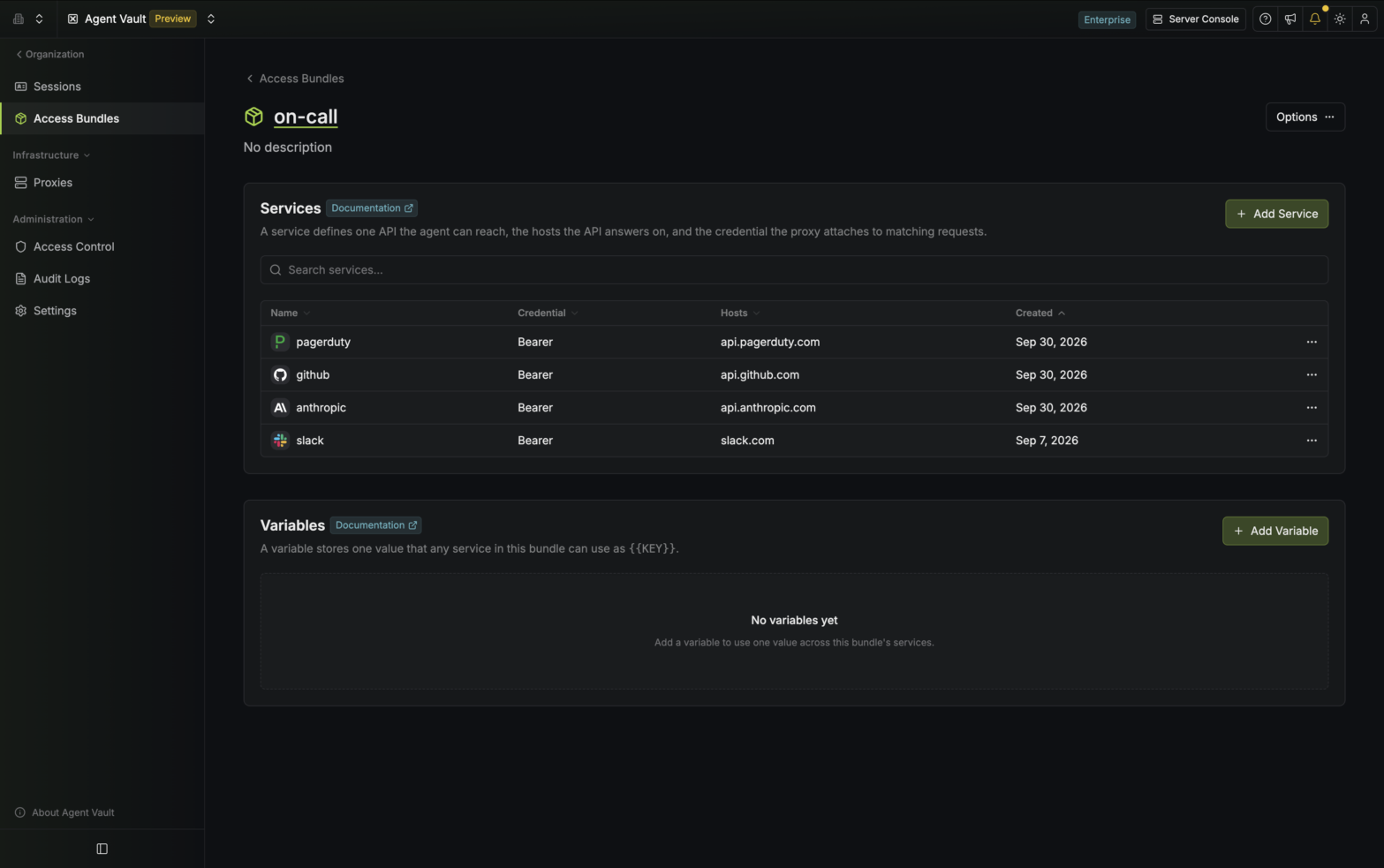 Under **Variables**, select **Add Variable**.
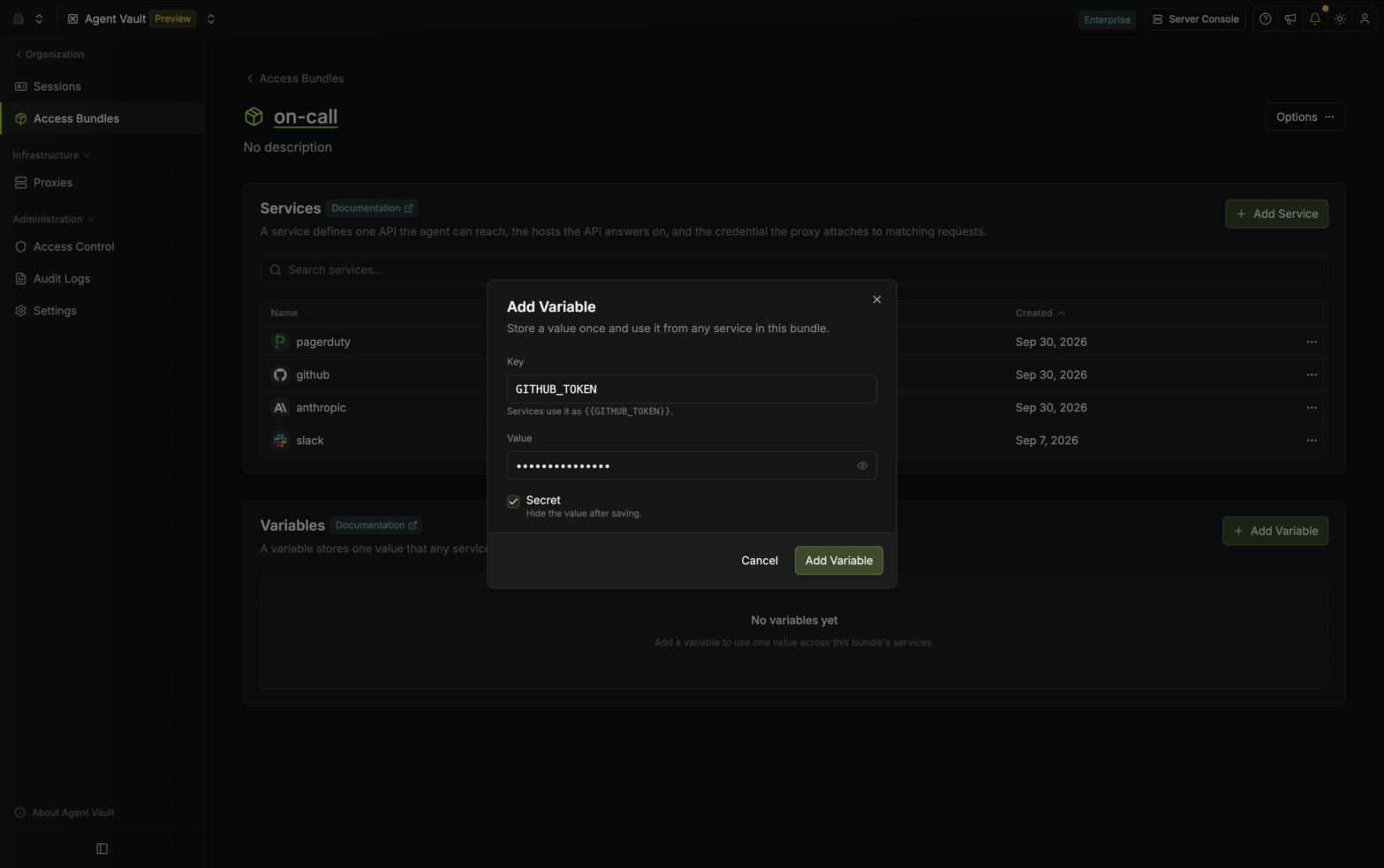 Enter a **Key** and a **Value**.
A key starts with a letter, uses only uppercase letters, numbers, and underscores, and can be up to 64 characters long. Two variables in the same access bundle can't have the same key.
Leave **Secret** selected to hide the value once you save it. If you're storing something that isn't sensitive, such as an organization ID, clear **Secret** so the value stays visible in the list.
Select **Add Variable**. The variable appears in the **Variables** list.
Enter a **Key** and a **Value**.
A key starts with a letter, uses only uppercase letters, numbers, and underscores, and can be up to 64 characters long. Two variables in the same access bundle can't have the same key.
Leave **Secret** selected to hide the value once you save it. If you're storing something that isn't sensitive, such as an organization ID, clear **Secret** so the value stays visible in the list.
Select **Add Variable**. The variable appears in the **Variables** list.
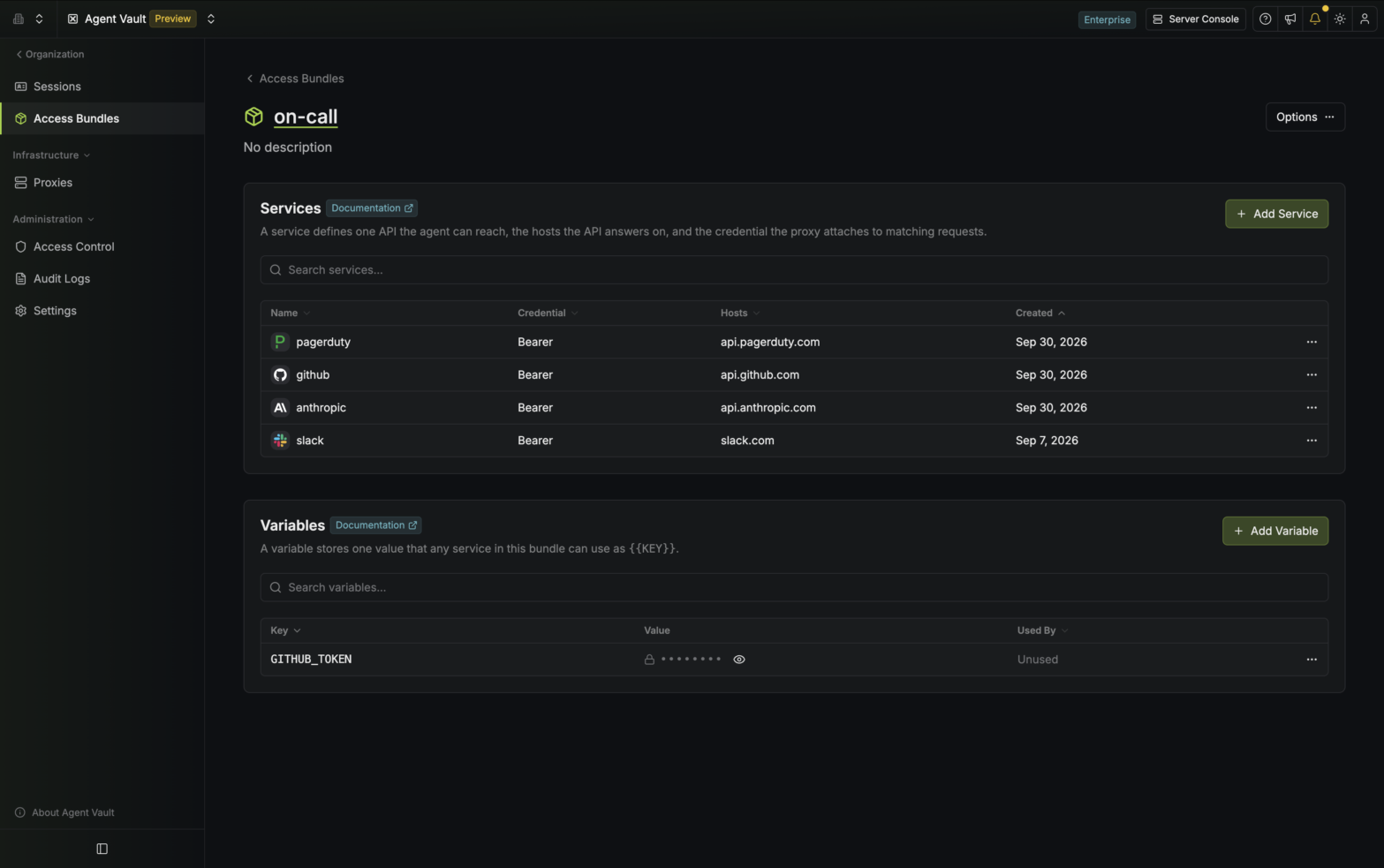 An access bundle can hold up to 100 variables.
## Use a variable in a service
You can use a variable in the following fields of a service:
| Part of the service | Accepts variables |
| - | - |
| [Bearer](/docs/documentation/platform/agent-vault/services#bearer) credential | **Token** |
| [Basic](/docs/documentation/platform/agent-vault/services#basic) credential | **Username** and **Password** |
| [Custom header](/docs/documentation/platform/agent-vault/services#custom-headers) | **Value** |
| [Substitution](/docs/documentation/platform/agent-vault/services#substitutions) | **With** (value) |
Other fields don't accept variables, and Infisical won't save the service if one of those fields contains `{{` or `}}`.
To use a variable:
[Add a service](/docs/documentation/platform/agent-vault/services#add-a-service), or open an existing service's actions menu and select **Edit**. Then go to the **Credential** step.
In a field that accepts variables, type `{{`. A list of the bundle's variables appears.
An access bundle can hold up to 100 variables.
## Use a variable in a service
You can use a variable in the following fields of a service:
| Part of the service | Accepts variables |
| - | - |
| [Bearer](/docs/documentation/platform/agent-vault/services#bearer) credential | **Token** |
| [Basic](/docs/documentation/platform/agent-vault/services#basic) credential | **Username** and **Password** |
| [Custom header](/docs/documentation/platform/agent-vault/services#custom-headers) | **Value** |
| [Substitution](/docs/documentation/platform/agent-vault/services#substitutions) | **With** (value) |
Other fields don't accept variables, and Infisical won't save the service if one of those fields contains `{{` or `}}`.
To use a variable:
[Add a service](/docs/documentation/platform/agent-vault/services#add-a-service), or open an existing service's actions menu and select **Edit**. Then go to the **Credential** step.
In a field that accepts variables, type `{{`. A list of the bundle's variables appears.
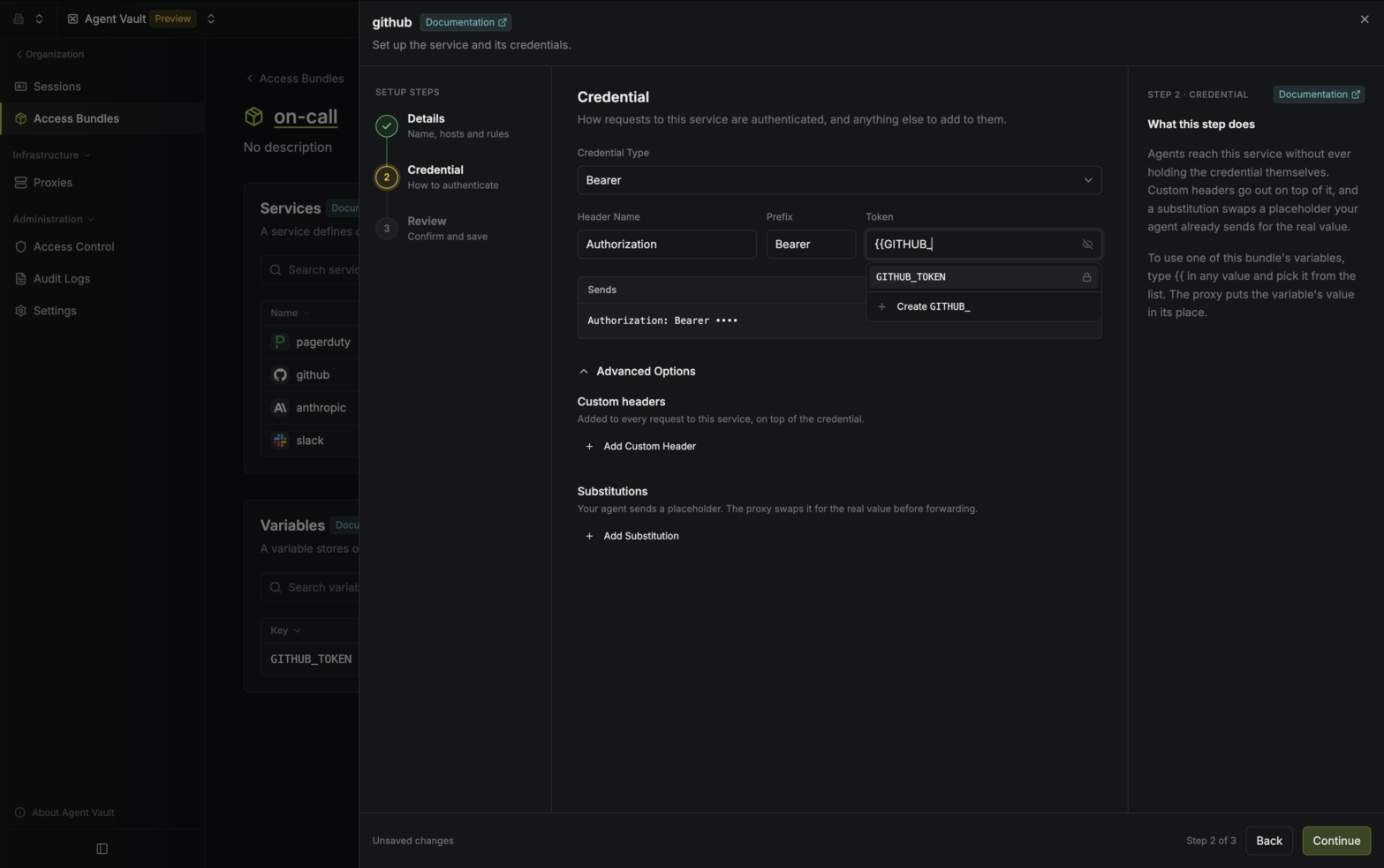 Select a variable from the list. Infisical inserts the reference, such as `{{GITHUB_TOKEN}}`.
You can also create a variable without leaving the service: type its key, then select **Create** at the end of the list.
Select a variable from the list. Infisical inserts the reference, such as `{{GITHUB_TOKEN}}`.
You can also create a variable without leaving the service: type its key, then select **Create** at the end of the list.
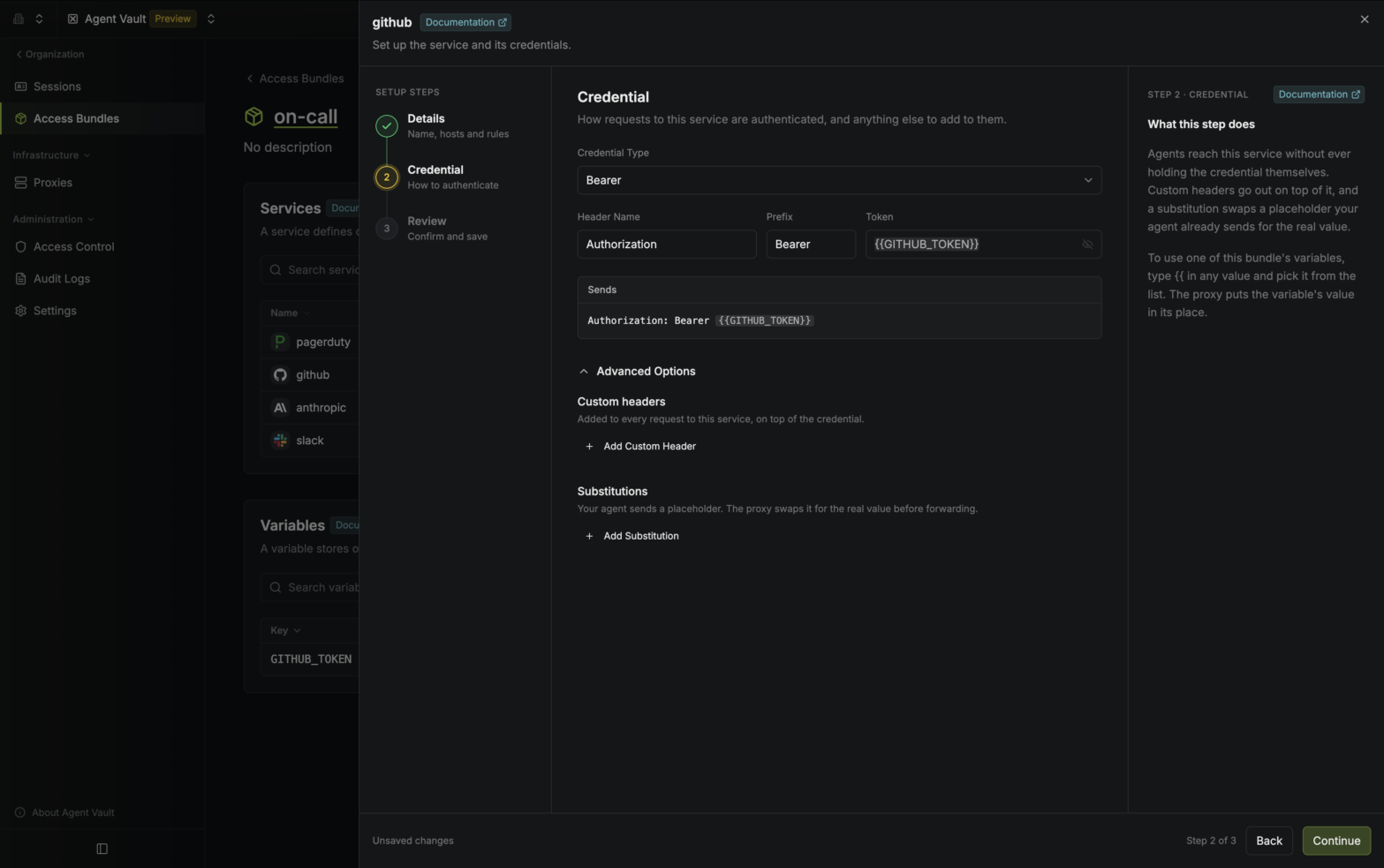 A reference can fill a whole field or part of one. For example, if a custom header's **Value** is `org-{{ORG_ID}}`, the proxy sends `org-` followed by the value of `ORG_ID`.
A field can contain up to three references. If a field uses the same key more than once, each use counts toward the limit, so `{{ORG_ID}}/{{ORG_ID}}` counts as two.
## Change or delete a variable
To change a variable, open its actions menu in the **Variables** list and select **Edit**. You can change the key, the value, and whether the value is secret. If the variable is secret, leave **Value** blank to keep the current value.
If you rename a variable, the services that use it keep working, and you don't need to edit them. If you change a variable's value, the proxy sends the new value within one [poll interval](/docs/documentation/platform/agent-vault/proxies#poll-interval) (60 seconds by default), and running agents don't need a restart.
The **Used By** column in the **Variables** list shows which services use each variable.
To delete a variable, open its actions menu and select **Delete**. If any service still uses the variable, the dialog lists those services, and you can't delete the variable until you [remove the reference](#use-a-variable-in-a-service) from each one.
A reference can fill a whole field or part of one. For example, if a custom header's **Value** is `org-{{ORG_ID}}`, the proxy sends `org-` followed by the value of `ORG_ID`.
A field can contain up to three references. If a field uses the same key more than once, each use counts toward the limit, so `{{ORG_ID}}/{{ORG_ID}}` counts as two.
## Change or delete a variable
To change a variable, open its actions menu in the **Variables** list and select **Edit**. You can change the key, the value, and whether the value is secret. If the variable is secret, leave **Value** blank to keep the current value.
If you rename a variable, the services that use it keep working, and you don't need to edit them. If you change a variable's value, the proxy sends the new value within one [poll interval](/docs/documentation/platform/agent-vault/proxies#poll-interval) (60 seconds by default), and running agents don't need a restart.
The **Used By** column in the **Variables** list shows which services use each variable.
To delete a variable, open its actions menu and select **Delete**. If any service still uses the variable, the dialog lists those services, and you can't delete the variable until you [remove the reference](#use-a-variable-in-a-service) from each one.