> ## Documentation Index
> Fetch the complete documentation index at: https://infisical.com/docs/llms.txt
> Use this file to discover all available pages before exploring further.
# Session logs
> Keep an encrypted record of every request an AI agent makes, stored in your own Amazon S3 bucket.
Session logs are a paid feature.
If you're using Infisical Cloud, they're available under the **Enterprise Tier**. If you're self-hosting Infisical, contact [sales@infisical.com](mailto:sales@infisical.com) to purchase an enterprise license to use them.
A session log is the per-request record of what an agent actually did: the method, host, path, status, and whether a credential went out with it. Every request that reaches a proxy is recorded, including requests to hosts that no access bundle covers.
Records are encrypted before they leave the proxy and stored in an Amazon S3 bucket you own.
## Setting up session logs
Go to **Settings** under Agent Vault and select **Set Up Session Logs** on the **Session Logs** card:
1. Turn on **Enable**.
2. Pick the **AWS Connection** whose credentials write the records. It can be one from your organization or one created in Agent Vault, or select **Create New Connection** to add one.
3. Enter the **Bucket** and **Region** of an S3 bucket you've already created.
4. Optionally set a **Key Prefix**, so session logs sit under one path in a bucket you use for other things.
5. Select **Save**.
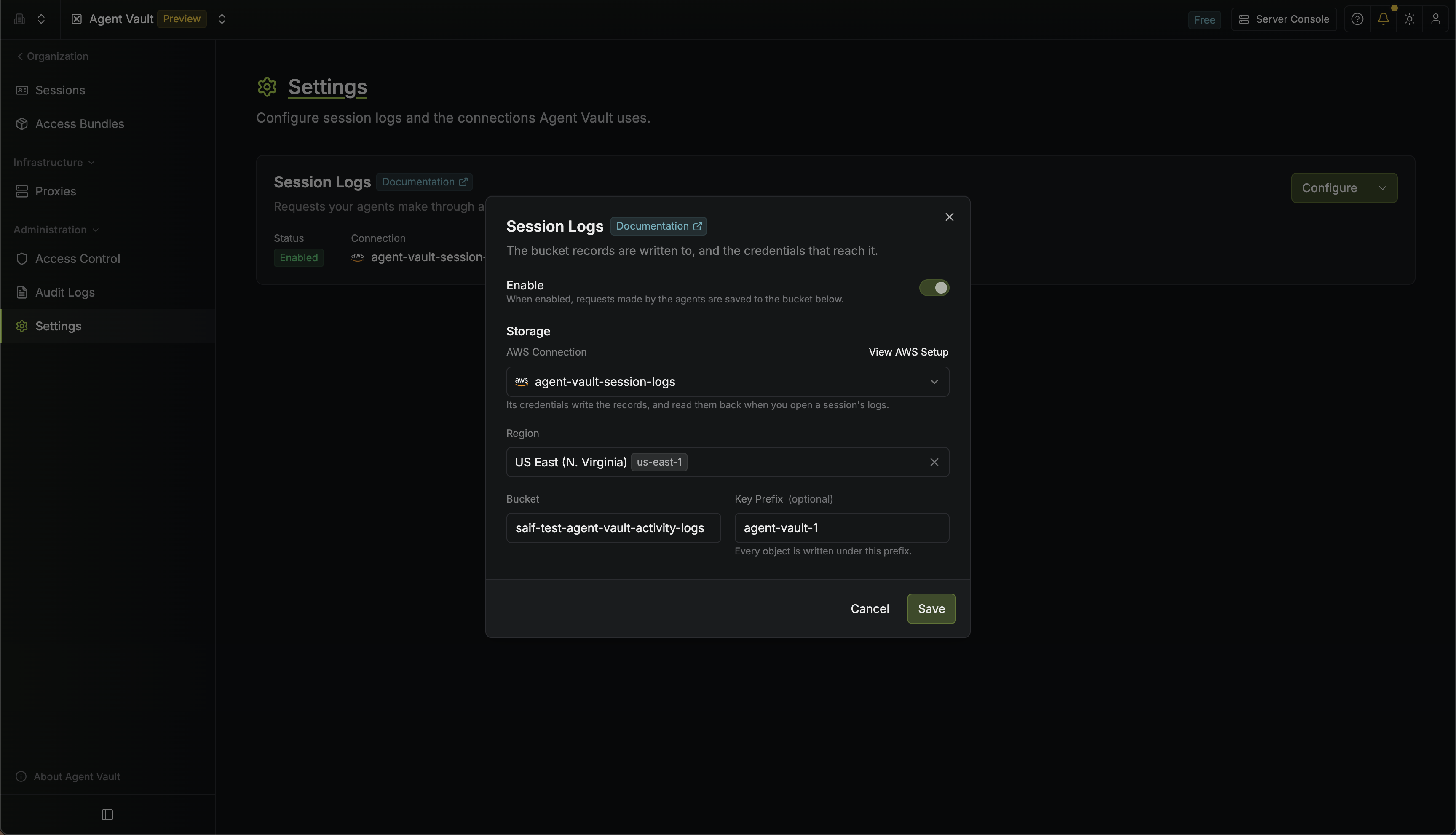 When you save, Infisical checks that the bucket exists and that it can write to it.
The connection needs an IAM policy and the bucket needs a CORS rule. Select **View AWS Setup** in the **Session Logs** dialog to see both.
Attach this identity policy (not a bucket policy) to the user or role the connection authenticates as:
```json theme={"dark"}
{
"Version": "2012-10-17",
"Statement": [
{
"Effect": "Allow",
"Action": ["s3:PutObject", "s3:GetObject"],
"Resource": "arn:aws:s3::://*"
},
{
"Effect": "Allow",
"Action": ["s3:ListBucket"],
"Resource": "arn:aws:s3:::"
}
]
}
```
Add this CORS rule to the bucket, because your browser is what fetches the records:
```json theme={"dark"}
[
{
"AllowedHeaders": ["*"],
"AllowedMethods": ["GET"],
"AllowedOrigins": ["https://app.infisical.com"],
"MaxAgeSeconds": 3000
}
]
```
If you're on EU Cloud or a self-hosted instance, replace `https://app.infisical.com` with `https://eu.infisical.com` or your instance's URL.
## Viewing session logs
Go to **Sessions** and select **View Session Logs** on the session's row. You can filter and search the requests, and while the session is active, new logs keep appearing.
When you save, Infisical checks that the bucket exists and that it can write to it.
The connection needs an IAM policy and the bucket needs a CORS rule. Select **View AWS Setup** in the **Session Logs** dialog to see both.
Attach this identity policy (not a bucket policy) to the user or role the connection authenticates as:
```json theme={"dark"}
{
"Version": "2012-10-17",
"Statement": [
{
"Effect": "Allow",
"Action": ["s3:PutObject", "s3:GetObject"],
"Resource": "arn:aws:s3::://*"
},
{
"Effect": "Allow",
"Action": ["s3:ListBucket"],
"Resource": "arn:aws:s3:::"
}
]
}
```
Add this CORS rule to the bucket, because your browser is what fetches the records:
```json theme={"dark"}
[
{
"AllowedHeaders": ["*"],
"AllowedMethods": ["GET"],
"AllowedOrigins": ["https://app.infisical.com"],
"MaxAgeSeconds": 3000
}
]
```
If you're on EU Cloud or a self-hosted instance, replace `https://app.infisical.com` with `https://eu.infisical.com` or your instance's URL.
## Viewing session logs
Go to **Sessions** and select **View Session Logs** on the session's row. You can filter and search the requests, and while the session is active, new logs keep appearing.
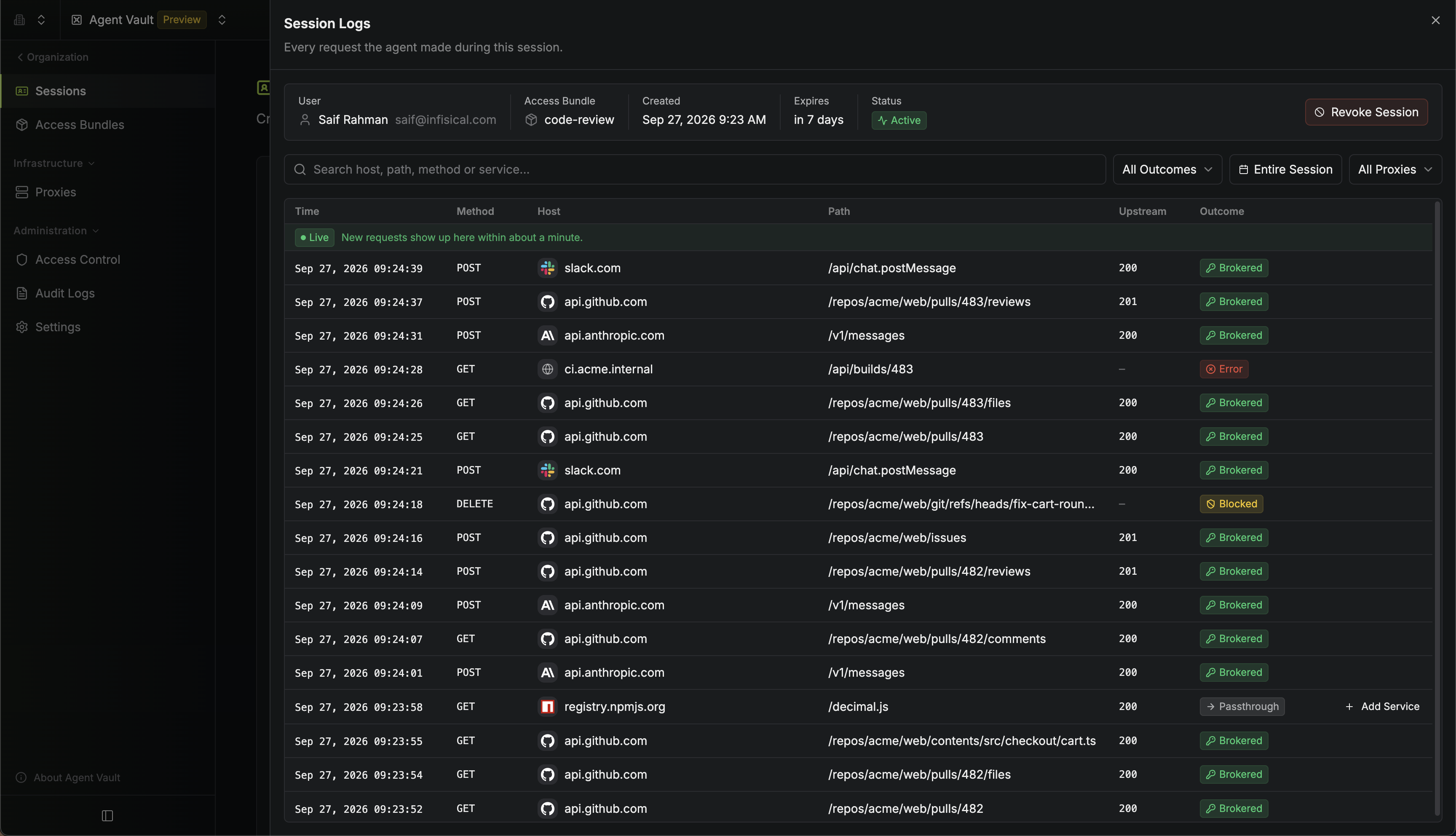 The API returns a session's logs as chunks. A chunk is one encrypted batch of [records](#what-gets-recorded) that a proxy uploaded to your bucket. You can read a session's logs if you created the session or you're an Agent Vault admin.
Call [the endpoint that lists session logs](/docs/api-reference/endpoints/agent-vault-session-logs/list). It returns the newest chunks first. To get older chunks, call it again with the response's `nextCursor` as `cursor`.
Download each chunk from its `presignedGetUrl` within 5 minutes, before the URL expires. If `presignedGetUrl` is null, either the chunk is in a bucket other than the current one, or `sessionLogs.storageUnavailable` says why the chunk can't be downloaded right now.
Check that the SHA-256 digest of the downloaded bytes, as base64 without padding, matches `ciphertextSha256`. If the digests differ, the chunk was changed after the proxy uploaded it.
Decrypt the chunk with AES-256-GCM. The key is `sessionLogs.sessionKey` and the IV is the chunk's `iv`, both base64 decoded. The associated data is the SHA-256 digest of `||v1`. The last 16 bytes of the chunk are the authentication tag.
Parse the decrypted bytes as JSON. Each chunk holds an array of records, and `decision` holds the [outcome](#what-gets-recorded) in lowercase:
```json theme={"dark"}
{
"ts": "2026-09-16T10:31:04.221Z",
"seq": 8412,
"proxyId": "7c1e…",
"method": "POST",
"host": "api.github.com",
"port": "443",
"path": "/repos/acme/web/issues",
"status": 201,
"decision": "brokered",
"service": "github",
"accessBundle": "code-review"
}
```
This Node.js script reads the newest page of a session's logs:
```javascript theme={"dark"}
import { createDecipheriv, createHash } from "node:crypto";
const token = "";
const sessionId = "".toLowerCase();
const res = await fetch(`https://app.infisical.com/api/v1/agent-vault/sessions/${sessionId}/logs`, {
headers: { Authorization: `Bearer ${token}` }
});
const { sessionLogs, chunks } = await res.json();
for (const chunk of chunks) {
if (!chunk.presignedGetUrl) continue;
const body = Buffer.from(await (await fetch(chunk.presignedGetUrl)).arrayBuffer());
const digest = createHash("sha256").update(body).digest("base64").replace(/=+$/, "");
if (digest !== chunk.ciphertextSha256) throw new Error(`Chunk ${chunk.chunkId} was changed`);
const aad = createHash("sha256").update(`${sessionId}|${chunk.chunkId}|v1`).digest();
const decipher = createDecipheriv(
"aes-256-gcm",
Buffer.from(sessionLogs.sessionKey, "base64"),
Buffer.from(chunk.iv, "base64")
);
decipher.setAAD(aad);
decipher.setAuthTag(body.subarray(-16));
const plaintext = Buffer.concat([decipher.update(body.subarray(0, -16)), decipher.final()]);
console.log(JSON.parse(plaintext.toString("utf8")));
}
```
The script runs outside a browser, so the bucket's CORS rule doesn't apply to it.
To receive new logs as they arrive, pass the response's `liveCursor` as `cursor` to [the endpoint that tails session logs](/docs/api-reference/endpoints/agent-vault-session-logs/tail), then keep calling it with each response's `nextCursor`. If `hasMore` is true, call again right away. Otherwise, wait a few seconds before the next call. The same chunk can appear in more than one response, so skip any `chunkId` you've already read.
## What gets recorded
Each request produces one record with:
| Field | What it holds |
| - | - |
| **Time** | When the request was made |
| **Proxy** | The proxy that handled it |
| **Method**, **Host**, **Path** | Where the request went, for example `POST api.github.com/repos/acme/web/issues` |
| **Upstream status** | The HTTP status code the API returned, such as `201`. For **Blocked** and **Error** requests, it's the status code Agent Vault returned itself, such as `403` or `502` |
| **Outcome** | What the proxy did with the request |
| **Service** | The service that matched the request, if any |
The outcome is one of four:
| Outcome | What happened |
| - | - |
| **Brokered** | A service matched and its credential went out with the request |
| **Passthrough** | No service matched, or the one that did carries no credential. The request went out untouched |
| **Blocked** | The traffic policy refused the request |
| **Error** | The proxy couldn't reach the upstream |
Request and response bodies, headers, and query strings aren't recorded.
## Managing session logs
### Connections
Session logs use one AWS connection at a time, which you pick in the **Session Logs** dialog. It can be one created in Agent Vault or one your organization already has under **Integrations**. See [AWS connection](/docs/integrations/app-connections/aws) for how to create one.
To update its AWS credentials, open the menu next to **Configure** on the **Session Logs** card and select **Edit AWS Credentials**. For an organization connection, update the credentials under **Integrations** instead.
To add or delete Agent Vault's AWS connections, select **Manage Connections** from the same menu:
The API returns a session's logs as chunks. A chunk is one encrypted batch of [records](#what-gets-recorded) that a proxy uploaded to your bucket. You can read a session's logs if you created the session or you're an Agent Vault admin.
Call [the endpoint that lists session logs](/docs/api-reference/endpoints/agent-vault-session-logs/list). It returns the newest chunks first. To get older chunks, call it again with the response's `nextCursor` as `cursor`.
Download each chunk from its `presignedGetUrl` within 5 minutes, before the URL expires. If `presignedGetUrl` is null, either the chunk is in a bucket other than the current one, or `sessionLogs.storageUnavailable` says why the chunk can't be downloaded right now.
Check that the SHA-256 digest of the downloaded bytes, as base64 without padding, matches `ciphertextSha256`. If the digests differ, the chunk was changed after the proxy uploaded it.
Decrypt the chunk with AES-256-GCM. The key is `sessionLogs.sessionKey` and the IV is the chunk's `iv`, both base64 decoded. The associated data is the SHA-256 digest of `||v1`. The last 16 bytes of the chunk are the authentication tag.
Parse the decrypted bytes as JSON. Each chunk holds an array of records, and `decision` holds the [outcome](#what-gets-recorded) in lowercase:
```json theme={"dark"}
{
"ts": "2026-09-16T10:31:04.221Z",
"seq": 8412,
"proxyId": "7c1e…",
"method": "POST",
"host": "api.github.com",
"port": "443",
"path": "/repos/acme/web/issues",
"status": 201,
"decision": "brokered",
"service": "github",
"accessBundle": "code-review"
}
```
This Node.js script reads the newest page of a session's logs:
```javascript theme={"dark"}
import { createDecipheriv, createHash } from "node:crypto";
const token = "";
const sessionId = "".toLowerCase();
const res = await fetch(`https://app.infisical.com/api/v1/agent-vault/sessions/${sessionId}/logs`, {
headers: { Authorization: `Bearer ${token}` }
});
const { sessionLogs, chunks } = await res.json();
for (const chunk of chunks) {
if (!chunk.presignedGetUrl) continue;
const body = Buffer.from(await (await fetch(chunk.presignedGetUrl)).arrayBuffer());
const digest = createHash("sha256").update(body).digest("base64").replace(/=+$/, "");
if (digest !== chunk.ciphertextSha256) throw new Error(`Chunk ${chunk.chunkId} was changed`);
const aad = createHash("sha256").update(`${sessionId}|${chunk.chunkId}|v1`).digest();
const decipher = createDecipheriv(
"aes-256-gcm",
Buffer.from(sessionLogs.sessionKey, "base64"),
Buffer.from(chunk.iv, "base64")
);
decipher.setAAD(aad);
decipher.setAuthTag(body.subarray(-16));
const plaintext = Buffer.concat([decipher.update(body.subarray(0, -16)), decipher.final()]);
console.log(JSON.parse(plaintext.toString("utf8")));
}
```
The script runs outside a browser, so the bucket's CORS rule doesn't apply to it.
To receive new logs as they arrive, pass the response's `liveCursor` as `cursor` to [the endpoint that tails session logs](/docs/api-reference/endpoints/agent-vault-session-logs/tail), then keep calling it with each response's `nextCursor`. If `hasMore` is true, call again right away. Otherwise, wait a few seconds before the next call. The same chunk can appear in more than one response, so skip any `chunkId` you've already read.
## What gets recorded
Each request produces one record with:
| Field | What it holds |
| - | - |
| **Time** | When the request was made |
| **Proxy** | The proxy that handled it |
| **Method**, **Host**, **Path** | Where the request went, for example `POST api.github.com/repos/acme/web/issues` |
| **Upstream status** | The HTTP status code the API returned, such as `201`. For **Blocked** and **Error** requests, it's the status code Agent Vault returned itself, such as `403` or `502` |
| **Outcome** | What the proxy did with the request |
| **Service** | The service that matched the request, if any |
The outcome is one of four:
| Outcome | What happened |
| - | - |
| **Brokered** | A service matched and its credential went out with the request |
| **Passthrough** | No service matched, or the one that did carries no credential. The request went out untouched |
| **Blocked** | The traffic policy refused the request |
| **Error** | The proxy couldn't reach the upstream |
Request and response bodies, headers, and query strings aren't recorded.
## Managing session logs
### Connections
Session logs use one AWS connection at a time, which you pick in the **Session Logs** dialog. It can be one created in Agent Vault or one your organization already has under **Integrations**. See [AWS connection](/docs/integrations/app-connections/aws) for how to create one.
To update its AWS credentials, open the menu next to **Configure** on the **Session Logs** card and select **Edit AWS Credentials**. For an organization connection, update the credentials under **Integrations** instead.
To add or delete Agent Vault's AWS connections, select **Manage Connections** from the same menu:
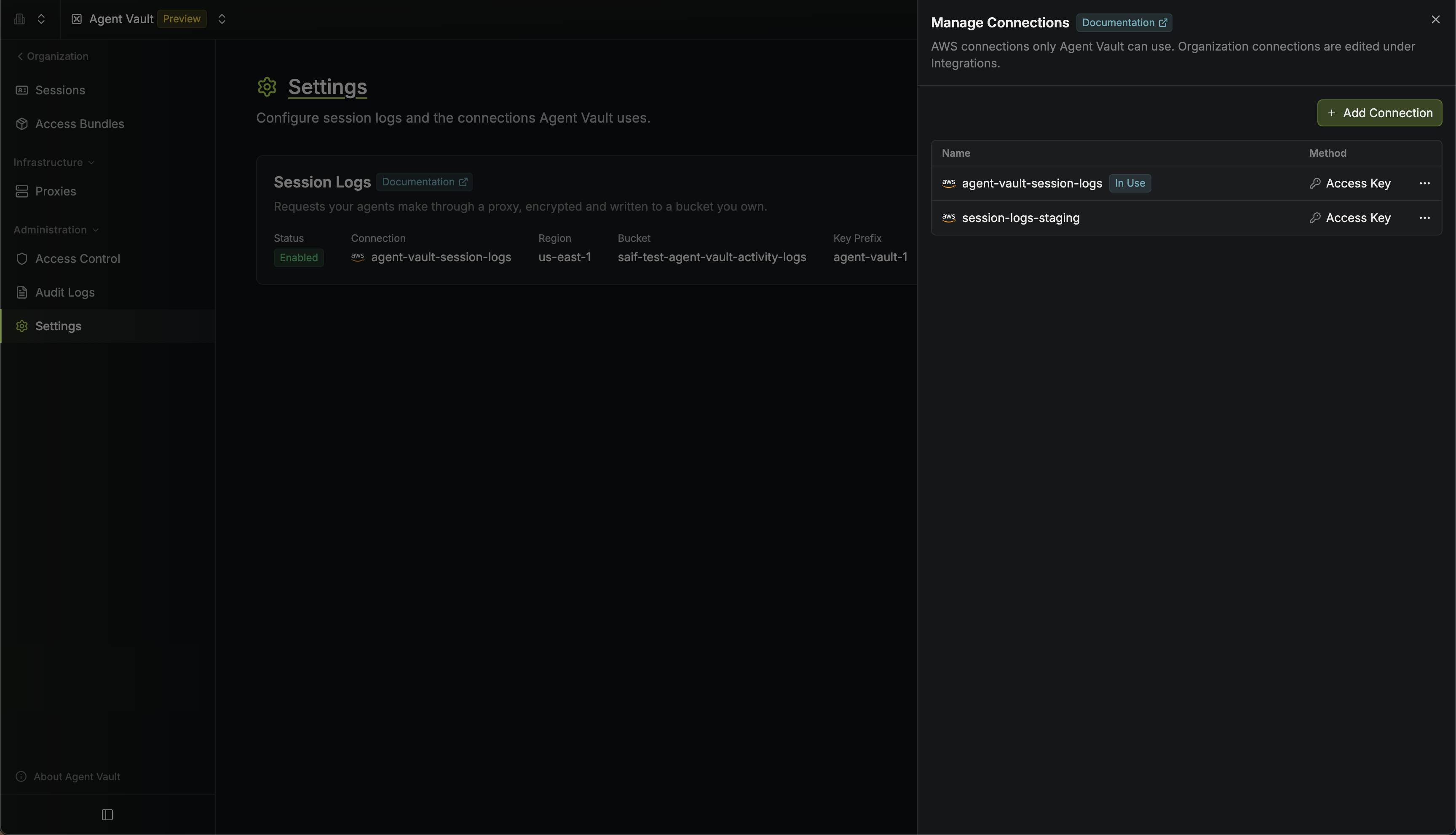 You can't delete the connection session logs are using. Pick a different one in the **Session Logs** dialog first.
### Changing the bucket or prefix
Changing the bucket copies nothing, so everything recorded before the change can't be read in Infisical until you switch back to that bucket.
Changing only the key prefix keeps earlier records readable, as long as the AWS connection can still read the old prefix. The [IAM policy](#setting-up-session-logs) on this page covers only the current prefix.
### Retention
Infisical never deletes sessions or their session logs. To delete older logs automatically, add a lifecycle rule to the bucket in AWS.
## Troubleshooting
If a session shows no session logs when you expect some, check the logs of each proxy the agent used.
You can't delete the connection session logs are using. Pick a different one in the **Session Logs** dialog first.
### Changing the bucket or prefix
Changing the bucket copies nothing, so everything recorded before the change can't be read in Infisical until you switch back to that bucket.
Changing only the key prefix keeps earlier records readable, as long as the AWS connection can still read the old prefix. The [IAM policy](#setting-up-session-logs) on this page covers only the current prefix.
### Retention
Infisical never deletes sessions or their session logs. To delete older logs automatically, add a lifecycle rule to the bucket in AWS.
## Troubleshooting
If a session shows no session logs when you expect some, check the logs of each proxy the agent used.